
1. Įvadas
This manual provides detailed instructions for the installation, operation, and maintenance of your Akuvox SP-R59P Desktop IP Phone. Please read this manual thoroughly before using the device to ensure proper functionality and to prevent damage. The Akuvox SP-R59P is a wired SIP VoIP phone designed for professional communication environments, offering reliable performance and a range of features.
2. Pakuotės turinys
Verify that all items listed below are present in your package. If any item is missing or damaged, please contact your vendor.
- Akuvox SP-R59P IP Phone Unit
- Ragelis
- Ragelio laidas (suvyniotas)
- Ethernet kabelis
- Telefono stovas
- Greito paleidimo vadovas (gali būti pridėtas atskirai)
3. Produktas baigtasview
Familiarize yourself with the components and features of your Akuvox SP-R59P IP Phone.
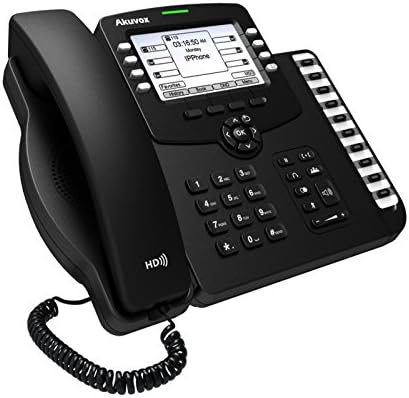
3.1 paveikslas: Priekyje-kairėn view of the Akuvox SP-R59P Desktop IP Phone, showing the display, keypad, and side-mounted programmable keys.
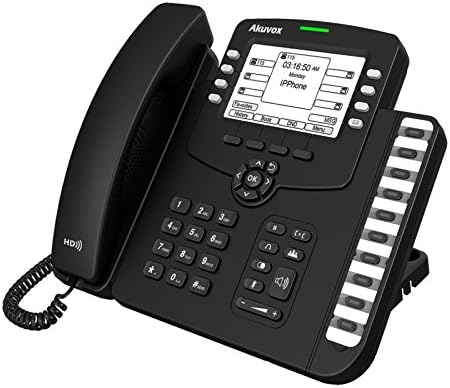
3.2 paveikslas: Priekyje-dešinėje view of the Akuvox SP-R59P Desktop IP Phone, highlighting the main keypad, navigation buttons, and additional programmable keys.
3.1. Telefono komponentai
- LCD ekranas: Shows call information, menu options, and status.
- Programuojami klavišai: Line keys or feature keys, typically located on the side or below the display.
- Naršymo mygtukai: Used to navigate menus and lists. (Up, Down, Left, Right, OK).
- Klaviatūra: Standartiniai 0–9, *, # rinkimui.
- Funkciniai klavišai: Dedicated buttons for features like Speakerphone, Mute, Headset, Hold, Transfer, Redial, Voicemail.
- Garsumo valdymas: Reguliuoja ragelio, ausinių ir garsiakalbio garsumą.
- Ragelis: Dėl privačių pokalbių.
- Garsiakalbis: Laisvų rankų bendravimui.
- Uostai (gale): Ethernet (LAN/PC), Handset, Power Adapter (if not using PoE).
4. Sąranka
Follow these steps to set up your Akuvox SP-R59P IP Phone.
4.1. Attaching the Phone Stand
- Align the tabs on the phone stand with the slots on the back of the phone unit.
- Švelniai stumkite stovą į vietą, kol jis tvirtai spragtelės.
4.2. Ragelio prijungimas
- Plug one end of the coiled handset cord into the handset port on the phone unit (usually on the left side).
- Kitą susukto laido galą prijunkite prie ragelio esančio prievado.
4.3. Tinklo ir maitinimo prijungimas
The Akuvox SP-R59P supports Power over Ethernet (PoE). If your network switch provides PoE, a separate power adapter is not required.
- Ethernet jungtis: Connect one end of the Ethernet cable to the LAN port on the back of the phone. Connect the other end to an available Ethernet port on your network switch or router.
- Maitinimo jungtis (jei nenaudojamas PoE): If your network does not support PoE, connect the power adapter (sold separately or included) to the power port on the back of the phone, then plug the adapter into a power outlet.
- Kompiuterio jungtis (neprivaloma): If you need to connect a computer through the phone, connect an Ethernet cable from your computer to the PC port on the back of the phone.
4.4. Pradinis paleidimas
Once connected, the phone will automatically power on and begin its boot-up sequence. The display will show the Akuvox logo, followed by network configuration and SIP registration status. This process may take a few minutes.
5. Naudojimo instrukcijos
This section covers basic operations of your Akuvox SP-R59P IP Phone.
5.1. Skambinimas
- Numerio rinkimas pakėlus ragelį: Pakelkite ragelį arba paspauskite Garsiakalbis button. Dial the number using the keypad.
- Numerio rinkimas padėtas ragelis: Dial the number first, then pick up the handset or press the Garsiakalbis mygtuką, kad pradėtumėte skambutį.
- Perskambinti: Paspauskite Perskambinti mygtuką, kad paskambintumėte paskutiniu rinktu numeriu.
5.2. Atsiliepimas į skambučius
- Kai suskamba telefonas, pakelkite ragelį arba paspauskite Garsiakalbis mygtuką.
- Alternatively, press the corresponding Linijos raktas if multiple lines are configured.
5.3. Baigti skambučius
Padėkite ragelį arba paspauskite Garsiakalbis button to end an active call.
5.4. Skambinimo funkcijos
- Laikyti: Pokalbio metu paspauskite Laikykis mygtuką. Paspauskite jį dar kartą, kad tęstumėte skambutį.
- Pervedimas: Pokalbio metu paspauskite Perdavimas button. Dial the new number, then press Perdavimas dar kartą (aklas peradresavimas) arba palaukite, kol pašnekovas atsilieps, ir paspauskite Perdavimas (dalyvavo pervedime).
- Nutildyti: Paspauskite Nutildyti mygtuką, kad nutildytumėte mikrofoną. Paspauskite jį dar kartą, kad įjungtumėte nutildymą.
- Garsiakalbis: Paspauskite Garsiakalbis button to switch between handset and speakerphone mode.
- Balso paštas: Paspauskite Balso paštas button to access your voicemail messages. Follow the voice prompts.
5.5. Garso reguliavimas
Naudokite Apimtis buttons (usually located below the keypad) to adjust the volume of the handset, headset, or speakerphone during a call, or the ringer volume when the phone is idle.
6. Priežiūra
Tinkama priežiūra užtikrina jūsų IP telefono ilgaamžiškumą ir optimalų veikimą.
- Valymas: Telefono paviršių valykite minkšta, sausa šluoste. Įsisenėjusias dėmes šiek tiek nuvalykite.amp cloth with mild soap can be used, but ensure no liquid enters the phone. Do not use abrasive cleaners or solvents.
- Aplinka: Keep the phone away from direct sunlight, heat sources, and excessive moisture. Ensure adequate ventilation.
- Tvarkymas: Venkite telefono numetimo ir stiprių smūgių.
7. Problemų sprendimas
If you encounter issues with your Akuvox SP-R59P, refer to the following common problems and solutions.
| Problema | Galima priežastis | Sprendimas |
|---|---|---|
| Telefonas neįsijungia. | Nėra maitinimo jungties arba sugedęs maitinimo šaltinis. | Check Ethernet cable for PoE connection. If using a power adapter, ensure it's securely plugged into the phone and a working power outlet. |
| Nėra rinkimo tono. | Network issue, SIP registration failure, or handset not connected properly. | Verify Ethernet cable connection. Check network status on the phone's display. Ensure handset cord is securely plugged in. Contact your IT administrator if SIP registration fails. |
| Negalima skambinti arba priimti skambučių. | SIP registration failure, incorrect network settings, or service provider issue. | Check network connectivity. Confirm SIP account details with your service provider or IT administrator. Restart the phone. |
| Ekranas tuščias arba užstrigęs. | Programinės įrangos triktis arba maitinimo problema. | Restart the phone by disconnecting and reconnecting the power/Ethernet cable. If the problem persists, contact support. |
8. Specifikacijos
Key technical specifications for the Akuvox SP-R59P IP Phone.
- Prekinis ženklas: Akuvox
- Modelio numeris: SP-R59P
- Telefono tipas: Laidinis
- Rinkiklio tipas: Klaviatūra
- Atsakiklio tipas: Skaitmeninis
- Skambintojo ID: Nėra
- Galia: PoE (Power over Ethernet) palaikymas
- ASIN: B071H18BT5
9. Garantija ir palaikymas
For warranty information, please refer to the warranty card included with your product or visit the official Akuvox website. For technical support, troubleshooting assistance beyond this manual, or to inquire about replacement parts, please contact your vendor or Akuvox customer support directly.
Atsarginių dalių prieinamumas: informacija nepateikiama.
Software updates guaranteed until: Information unavailable.