
1. Įvadas
The LaiPuDuo RGBW Wall-Mounted Touch Panel Dimmer Switch is designed for controlling various LED light sources, including point light sources, flexible light strips, and wall washer lamps. It features a glass panel design and a high-precision capacitance touch control chip for enhanced touch sensitivity and reduced false triggers. This controller allows for various lighting effects such as jump change, gradual change, and strobe, based on application requirements.
2. Pakuotės turinys
Prašome patikrinti, ar pakuotėje yra visi reikalingi daiktai:
- 1 x RGBW Full Color Touch Panel Controller
- 1 x Vartotojo vadovas

Image: The LaiPuDuo RGBW Touch Panel Controller shown next to its product packaging box.
3. Techninės specifikacijos
- Darbinė temperatūra: -20°C iki 60°C
- Tiekimas ttage: DC 12-24V
- Išvesties kanalai: 4 kanalai
- Ryšio režimas: Paprastasis anodas
- Išoriniai matmenys: L86 × W86 × H37mm (3.39 x 3.39 x 1.46 inches)
- Grynasis svoris: 128g
- Statinis energijos suvartojimas: <1W
- Išėjimo srovė: <4A (each channel)
- Išėjimo galia: 12V: <192W, 24V: <384W
- Medžiaga: Glass (panel), Metal (contact)
- Kontrolės metodas: Palieskite
- Montavimo tipas: Sieninis laikiklis
- Ryšio protokolas: Wi-Fi (as per specifications, though primary control is touch)
- Tarptautinis apsaugos įvertinimas: IP54
4. Montavimas
Follow these steps for proper installation of the RGBW Touch Panel Dimmer Switch:
- Paruoškite laidus: Ensure the power supply is disconnected before beginning installation. Identify the input (DC12-24V) and output (RGBW) terminals on the back of the controller.
- Prijunkite LED juostelę: Connect the corresponding wires from your RGBW LED light strip to the output terminals (R, G, B, W, and + for common anode) on the controller.
- Prijunkite maitinimo šaltinį: Connect the DC12-24V power supply wires to the input terminals (+ and -) on the controller.
- Montavimo valdiklis: Securely mount the controller to the wall using appropriate mounting hardware (not included).
- Prijunkite maitinimo adapterį: Once all connections are secure, connect the power adapter to the power source.

Image: The rear of the controller displaying the input and output wiring terminals for power and LED strip connections.
Diegimo vaizdo vadovas
Video: This video demonstrates the wiring process for connecting the RGBW controller to an LED strip and power supply, followed by a demonstration of its basic operation.
5. Naudojimo instrukcijos
The touch panel provides intuitive control over your LED lighting. Refer to the image below for button layout and functions.
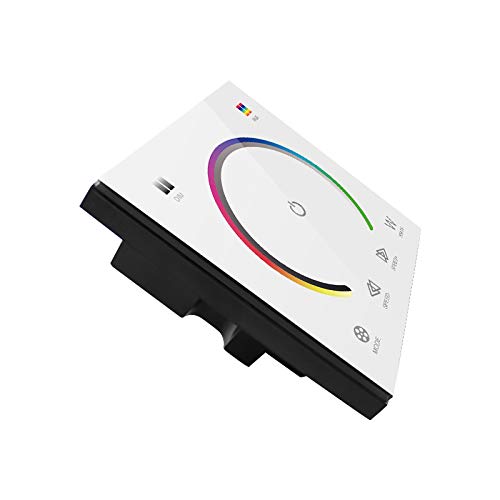
Image: The front of the touch panel controller, showing the color wheel, power button, mode, speed, and white light controls.
- Power Button (Center Circle): Touch to turn the LED lights on or off.
- Spalvų ratas: Slide your finger around the color wheel to select a desired RGB color. The LED strip will change to the selected color.
- White Light (W Button): Touch the 'W' button to activate or adjust the dedicated white light channel.
- Režimo mygtukas: Perjungia įvairius iš anksto užprogramuotus dinaminio apšvietimo režimus.
- Speed Buttons (Left/Right Arrows): Adjust the speed of dynamic lighting modes.
Operacijos vaizdo vadovas
Video: This video demonstrates the functionality of the touch panel, including color selection via the color wheel, switching between RGB and white light, and adjusting modes and speeds.
6. Priežiūra
To ensure the longevity and proper functioning of your touch panel dimmer switch:
- Valymas: The glass panel can be cleaned with a soft, dry cloth. Avoid abrasive cleaners or harsh chemicals that may damage the surface.
- Aplinka: Operate the device within the specified working temperature range (-20°C to 60°C). Avoid exposure to extreme moisture or direct sunlight.
- Galia: Always disconnect power before performing any maintenance or wiring adjustments.
7. Problemų sprendimas
If you encounter issues with your RGBW Touch Panel Dimmer Switch, refer to the following common problems and solutions:
- Šviesos neįsijungia:
- Check if the power supply is correctly connected and providing the specified DC12-24V.
- Verify that the LED strip is properly connected to the output terminals.
- Ensure the power button on the touch panel is activated.
- Incorrect colors or incomplete color display:
- Confirm that the RGBW wires from the LED strip are connected to the correct corresponding terminals on the controller (R to R, G to G, B to B, W to W).
- Ensure the common anode (+) wire is correctly connected.
- Check if the LED strip itself is functioning correctly by testing it with another controller if possible.
- Jutiklinis skydelis nereaguoja:
- Ensure the panel is clean and dry. Moisture or dirt can affect touch sensitivity.
- Temporarily disconnect and reconnect the power supply to reset the controller.
- White light or RGB colors do not operate simultaneously:
- This controller is designed to switch between RGB colors and the dedicated white channel. Simultaneous operation of RGB and the separate white channel is not supported. You must select either an RGB color or the white light function.
8. Garantija ir palaikymas
Dėl garantijos informacijos ar techninės pagalbos susisiekite tiesiogiai su pardavėju arba gamintoju. Išsaugokite pirkimo kvitą kaip pirkimo įrodymą.