
ALIGATOR A321
Aligator A321 Mobile Phone for Seniors User Manual
Model: A321 | Brand: ALIGATOR
1. Įvadas
This manual provides comprehensive instructions for the safe and efficient use of your Aligator A321 mobile phone. Designed with seniors in mind, the A321 features large buttons, a clear display, and an essential SOS function for emergencies. Please read this manual thoroughly before operating your device.
2. Pakuotės turinys
Pažymėkite langelį prie šių elementų:
- „Aligator A321“ mobilusis telefonas
- Baterija
- Įkrovimo adapteris
- USB įkrovimo laidas
- Vartotojo vadovas (šis dokumentas)
Jei trūksta kokių nors prekių arba jos pažeistos, susisiekite su pardavėju.
3. Telefonas baigtasview
Susipažinkite su pagrindiniais savo „Aligator A321“ telefono komponentais.

Image 1: Aligator A321 Front View. This image displays the front of the Aligator A321 mobile phone, showing the screen, large numeric keypad, call and end call buttons, and navigation keys. The brand "ALIGATOR" is visible below the screen.
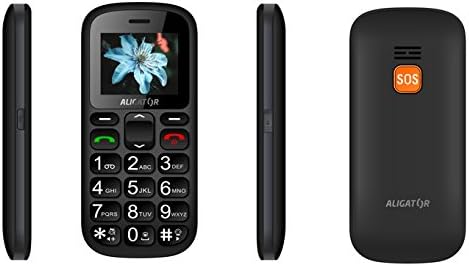
Image 2: Aligator A321 Side and Back View. This image shows multiple views of the Aligator A321. From left to right: left side profile, priekis view, right side profile, and the back of the phone. The back view prominently features the orange SOS button and the "ALIGATOR" logo.
Pagrindiniai komponentai:
- Ekranas: 1.8-inch color screen for viewing menus, contacts, and messages.
- Skaitmeninė klaviatūra: Large, easy-to-press buttons for dialing numbers and typing messages.
- Call/End Call Buttons: Green button to initiate calls, red button to end calls or return to the home screen.
- Naršymo mygtukai: Meniu naršymui mygtukai „aukštyn“, „žemyn“, „kairėn“, „dešinėn“ ir „gerai / patvirtinti“.
- SOS mygtukas: Located on the back of the phone, used for emergency calls and SMS (see Section 5.4).
- Žibintuvėlis: Integruotas apšvietimas patogumui.
- Įkrovimo prievadas: Located at the bottom for connecting the charging cable.
4. Sąranka
4.1. SIM kortelės (-ių) ir akumuliatoriaus įdėjimas
- Atsargiai nuimkite telefono galinį dangtelį.
- If the battery is already inserted, remove it by gently lifting it from the notch.
- Locate the SIM card slot(s). The Aligator A321 supports Dual SIM. Insert your SIM card(s) into the designated slot(s) with the gold contacts facing down, ensuring it clicks into place.
- Insert the battery, aligning the gold contacts on the battery with those in the phone.
- Replace the back cover, pressing firmly until it snaps securely.
4.2. „MicroSD“ kortelės įdėjimas (pasirinktinai)
The phone supports MicroSD cards for additional storage (e.g., for photos or music).
- Nuimkite galinį dangtelį ir bateriją, kaip aprašyta aukščiau.
- Locate the MicroSD card slot.
- Insert the MicroSD card with the gold contacts facing down until it is securely in place.
- Pakeiskite bateriją ir galinį dangtelį.
4.3. Akumuliatoriaus įkrovimas
Prieš pirmą kartą naudodami, visiškai įkraukite telefono bateriją.
- Connect the USB charging cable to the charging adapter.
- Prijunkite įkrovimo adapterį į standartinį sieninį lizdą.
- Connect the other end of the USB cable to the charging port at the bottom of your phone.
- The battery indicator on the screen will show charging status. Disconnect the charger once the battery is full.
4.4. Įjungimas/išjungimas
- Norėdami įjungti: Paspauskite ir palaikykite Skambinimo mygtukas (green button) until the screen lights up.
- Norėdami išjungti: Paspauskite ir palaikykite Baigti skambutį mygtukas (red button) until the power-off options appear, then confirm.
5. Naudojimo instrukcijos
5.1. Skambinimas ir skambučių priėmimas
- Norėdami paskambinti: Įveskite telefono numerį naudodami skaitmeninę klaviatūrą ir paspauskite Skambinimo mygtukas.
- Norėdami atsiliepti į skambutį: Kai suskamba telefonas, paspauskite Skambinimo mygtukas.
- Norėdami baigti skambutį: Paspauskite Baigti skambutį mygtukas.
5.2. SMS žinučių siuntimas ir gavimas
- Norėdami išsiųsti SMS žinutę: Navigate to the "Messages" menu, select "New Message," enter the recipient's number and your message, then send.
- Norėdami perskaityti SMS žinutę: New messages will typically display a notification. Navigate to the "Messages" menu to view savo pašto dėžutę.
5.3. Managing Contacts (Phonebook)
Telefonų knygoje galima saugoti iki 500 įrašų.
- Norėdami pridėti kontaktą: Go to "Contacts" or "Phonebook," select "Add New," enter the name and phone number, then save.
- Norėdami paskambinti kontaktui: Go to "Contacts," select the desired contact, and press the Skambinimo mygtukas.
5.4. SOS avarinė funkcija
The SOS button is a critical safety feature. It allows you to quickly contact pre-set emergency numbers and send an SOS message with your location.
- SOS numerių nustatymas: Access the "SOS Settings" menu. You can typically add up to 5 emergency contact numbers. These numbers will be called sequentially until one answers.
- SOS aktyvinimas: Avarijos atveju paspauskite ir palaikykite SOS mygtukas telefono gale kelias sekundes.
- SOS Action: The phone will automatically:
- Send an emergency SMS message to all pre-set SOS numbers.
- Initiate calls to the pre-set SOS numbers in a loop until one is answered.
- Activate the SOS Locator function (see Section 5.5).
5.5. SOS Locator
The SOS Locator feature sends your phone's approximate location via SMS to your emergency contacts when the SOS button is activated. This allows the recipient to view your location on a map (if their device supports it).
- This function is automatically triggered when the SOS button is pressed.
- Ensure your phone has network coverage for the SMS to be sent successfully.
5.6. Kitos funkcijos
- Žibintuvėlis: Often activated by a dedicated side button or through the menu.
- FM radijas: Requires headphones (not included) to be plugged in as an antenna. Access via the "Multimedia" or "Tools" menu.
- Žadintuvas: Set multiple alarms through the "Tools" or "Settings" menu.
- Skaičiuotuvas: Basic arithmetic functions available in the "Tools" menu.
6. Priežiūra ir priežiūra
- Valymas: Telefono paviršių valykite minkšta, sausa šluoste. Venkite skystų valiklių.
- Akumuliatoriaus priežiūra:
- Nelaikykite baterijos nuo ekstremalių temperatūrų.
- Venkite dažnai visiškai iškrauti akumuliatorių.
- Jei telefonas nebus naudojamas ilgesnį laiką, prieš padėdami jį į sandėlį, iš dalies jį įkraukite.
- Atsparumas vandeniui: This phone is not waterproof. Keep it away from water and moisture.
- Poveikis: Venkite telefono numetimo ir stiprių smūgių.
7. Problemų sprendimas
| Problema | Galima priežastis | Sprendimas |
|---|---|---|
| Telefonas neįsijungia. | Battery is discharged or not inserted correctly. | Įkraukite bateriją. Įsitikinkite, kad baterija tinkamai įdėta. |
| Negalima skambinti arba priimti skambučių. | Nėra tinklo signalo, neįdėta SIM kortelė arba yra SIM kortelės problema. | Patikrinkite tinklo signalo stiprumą. Įdėkite SIM kortelę iš naujo. Susisiekite su savo paslaugų teikėju. |
| SOS funkcija neveikia. | SOS numbers not set, no network, or button not pressed long enough. | Ensure SOS numbers are configured. Check network coverage. Press and hold the SOS button for several seconds. |
| Baterija greitai išsikrauna. | Intensyvus naudojimas, sena baterija arba foniniai procesai. | Reduce usage. Consider replacing the battery if it's old. Close unused applications. |
8. Specifikacijos
| Funkcija | Detalė |
|---|---|
| Prekės ženklas | ALIGATORIAUS |
| Modelio pavadinimas | A321 |
| Spalva | Juoda |
| Produkto tipas | Mobile Phone (Feature Phone) |
| Operacinė sistema | KaiOS |
| Ekrano dydis | 1.8 colių |
| Korinio ryšio technologija | 2G (GSM) |
| Ryšio technologija | 2G (GSM) |
| Number of SIM Slots | Dvi SIM kortelės |
| Telefonų knygos talpa | 500 įrašų |
| Pokalbių laikas | Iki 4 valandų |
| Budėjimo laikas | Iki 240 valandų |
| Ypatingos savybės | SOS Button, SOS Locator, Large Keys, Flashlight, FM Radio, Alarm Clock, Calculator, Micro SD Card Support |
| Suderinami įrenginiai | A321 |
9. Garantija ir palaikymas
Your Aligator A321 mobile phone comes with a standard manufacturer's warranty. Please refer to the warranty card included in your package for specific terms and conditions, including the warranty period and coverage details.
Klientų aptarnavimas:
For technical assistance, troubleshooting beyond this manual, or warranty claims, please contact your retailer or the official ALIGATOR customer support. Contact information can usually be found on the manufacturer's websvetainėje arba ant pakuotės.
When contacting support, please have your product model (A321) and purchase details ready.
Ask a question about this manual
Ask about setup, troubleshooting, compatibility, parts, safety, or missing instructions. Manuals+ will review the question and use this page’s manual context to help answer it.