
Rii RK202
Rii RK202 Gaming Keyboard User Manual
Modelis: RK202
1. Įvadas
The Rii RK202 Gaming Keyboard is designed to provide an enhanced experience for both gaming and general typing. It features a full-size layout with 105 keys, multi-color LED backlighting, and dedicated multimedia functions. This manual provides detailed instructions for setup, operation, maintenance, and troubleshooting to ensure optimal performance and longevity of your keyboard.
2. Sąranka
2.1 Pakuotės turinys
- Rii RK202 Gaming Keyboard (with integrated USB cable)
2.2 Klaviatūros prijungimas
- Locate an available USB port on your computer, laptop, gaming console (PS4, Xbox One), Smart TV, or other compatible device.
- Insert the USB connector of the Rii RK202 keyboard firmly into the USB port.
- Klaviatūra yra „plug-and-play“ tipo. Jūsų operacinė sistema turėtų automatiškai aptikti ir įdiegti reikiamas tvarkykles. Paprastai nereikia diegti jokios papildomos programinės įrangos.
The keyboard is compatible with Windows 95/98/XP/2000/ME/VISTA/7/8/9/10, Google Android TV Box, HTPC, IPTV, Mac OS (with limited backlight functionality), Chrome OS, and all versions of Raspberry Pi.

Image: The Rii RK202 Gaming Keyboard connected to a device via its integrated USB cable.
3. Naudojimo instrukcijos
3.1 Pagrindinės klaviatūros funkcijos
The Rii RK202 features a standard QWERTY layout with 105 keys, including a numeric keypad and function keys (F1-F12). It supports 19-key anti-ghosting for accurate input during fast-paced gaming.
3.2 Daugialypės terpės klavišai
The keyboard includes dedicated multimedia functions accessible via the Fn key combined with the F-keys. These shortcuts allow quick control over media playback and system functions.

Image: A visual guide to the multimedia functions (Fn + F1-F12) on the Rii RK202 keyboard.
- Fn + F1: Muzikos grotuvas
- Fn + F2: Sumažinti garsumą
- Fn + F3: Padidinti garsumą
- Fn + F4: Nutildyti
- Fn + F5: Sustabdyti atkūrimą
- Fn + F6: Ankstesnis takelis
- Fn + F7: Leisti / pristabdyti
- Fn + F8: Kitas takelis
- Fn + F9: El. paštas
- Fn + F10: Web Pagrindinis puslapis
- Fn + F11: Užrakinti kompiuterį
- Fn + F12: Skaičiuoklė
3.3 Foninio apšvietimo valdymas
The Rii RK202 keyboard features 7-color LED backlighting with adjustable brightness and various lighting modes.

Image: A visual guide to controlling the LED backlight, including brightness adjustment and mode changes.
- Turn Backlight ON/OFF: Paspauskite Fn + * (asterisk key, located near the right Shift key).
- Sureguliuokite ryškumą: Paspauskite Fn + PgUp to increase brightness (4 levels). Press Fn + PgDn ryškumui sumažinti.
- Keisti apšvietimo režimą: Paspauskite Fn + Light Bulb Key (located next to the right Shift key) to cycle through static color, breathing mode, and off.
Pastaba: The backlight function is not supported on MacOS systems.
3.4 Automatinis miego režimas
To conserve energy, the keyboard will automatically enter a sleep mode if there is no interaction for approximately 10 minutes. The backlight will turn off. To reactivate the keyboard, simply press any key, and it will return to operational mode.
3.5 Integrated Smartphone Holder
The keyboard features a built-in slot designed to hold a smartphone, providing convenient access to your device while using the keyboard.
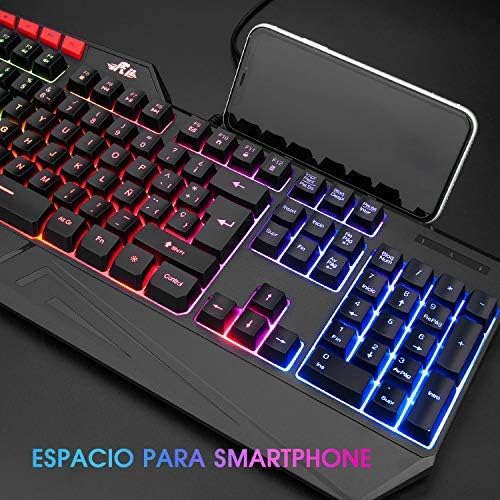
Image: The Rii RK202 keyboard featuring its integrated smartphone holder, with a phone placed in the slot.
4. Priežiūra
4.1 Klaviatūros valymas
- Prieš valydami atjunkite klaviatūrą nuo įrenginio.
- Use a soft, dry, lint-free cloth to gently wipe the surface of the keys and the keyboard body.
- For stubborn dirt or grime, lightly dampen the cloth with water or a mild, non-abrasive cleaning solution. Ensure the cloth is not dripping wet.
- Avoid spraying cleaning solutions directly onto the keyboard. Do not allow any liquid to seep into the key switches or internal components.
- Norėdami pašalinti dulkes ir šiukšles iš tarpų tarp klavišų, naudokite suslėgtą orą.
- Ensure the keyboard is completely dry before reconnecting it to your device.
4.2 Bendroji priežiūra
- Avoid exposing the keyboard to extreme temperatures, direct sunlight, or high humidity.
- Do not drop or subject the keyboard to strong impacts.
- Laikykite skysčius atokiai nuo klaviatūros, kad ji nebūtų pažeista.
5. Problemų sprendimas
5.1 Klaviatūra nereaguoja
- Patikrinkite USB jungtį: Ensure the USB cable is securely plugged into both the keyboard and the device. Try unplugging and re-plugging the cable.
- Išbandykite kitą USB prievadą: Connect the keyboard to a different USB port on your device.
- Bandymas kitame įrenginyje: If possible, test the keyboard on another computer or compatible device to determine if the issue is with the keyboard or your original device.
- Iš naujo paleiskite įrenginį: Paleiskite kompiuterį arba įrenginį iš naujo.
5.2 Neveikia foninis apšvietimas
- Įjungti foninį apšvietimą: Ensure the backlight is turned on by pressing Fn + *.
- Sureguliuokite ryškumą: Padidinkite ryškumą naudodami Fn + PgUp.
- Patikrinkite apšvietimo režimą: Perjunkite apšvietimo režimus naudodami Fn + Light Bulb Key.
- Suderinamumas su „MacOS“: Remember that backlight functionality is not supported on MacOS systems.
5.3 Specific Keys Not Registering
- Valyti po klavišais: Use compressed air to remove any debris or dust that might be lodged under the unresponsive keys.
- Programinės įrangos konfliktas: Check if any recently installed software or drivers are causing conflicts.
- If the issue persists after trying these steps, contact customer support for further assistance.
6. Specifikacijos
| Funkcija | Detalė |
|---|---|
| Modelio numeris | RK202 |
| Matmenys (I x P x A) | 47.5 x 21.49 x 3 cm (18.7 x 8.46 x 1.18 colio) |
| Svoris | 840 g (1.85 svaro) |
| Ryšys | Laidinis USB |
| Raktų skaičius | 105 raktai |
| Anti-Ghosting | 19 raktai |
| Foninis apšvietimas | 7-color LED with adjustable brightness and modes |
| Medžiaga | ABS plastikas |
| Rakto gyvavimo trukmė | Iki 50 milijonų paspaudimų |
| Suderinamumas | Windows (95/98/XP/2000/ME/VISTA/7/8/9/10), PC, Laptop, Google Android TV Box, HTPC, IPTV, Smart TV, Mac OS (limited backlight), Chrome OS, Raspberry Pi |
7. Informacija apie garantiją
Please refer to the warranty policy provided by your retailer or the manufacturer's official website for detailed information regarding warranty coverage, terms, and conditions. Keep your proof of purchase for any warranty claims.
8. Pagalba klientams
For technical assistance, troubleshooting not covered in this manual, or other inquiries, please visit the official Rii website or contact your point of purchase. Ensure you have your product model number (RK202) available when seeking support.
Ask a question about this manual
Ask about setup, troubleshooting, compatibility, parts, safety, or missing instructions. Manuals+ will review the question and use this page’s manual context to help answer it.