
Comix CS-3302
„Comix CS-3302“ 12 skaitmenų stalinio skaičiuotuvo naudotojo vadovas
Model: CS-3302 (P/N: 11821063)
Brand: Comix
1. Įvadas
This user manual provides comprehensive instructions for the Comix CS-3302 12-Digit Desktop Calculator. Please read this manual thoroughly before using the calculator to ensure proper operation and to maximize its lifespan. This calculator is designed for general office and school use, featuring a large LCD display, dual power source, and various calculation functions.
2. Saugos informacija
- Saugokite skaičiuotuvą nuo ekstremalių temperatūrų, tiesioginių saulės spindulių ar didelės drėgmės.
- Venkite skaičiuotuvo numetimo ir stiprių smūgių.
- Do not attempt to disassemble or modify the calculator. This will void the warranty.
- Use a soft, dry cloth for cleaning. Do not use liquid cleaners or abrasive materials.
- Laikyti mažiems vaikams nepasiekiamoje vietoje.
3. Produktas baigtasview

3.1 paveikslas: Priekyje view of the Comix CS-3302 Desktop Calculator, showing the large LCD display and full keypad.
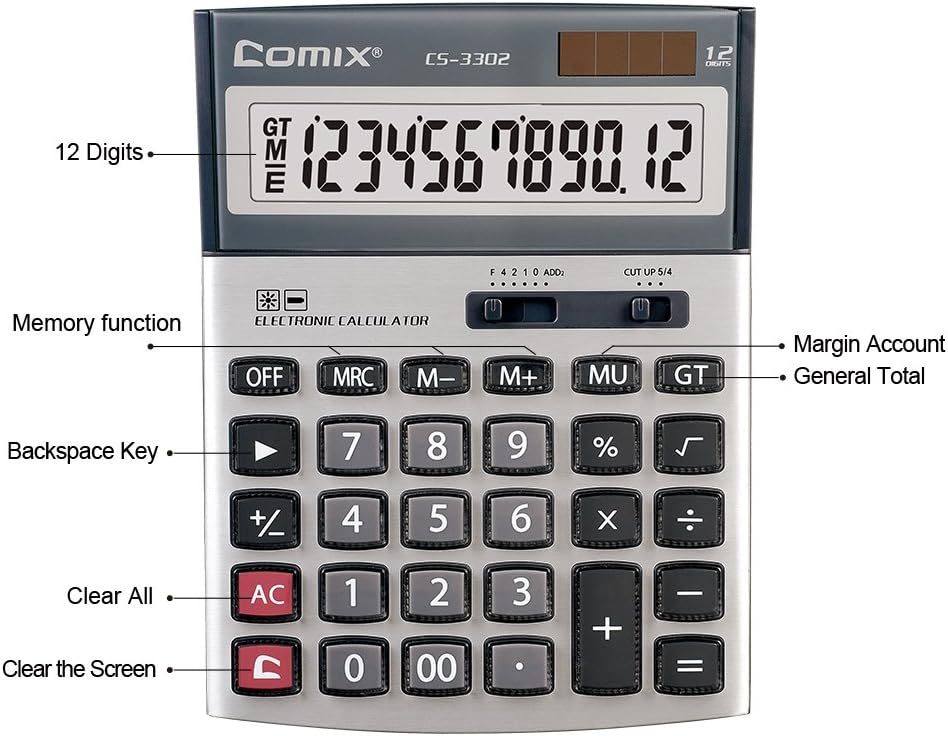
3.2 paveikslas: Key functions and display features of the Comix CS-3302 Calculator, including 12 digits display, memory functions, and clear keys.

3.3 paveikslas: Dimensions of the Comix CS-3302 Calculator, showing its compact and ergonomic design.

3.4 paveikslas: Kampuotas view of the Comix CS-3302 Calculator, highlighting its sleek profile ir klavišų išdėstymą.

3.5 paveikslas: Šoninis profesionalasfile of the Comix CS-3302 Calculator, showing its slim design.

3.6 paveikslas: Retail packaging of the Comix CS-3302 Calculator, highlighting key features like 12 digits, dual power, and acrylic keys.
4. Sąranka
4.1 Maitinimo šaltinis
The Comix CS-3302 calculator operates on a dual power system: solar and battery. The solar panel provides power in well-lit environments, while a single AA battery (not included) serves as an auxiliary power source for low-light conditions or when solar power is insufficient.
- Akumuliatoriaus montavimas: Locate the battery compartment on the back of the calculator. Open the cover and insert one AA battery, ensuring correct polarity (+/-). Close the battery compartment cover securely.
- Pradinis įjungimas: The calculator should power on automatically when sufficient light is available or with the battery installed. If not, press the ON/AC mygtuką.
5. Naudojimo instrukcijos
5.1 Pagrindinės operacijos
- Papildymas (+): Įveskite pirmąjį skaičių, paspauskite +, įveskite antrą skaičių ir paspauskite =.
- Atimtis (-): Įveskite pirmąjį skaičių, paspauskite -, įveskite antrą skaičių ir paspauskite =.
- Daugyba (×): Įveskite pirmąjį skaičių, paspauskite ×, įveskite antrą skaičių ir paspauskite =.
- Skyrius (÷): Įveskite pirmąjį skaičių, paspauskite ÷, įveskite antrą skaičių ir paspauskite =.
- Proctage (%): Įveskite numerį, paspauskite × (arba ÷), enter the percentage value, then press %. Pavyzdžiui,ample, to calculate 10% of 200, enter 200 × 10 %.
- Kvadratinė šaknis (√): Įveskite numerį, tada paspauskite √.
5.2 Specialiosios funkcijos
- IŠJUNGTA: Powers off the calculator.
- AC (viskas skaidrus): Išvalo visus įrašus ir atmintį, grąžindamas skaičiuotuvą į pradinę būseną.
- C (Aiškus įrašas): Išvalo paskutinį įvestą skaičių arba dabartinę rodomą reikšmę nepaveikdamas ankstesnių skaičiavimų ar atminties.
- Grįžimo klavišas (►): Ištrina paskutinį įvestą skaitmenį.
- M+ (Memory Plus): Prideda rodomą reikšmę į atmintį.
- M- (atminties minusas): Atima rodomą reikšmę iš atminties.
- MRC (atminties iškvietimas / išvalymas): Paspauskite vieną kartą, kad iškviestumėte atmintyje išsaugotą reikšmę. Paspauskite du kartus, kad išvalytumėte atmintį.
- MU (Mark Up / Margin Account): Used for profit margin calculations. Enter cost, press MU, enter selling price, then press = to get the profit margin.
- GT (bendra suma): Accumulates the results of all calculations. Pressing GT displays the grand total.
- +/- (ženklo pakeitimas): Pakeičia rodomo skaičiaus ženklą (teigiamą į neigiamą arba neigiamą į teigiamą).
5.3 Dešimtainių skaičių ir apvalinimo nustatymai
The calculator features two slide switches at the top for controlling decimal places and rounding:
- Decimal Selector (F 4 2 1 0 ADD2):
- F (slankusis dešimtainis skaičius): Displays all available decimal places.
- 4, 2, 1, 0: Sets the number of decimal places to 4, 2, 1, or 0 respectively.
- ADD2 (pridėjimo režimas): Automatiškai prie visų rezultatų pridedamos dvi dešimtainės vietos, tai naudinga skaičiuojant valiutą.
- Rounding Selector (CUT UP 5/4):
- CUT (Cut Off): Truncates the number, discarding all digits beyond the set decimal places.
- UP (Round Up): Rounds up the last digit if there are any non-zero digits beyond the set decimal places.
- 5/4 (Round Half Up): Rounds up if the first discarded digit is 5 or greater, otherwise rounds down.
6. Priežiūra
- Valymas: Wipe the calculator surface with a soft, dry cloth. For stubborn dirt, slightly dampen the cloth with water, but ensure no liquid enters the calculator. Do not use chemical cleaners.
- Saugykla: When not in use for extended periods, store the calculator in a cool, dry place away from direct sunlight and extreme temperatures.
- Baterijos keitimas: If the display becomes dim or unresponsive in low light, replace the AA battery. Ensure the calculator is off before replacing the battery.
7. Problemų sprendimas
| Problema | Galima priežastis | Sprendimas |
|---|---|---|
| Ekranas tuščias arba blankus. | Nepakanka šviesos saulės energijai arba išsikrovusi baterija. | Move to a brighter area or replace the AA battery. |
| Neteisingi skaičiavimo rezultatai. | Incorrect input, incorrect decimal/rounding settings, or memory interference. | Paspauskite AC to clear all and restart. Check decimal and rounding switch positions. Ensure correct key presses. |
| Klavišai nereaguoja. | Calculator frozen or physical damage. | Pabandykite paspausti IŠJUNGTA tada ON/AC. If problem persists, remove and reinsert battery. If still unresponsive, contact support. |
8. Specifikacijos
| Prekės ženklas | Komiksas |
| Modelio numeris | CS-3302 (P/N: 11821063) |
| Ekranas | 12 skaitmenų LCD |
| Maitinimo šaltinis | Dual Power (Solar & 1x AA Battery - not included) |
| Medžiaga | Akrilas, Metalas |
| Matmenys (I x P x A) | Apytiksliai 23.6 x 15.7 x 4.3 cm (9.3 x 6.2 x 1.7 colio) |
| Svoris | Maždaug 322 g (0.71 svaro) |
| Darbinė temperatūra | -25 ℃ iki +60 ℃ (nuo -13 ℉ iki +140 ℉) |
| UPC | 842064102524 |
9. Garantija ir palaikymas
Comix products are designed for quality and durability. This product comes with a 3 metų garantija nuo įsigijimo datos, apimanti medžiagų ir gamybos defektus įprasto naudojimo sąlygomis.
For warranty claims, technical support, or any inquiries regarding your Comix CS-3302 calculator, please contact Comix customer service through their official website or the retailer where the product was purchased. Please have your proof of purchase and the product model number ready when contacting support.
For more information, visit the official Comix websvetainė: www.comix.com
Ask a question about this manual
Ask about setup, troubleshooting, compatibility, parts, safety, or missing instructions. Manuals+ will review the question and use this page’s manual context to help answer it.