
Įvadas
Ačiū, kad pirkoteasing Juodasisweb BWA16AA003 1000W HiFi Bluetooth Stereo System. This powerful audio system is designed to provide a rich and immersive sound experience with its front speakers and subwoofer. It features wireless Bluetooth connectivity, a digital FM radio, and a top-loading CD player, allowing you to enjoy your favorite music from various sources. This manual provides detailed instructions for setup, operation, maintenance, and troubleshooting to ensure optimal performance and longevity of your device.
Svarbi saugos informacija
Prieš naudodami šį gaminį, atidžiai perskaitykite visas saugos ir naudojimo instrukcijas. Išsaugokite šias instrukcijas ateičiai.
- Nelaikykite šio prietaiso nuo lietaus ar drėgmės.
- Neužblokuokite jokių ventiliacijos angų. Montuokite pagal gamintojo instrukcijas.
- Nemontuokite šalia jokių šilumos šaltinių, pvz., radiatorių, šilumokaičių, viryklių ar kitų įrenginių (įskaitant ampkeltuvai), kurie gamina šilumą.
- Saugokite, kad maitinimo laidas nebūtų užeinamas ar užspaudžiamas, ypač prie kištukų, patogių talpyklų ir vietų, kur jie išeina iš prietaiso.
- Naudokite tik gamintojo nurodytus priedus/priedus.
- Atjunkite šį prietaisą iš elektros lizdo žaibuojant arba kai jis nenaudojamas ilgą laiką.
- Visus techninės priežiūros darbus patikėkite kvalifikuotam techninės priežiūros personalui. Techninė priežiūra reikalinga, kai aparatas buvo kaip nors pažeistas, pvz., pažeistas maitinimo laidas arba kištukas, į aparatą išsiliejo skystis ar įkrito daiktai, aparatas buvo paveiktas lietaus ar drėgmės, neveikia normaliai. , arba buvo numestas.
Pakuotės turinys
Carefully unpack your stereo system and ensure all items are present. If any items are missing or damaged, please contact your retailer.
- Juodaweb BWA16AA003 Main Unit
- Kairysis garsiakalbis
- Dešinysis garsiakalbis
- Žemųjų dažnių garsiakalbis
- Maitinimo laidas
- Vartotojo vadovas
Produktas baigtasview
Familiarize yourself with the main unit's controls and features.
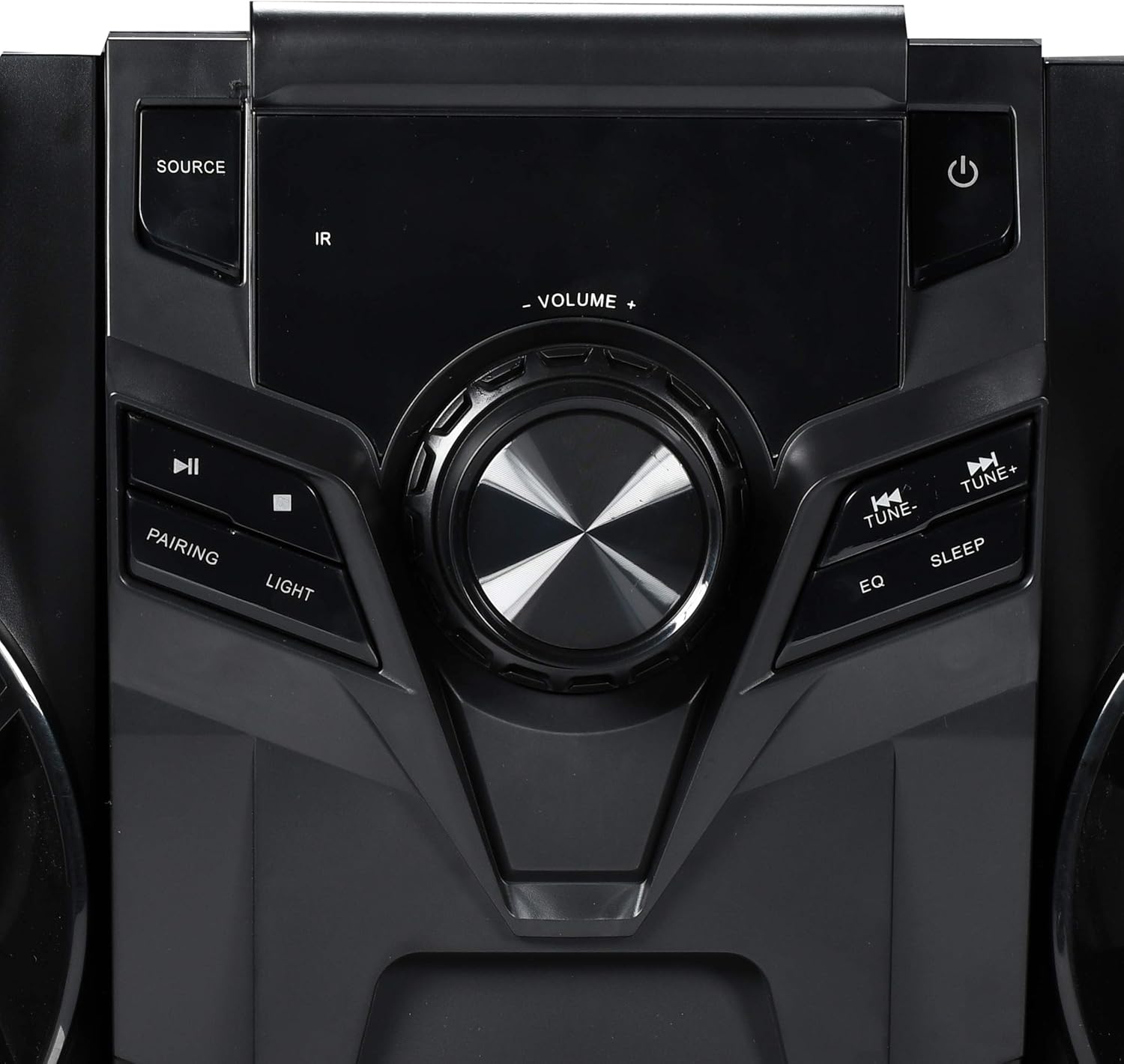
1 pav.: Priekinio skydelio valdikliai
This image displays the central control panel of the Blackweb BWA16AA003 stereo system. Key controls visible include the large central volume knob, a "SOURCE" button on the upper left for input selection, and a power button (represented by the universal power symbol) on the upper right. Below the source button are playback controls: a play/pause button and a pairing button for Bluetooth. Below the power button are "TUNE-" and "TUNE+" buttons for radio tuning, along with "EQ" and "SLEEP" buttons. An "IR" sensor for remote control input is also visible.
Valdymo skydelio funkcijos:
- Įjungimo mygtukas (⏻): Įjungia arba išjungia sistemą.
- SOURCE mygtukas: Selects the input source (e.g., CD, Bluetooth, FM Radio).
- GARSUMO rankenėlė: Reguliuoja pagrindinį garsumo lygį.
- Atkūrimo / pristabdymo mygtukas (⏸): Plays or pauses audio playback (CD/Bluetooth).
- SUSIEJIMO mygtukas: Įjungia „Bluetooth“ susiejimo režimą.
- Šviesos mygtukas: Controls the multi-color LED lighting effects on the speakers.
- TUNE- / TUNE+ mygtukai: Tunes FM radio frequencies or navigates tracks/chapters.
- EQ mygtukas: Perjungia iš anksto nustatytus ekvalaizerio parametrus.
- MIEGO mygtukas: Nustato miego laikmatį.
- IR jutiklis: Receives signals from a compatible remote control (note: remote control not included as per specifications).
- USB prievadas: Located on the front or rear panel, used for charging compatible devices (charging cable sold separately).
- CD dėklas: Top-loading tray for inserting audio CDs.
Sąranka
1. Įdėjimas
Place the main unit and speakers on a stable, flat surface. Ensure adequate ventilation around the unit to prevent overheating. For optimal sound, position the left and right speakers equidistant from the main unit and facing the listening area.
2. Garsiakalbio prijungimas
Connect the speaker wires from the left and right speakers and the subwoofer to the corresponding speaker terminals on the rear of the main unit. Ensure correct polarity (positive to positive, negative to negative) for optimal sound quality.
3. Maitinimo prijungimas
Plug the power cord into the AC IN socket on the rear of the main unit, then plug the other end into a standard wall outlet (AC 120V~60Hz).
Naudojimo instrukcijos
Maitinimo įjungimas/išjungimas
Paspauskite Maitinimo mygtukas (⏻) on the front panel to turn the system on or off.
Šaltinio pasirinkimas
Paspauskite ŠALTINIS mygtukas repeatedly to cycle through available input modes: CD, Bluetooth, FM Radio.
Bluetooth veikimas
- Switch the system to Bluetooth mode using the ŠALTINIS mygtukas. The display will indicate "BT" or "Bluetooth".
- The system will automatically enter pairing mode. If not, press the PAIRING Button. The Bluetooth indicator will flash.
- Įrenginyje su „Bluetooth“ ryšiu (išmaniajame telefone, planšetiniame kompiuteryje, nešiojamajame kompiuteryje) įjunkite „Bluetooth“ ir ieškokite galimų įrenginių.
- Pasirinkite „Juodaweb BWA16AA003" (or similar name) from the list of devices.
- Once paired, the Bluetooth indicator will stop flashing and remain solid. You can now play audio wirelessly from your device.
CD atkūrimas
- Switch the system to CD mode using the ŠALTINIS mygtukas.
- Gently place an audio CD (CD or CD-R/RW) into the top-loading CD tray with the label side facing up.
- The system will automatically begin playing the CD. If not, press the Atkūrimo/pauzės mygtukas (⏸).
- Naudokite TUNE- / TUNE+ Buttons praleisti takelius.
FM radijo veikimas
- Switch the system to FM Radio mode using the ŠALTINIS mygtukas.
- Extend the FM antenna fully for better reception.
- Paspauskite TUNE- / TUNE+ Buttons to manually tune to a desired frequency.
- To auto-scan and save presets (if available), refer to the on-screen display or specific instructions for your model's auto-scan function.
USB įkrovimas
Connect your compatible device's USB charging cable (sold separately) to the USB port on the stereo system to charge your device.
LED šviesos valdymas
Paspauskite Šviesos mygtukas to cycle through different multi-color LED lighting effects on the speakers or to turn them off.
Garsumo reguliavimas
Pasukite TŪRIO rankenėlė pagal laikrodžio rodyklę, norėdami padidinti garsumą, ir prieš laikrodžio rodyklę, norėdami sumažinti garsumą.
Ekvalaizeris (EQ)
Paspauskite EQ mygtukas to cycle through various preset equalizer modes (e.g., Rock, Pop, Jazz, Classic, Flat) to optimize sound for different music genres.
Miego laikmatis
Paspauskite MIEGO mygtukas repeatedly to set a sleep timer (e.g., 15, 30, 60, 90 minutes). The system will automatically turn off after the selected time.
Priežiūra
Valymas
Wipe the unit with a soft, dry cloth. Do not use abrasive cleaners, waxes, or solvents as they may damage the finish. Ensure the unit is unplugged before cleaning.
Sandėliavimas
If the unit is to be stored for an extended period, unplug it from the power outlet and store it in a cool, dry place, away from direct sunlight and extreme temperatures.
Trikčių šalinimas
Prieš kreipdamiesi į klientų aptarnavimo tarnybą, peržiūrėkite toliau pateiktą lentelę, kurioje pateikiamos dažniausiai pasitaikančios problemos ir jų sprendimai.
| Problema | Galima priežastis | Sprendimas |
|---|---|---|
| Nėra galios | Maitinimo laidas netinkamai prijungtas. Maitinimo lizdas neveikia. | Įsitikinkite, kad maitinimo laidas tvirtai įjungtas į įrenginį ir sieninį lizdą. Išbandykite lizdą su kitu įrenginiu. |
| Nėra garso | Garsumas per mažas arba nutildytas. Pasirinktas neteisingas šaltinis. Speaker wires not connected properly. | Padidinkite garsumą. Paspauskite mygtuką SOURCE, kad pasirinktumėte tinkamą įvestį. Check speaker wire connections at both the unit and speakers. |
| Nepavyko susieti „Bluetooth“ | Bluetooth device is too far away. Bluetooth not enabled on your device. System is not in pairing mode. | Move your Bluetooth device closer to the stereo system. Įsitikinkite, kad jūsų įrenginyje įjungtas „Bluetooth“. Press the PAIRING button on the stereo system. |
| CD negroja | Kompaktinis diskas yra nešvarus arba subraižytas. CD įdėtas neteisingai. Pasirinktas neteisingas šaltinis. | Clean the CD with a soft cloth. Re-insert the CD with the label side facing up. Norėdami pasirinkti CD režimą, paspauskite SOURCE mygtuką. |
| Prastas FM ryšys | FM antenna not extended. Trikdžiai iš kitų elektroninių prietaisų. | Iki galo ištraukite FM anteną. Perkelkite įrenginį toliau nuo kitų elektroninių prietaisų. |
Specifikacijos
| Prekės ženklas | Juodaweb |
| Modelis | BWA16AA003 |
| Išėjimo vattage | 1000 vatų |
| Suderinami įrenginiai | Išmanusis telefonas, planšetinis kompiuteris, nešiojamas kompiuteris |
| Ryšio technologija | Bluetooth, USB |
| Garsiakalbio tipas | Stereo (with Subwoofer) |
| CD grotuvas | Yes (CD and CD-R/RW compatible) |
| FM radijas | Yes (Digital FM with presets) |
| USB prievadas | Yes (for device charging) |
| LED apšvietimas | Multi-color LED speaker illumination |
| Matmenys (I x P x A) | 72.64 x 36.83 x 32.77 cm (apytiksliai 28.6 x 14.5 x 12.9 colio) |
| Svoris | 14.17 kg (apie 31.24 svaro) |
Garantija ir palaikymas
For warranty information or technical support, please refer to the documentation included with your purchase or contact Blackweb customer service. Keep your proof of purchase for warranty claims.