
Įvadas
The Perixx PERIBOARD-313 is a wired, full-sized keyboard featuring an integrated touchpad and a 3-level LED backlight. Designed for convenience and efficiency, this keyboard combines typing and pointing functionalities into a single device, making it suitable for various computing environments. Its dimensions are approximately 456mm x 160mm x 30mm, with a touchpad measuring 57mm x 40mm.
This manual provides comprehensive instructions for the proper setup, operation, and maintenance of your PERIBOARD-313 keyboard to ensure optimal performance and longevity.
Pakuotės turinys
- 1 x Perixx PERIBOARD-313 Wired USB Backlit Keyboard with Touchpad
- Vartotojo vadovas (šis dokumentas)

Image: The Perixx PERIBOARD-313 keyboard, its USB cable, and the user manual shown next to the product packaging.
Sistemos reikalavimai
- Operacinė sistema: Windows 7, 8 arba 10
- Connectivity: Available USB port
Sąranka
- Išpakuokite klaviatūrą: Carefully remove the PERIBOARD-313 from its packaging.
- Prisijunkite prie kompiuterio: Prijunkite klaviatūros USB jungtį prie laisvo kompiuterio USB prievado.
- Tvarkyklės diegimas: The keyboard is plug-and-play. Your operating system will automatically detect and install the necessary drivers. No additional software installation is required.
- Patikrinkite funkcionalumą: Once connected, the keyboard and touchpad should be immediately functional. Test by typing and moving the cursor.
Naudojimo instrukcijos
Klaviatūros išdėstymas
The PERIBOARD-313 features a standard full-size US English QWERTY layout with 104 keys, including a dedicated numeric keypad and function keys.

Image: Detailed diagram illustrating the full QWERTY keyboard layout, including the numeric keypad and integrated touchpad.
Jutiklinės dalies funkcijos
The integrated touchpad provides precise cursor control and includes two buttons that function as left and right mouse clicks.
- Žymeklio judėjimas: Norėdami perkelti žymeklį ekrane, braukite pirštu per jutiklinį paviršių.
- Kairysis spustelėjimas: Press the left button below the touchpad or tap once on the touchpad surface.
- Dešiniuoju pelės mygtuku spustelėkite: Press the right button below the touchpad or tap with two fingers on the touchpad surface (if supported by OS settings).
- Slinkimas: Use two fingers to scroll vertically on the touchpad (if supported by OS settings).
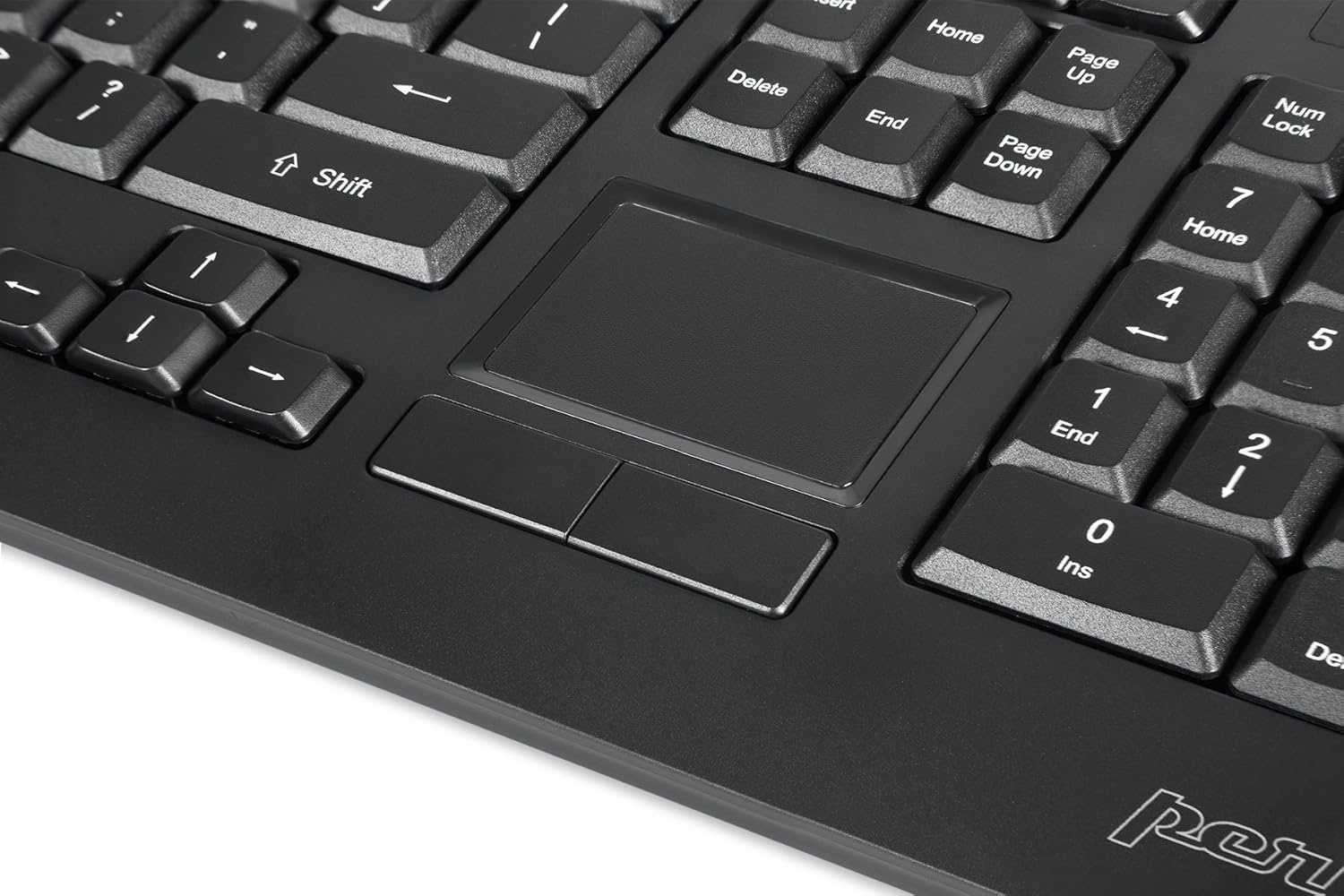
Image: A close-up of the integrated touchpad, highlighting its surface and the two dedicated click buttons.

Image: A user's hand interacting with the touchpad for cursor control.
Foninio apšvietimo valdymas
The keyboard features a white LED backlight with three adjustable brightness levels. Use the dedicated backlight control keys to adjust the illumination.
- Įjungti/išjungti foninį apšvietimą: Paspauskite Fn + F12 klavišų kombinacija.
- Sureguliuokite ryškumą: Paspauskite Fn + F11 norėdami perjungti tris ryškumo lygius.
Daugialypės terpės raktai
The PERIBOARD-313 includes 10 multimedia function keys for quick access to media controls and internet features. These functions are activated by holding the Fn key and pressing the corresponding function key (F1-F10).
- Fn + F1: Atidarykite Media Player
- Fn + F2: Sumažinti garsumą
- Fn + F3: Padidinti garsumą
- Fn + F4: Nutildyti
- Fn + F5: Ankstesnis takelis
- Fn + F6: Kitas takelis
- Fn + F7: Leisti / pristabdyti
- Fn + F8: Sustok
- Fn + F9: Atidaryti Web Naršyklė
- Fn + F10: Atidaryti el. pašto klientą
Integruoti USB šakotuvai
The keyboard features two integrated USB 2.0 hubs, allowing you to connect additional USB devices directly to the keyboard for convenience.

Image: The side of the keyboard displaying the two built-in USB 2.0 ports for connecting peripherals.
Priežiūra
- Valymas: Disconnect the keyboard from your computer before cleaning. Use a soft, damp cloth to wipe the surface. For deeper cleaning between keys, use compressed air to remove dust and debris. Avoid using harsh chemicals or abrasive cleaners.
- Saugykla: Store the keyboard in a dry environment, away from extreme temperatures and direct sunlight.
- Skysčio ekspozicija: This keyboard is not water-resistant. Avoid spilling liquids on it. If liquid exposure occurs, immediately disconnect the keyboard and allow it to dry completely before reconnecting.
Trikčių šalinimas
| Problema | Galima priežastis | Sprendimas |
|---|---|---|
| Klaviatūra nereaguoja | Atsilaisvinęs USB ryšys, sugedęs USB prievadas, tvarkyklės problema. |
|
| Touchpad neveikia | Driver issue, touchpad disabled (unlikely for wired), physical damage. |
|
| Backlight not turning on/off or adjusting | Incorrect key combination, software conflict. |
|
| Multimedijos klavišai neveikia | Incorrect key combination, software conflict. |
|
Specifikacijos
| Prekės ženklas | Perixx |
| Modelio pavadinimas | PERIBOARD-313 US |
| Modelio numeris | 11445 |
| Ryšio technologija | USB-A (laidinis) |
| Klaviatūros aprašymas | QWERTY, Full-sized, Backlit |
| Ypatinga funkcija | Backlit, Integrated Touchpad, USB Hubs |
| Spalva | Juoda |
| Klaviatūros foninio apšvietimo spalva | Single Color (White LED) |
| Medžiaga | ABS plastikas |
| Raktų skaičius | 104 |
| Jungiklio tipas | Membrana |
| Jutiklinės dalies matmenys | 57 mm x 40 mm (2.24 colio x 1.57 colio) |
| Klaviatūros matmenys | 456 mm x 160 mm x 30 mm (17.95 x 6.30 x 1.18 colio) |
| Prekės svoris | 1.85 svaro |
| Total USB 2.0 Ports | 2 (Integrated Hubs) |
Image: Technical drawing with key dimensions of the PERIBOARD-313 keyboard.
Garantija
„Perixx PERIBOARD-313“ komplektuojamas su 1 metų ribota garantija from the date of purchase. This warranty covers manufacturing defects and workmanship under normal use. It does not cover damage caused by misuse, accident, modification, or unauthorized repair. Please retain your proof of purchase for warranty claims.
Palaikymas
For further assistance, technical support, or warranty inquiries, please visit the official Perixx websvetainėje arba susisiekite su jų klientų aptarnavimo tarnyba. Daugiau informacijos ir kontaktinius duomenis galite rasti „Perixx“ prekės ženklo parduotuvė „Amazon“ platformoje.