
Įvadas
The Beurer HM55 Wireless Thermometer and Hygrometer is designed to monitor your indoor climate, providing real-time data on temperature and relative humidity. This device helps you maintain a comfortable and healthy environment within your home by displaying current conditions and allowing long-term monitoring via the Beurer FreshRoom app on your smartphone. This manual provides essential information for the safe and effective use of your HM55 device.
Pagrindinės savybės
- Monitors and displays current time, temperature, and relative humidity.
- Suteikia greitą persileidimąview of indoor environment quality through a colored indicator.
- Bluetooth Smart connectivity for long-term monitoring with the free Beurer FreshRoom app.
- Allows monitoring of temperature and humidity trends over time with easy-to-read graphs in the app.
- Compact and elegant design for discreet placement.
- Multi-room display function enables management of multiple Beurer indoor humidity monitors via the app.
- App features include LED brightness control and time zone settings.
Saugos informacija
Prieš naudodami įrenginį, atidžiai perskaitykite šias saugos instrukcijas. Išsaugokite šį vadovą ateičiai.
Bendra sauga
- Nelaikykite prietaiso nuo tiesioginių saulės spindulių, ekstremalių temperatūrų ar didelės drėgmės.
- Keep the device away from water and other liquids. Do not immerse it.
- Neatidarykite ir nebandykite taisyti įrenginio patys. Visus techninės priežiūros darbus patikėkite kvalifikuotiems specialistams.
- Šis prietaisas nėra žaislas. Laikykite jį vaikams nepasiekiamoje vietoje.
- Prietaisą naudokite tik pagal paskirtį, kaip aprašyta šiame vadove.
Akumuliatoriaus sauga
- Always insert batteries with the correct polarity (+/-).
- Nemaišykite senų ir naujų baterijų arba skirtingų tipų baterijų.
- Remove depleted batteries promptly to prevent leakage and damage.
- Jei prietaiso nenaudosite ilgą laiką, išimkite baterijas.
- Baterijas išmeskite pagal vietinius reikalavimus. Nemeskite baterijų į ugnį.
Pakuotės turinys
Carefully unpack your Beurer HM55 and check that all components are present and undamaged.
- 1 x Beurer HM55 Thermo-Hygrometer
- 2 x 1.5 V AAA baterijos
- 1 x naudojimo instrukcija (šis dokumentas)
Įrenginys baigtasview
Familiarize yourself with the components of your Beurer HM55 device.
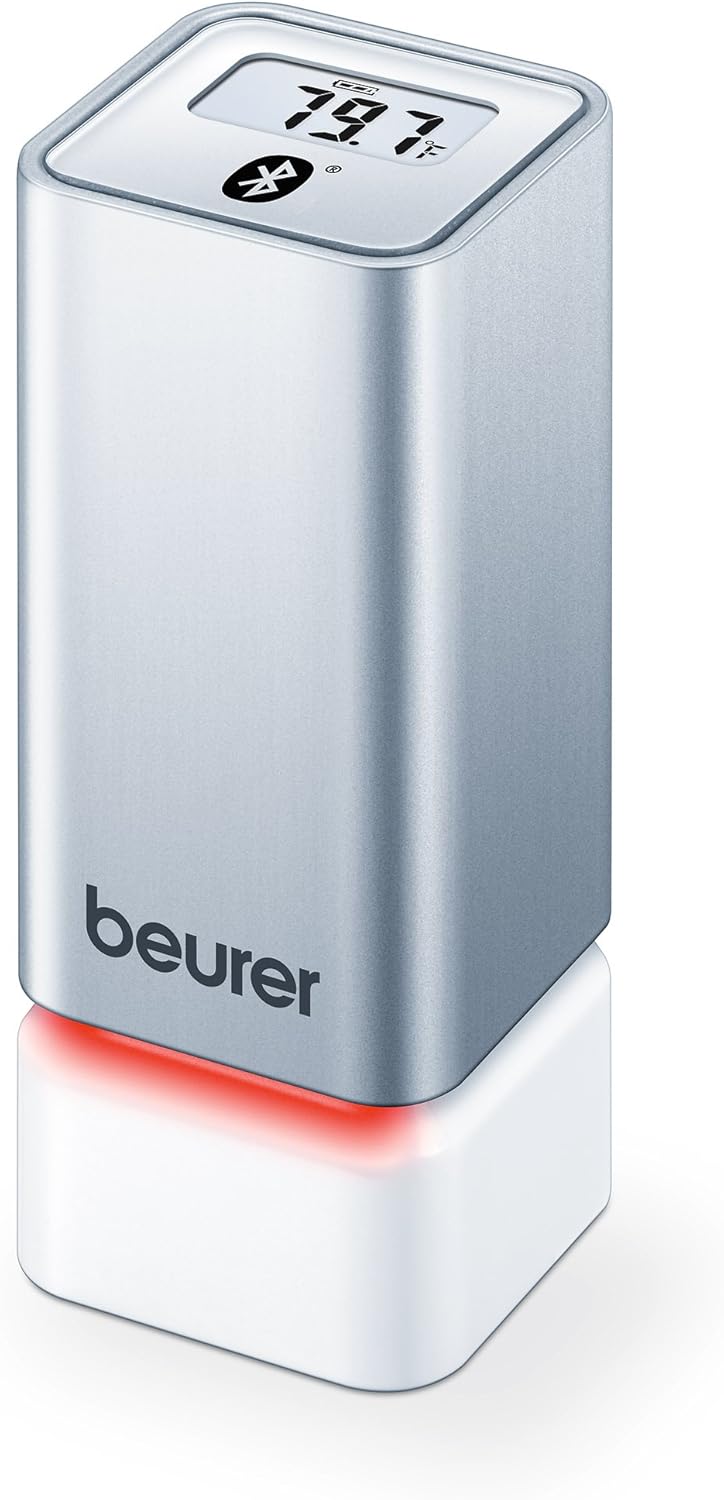
1 paveikslas: Priekyje view of the Beurer HM55 device, showing the display and Beurer logo.

2 paveikslas: Close-up of the HM55 display, indicating temperature, humidity, and Bluetooth icon.

3 paveikslas: The compact size of the HM55 device, shown in comparison to a hand.
- Ekranas: Shows current temperature, relative humidity, and time.
- LED indikatorius: Located at the base, changes color to indicate indoor climate quality.
- Baterijų skyrius: Located on the underside of the device.
- „Bluetooth“ simbolis: Rodo aktyvų „Bluetooth“ ryšį.
Sąranka
1. Baterijų įdėjimas
- Locate the battery compartment on the bottom of the HM55 device.
- Atidarykite akumuliatoriaus skyriaus dangtelį.
- Įdėkite dvi 1.5 V AAA baterijas, užtikrindami teisingą poliškumą (+/-).
- Close the battery compartment cover securely. The device display should activate.
2. Downloading the Beurer FreshRoom App
The Beurer FreshRoom app is required to utilize the full functionality of your HM55 device, including long-term monitoring and multi-room management. The app is compatible with iOS (version 8.0 or higher) and Android (version 4.4 or higher with Bluetooth 4.0).
- For iOS devices, download the "Beurer FreshRoom" app from the Apple App Store.
- For Android devices, download the "Beurer FreshRoom" app from the Google Play Store.
- Alternatively, scan the QR code provided in the product packaging or visit the official Beurer webtiesioginių nuorodų svetainė. Beurer Smartphone App Information

4 paveikslas: Example of the Beurer FreshRoom app interface on a smartphone.
3. Susiejimas su išmaniuoju telefonu
- Įsitikinkite, kad jūsų išmaniajame telefone įjungtas „Bluetooth“.
- Open the Beurer FreshRoom app.
- Follow the on-screen instructions within the app to search for and connect to your HM55 device. The app will guide you through the pairing process.
- Once successfully paired, the Bluetooth symbol on the HM55 display will illuminate, and data will begin to synchronize with the app.
4. Pradinis paskirstymas
Place the HM55 in the room you wish to monitor. For accurate readings, avoid placing it:
- Near heat sources (e.g., radiators, direct sunlight).
- Near air conditioning vents or open windows.
- In areas with high airflow or drafts.
- In direct contact with moisture.
Prietaiso valdymas
Ekrano supratimas
The HM55 display provides immediate readings:
- Temperatūra: Displays in Celsius (°C) or Fahrenheit (°F). The unit can be changed via the app.
- Santykinė oro drėgmė: Rodoma procentaistage (%).
- Laikas: Displays the current time, synchronized via the app.
- „Bluetooth“ piktograma: Indicates an active connection to your smartphone.
Interpreting the Colored Climate Indicator
The LED light at the base of the HM55 provides a quick visual indication of your indoor climate:
- Žalia: Optimal indoor climate.
- Raudona: Poor indoor climate (e.g., too dry, too humid, or extreme temperature).
- The specific thresholds for these indicators can be customized within the Beurer FreshRoom app.

5 paveikslas: HM55 device showing a red LED indicator, signifying a poor indoor climate.

6 paveikslas: HM55 device showing a green LED indicator, signifying an optimal indoor climate.
Using the Beurer FreshRoom App
The app provides advanced features for monitoring and managing your indoor climate:
- Realaus laiko duomenys: View current temperature and humidity readings from your device.
- Istorinė data: Access graphs and logs of temperature and humidity over various periods (e.g., hourly, kasdien, kas savaitę, kas mėnesį).
- Įspėjimai: Set custom minimum and maximum thresholds for temperature and humidity. Receive notifications if readings fall outside these ranges.
- Nustatymai: Adjust device settings such as temperature unit (°C/°F), LED brightness, and time zone.
Multi-Room Function
If you have multiple Beurer HM55 devices, the FreshRoom app allows you to monitor all of them from a single interface. Each device can be assigned to a specific room for easy identification and tracking.
- Add each additional HM55 device to the app following the pairing instructions.
- Assign a unique name or room designation to each device within the app settings.
- View and compare climate data from all connected rooms on a single dashboard.
Priežiūra
Valymas
- Nuvalykite įrenginį minkšta, sausa arba šiek tiek drėgna šluosteamp audinys.
- Nenaudokite abrazyvinių valiklių, tirpiklių ar stiprių cheminių medžiagų, nes jos gali pažeisti paviršių ar vidinius komponentus.
- Įsitikinkite, kad į prietaisą nepatenka skysčio.
Baterijos keitimas
When the battery low indicator appears on the display or in the app, replace both AAA batteries following the instructions in the "Inserting Batteries" section.
Sandėliavimas
If the device will not be used for an extended period, remove the batteries and store the device in a cool, dry place, away from direct sunlight and extreme temperatures.
Trikčių šalinimas
If you encounter issues with your Beurer HM55, refer to the following common problems and solutions:
| Problema | Galima priežastis | Sprendimas |
|---|---|---|
| Device display is blank. | Baterijos išsikrovusios arba netinkamai įdėtos. | Patikrinkite baterijų poliškumą arba pakeiskite jas naujomis AAA baterijomis. |
| Programėlė negali prisijungti prie įrenginio. | Bluetooth is off on smartphone; device is out of range; app issue. | Ensure Bluetooth is enabled. Move smartphone closer to the device. Restart the app or smartphone. Re-pair the device if necessary. |
| Readings appear inaccurate. | Device placement is suboptimal; environmental factors. | Relocate the device away from direct heat, cold, or drafts. Allow time for readings to stabilize after relocation. |
| LED indicator is always red. | Indoor climate is consistently outside optimal range; app settings. | Check temperature and humidity levels in the app. Adjust environmental conditions (e.g., use a humidifier/dehumidifier, adjust heating/cooling). Review and adjust alert thresholds in the app. |
Techninės specifikacijos
| Modelis | HM55 |
| Prekės ženklas | Beureris |
| Maitinimo šaltinis | 2 x 1.5 V AAA baterijos |
| Ryšys | Bluetooth Smart (Bluetooth 4.0) |
| Programų suderinamumas | iOS 8.0 ar naujesnė versija, Android 4.4 arba naujesnė versija |
| Montavimo tipas | Sieninis laikiklis |
| Spalva | Sidabras |
| Įtraukti komponentai | Beurer Thermo-Hygrometer |
Garantija ir palaikymas
„Beurer“ šiam gaminiui suteikia ribotą garantiją. Išsamias garantijos sąlygas rasite prie gaminio pridėtoje garantijos kortelėje arba apsilankykite oficialioje „Beurer“ svetainėje. websvetainę.
For technical support, troubleshooting assistance, or to inquire about replacement parts, please contact Beurer customer service. Contact information can typically be found on the Beurer websvetainėje arba produkto pakuotėje.
Internetiniai ištekliai: For additional information and app support, visit Beurer Smartphone App Information.