
1. Įvadas
Thank you for choosing the Andoer Mini 49-LED Camera Video Light. This compact and versatile lighting solution is designed to enhance your photography and videography with bright, dimmable illumination. Featuring 49 high-quality LED beads, a 6000K color temperature, and a CRI of ≥90, it provides natural and soft white light. Its design includes multiple hot shoe bases for interlocking with other lights and a standard hot shoe mount with a 1/4-inch thread for broad compatibility with cameras and light stands.

1.1 pav.: priekis view of the Andoer Mini 49-LED Camera Video Light.
2. Saugos informacija
Please read and understand all safety precautions before using this product to prevent damage or injury.
- Saugokite prietaisą nuo vandens ar per didelės drėgmės.
- Venkite tiesioginio LED šviesos poveikio akims, nes ji gali būti labai ryški.
- Nebandykite ardyti ar modifikuoti šviestuvo. Remontą turėtų atlikti tik kvalifikuoti specialistai.
- Use only specified AA batteries. Ensure correct polarity when inserting batteries.
- Išimkite baterijas, jei šviestuvas bus nenaudojamas ilgesnį laiką.
- Laikyti vaikams nepasiekiamoje vietoje.
3. Sąranka
3.1 Akumuliatoriaus įdėjimas
- Raskite baterijų skyriaus dangtelį, esantį žibinto gale.
- Atidarykite dangtelį.
- Įdėkite dvi (2) AA baterijas, užtikrindami teisingą poliškumą (+/-), kaip nurodyta skyriaus viduje.
- Saugiai uždarykite akumuliatoriaus skyriaus dangtelį.

Figure 3.1: Open battery compartment for AA battery installation.
3.2 Šviestuvo montavimas
The Andoer Mini 49-LED Camera Video Light offers versatile mounting options:
- On-Camera Hot Shoe: The light features a standard hot shoe mount at its base. Slide this mount into your camera's hot shoe slot and tighten the locking ring for a secure fit.
- 1/4-inch Thread: The hot shoe mount also includes a 1/4-inch thread, allowing it to be attached to light stands, tripods, or other accessories with a compatible screw.

Figure 3.2: The video light mounted on a DSLR camera's hot shoe.
3.3 Interlocking Multiple Lights
For enhanced lighting effects, multiple Andoer Mini 49-LED lights can be interlocked. The light is equipped with hot shoe bases on three sides (top, left, right).
- Mount the first light onto your camera or stand.
- Take a second light and slide its hot shoe mount into one of the hot shoe bases on the first light.
- Repeat for additional lights as needed.

Figure 3.3: Multiple lights interlocked for broader illumination.
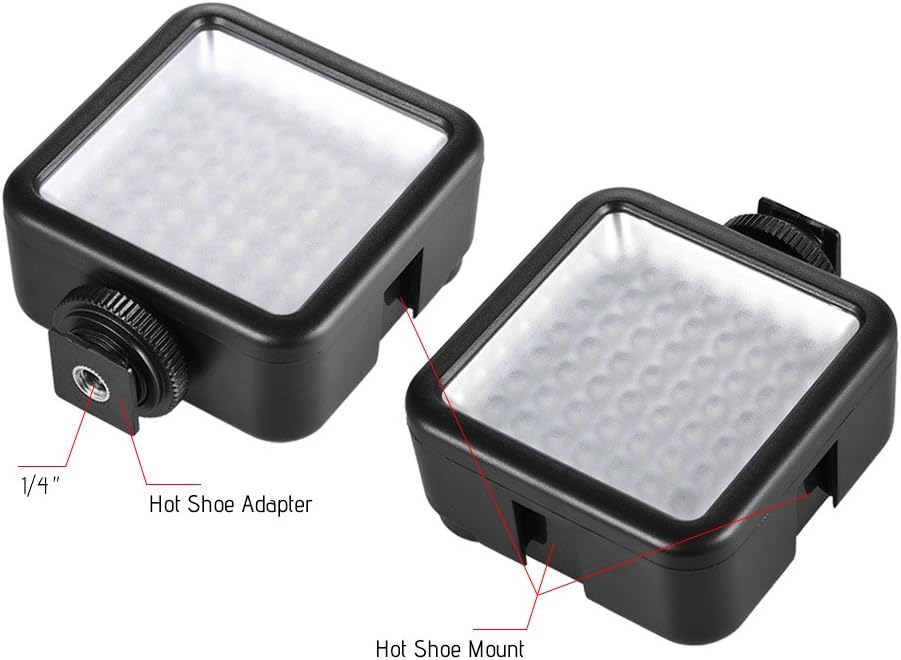
Figure 3.4: Detail of the hot shoe adapter and mount for interlocking.
4. Naudojimo instrukcijos
4.1 Įjungimas / išjungimas ir ryškumo reguliavimas
The light features a single rotary knob for both power control and brightness adjustment.
- Maitinimas: Rotate the knob clockwise from the 'OFF' position. The light will turn on at its lowest brightness setting.
- Sureguliuokite ryškumą: Continue rotating the knob clockwise to increase brightness from 0% to 100%. Rotate counter-clockwise to decrease brightness.
- Išjungti: Rotate the knob counter-clockwise until it clicks into the 'OFF' position.

Figure 4.1: The ON/Dimmer rotary knob on the back of the light.

Figure 4.2: Visual representation of 0-100% dimmable brightness.
5. Priežiūra
- Valymas: Use a soft, dry cloth to clean the exterior of the light. Do not use abrasive cleaners or solvents.
- Saugykla: Store the light in a cool, dry place away from direct sunlight and extreme temperatures. Remove batteries if storing for extended periods.
- Akumuliatoriaus priežiūra: Replace batteries when the light output becomes dim or inconsistent. Dispose of used batteries responsibly according to local regulations.
6. Problemų sprendimas
| Problema | Galima priežastis | Sprendimas |
|---|---|---|
| Šviesa neįsijungia. | Baterijos išsikrovė arba įdėtos neteisingai. | Patikrinkite baterijų poliškumą. Pakeiskite naujomis AA baterijomis. |
| Light dims quickly or is inconsistent. | Maža akumuliatoriaus energija. | Pakeiskite naujus AA tipo elementus. |
| Light is not securely mounted. | Mounting knob/ring is loose. | Ensure the hot shoe locking ring is tightened. |
7. Specifikacijos
| Funkcija | Specifikacija |
|---|---|
| Modelis | W49 |
| LED kiekis | 49 vnt |
| Maitinimo išvestis | 5.5W |
| Spalvos temperatūra | 6000 tūkst |
| CRI (spalvų perteikimo indeksas) | ≥ 90 |
| Tamsinimo diapazonas | 0 % – 100 % |
| Maitinimo šaltinis | 2 x AA baterijos (į komplektą neįeina) |
| Visą gyvenimą | Iki 50,000 valandų |
| Montavimas | Hot Shoe Mount, 1/4-inch Thread |
| Gaminio matmenys | 3.15 x 1.22 x 2.56 colio (8 x 3.1 x 6.5 cm) |
| Prekės svoris | 3.36 uncijos (95.25 gramų) |

7.1 pav.: Gaminio matmenys.
8. Informacija apie garantiją
Specific warranty details for the Andoer Mini 49-LED Camera Video Light are typically provided at the point of purchase or within the product packaging. Please retain your proof of purchase for any warranty claims. For detailed warranty terms and conditions, please refer to the documentation included with your product or contact the seller/manufacturer directly.
9. Parama
If you encounter any issues or have questions regarding your Andoer Mini 49-LED Camera Video Light that are not covered in this manual, please contact the retailer from whom you purchased the product. Alternatively, you may visit the official Andoer websvetainėje, kur rasite daugiau pagalbos ir kontaktinės informacijos.