
Svarbios saugos instrukcijos
Prieš naudodami šį gaminį, perskaitykite ir supraskite visas saugos instrukcijas. Išsaugokite šias instrukcijas ateičiai.
- Nenaudokite šio prietaiso šalia vandens ar drėgmės.
- Valykite tik sausa šluoste.
- Neužblokuokite jokių ventiliacijos angų. Montuokite pagal gamintojo instrukcijas.
- Nemontuokite šalia jokių šilumos šaltinių, pvz., radiatorių, šilumokaičių, viryklių ar kitų įrenginių (įskaitant ampkeltuvai), kurie gamina šilumą.
- Saugokite maitinimo laidą, kad ant jo neužeitų ar nesuspaustų, ypač prie kištukų, patogių lizdų ir toje vietoje, kur jie išeina iš aparato.
- Naudokite tik gamintojo nurodytus priedus/priedus.
- Atjunkite šį įrenginį žaibuojant arba kai nenaudojate ilgą laiką.
- Visus techninės priežiūros darbus patikėkite kvalifikuotam techninės priežiūros personalui. Techninė priežiūra reikalinga, kai aparatas buvo kaip nors pažeistas, pvz., pažeistas maitinimo laidas arba kištukas, į aparatą išsiliejo skystis ar įkrito daiktai, aparatas buvo paveiktas lietaus ar drėgmės, neveikia normaliai. , arba buvo numestas.
Produktas baigtasview
The AUNA Roadie KIDS Boombox is a versatile audio system featuring a top-loading CD player, Bluetooth connectivity, USB playback, AUX input, and AM/FM radio. It is designed for portable use with both AC power and battery options, and includes integrated LED lights.

1 pav.: priekis view of the AUNA Roadie KIDS Boombox with active red LED lights.

2 pav.: Detalus priekis view showing the display, USB port, and control panel.
Valdikliai ir komponentai
- CD skyrius: Top-loading tray for audio CDs.
- Ekranas: LED screen showing track number, mode, and radio frequency.
- Valdymo mygtukai: Play/Pause, Stop, Skip Forward/Backward, Program, Album.
- Garsiakalbiai: Integrated stereo speakers with LED illumination.
- USB prievadas: For playing MP3/WMA files iš USB atmintinės.
- AUX IN lizdas: 3.5 mm įvestis išoriniams garso įrenginiams prijungti.
- Ausinių lizdas: 3.5 mm išvestis privačiam klausymuisi.
- AM/FM antena: Extendable antenna for radio reception.
- Garsumo rankenėlė: Reguliuoja garso išvesties lygį.
- Režimo pasirinkimo jungiklis: Toggles between CD, USB, Bluetooth, AUX, AM, and FM modes.
- Šviesos jungiklis: Turns the LED speaker lights on or off.
- Kintamosios srovės įvesties lizdas: Kintamosios srovės adapterio prijungimui.
- Baterijų skyrius: Located on the bottom for C-type batteries.
- Nešiojimo rankena: Kad būtų lengviau pernešti.
Sąranka
Maitinimo šaltinis
The AUNA Roadie KIDS Boombox can be powered by either the included AC power adapter or by batteries.
Kintamosios srovės maitinimo jungtis
- Įsitikinkite, kad magnetola yra išjungta.
- Connect the small end of the AC power adapter to the AC IN jack on the back of the boombox.
- Plug the other end of the AC power adapter into a standard wall outlet (110-120V ~ / 50-60 Hz).

3 pav.: galinis view with AC power input and antenna.
Akumuliatoriaus montavimas
For portable use, the boombox requires 6 x C-type batteries (not included).
- Įsitikinkite, kad „boombox“ yra išjungtas ir atjungtas nuo kintamosios srovės maitinimo.
- Įrenginio apačioje raskite baterijų skyrių.
- Atidarykite akumuliatoriaus skyriaus dangtelį.
- Insert 6 C-type batteries, ensuring correct polarity (+/-) as indicated inside the compartment.
- Saugiai uždarykite akumuliatoriaus skyriaus dangtelį.
Naudojimo instrukcijos
Bendra operacija
- Maitinimo įjungimas/išjungimas: Use the main power switch located on the side of the unit.
- Garsumo valdymas: Pasukite TOMAS rankenėlę įrenginio šone, kad sureguliuotumėte garso lygį.
- Režimo pasirinkimas: Naudokite REŽIMAS selector switch on the side to choose between CD/USB/BT/AUX and AM/FM radio functions.

4 pav.: šonas view showing Volume and Mode controls.
CD grotuvo veikimas
The boombox supports Audio CD, CD-R, CD-RW, and MP3-CDs.
- Perjunkite REŽIMAS parinkiklis į CD.
- Gently press the 'OPEN' area on the CD compartment lid to open it.
- Place a CD onto the spindle with the label side facing up.
- Close the CD compartment lid firmly until it clicks. The display will show 'CD' and then the total number of tracks.
- Paspauskite PALEISTI / PAUZĖ mygtuką, norėdami pradėti atkūrimą.
- Paspauskite PALEISTI / PAUZĖ again to pause, and press STOP norėdami baigti atkūrimą.
- Naudokite Praleisti pirmyn (>> |) arba PRAŠKITE ATGAL (|<) mygtukais naršykite tarp takelių.
- Programuotas atkūrimas: Sustabdymo režimu paspauskite PROGRAMA button. The display will show '01'. Use PRALEIDIMAS PIRMYN/ATGAL norėdami pasirinkti takelį, tada paspauskite PROGRAMA again to confirm. Repeat for up to 20 tracks (CD) or 99 tracks (MP3). Press ŽAISTI , kad pradėtumėte užprogramuotą atkūrimą.
- Kartojimo funkcijos: Atkūrimo metu paspauskite KARTOT button to cycle through repeat modes (e.g., repeat one track, repeat all tracks, repeat folder for MP3 CDs).
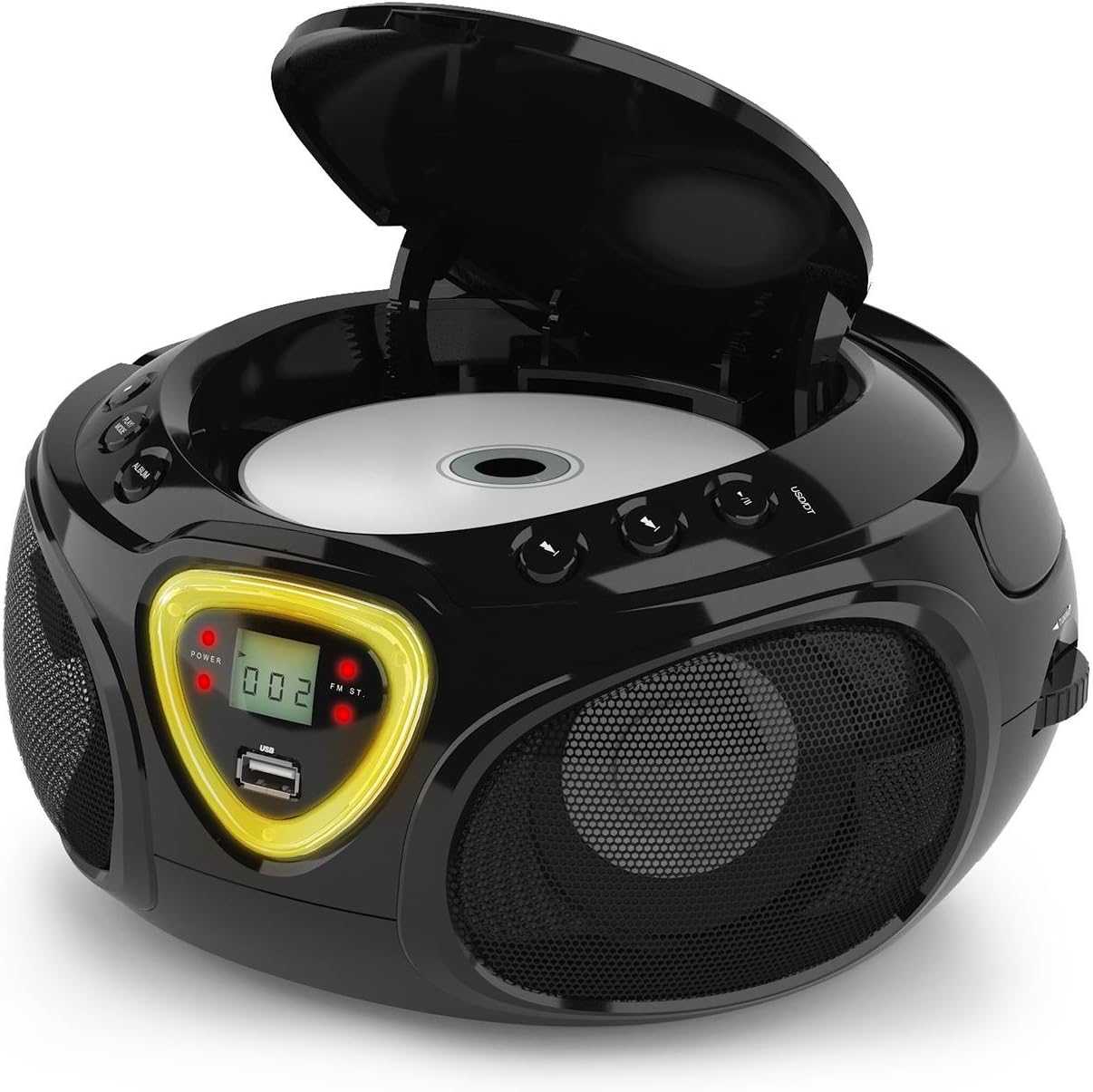
5 pav.: CD skyrius atidarytas diskui įdėti.
Bluetooth veikimas
- Perjunkite REŽIMAS parinkiklis į BT (Bluetooth). The display will show 'BT' and flash, indicating pairing mode.
- Įjunkite „Bluetooth“ savo išmaniajame telefone, planšetiniame kompiuteryje ar kitame įrenginyje su „Bluetooth“ palaikymu.
- Ieškokite available devices and select 'AUNA Roadie' from the list.
- Once successfully paired, the 'BT' indicator on the boombox display will stop flashing and remain solid.
- You can now play audio from your connected device through the boombox. Use the controls on your device or the boombox's Play/Pause and Skip buttons to manage playback.
USB atkūrimas
„Boombox“ palaiko MP3 ir WMA file formats from USB flash drives.
- Įdėkite USB atmintinę į USB port on the front of the boombox.
- Perjunkite REŽIMAS parinkiklis į USB. The unit will automatically detect and begin playing compatible audio files.
- Naudokite PALEISTI / PAUZĖ, STOP, ir PRALEIDIMAS PIRMYN/ATGAL mygtukai, skirti valdyti atkūrimą.
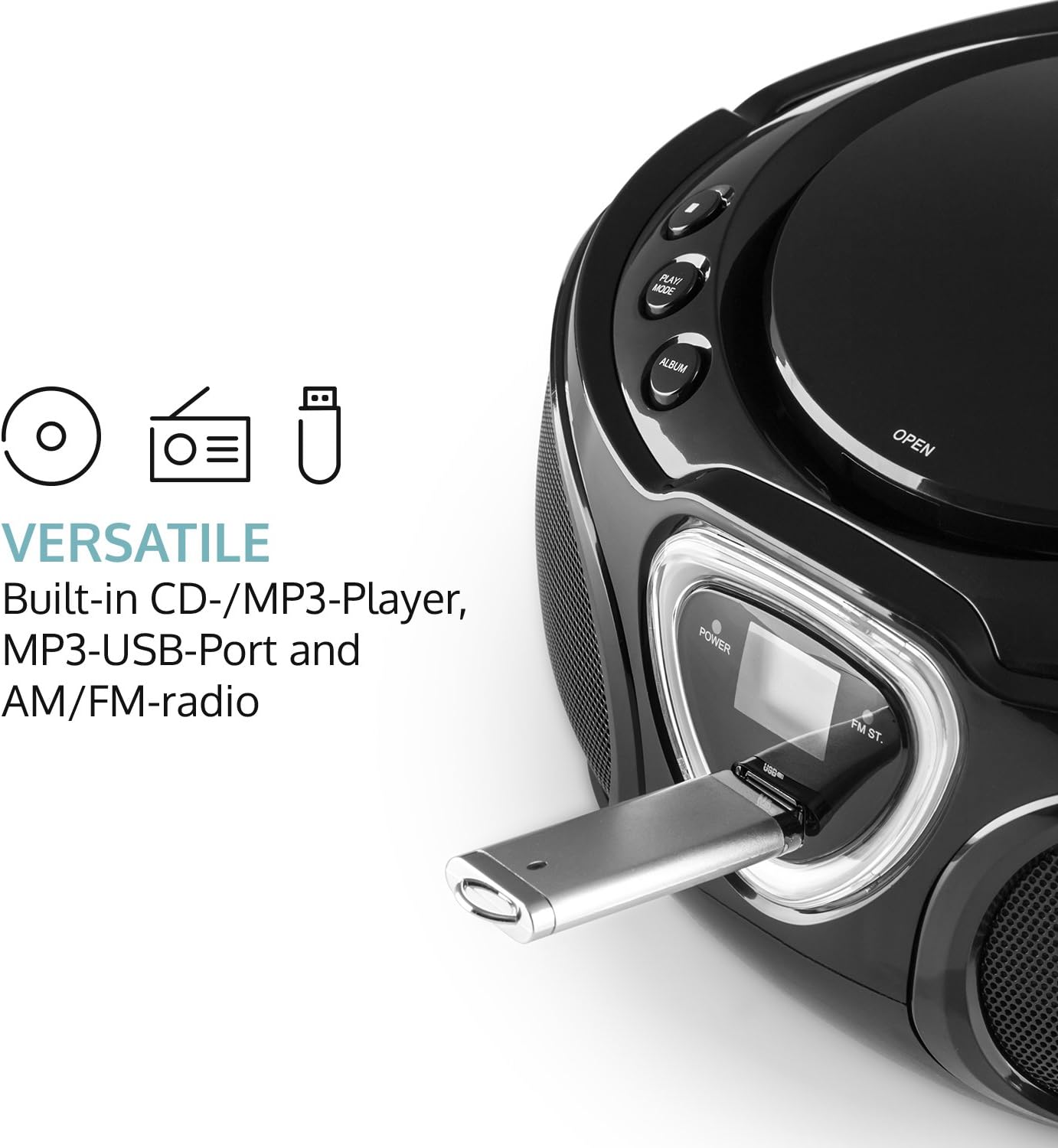
Figure 6: USB port with a flash drive inserted.
AUX įvestis
- Prijunkite vieną 3.5 mm garso kabelio (nepridedamas) galą prie Aux in lizdas ant magnetofono.
- Kitą garso kabelio galą prijunkite prie išorinio garso įrenginio (pvz., MP3 grotuvo, išmaniojo telefono) ausinių lizdo arba garso išvesties.
- Perjunkite REŽIMAS parinkiklis į AUX.
- Control playback and volume directly from your external audio device.
Radijo veikimas (AM/FM)
- Perjunkite REŽIMAS selector to either AM or FM.
- Ištieskite teleskopinę anteną, kad gautumėte optimalų FM priėmimą. AM priėmimui pasukite įrenginį, kad gautumėte geriausią priėmimą.
- Pasukite TUNINGAS dial on the side of the unit to scan for radio stations.

7 pav.: šonas view with Tuning dial and Light switch.
LED šviesos funkcija
The boombox features multi-color LED lights that illuminate the speakers.
- Naudokite ŠVIESOS ĮJUNGTA/IŠJUNGTA switch on the side of the unit to turn the LED lights on or off.
- The lights will typically pulse and change color with the rhythm of the music when active.

Figure 8: Boombox with active LED lights.
Ausinių naudojimas
For private listening, connect any standard 3.5mm headphones (not included) to the AUSINĖS jack. The main speakers will automatically mute when headphones are connected.
Priežiūra
Įrenginio valymas
- Wipe the exterior of the boombox with a soft, dry cloth.
- Nenaudokite abrazyvinių valiklių, vaško ar tirpiklių, nes jie gali pažeisti apdailą.
- For the CD lens, use a specialized CD lens cleaning kit if necessary. Avoid touching the lens directly.
Sandėliavimas
- Laikykite „Boombox“ vėsioje, sausoje vietoje, toliau nuo tiesioginių saulės spindulių ir ekstremalių temperatūrų.
- If storing for an extended period, remove the batteries to prevent leakage and damage to the unit.
Trikčių šalinimas
If you encounter any issues with your AUNA Roadie KIDS Boombox, please refer to the following common problems and solutions:
| Problema | Galima priežastis | Sprendimas |
|---|---|---|
| Nėra galios | AC adapter not connected, batteries depleted or incorrectly inserted. | Check AC adapter connection. Replace or correctly insert batteries. |
| Nėra garso | Volume too low, incorrect mode selected, headphones connected. | Increase volume. Select correct mode (CD, BT, USB, AUX, AM/FM). Disconnect headphones if using speakers. |
| CD negroja | CD inserted incorrectly, CD dirty/scratched, incompatible CD format. | Ensure CD is label-side up. Clean CD. Use compatible CD format. |
| Bluetooth neprisijungia | Boombox not in BT mode, device too far, already paired to another device. | Switch to BT mode. Ensure device is within 10 meters. Disconnect from other devices. |
| Prastas radijo priėmimas | Antenna not extended/adjusted, weak signal. | Extend and adjust FM antenna. Rotate unit for AM. Try a different location. |
Specifikacijos
| Funkcija | Detalė |
|---|---|
| Prekės ženklas | AUNA |
| Ryšio technologija | Pagalbinis, „Bluetooth“, USB |
| Spalva | Juoda |
| Garsiakalbio tipas | Stereo |
| Prekės matmenys (I x P x A) | 7.9 x 9.5 x 5.2 colio |
| Maitinimo šaltinis | AC (110-120V ~ / 50-60 Hz) or 6 x C-type batteries (9V DC) |
| Suderinami įrenginiai | Nešiojamasis kompiuteris, išmanusis telefonas, planšetinis kompiuteris |
| Vattage | 3 watts (2 x 1.5W speakers) |
| Garso išvesties režimas | Stereo |
| Palaikomi garso formatai | CD, MP3, WMA |
| Bluetooth versija | 2.1 + EDR (Profiles: A2DP, AVRCP) |
| Suderinami CD formatai | Garso CD, CD-R, CD-RW, MP3-CD |
| Programmable Playback | 20 tracks (CD), 99 tracks (MP3) |
| Prekės svoris | 3.4 svaro |
Garantija ir palaikymas
This product comes with a manufacturer's warranty. For detailed warranty information, please refer to the documentation included with your purchase or visit the official AUNA website. If you require technical assistance, troubleshooting beyond this manual, or have questions regarding your product, please contact AUNA customer support.