
1. Įvadas
Ačiū, kad pirkoteasing the auna TT-Classic Turntable. This manual provides important information regarding the setup, operation, and maintenance of your device. Please read it thoroughly before use to ensure proper functionality and to prevent damage.
The auna TT-Classic is a stylish belt-drive turntable designed to play your favorite vinyl records at 33, 45, and 78 RPM. It features an integrated AudioTechnica MM pickup system for high-quality sound reproduction, built-in stereo speakers, and a USB port for digitizing your vinyl collection to MP3 files.
2. Saugos instrukcijos
- Prieš naudodami įrenginį, atidžiai perskaitykite visas instrukcijas.
- Išsaugokite šį vadovą ateityje.
- Saugokite įrenginį nuo lietaus, drėgmės ar tiesioginių saulės spindulių.
- Įsitikinkite, kad įrenginys pastatytas ant stabilaus, lygaus paviršiaus.
- Neužblokuokite jokių ventiliacijos angų.
- Naudokite tik su įrenginiu pateiktą maitinimo adapterį.
- Atjunkite įrenginį žaibuojant arba kai nenaudojate ilgą laiką.
- Visus techninės priežiūros darbus patikėkite kvalifikuotam techninės priežiūros personalui.
3. Pakuotės turinys
Atsargiai išpakuokite visus daiktus ir įsitikinkite, kad gavote šiuos daiktus:
- 1 x auna TT-Classic Turntable Unit
- 1 x veltinio kilimėlis
- 1 x Dust Cover (removable)
- 1 x Maitinimo adapteris (12 V nuolatinė srovė)
- 1 x User Manual (German and English)
- 1 x Removable Stylus Lift
Note: This unit may include a pre-installed EU-UK power converter for your convenience.
4. Produktas baigtasview
Familiarize yourself with the components of your auna TT-Classic turntable:

4.1 paveikslas: Į viršų view of the auna TT-Classic turntable with the dust cover open, revealing the platter, tonearm, and volume control knob.

4.2 paveikslas: Priekinis kampas view of the auna TT-Classic turntable with the transparent dust cover closed, highlighting its elegant design.

4.3 paveikslas: Detail of the volume control knob located on the front right side of the turntable.

4.4 paveikslas: Close-up of the tonearm assembly, featuring the AudioTechnica MM pickup system.
Pagrindiniai komponentai:
- Lėkštė: Besisukanti platforma, kurioje dedami įrašai.
- Tonearmas: Holds the cartridge and stylus, which reads the record grooves.
- Plunksna (adata): The tip of the cartridge that makes contact with the record.
- Apsauga nuo dulkių: Apsaugo patefoną nuo dulkių, kai jis nenaudojamas.
- Greičio parinkiklis: Allows selection of 33, 45, or 78 RPM.
- Garsumo valdymas: Adjusts the output level of the integrated speakers.
- USB prievadas: For connecting to a computer for digitization.
- RCA išvestis: Prijungimui prie išorinio ampkeltuvai ar garsiakalbiai.
- Maitinimo įvestis: For connecting the DC 12V power adapter.
- ĮJUNGIMO/IŠJUNGIMO jungiklis: Įjungia arba išjungia įrenginį.
5. Sąranka
Atlikite šiuos veiksmus, kad nustatytumėte patefoną:
5.1 Išpakavimas ir įdėjimas
- Atsargiai išimkite patefoną iš pakuotės.
- Place the turntable on a stable, level surface away from direct heat sources, dust, and vibrations.
- Remove any protective packaging materials from the platter and tonearm.
- Place the felt mat onto the platter.
- Install the dust cover by aligning its hinges with the slots on the back of the turntable.
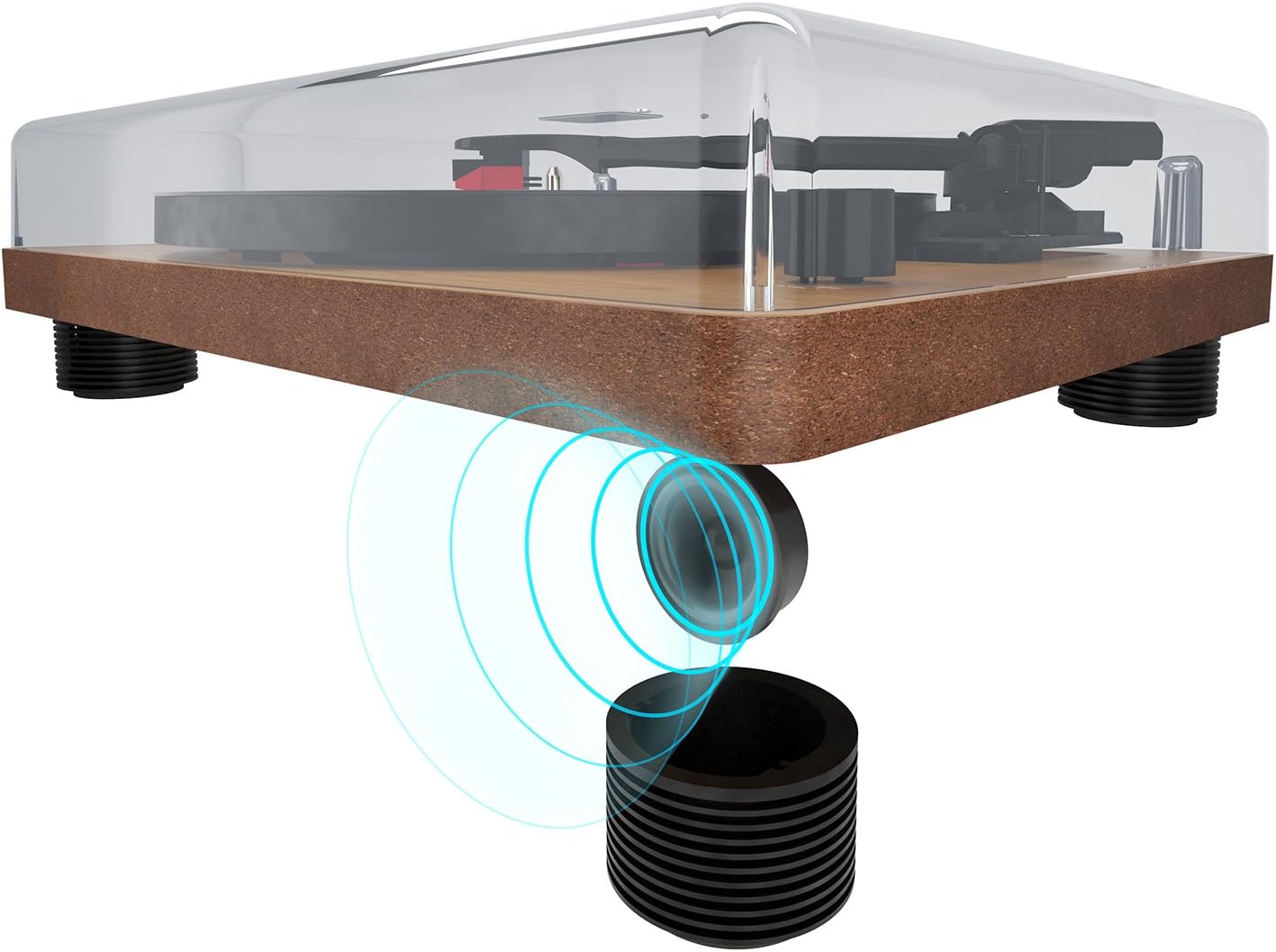
5.1 paveikslas: The turntable's feet are designed to minimize vibrations for optimal sound.
5.2 Maitinimo jungtis
- Įsitikinkite, kad galiniame skydelyje esantis įjungimo/išjungimo jungiklis yra išjungtas.
- Connect the DC 12V power adapter to the 'DC 12V' input port on the rear of the turntable.
- Prijunkite maitinimo adapterį į tinkamą sieninį lizdą.
5.3 Garso jungtys (neprivalomos)
If you wish to connect the turntable to an external amplifier or powered speakers, use the RCA output ports:
- Connect an RCA cable (not included) to the 'AUDIO' RCA output ports (red for right, white for left) on the rear of the turntable.
- Prijunkite kitą RCA kabelio galą prie atitinkamos įvesties savo televizoriuje. ampkeltuvai arba maitinami garsiakalbiai.

5.2 paveikslas: Rear panel connections: AUDIO (RCA), USB, DC 12V power input, and ON/OFF switch.

5.3 paveikslas: Detail of the RCA stereo audio output ports.
6. Naudojimo instrukcijos
6.1 Įrašo atkūrimas
- Turn on the turntable using the ON/OFF switch on the rear panel.
- Place a record on the platter, ensuring it is centered on the spindle.
- Pasirinkite tinkamą greitį (33, 45 arba 78 aps./min.) naudodami greičio pasirinkimo jungiklį.
- Švelniai pakelkite tonarmą naudodami tonarmo svirtį.
- Uždėkite tonarmą virš norimo plokštelės pradinio griovelio.
- Lėtai nuleiskite tonarmą naudodami ženklinimo svirtį. Adata palies plokštelę ir prasidės atkūrimas.
- Adjust the volume using the volume control knob on the front of the unit.
- Norėdami sustabdyti atkūrimą, pakelkite tonarmą naudodami svirtį ir grąžinkite jį į tonarmo laikiklį.

6.1 paveikslas: The speed selector switch allows you to choose between 33, 45, and 78 RPM.
6.2 Digitizing Records to MP3 (USB Function)
The auna TT-Classic allows you to convert your vinyl records into MP3 digital files naudojasi kompiuteriu.
- Connect the turntable to your computer using a USB cable (not included) via the 'USB' port on the rear panel.
- Download and install suitable audio recording software on your computer (e.g., Audacity, available for free online).
- Follow the instructions of your chosen software to configure it for recording from the turntable (it will typically appear as a USB audio device).
- Start recording in the software, then begin playing your record on the turntable as described in section 6.1.
- Once the record has finished playing, stop the recording in your software and save the audio file MP3 formatu.

6.2 paveikslas: The USB port for connecting to a computer for digitization.
7. Priežiūra
7.1 Patefono valymas
- Prieš valydami patefoną, visada atjunkite jį nuo elektros lizdo.
- Use a soft, dry cloth to wipe the dust cover and cabinet. Do not use abrasive cleaners or solvents.
- The platter and tonearm should be handled with extreme care. Use a soft brush or lint-free cloth for delicate areas.
7.2 Rašiklio priežiūra
- A dirty or worn stylus can damage your records and degrade sound quality.
- Clean the stylus regularly using a soft stylus brush, brushing gently from back to front.
- The stylus should be replaced after approximately 300-500 hours of playback, or if you notice a significant drop in sound quality or increased record wear.
7.3 Belt Drive Maintenance
The auna TT-Classic uses a belt drive system. The drive belt is typically located under the platter. If the platter stops spinning or spins inconsistently, the belt may need to be inspected or replaced. Refer to a qualified technician if you suspect an issue with the belt drive.

7.1 paveikslas: Illustration of the belt drive system, responsible for rotating the platter.
8. Problemų sprendimas
If you encounter any issues with your turntable, consult the following table before seeking professional service:
| Problema | Galima priežastis | Sprendimas |
|---|---|---|
| Nėra galios | Power adapter not connected; ON/OFF switch is off; power outlet malfunction. | Ensure power adapter is securely connected and plugged into a working outlet. Turn ON/OFF switch to ON. |
| Iš garsiakalbių nėra garso | Volume too low; external amplifier/speakers not connected or off; stylus not making contact. | Increase volume. Check external audio connections and ensure external devices are powered on. Ensure tonearm is lowered correctly. |
| Garsas iškraipytas arba trūkčioja | Record is dirty or damaged; stylus is dirty or worn; turntable not level; excessive vibration. | Clean the record. Clean or replace the stylus. Ensure turntable is on a stable, level surface. Reduce external vibrations. |
| Lėkštė nesisuka | Belt dislodged or broken; motor issue. | Inspect the drive belt (under the platter). If dislodged, carefully re-seat it. If broken, replace it. If problem persists, contact support. |
| USB įrašymas neveikia | USB cable not connected; software not configured correctly; driver issues. | Ensure USB cable is connected. Check software settings to ensure the turntable is selected as the input device. Try restarting your computer. |
9. Specifikacijos
| Funkcija | Specifikacija |
|---|---|
| Prekės ženklas | auna |
| Modelio pavadinimas | TT-Classic |
| Pavaros tipas | Diržo pavara |
| Palaikomi greičiai | 33 1/3, 45, 78 aps./min |
| Paėmimo sistema | AudioTechnica MM (Moving Magnet) |
| Jungtys | 1 x USB Port, RCA Stereo Output |
| Ypatingos savybės | Automatic Start Function (can be deactivated), Removable Dust Cover, Integrated Stereo Speakers, Pitch Control |
| Maitinimo šaltinis | DC 12V (Power Adapter Included) |
| Medžiaga | Plastic, Wood Veneer Finish |
| Matmenys (P x G x A) | 41 x 33 x 12 cm (16.1 x 13 x 4.7 colio) |
| Svoris | 3.2 kg (7.05 svaro) |
| Suderinami įrenginiai | Garsiakalbiai, Ampgelbėtojai |
10. Garantija ir palaikymas
auna products are designed and manufactured to the highest quality standards. For warranty information and technical support, please refer to the documentation provided with your purchase or visit the official auna websvetainėje. Išsaugokite pirkimo įrodymą, jei prireiktų pateikti garantinį ieškinį.
For further assistance, please contact auna customer service.