
1. Įvadas
This manual provides instructions for the installation, operation, and maintenance of the Nexxt Solutions Naxos800 8-Port Fast Ethernet Network Switch. The Naxos800 is an unmanaged compact desktop switch designed for small office/home office (SOHO) environments, student dormitories, and small enterprises, offering reliable network connectivity.
2. Pagrindinės savybės
- 8 greito Ethernet prievadai: Provides 8 UTP/STP 10/100Mbps ports with auto MDI/MDIX.
- Plug and Play: Simple setup requiring no software configuration.
- Nevaldomas jungiklis: Operates without requiring complex management interfaces.
- Store-and-Forward Technology: Ensures efficient packet transmission.
- MAC adreso mokymasis: Supports auto-learning and aging with a built-in 1000 MAC address table.
- Kompaktiškas dizainas: Suitable for desktop or wall mounting.
- Energijos taupymas: Mažo energijos suvartojimo dizainas.
- Srauto valdymas: Full duplex and half duplex back pressure flow control.
- Patvarumas: Integrated lightning protection and a sturdy metal case.
- Tylus veikimas: Fanless design for silent performance.
3. Pakuotės turinys
Patikrinkite, ar jūsų pakuotėje yra šie elementai:
- One (1) Nexxt Solutions Naxos800 8-Port Fast Ethernet Switch
- Vienas (1) maitinimo adapteris

Image: The Nexxt Solutions Naxos800 switch, its power adapter, and product packaging.
4. Produktas baigtasview

Vaizdas: priekis view of the Naxos800 switch, showing the Nexxt logo and eight green LED indicators for port activity.
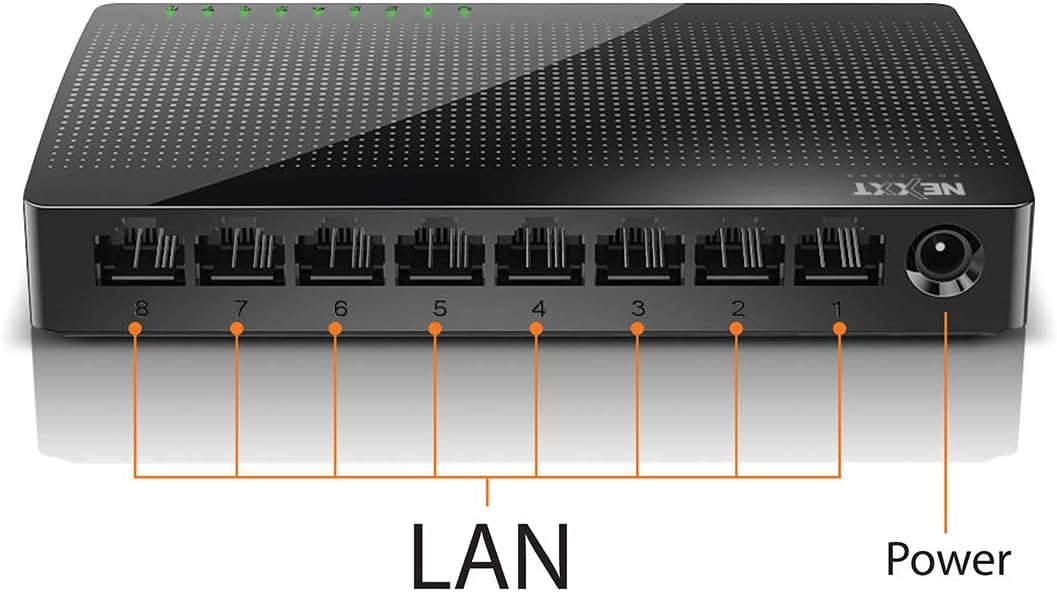
Vaizdas: Galinis view of the Naxos800 switch, highlighting the eight LAN ports (numbered 1-8) and the power input port.
LED indikatoriai
The front panel features LED indicators for each port, providing visual status:
- Žalias šviesos diodas (šviečia nuolat): Indicates a stable link connection.
- Žalias šviesos diodas (mirksi): Indicates data activity on the corresponding port.
- Šviesos diodas išjungtas: No link or connection detected.
5. Sąranka ir diegimas
The Naxos800 switch is designed for simple plug-and-play installation. No software or complex configuration is required.
- Vieta: Place the switch on a stable, flat surface or mount it on a wall using appropriate hardware (not included). Ensure adequate ventilation around the device.
- Prijunkite prie maitinimo: Connect the provided power adapter to the power input port on the switch and then plug the adapter into a standard electrical outlet. The power LED (if present, or the port LEDs will light up) should illuminate.
- Prisijunkite prie tinklo:
- Connect your router or modem to any of the 8 LAN ports on the Naxos800 switch using an Ethernet cable.
- Connect your network devices (e.g., computers, gaming consoles, IP cameras, Smart TVs, printers) to the remaining LAN ports on the Naxos800 switch using an Ethernet cable.
- Patikrinkite ryšį: Once devices are connected, the corresponding LED indicators on the switch's front panel should light up green (solid for link, flashing for activity).

Image: Diagram illustrating a typical network setup. An ADSL or Cable Modem connects to a Router, which then connects to the Naxos800 switch. Various devices like laptops, media players, game consoles, IP cameras, Smart TVs, and IP phones are connected to the Naxos800 switch.
6. Jungiklio valdymas
The Naxos800 is an unmanaged switch, meaning it operates automatically without user intervention once connected. It functions as an internet splitter, expanding the number of wired network connections available from your router or modem.
- Automatinis greičio aptikimas: Each port automatically detects the speed of the connected device (10Mbps or 100Mbps) and adjusts accordingly.
- Automatinis MDI/MDIX: Eliminates the need for crossover cables; the switch automatically detects and corrects for straight-through or crossover cable types.
- Duomenų perdavimas: Data packets are forwarded between connected devices at Fast Ethernet speeds. The store-and-forward architecture ensures data integrity.
7. Priežiūra
The Naxos800 switch requires minimal maintenance.
- Valymas: Jungiklio išorę valykite minkštu, sausu skudurėliu. Nenaudokite skystų ar aerozolinių valiklių.
- Vėdinimas: Įsitikinkite, kad ventiliacijos angos nėra užblokuotos, kad išvengtumėte perkaitimo.
- Maitinimo ciklas: If the device experiences issues, a simple power cycle (unplugging and replugging the power adapter) can often resolve minor problems.
8. Problemų sprendimas
If you encounter issues with your Naxos800 switch, refer to the following common problems and solutions:
| Problema | Galima priežastis | Sprendimas |
|---|---|---|
| Nėra maitinimo / Įrenginys neįsijungia. | Maitinimo adapteris neprijungtas arba sugedęs; maitinimo lizdas neveikia. | Ensure the power adapter is securely connected to the switch and a working electrical outlet. Try a different outlet. |
| Prijungto įrenginio ryšio lemputė nedega. | Ethernet kabelis sugedęs arba netinkamai prijungtas; įrenginys neįjungtas arba sugedęs; neteisingas prievadas. |
|
| Mažas tinklo greitis. | Network congestion; faulty cable; device limitations. |
|
9. Specifikacijos
| Atributas | Vertė |
|---|---|
| Modelio numeris | ASIDT084U3 |
| Uostai | 8 x 10/100Mbps Fast Ethernet (UTP/STP) |
| Backplane Bandwidth | 1.6 Gbps |
| MAC adresų lentelė | 1000 įrašų |
| Prieigos kontrolė | CDMA |
| Srauto valdymas | Full duplex and half duplex back pressure |
| Matmenys (I x P x A) | 12.4 x 5.9 x 2.3 cm |
| Svoris | 140 g |
| Maitinimo įvestis | Išorinis maitinimo adapteris (pridedamas) |
Pastaba: specifikacijos gali būti keičiamos be išankstinio įspėjimo.
10. Garantija ir palaikymas
The Nexxt Solutions Naxos800 8-Port Fast Ethernet Network Switch comes with a 5 metų ribota garantija. For warranty claims or technical support, please contact Nexxt Solutions customer service. Refer to the official Nexxt Solutions websvetainę, kurioje rasite naujausią pagalbos informaciją ir kontaktinius duomenis.
Nexxt Solutions is a US company committed to quality and customer service.