
1. Įvadas
This manual provides detailed instructions for the installation, operation, maintenance, and troubleshooting of your FSP 400W Micro ATX Power Supply (Model FSP400-60GHS(85)-R1). This power supply unit is designed for compact small form factor PC systems, offering 400 watts of power output with 80 Plus Bronze certification for high efficiency. It is compatible with Intel and AMD CPU systems and standard PC configurations.
Please read this manual thoroughly before installation and operation to ensure proper usage and to prevent damage to the unit or other components.
2. Saugos informacija
ĮSPĖJIMAS: Power supplies contain high voltage komponentai. Neatidarykite maitinimo šaltinio casing. There are no user-serviceable parts inside. Opening the casing will void the warranty and poses a risk of electric shock.
- Prieš montuodami ar atlikdami techninę priežiūrą, įsitikinkite, kad maitinimo šaltinis yra atjungtas nuo kintamosios srovės maitinimo lizdo.
- Maitinimo šaltinį įrenkite gerai vėdinamoje vietoje.
- Do not operate the power supply in high humidity or extreme temperature environments.
- Naudokite tik tuos laidus, kurie yra komplekte su maitinimo šaltiniu.
- Prieš įjungdami sistemą, įsitikinkite, kad visi laidai yra tvirtai prijungti.
- Šis gaminys skirtas naudoti asmeniniuose kompiuteriuose. Nenaudokite jo jokiems kitiems tikslams.
3. Pakuotės turinys
Patikrinkite, ar jūsų pakuotėje yra visi toliau išvardyti daiktai:
- FSP 400W Micro ATX Power Supply (FSP400-60GHS(85)-R1)
- Kintamosios srovės maitinimo laidas
- SFX to PS2 Bracket
- Vartotojo vadovas
- Mounting Screws (typically included with PC cases, but sometimes with PSUs)

Figure 3.1: Package Contents. Shows the power supply unit, user manual, various power cables, an AC power cord, and an SFX to PS2 adapter bracket.
4. Produktas baigtasview
The FSP400-60GHS(85)-R1 is a compact power supply designed for small form factor systems. Key features include an 80mm cooling fan with thermal sensing technology and an energy-saving 1-watt standby mode.
4.1 Fizinis išdėstymas

4.1 pav.: Kampinis view of the FSP 400W Micro ATX Power Supply, highlighting the fan grille, power switch, and AC power input.

4.2 pav.: galinis view of the power supply, detailing the main power switch and the AC power input socket.

4.3 paveikslas: viršuje view of the power supply, showing the protective grille over the 80mm cooling fan.
4.2 Išvesties jungtys
The power supply includes various connectors to power your system components:
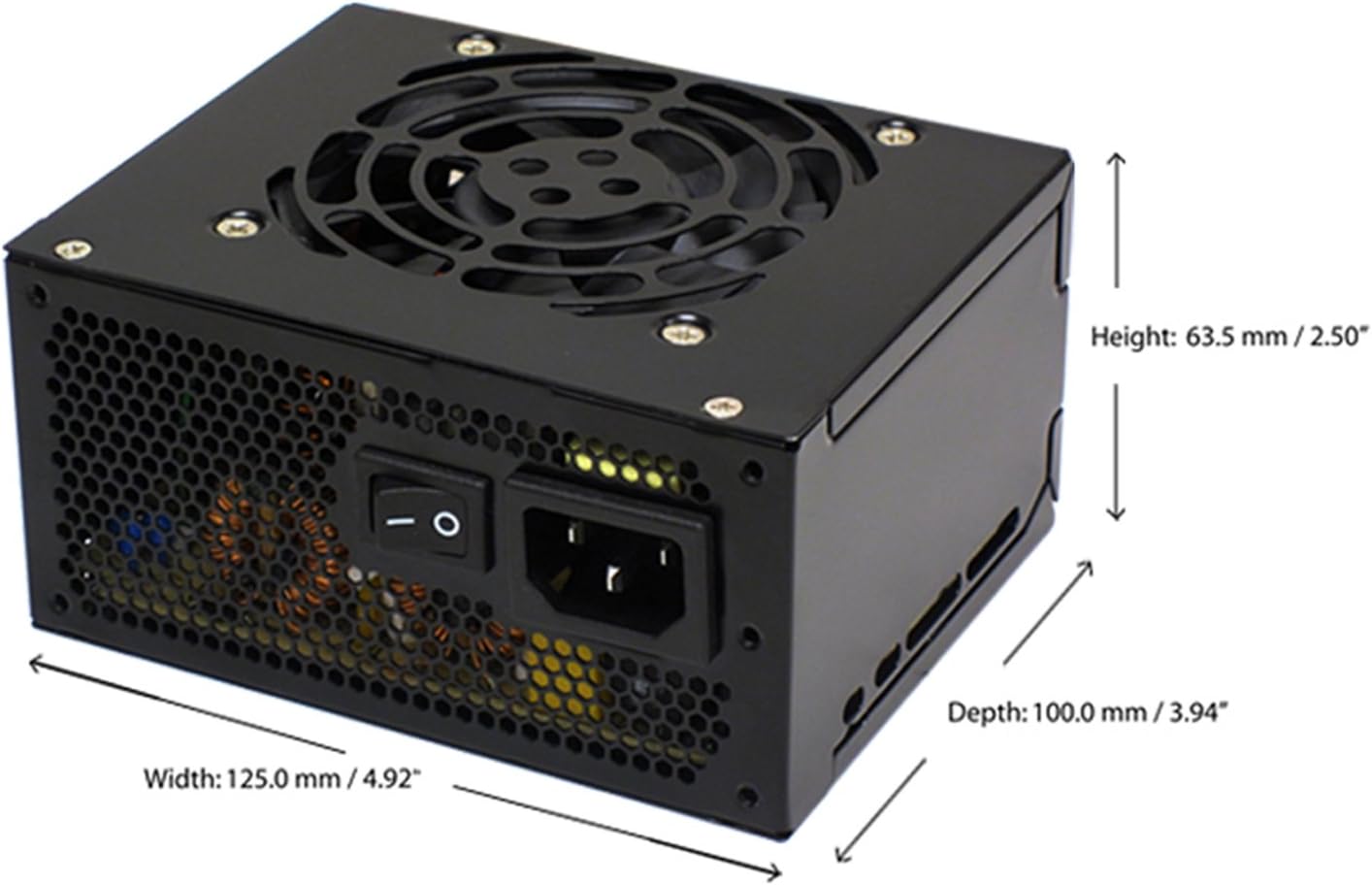
Figure 4.4: Diagram illustrating the types and quantities of output connectors available on the FSP400-60GHS(85)-R1 power supply.
- Main 24 Pin (1): For motherboard power.
- P4 | EPS 4+4 Pin (1): For CPU power.
- PCI-E 8 Pin (6+2) (1): Grafikos plokštėms.
- Molex 4 Pin (3): For older peripherals and fans.
- Serial ATA 15 Pin (3): For SATA hard drives and SSDs.
- FDD 4 Pin (1): For floppy disk drives or other legacy devices.
5. Sąranka ir diegimas
Before beginning installation, ensure your computer system is powered off and disconnected from the AC power outlet. It is recommended to wear an anti-static wrist strap to prevent electrostatic discharge (ESD) damage to components.
5.1 Maitinimo šaltinio įrengimas
- Paruoškite bylą: Open your computer case. Identify the power supply mounting area.
- Maitinimo bloko montavimas:
- For SFX cases: Insert the FSP400-60GHS(85)-R1 directly into the SFX power supply bay and secure it with screws.
- For standard ATX cases: Attach the included SFX to PS2 bracket to the power supply. Then, mount the power supply with the bracket into the ATX power supply bay and secure it with screws.

Figure 5.1: The FSP 400W Micro ATX Power Supply shown with the SFX to PS2 adapter bracket installed, ready for mounting in a standard ATX case.

Figure 5.2: Illustration demonstrating how the SFX power supply fits into a PS2 (ATX) case using the provided adapter bracket.
5.2 Jungiamieji kabeliai
Connect the appropriate cables to your motherboard and components. Refer to your motherboard and component manuals for specific connection points.
- Pagrindinės plokštės maitinimas: Connect the 24-pin ATX connector to the corresponding socket on your motherboard.
- CPU galia: Connect the 4+4-pin EPS/ATX 12V connector to the CPU power socket on your motherboard.
- Vaizdo plokštės galia: If your graphics card requires external power, connect the 6+2-pin PCI-E connector(s) to the graphics card.
- Saugojimo įrenginiai: Connect SATA power connectors to your SATA hard drives, SSDs, and optical drives.
- Išoriniai įrenginiai: Use Molex 4-pin connectors for case fans or other legacy peripherals as needed.
- Kabelių valdymas: Route cables neatly to ensure proper airflow within the case.
Once all internal connections are made, close your computer case.
5.3 Išorinis ryšys
- Prijunkite kintamosios srovės maitinimo laidą prie maitinimo šaltinio kintamosios srovės įvado.
- Plug the other end of the AC power cord into a grounded wall outlet or surge protector.
- Ensure the power switch on the back of the power supply is in the "OFF" (O) position before plugging it in.
6. Naudojimo instrukcijos
6.1 Sistemos įjungimas
- After all connections are secure, flip the power switch on the back of the power supply to the "ON" (I) position.
- Norėdami paleisti sistemą, paspauskite kompiuterio korpuso maitinimo mygtuką.
6.2 Thermal Control System
The FSP400-60GHS(85)-R1 features an 80mm cooling fan with thermal sensing technology. This system automatically adjusts the fan speed based on the internal temperature of the power supply, optimizing cooling performance while minimizing noise.
6.3 Energy Saver Standby Mode
This power supply is designed with an energy-saving 1-watt standby mode, reducing power consumption when the system is in a low-power state or turned off but still connected to AC power.
7. Priežiūra
Tinkama priežiūra užtikrina jūsų maitinimo šaltinio ilgaamžiškumą ir optimalų veikimą.
- Valymas: Periodically clean the exterior of the power supply and its fan grille to prevent dust buildup. Use a soft, dry cloth or compressed air. Ensure the power supply is disconnected from AC power before cleaning.
- Vėdinimas: Ensure that the power supply's fan and ventilation openings are not obstructed. Good airflow is crucial for cooling.
- Kabelio vientisumas: Regularly check all power cables for any signs of wear, fraying, or damage. Replace damaged cables immediately.
Do not attempt to open the power supply unit for internal cleaning or repair. This will void the warranty and can be dangerous.
8. Problemų sprendimas
Jei kyla problemų dėl maitinimo šaltinio, žr. šias dažniausiai pasitaikančias problemas ir sprendimus:
8.1 Sistemai netiekiamas maitinimas
- Patikrinkite kintamosios srovės maitinimą: Įsitikinkite, kad kintamosios srovės maitinimo laidas yra tvirtai prijungtas tiek prie maitinimo šaltinio, tiek prie veikiančio sieninio lizdo.
- Maitinimo jungiklis: Verify that the power switch on the back of the power supply is in the "ON" (I) position.
- Vidinės jungtys: Confirm that the 24-pin ATX and 4+4-pin EPS/ATX 12V connectors are firmly seated in the motherboard.
- Trumpas sujungimas: Disconnect all peripheral power cables (SATA, Molex, PCI-E) and attempt to power on. If the system powers on, a short circuit may exist in one of the connected components or cables. Reconnect them one by one to identify the faulty component.
8.2 Sistemos nestabilumas arba atsitiktiniai išsijungimai
- Perkrova: Ensure your system's power requirements do not exceed the 400W capacity of the power supply.
- Vėdinimas: Check for proper airflow within the case and ensure the power supply's fan is not obstructed. Overheating can cause instability.
- Kabelių jungtys: Re-check all power connections to ensure they are secure. Loose connections can lead to intermittent power delivery.
8.3 Per didelis ventiliatoriaus triukšmas
- Dulkių susidarymas: Clean the fan grille and fan blades with compressed air.
- Kliūtis: Ensure no cables or foreign objects are interfering with the fan's rotation.
- Veikimo aplinka: High ambient temperatures can cause the thermal control system to increase fan speed. Ensure adequate room ventilation.
If troubleshooting steps do not resolve the issue, contact FSP customer support or your retailer for assistance.
9. Specifikacijos
Detailed technical specifications for the FSP400-60GHS(85)-R1 power supply:
| Modelio pavadinimas | FSP 400W Micro ATX Power Supply |
| Modelio numeris | FSP400-60GHS(85)-R1 |
| Prekės ženklas | FSP |
| Išėjimo vattage | 400 vatų |
| 80+ sertifikatas | 80 plius bronza |
| Formos faktorius | Micro ATX (SFX with PS2 bracket) |
| Aušinimo būdas | Air (80mm fan with thermal control) |
| Maitinimo bloko dizainas | Ne modulinis |
| Įvesties tomastage | 100–265 voltų (kintamoji srovė) |
| Matmenys (I x P x A) | 4.9 x 3.9 x 2.5 colio (125.0 x 100.0 x 63.5 mm) |
| Prekės svoris | 2.31 svaro |
| Suderinami įrenginiai | Personal Computer (AMD/Intel CPU systems) |
| Jungtys | Main 24 Pin (1), P4 | EPS 4+4 Pin (1), PCI-E 8 Pin (6+2) (1), Molex 4 Pin (3), Serial ATA 15 Pin (3), FDD 4 Pin (1) |
| Aplinkosaugos laikymasis | RoHS, bešvinis, ekologiškas produktas (GP) |

Figure 9.1: Physical dimensions of the FSP 400W Micro ATX Power Supply.

Figure 9.2: Illustrative diagram showing typical cable lengths for the power supply connectors.
10. Informacija apie garantiją
The FSP 400W Micro ATX Power Supply (FSP400-60GHS(85)-R1) is covered by a 3 metų gamintojo garantija. This warranty guarantees the quality and performance of the product for the specified period from the date of purchase.
The warranty covers defects in materials and workmanship under normal use. It does not cover damage resulting from improper installation, accidents, misuse, abuse, natural disasters, or unauthorized modifications or repairs. Opening the power supply casing, garantija bus anuliuota.
For warranty claims or service, please retain your proof of purchase and contact FSP customer support.
11. Pagalba klientams
If you require further assistance, have questions, or need to report an issue that cannot be resolved using the troubleshooting guide, please contact FSP customer support.
- FSP Websvetainė: Visit the official FSP websvetainė, kurioje rasite informacijos apie produktus, DUK ir pagalbos išteklių.
- Kontaktinė informacija: Refer to the FSP website or your product packaging for the most current customer service contact details (phone, email, or support portal).
When contacting support, please have your product model number (FSP400-60GHS(85)-R1) and proof of purchase readily available.
