

Įvadas
This manual provides comprehensive instructions for the setup, operation, and maintenance of your MASTER & DYNAMIC MH40 Over-Ear Headphones. Please read this guide thoroughly to ensure optimal performance and longevity of your device.
Pakuotės turinys
Patikrinkite, ar pakuotėje yra visi reikalingi daiktai:
- MASTER & DYNAMIC MH40 Over-Ear Headphones
- Audio Cable with In-line Microphone
- USB-C Charging Cable (for Bluetooth functionality)
- Canvas Carrying Case
- Vartotojo vadovas (šis dokumentas)
Produktas baigtasview
The MH40 headphones are designed with premium materials for durability and comfort. Key components include:
- Forged Aluminum Body: Provides a robust and lightweight structure.
- Lambskin Ear Pads: Offer comfort for extended listening sessions.
- Custom Neodymium Drivers: Engineered for superior sound reproduction.
- Reguliuojama galvos juosta: Užtikrina saugų ir patogų prigludimą.
- Nuimami laidai: For both audio and charging.

Figure 1: MASTER & DYNAMIC MH40 Over-Ear Headphones, showcasing black metal and camo leather design.
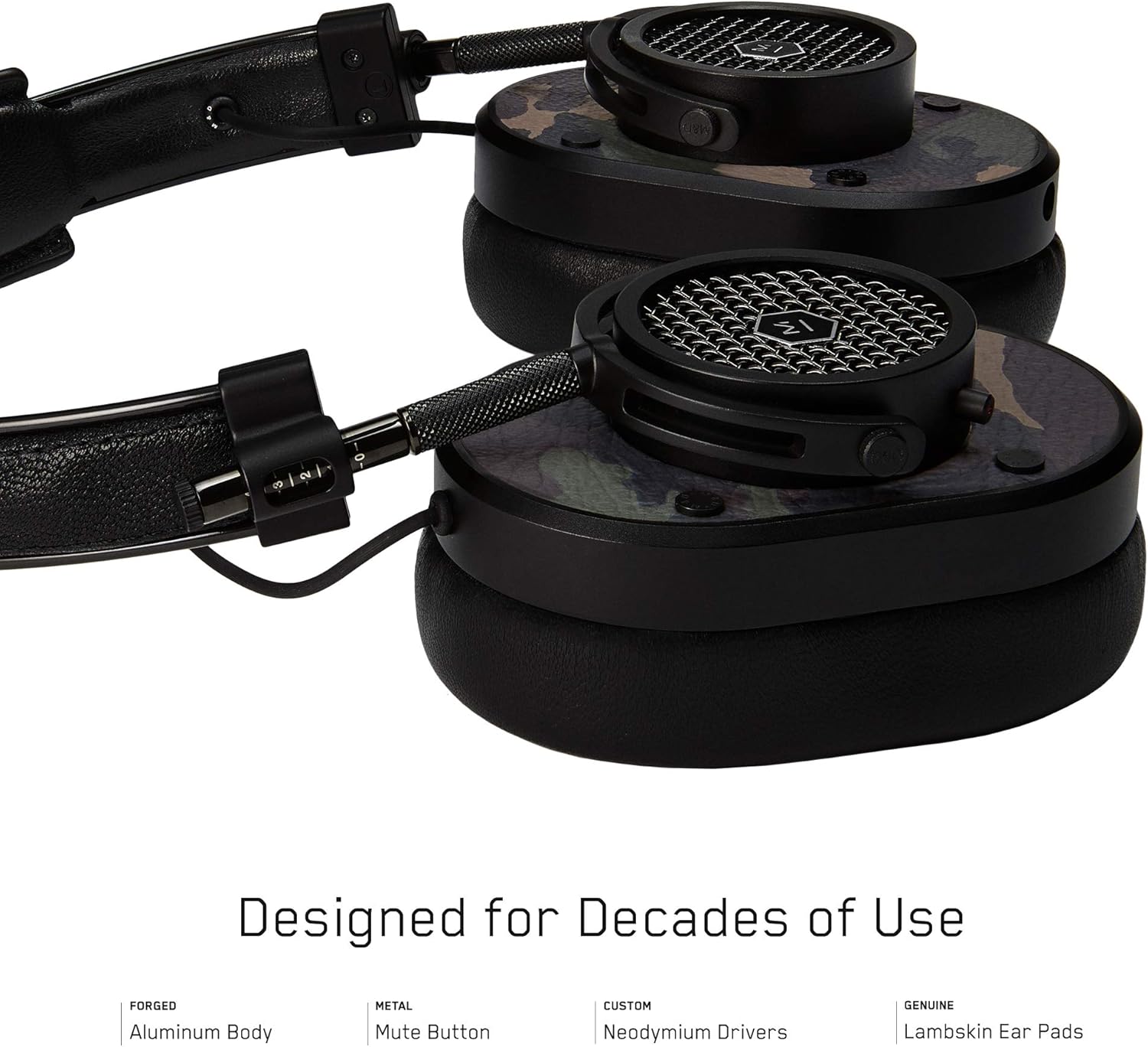
2 pav. Išsamus view of the MH40 headphone earcups, highlighting the lambskin ear pads, metal grille, and adjustable hinge.
Sąranka
1. Tinkamumo reguliavimas
- Gently extend or retract the metal arms on each side of the headband to adjust the height.
- Ausų kaušelius uždėkite taip, kad jie visiškai uždengtų ausis ir užtikrintų patogų bei saugų prigludimą.
- The lambskin ear pads are designed to conform to your head shape for optimal sound isolation and comfort.
2. Laidinis ryšys
- Locate the audio input port on the left earcup.
- Insert one end of the provided audio cable into the headphone's audio input.
- Connect the other end of the audio cable to your audio device's 3.5mm jack.
3. Bluetooth Pairing (Wireless Connection)
The MH40 headphones support Bluetooth connectivity for wireless audio. Ensure the headphones are charged before pairing.
- Maitinimas: Press and hold the power button (usually located on one of the earcups) until the indicator light flashes.
- Susiejimo režimas: Continue holding the power button or press a dedicated Bluetooth pairing button (if available) until the indicator light flashes rapidly, indicating pairing mode.
- Įrenginio prijungimas: On your audio device (smartphone, tablet, computer), navigate to Bluetooth settings and select "MH40" from the list of available devices.
- Patvirtinimas: The indicator light on the headphones will turn solid blue or green once successfully paired.
Pastaba: „Bluetooth“ veikimo atstumas yra maždaug 10 metrų (33 pėdos).
Naudojimo instrukcijos
Garso atkūrimas
- Leisti / pristabdyti: Press the multi-function button (often on the in-line microphone or earcup) once.
- Kitas takelis: Press the multi-function button twice rapidly.
- Ankstesnis takelis: Press the multi-function button three times rapidly.
- Garsumo valdymas: Use the volume up/down buttons on the in-line microphone or dedicated earcup controls.
Skambučių valdymas
- Atsiliepti / Baigti skambutį: Vieną kartą paspauskite daugiafunkcį mygtuką.
- Atmesti skambutį: Paspauskite ir palaikykite daugiafunkcį mygtuką maždaug 2 sekundes.
- Nutildyti mikrofoną: The MH40 features a dedicated mute button, typically located on the earcup or in-line control. Press to mute/unmute during a call.
Priežiūra
- Valymas: Use a soft, dry cloth to wipe the headphones. For leather parts, use a specialized leather cleaner if necessary. Avoid harsh chemicals or abrasive materials.
- Saugykla: When not in use, store the headphones in the provided canvas carrying case to protect them from dust and scratches.
- Kabelio priežiūra: Handle cables gently. Avoid sharp bends or excessive pulling to prevent damage. The retractable cable feature helps manage cable length.
- Ausų pagalvėlės: The magnetic ear pads are removable for cleaning or replacement. Gently pull them off and reattach by aligning the magnets.
Trikčių šalinimas
Nėra garso
- Laidinis: Ensure the audio cable is securely connected to both the headphones and the audio source. Check the volume level on both the headphones and the source device.
- Bluetooth: Verify that the headphones are powered on and successfully paired with your device. Check the volume levels. Try re-pairing the headphones.
Nepavyksta susieti per „Bluetooth“
- Ensure the headphones are in pairing mode (rapidly flashing indicator light).
- Įsitikinkite, kad šaltinio įrenginyje įjungtas „Bluetooth“.
- Perkelkite ausines arčiau savo įrenginio (iki 10 metrų).
- Išjunkite ir įjunkite ausines bei įrenginį, tada bandykite susieti dar kartą.
- If previously paired, try "forgetting" the device on your source and re-pairing.
Mikrofonas neveikia
- Patikrinkite, ar įjungtas mikrofono nutildymo mygtukas.
- Ensure the audio cable with the in-line microphone is fully inserted.
- Patikrinkite prijungto įrenginio mikrofono įvesties nustatymus.
Specifikacijos
| Modelio pavadinimas | MH40 |
| Ryšio technologija | Laidinis, Bluetooth |
| Belaidžio ryšio technologija | Bluetooth |
| Medžiaga | Copper (components), Lambskin (ear pads), Canvas (carrying case) |
| Valdymo tipas | Call Control, Touch |
| Kabelio funkcija | Ištraukiamas |
| Prekės svoris | 0.36 kilogramo (12.7 uncijos) |
| Garso tvarkyklės tipas | Dinaminis vairuotojas |
| Bluetooth diapazonas | 10 metrai |
| Ausinės forma | Virš ausies |
| Ypatingos savybės | Carrying case included, Lightweight, Microphone Included, Noise Isolation, Wireless |
| Gaminio matmenys | 7.48 x 6.3 x 2.76 colio |
| Gamintojas | MASTER & DYNAMIC |
| Spalva | Black Metal / Camo Leather |
| Ausų išdėstymas | Virš ausies |
| Triukšmo valdymas | Garso izoliacija |
| UPC | 858901007099 |
Garantija ir palaikymas
For detailed warranty information and customer support, please refer to the official MASTER & DYNAMIC websvetainėje arba susisiekite tiesiogiai su jų klientų aptarnavimo tarnyba. Išsaugokite pirkimo įrodymą garantiniams reikalavimams.
Palaikymas internetu: www.masterdynamic.com/support (Example link, actual link may vary)