
1. Įvadas
This manual provides instructions for the safe and efficient use of your Woods 50012WD 2-Outlet Outdoor 24-Hour Heavy Duty Mechanical Timer. This device is designed to automate the on/off cycles of outdoor electrical devices, such as seasonal lighting or pond pumps, for convenience and energy saving.
The timer features two grounded outlets and a durable, weather-resistant housing suitable for outdoor use. Please read this manual thoroughly before installation and operation.
2. Svarbi saugos informacija
ĮSPĖJIMAS: Kad sumažintumėte gaisro, elektros smūgio ar kūno sužalojimo riziką, visada laikykitės šių pagrindinių saugos priemonių:
- Do not immerse the timer in water or expose it to direct water spray. It is weather-resistant, not waterproof.
- Ensure the timer is plugged into a Ground Fault Circuit Interrupter (GFCI) protected outlet when used outdoors.
- Do not exceed the electrical ratings of the timer: 125V, 15A, 1875W, 60Hz.
- Always unplug the timer from the power source before cleaning or performing any maintenance.
- Do not use with extension cords that are not rated for outdoor use.
- Laikykite vaikus atokiau nuo laikmačio ir prijungtų įrenginių.
- Do not disassemble the timer. There are no user-serviceable parts inside.
- Ensure all connections are secure and dry before applying power.
3. Pakuotės turinys
- Woods 50012WD Outdoor Mechanical Timer
- Instrukcijų vadovas (šis dokumentas)
4. Produktas baigtasview
The Woods 50012WD timer features a rotating dial with segments for setting ON/OFF times, a manual override switch, and two grounded outlets.
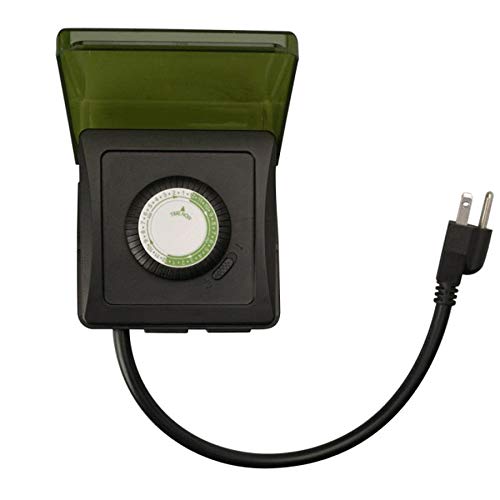
1 vaizdas: priekis view of the Woods 50012WD Outdoor Mechanical Timer. The timer is black with a green central dial and a short power cord extending from the bottom. Two grounded outlets are visible on the side.
5. Sąranka ir diegimas
- Pasirinkite vietą: Select a suitable outdoor location that is protected from direct heavy rain and snow, preferably under an overhang or in a sheltered area. Ensure the timer is placed on a stable surface or mounted securely.
- Prijunkite laikmatį: Insert the timer's power cord into a 125V, 60Hz GFCI-protected outdoor electrical outlet.
- Prijunkite įrenginius: Plug the devices you wish to control into the two grounded outlets on the timer. Ensure the total wattagPrijungtų įrenginių galia neviršija 1875 W.
6. Naudojimo instrukcijos
The Woods 50012WD is a 24-hour mechanical timer. Its operation relies on setting the current time and then pushing down segments on the dial to define ON periods.
6.1 Dabartinio laiko nustatymas
- Locate the rotating dial on the front of the timer. The dial is marked with 24 hours (1-24 or AM/PM indicators).
- Rotate the entire dial clockwise until the current time aligns with the "TIME NOW" arrow or indicator on the timer's housing. For example, if it's 6 PM, align the "18" (or "6 PM") mark with the indicator.
6.2 Įjungimo/išjungimo laikų nustatymas
The dial is surrounded by small segments. Each segment typically represents a 15 or 30-minute interval. Pushing a segment žemyn activates the connected device during that time interval. Pulling a segment up deactivates the device.
- Identify the time periods when you want your connected devices to be ON.
- For each desired ON period, push the corresponding segments on the dial žemyn.
- For all other times, ensure the segments are pulled up.
- The timer will now cycle ON and OFF according to your settings every 24 hours.
6.3 Rankinis valdymo jungiklis
The timer includes a manual override switch, usually located near the dial. This switch allows you to bypass the programmed settings.
- Laikmatis ĮJUNGTAS: The timer will operate according to the programmed ON/OFF segments.
- Visada: The connected devices will remain ON, overriding any programmed OFF times.
- Visada IŠJUNGTA: The connected devices will remain OFF, overriding any programmed ON times.
Refer to the specific markings on your timer for the exact positions of the manual override switch.
7. Priežiūra
- Valymas: Prieš valydami atjunkite laikmatį nuo maitinimo lizdo. Nuvalykite išorę minkšta,amp audinys. Nenaudokite abrazyvinių valiklių ar tirpiklių.
- Saugykla: If storing the timer for an extended period, ensure it is clean and dry. Store in a cool, dry place away from direct sunlight.
- Patikra: Periodically inspect the timer and its cord for any signs of damage, such as cracks, fraying, or discoloration. If damage is found, discontinue use and replace the unit.
8. Problemų sprendimas
| Problema | Galima priežastis | Sprendimas |
|---|---|---|
| Įrenginys neįsijungia/neišsijungia užprogramuotu laiku. |
|
|
| Timer is not working at all. |
|
|
9. Specifikacijos
- Modelis: 50012WD
- Tipas: Heavy Duty Outdoor Mechanical Timer
- Išparduotuvės: 2 įžeminti lizdai
- ttage Įvertinimas: 125 V
- AmpErage Reitingas: 15 A
- Dažnio reitingas: 60 Hz
- Galios įvertinimas: 1875 W
- Laikmačio tipas: 24 valandų mechaninė
- Prekinis ženklas: Woods (Southwire/Coleman Cable)
- UPC: 078693500121
10. Garantija ir palaikymas
Woods products are manufactured to high-quality standards. For warranty information or technical support, please refer to the official Woods (Southwire/Coleman Cable) websvetainėje arba susisiekite su klientų aptarnavimo skyriumi.
Išsaugokite pirkimo įrodymą, kad galėtumėte kreiptis dėl garantijos.
Kontaktinė informacija: Norėdami gauti naujausią pagalbos informaciją, apsilankykite Woods Store on Amazon or the official manufacturer's websvetainę.