
Kranas EE-5622
Crane EE-5622 Digital LED Display Tower Fan User Manual
Model: EE-5622
Įvadas
This manual provides detailed instructions for the safe and efficient use of your Crane EE-5622 Digital LED Display Tower Fan. Please read all instructions carefully before operation and retain this manual for future reference.

Image: Crane EE-5622 Tower Fan with its packaging, highlighting key features like digital LED display, 12-hour timer, 70-degree oscillation, and 3 adjustable speed settings.
Svarbios saugos instrukcijos
- Always place the fan on a firm, level surface.
- Nenaudokite ventiliatoriaus, jei pažeistas laidas arba kištukas.
- Ventiliatorių laikykite atokiau nuo vandens ar kitų skysčių.
- Ensure the fan is unplugged before cleaning or maintenance.
- Nekiškite pirštų ar pašalinių daiktų į jokias angas.
- Šis ventiliatorius skirtas naudoti tik patalpose.
- Prižiūrėkite vaikus, kai ventiliatorius veikia.
Pakuotės turinys
Patikrinkite, ar pakuotėje yra visi reikalingi daiktai:
- 1 x Crane EE-5622 Tower Fan
- 1 x Wireless Remote Control (batteries included)
- 1 x Naudotojo vadovas (šis dokumentas)
Sąranka
- Išpakavimas: Atsargiai išimkite ventiliatorių ir visus priedus iš pakuotės.
- Vieta: Place the fan on a stable, flat surface, ensuring there is adequate space around it for air circulation. Avoid placing it near curtains or objects that could obstruct airflow.
- Maitinimo jungtis: Prijunkite maitinimo laidą į standartinį elektros lizdą.

Vaizdas: Visas view of the Crane EE-5622 Tower Fan, showing its base and power cord connection point.
Naudojimo instrukcijos
The Crane EE-5622 Tower Fan can be operated using the control panel on top of the unit or the wireless remote control.
Valdymo skydelis
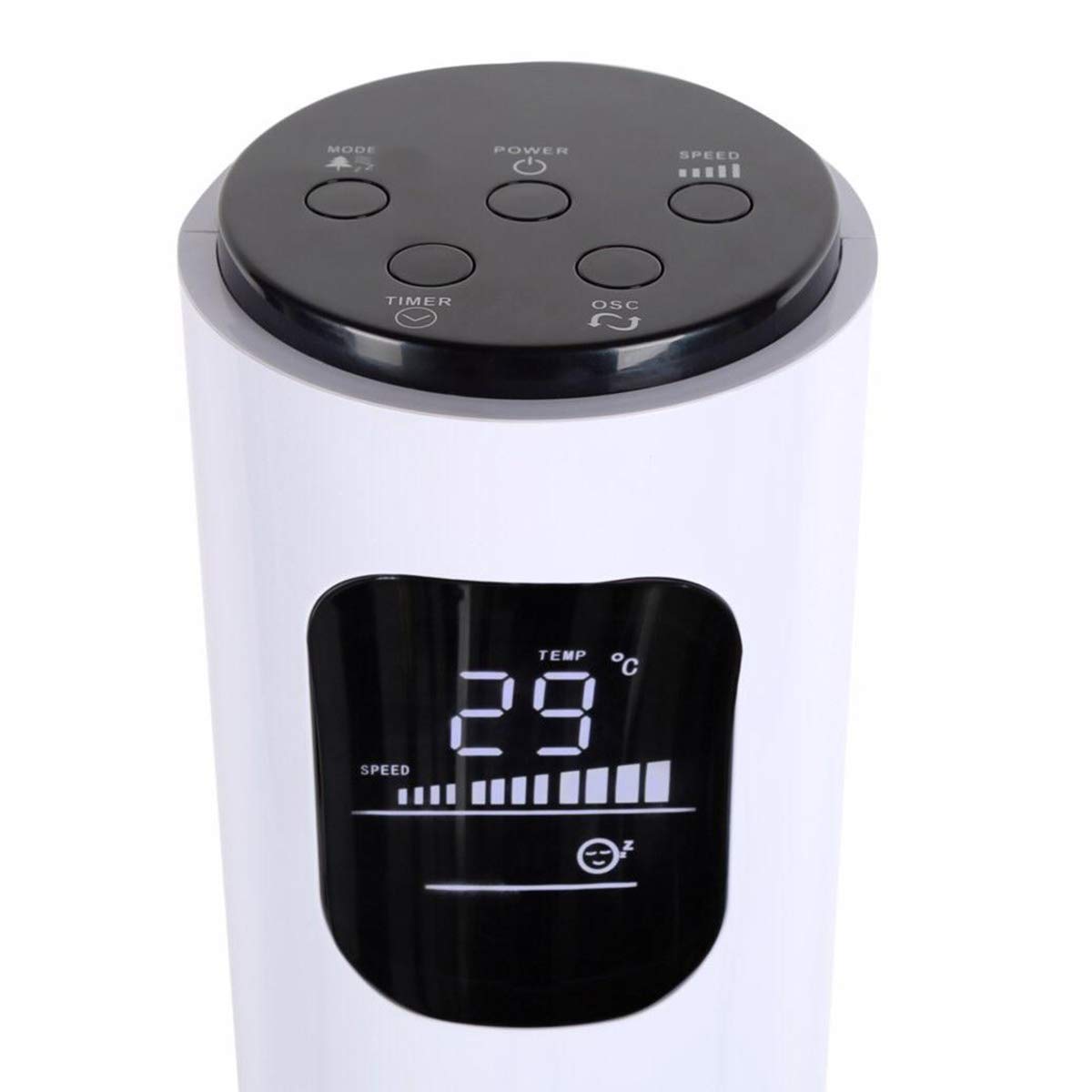
Image: Close-up of the fan's top control panel and digital LED display, showing buttons for Power, Speed, Oscillation, Timer, and Mode.
- Įjungimo mygtukas (⏻): Paspauskite, kad ĮJUNGTUMĖTE arba IŠJUNGTUMĖTE ventiliatorių.
- Greičio mygtukas (█████): Press to cycle through 3 speed settings (Low, Medium, High). The current speed is indicated on the LED display.
- Osciliacijos mygtukas (↻): Paspauskite, kad įjungtumėte arba išjungtumėte 70° osciliacijos funkciją.
- Laikmačio mygtukas (⏱): Paspauskite , kad nustatytumėte automatinio išjungimo laikmatį nuo 1 iki 12 valandų. Kiekvienas paspaudimas padidina laikmatį viena valanda.
- Režimo mygtukas (☼): Press to cycle through different operating modes:
- Įprastas režimas: Pastovus oro srautas pasirinktu greičiu.
- Natūralaus vėjelio režimas: Simulates natural wind by varying fan speed.
- Miegojimo rezimas: Laikui bėgant, ventiliatoriaus greitis palaipsniui mažinamas, kad miego metu veiktų tyliai.
Belaidis nuotolinio valdymo pultas
The remote control provides convenient operation from a distance. Ensure the remote is pointed towards the fan's receiver.
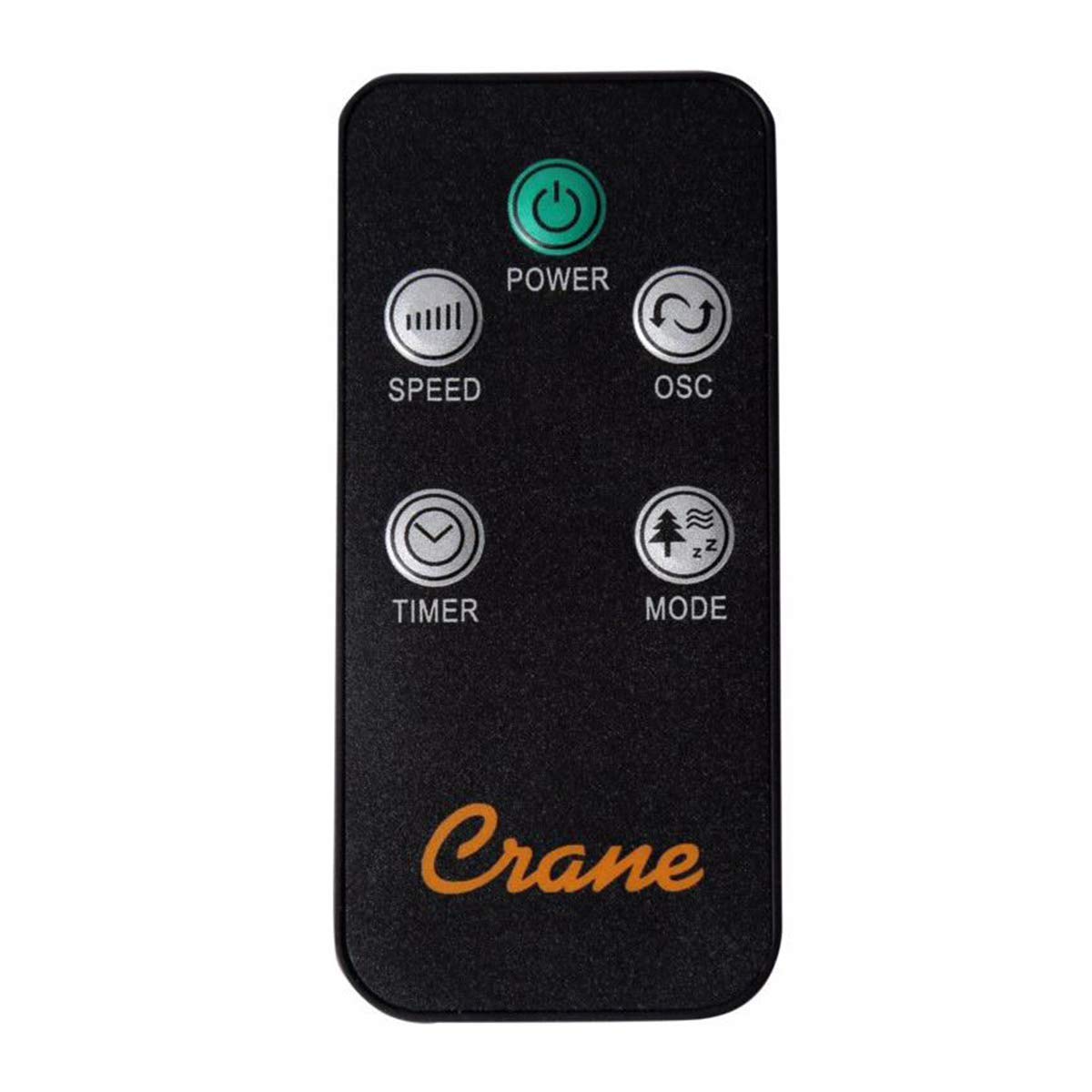
Image: The wireless remote control for the Crane EE-5622 Tower Fan, showing buttons for Power, Speed, Oscillation, Timer, and Mode.
The remote control features the same buttons as the control panel for Power, Speed, Oscillation, Timer, and Mode. It requires batteries (included).

Vaizdas: Viršus view of the Crane EE-5622 Tower Fan, illustrating the integrated slot for storing the remote control.
Priežiūra
Reguliarus ventiliatoriaus aptarnavimas užtikrina optimalų veikimą ir ilgaamžiškumą.
- Valymas: Prieš valydami ventiliatorių, visada atjunkite jį nuo elektros tinklo. Naudokite minkštą,amp cloth to wipe the exterior surfaces. Do not use abrasive cleaners or allow water to drip into the fan's interior.
- Dulkių šalinimas: Use a vacuum cleaner with a brush attachment or compressed air to remove dust from the air intake and exhaust grilles.
- Saugykla: If storing the fan for an extended period, clean it thoroughly, place it back in its original packaging, and store it in a cool, dry place.
Trikčių šalinimas
| Problema | Galima priežastis | Sprendimas |
|---|---|---|
| Ventiliatorius neįsijungia. | Nėra maitinimo šaltinio; Maitinimo laidas neįjungtas; Nenuspaustas maitinimo mygtukas. | Patikrinkite maitinimo lizdą; Įsitikinkite, kad maitinimo laidas yra tvirtai prijungtas; Paspauskite maitinimo mygtuką. |
| Silpnas oro srautas. | Fan speed set too low; Air intake/exhaust blocked; Dust accumulation. | Increase fan speed; Clear any obstructions; Clean the fan grilles. |
| Ventiliatorius triukšmingas. | Fan not on a level surface; Foreign object inside; Dust accumulation. | Place fan on a flat, stable surface; Unplug and check for obstructions; Clean the fan. |
| Nuotolinio valdymo pultas neveikia. | Išsikrovusios baterijos; Kliūtis tarp nuotolinio valdymo pulto ir ventiliatoriaus; Nuotolinio valdymo pultas netinkamai nukreiptas. | Replace remote control batteries; Remove obstructions; Point remote directly at the fan's receiver. |
Specifikacijos
| Prekės ženklas | Kranas |
| Modelio numeris | EE-5622 |
| Maitinimo šaltinis | AC Powered (Remote Control: Battery Powered) |
| Vattage | 45 vatų |
| Greičių skaičius | 3 |
| Virpesių kampas | 70° |
| Laikmatis | Nuo 1 iki 12 valandos |
| Aukštis | Maždaug 115 cm (44 colio) |
| Prekės svoris | 5.1 svaro |
| Kontrolės metodas | Nuotolinio valdymo pultas, mygtukai ant įrenginio |
| Ypatingos savybės | Digital LED Display, Room Temperature Display, Natural Breeze Mode, Sleep Mode, Auto Shut-off |
| Medžiaga | Acrylonitrile Butadiene Styrene (ABS), Plastic Blades |
| Naudojimas viduje / lauke | Naudoti tik patalpose |
Garantija ir palaikymas
For warranty information or technical support, please refer to the warranty card included with your product or contact Crane customer service directly. Contact details are typically available on the manufacturer's official websvetainėje arba produkto pakuotėje.
Note: Customer reviews indicate potential challenges with service support. It is recommended to retain your purchase receipt for warranty claims.
Ask a question about this manual
Ask about setup, troubleshooting, compatibility, parts, safety, or missing instructions. Manuals+ will review the question and use this page’s manual context to help answer it.