
1. Įvadas
The AC Infinity AIRTAP T4 is a register booster fan designed to enhance and improve existing airflow from HVAC register holes in your home. It features smart programming with 10-level speeds, heating and cooling triggers, timers, and cycles. This manual provides essential information for the safe and efficient operation of your AIRTAP T4.
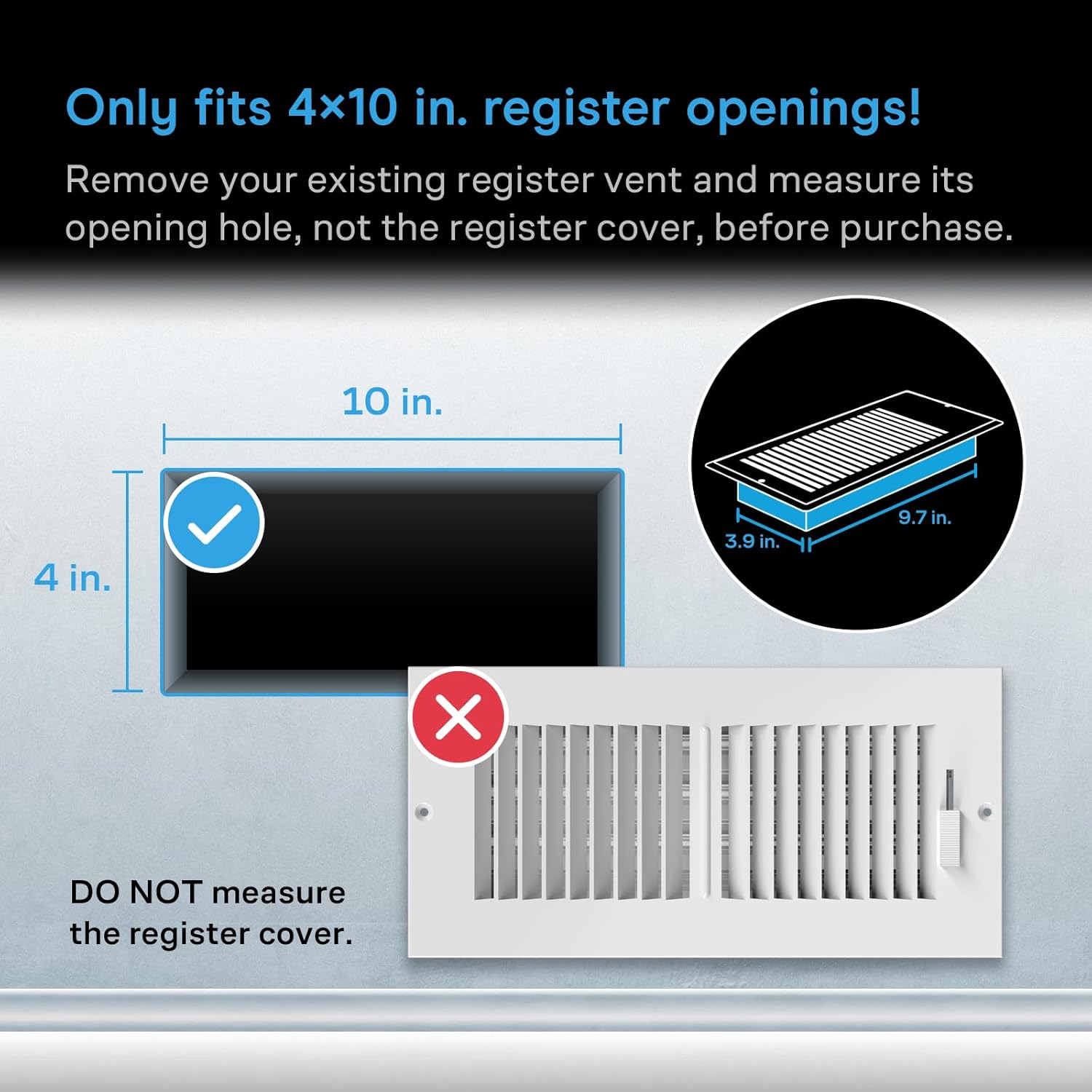
Figure 1: AC Infinity AIRTAP T4 Register Booster Fan (Bronze)
2. Saugos informacija
Please read this manual thoroughly before installation and operation. Failure to follow these instructions may result in electric shock, fire, or serious injury.
- Užtikrinkite maitinimo šaltinio ttage atitinka ventiliatoriaus reikalavimus.
- Nenaudokite ventiliatoriaus, jei pažeistas laidas arba kištukas.
- Ventiliatoriaus veikimo metu laikykite pirštus ir pašalinius daiktus atokiai nuo menčių.
- Do not immerse the fan in water or expose it to excessive moisture.
- Prieš valydami ar atlikdami bet kokią techninę priežiūrą, atjunkite ventiliatorių nuo elektros lizdo.
- Šis gaminys skirtas naudoti tik patalpose.
3. Sąranka
3.1 Measure Before Purchase
It is crucial to measure your existing duct opening before purchasing and installing the AIRTAP T4. This model is designed to fit 4 x 10 inch duct openings only. Remove your existing register vent and measure its opening hole, not the register cover.

Figure 2: Ensure your duct opening measures 4 x 10 inches.
3.2 diegimas
- Remove your existing floor or wall register.
- Carefully place the AC Infinity AIRTAP T4 into the duct opening. Ensure it sits flush with the floor or wall surface.
- Connect the power adapter to the fan and then plug it into a standard electrical outlet.

Figure 3: AIRTAP T4 installed in a floor vent, ready for operation.
4. Operacija
The AIRTAP T4 offers versatile control options including an on-device display, a remote controller, and a Bluetooth app.
4.1 Intelligent Programming
Utilize the smart programming features to optimize your home's heating and cooling. The system includes 10-level speeds, heating and cooling triggers, timers, and cycles.
- Temperature Controlled Airflow: Set desired temperature thresholds for automatic fan activation.
- 10-Level Speeds: Adjust fan speed from 1 to 10 to control airflow intensity.
- Timers and Cycles: Program the fan to operate during specific periods or in repeating cycles.

Figure 4: On-device display and remote controller for intelligent programming.
4.2 Valdymas „Bluetooth“ programėle
Download the AC Infinity app to unlock advanced programs, monitor climate data, set alarms, receive notifications, and remotely control your register fan via Bluetooth.
- Advanced Programs: Access additional customization options for fan operation.
- Climate Data: View real-time and historical temperature data.
- Pranešimai: Receive alerts for temperature changes or operational status.

Figure 5: Control your AIRTAP T4 and monitor data using the AC Infinity mobile app.
4.3 Tylus veikimas
The AIRTAP T4 features dual-ball bearing fans with a PWM motor, engineered to minimize noise while delivering high airflow. This ensures quiet operation even at higher speeds.

Figure 6: Dual-ball bearing fans designed for ultra-quiet performance.
5. Priežiūra
Regular maintenance ensures optimal performance and longevity of your AIRTAP T4.
- Valymas: Periodically wipe the surface of the fan with a soft, dry cloth. For deeper cleaning, unplug the unit and gently clean the fan blades with a soft brush or compressed air.
- Patikra: Regularly check the power cord and plug for any signs of damage. Do not use the unit if any damage is found.
6. Problemų sprendimas
| Problema | Galima priežastis | Sprendimas |
|---|---|---|
| Ventiliatorius neįsijungia | No power; Incorrect settings | Check power connection; Verify temperature triggers and fan speed settings. |
| Mažas oro srautas | Fan speed too low; Obstruction | Increase fan speed; Clear any obstructions from the vent or fan blades. |
| Ventiliatorius triukšmingas | Obstruction; Loose installation | Check for and remove any obstructions; Ensure the fan is securely seated in the vent. |
| Programa neprisijungia | Bluetooth off; App issue | Ensure Bluetooth is enabled on your device; Restart the app or reinstall if necessary. |
7. Specifikacijos
| Funkcija | Detalė |
|---|---|
| Modelio pavadinimas | AC-RBF4-B |
| Prekės ženklas | „AC Infinity“ |
| Spalva | Bronza |
| Duct Opening Size | 4x10 colių |
| Galinis CasinMatmenys | 3.93x9.76 colių |
| Gaminio matmenys (D x P x A) | 1.96 "D x 11.54" P x 5.51" A |
| Variklis | Dual 92 mm Fans |
| Oro srautas | 130 CFM |
| Triukšmo lygis | 17 dBA (as per feature bullets) / 18 Decibels (as per specifications) |
| Greičių skaičius | 10 |
| Maitinimo šaltinis | Su laidu elektra |
| Vattage | 6 vatų |
| ttage | 12 voltų |
| Kontrolės metodas | App, Button Control, Remote Control |
| Medžiaga | Aliuminis, Plastikas |
| Prekės svoris | 0.01 uncijos |
| UPC | 819137020238 |
8. Garantija ir palaikymas
AC Infinity products are designed with quality and durability in mind. For specific warranty details and to register your product, please visit the official AC Infinity website. For technical support, troubleshooting assistance, or any inquiries, please contact AC Infinity customer service through their websvetainėje arba kontaktinę informaciją, pateiktą jūsų produkto pakuotėje.
You can visit the AC Infinity Store for more information: AC Infinity parduotuvė