
1. Įvadas
Thank you for choosing the Feelworld FW703 7-inch IPS On-Camera Field Monitor. This manual provides essential information for the proper setup, operation, and maintenance of your device. Please read this manual thoroughly before using the monitor to ensure optimal performance and to prevent damage.
2. Produktas baigtasview
The Feelworld FW703 is a high-resolution 7-inch IPS monitor designed for professional camera and video camera applications. It offers a range of features to enhance your shooting experience.
Pagrindinės funkcijos:
- Didelės raiškos ekranas: The FW703 features a Full HD 1920x1200 resolution, a 1200:1 contrast ratio, and a pixel density of 323 PPI, ensuring smooth and clear display of images and videos. With a brightness of 450cd/m², the screen is clearly visible. The 160° viewing angle provides consistent image quality from various perspectives.
- Rec.709 HD Color Standard: Reproduces colors naturally and beautifully. Utilizing ITU standards and HD video Rec.709 calibration technology, images appear sharp. Includes fine color adjustment functions.
- 3G-SDI/4K HDMI Connectivity: Supports 3G-SDI and 4K HDMI input and output. SDI input supports SD, HD, and 3G formats up to 1080p 60Hz. HDMI input supports formats up to 4K 2160p 30Hz, supporting almost all signal formats. Suitable for DSLR HDMI cameras and professional broadcast SDI signals. It can simultaneously display live images on multiple displays while maintaining original video quality.
- Multi-functional Professional Auxiliary Functions: Professional auxiliary functions assist users in accurately monitoring video shooting, creation, and playback. Features include: Brightness Histogram; Embedded Audio Monitoring; Peaking Focus Assist; False Color; Zebra Exposure; Camera Mode; Image Flip; Check Field; Anamorphic Mode (1.3x, 2.0x, 2.0x mag); Safe Area (80%, 85%, 90%, 93%, 96%, 2.35:1); Color Temperature Adjustment. Also includes 9 Grid for 4K, Image Magnification (4X, 9X, 16X), and Zoom (U/D, L/R).
- Thin, Lightweight, and Portable Design: Designed for portability and functionality, with a depth of 22mm and a weight of 320g, allowing for free use anywhere. Enjoy clear images regardless of location.
- Lankstus maitinimo šaltinis: Supports 12V/1.5A power adapter and can also be powered by compatible batteries (e.g., Sony NP-F series via F970 battery plate).
- Įvairios montavimo parinktys: Features a standard 1/4 inch screw hole for easy attachment to camera rigs, heads, or magic arms. Includes a 360° swivel mount.
- Custom Shortcut Keys: F1 and F2 custom shortcut function keys allow users to set functions according to personal habits.
- New UI Menu: Adopts a new UI menu for more convenient and quick operation of functions.

Image: Feelworld FW703 7-inch FHD Screen with key display specifications.

Image: IPS Ultra-wide Viewing Angle of the FW703 monitor.
3. Pakuotės turinys
Gavę siuntinį, patikrinkite jo turinį, kad įsitikintumėte, jog yra visi reikalingi daiktai:
- Feelworld FW703 Monitor
- Mini HDMI laidas
- USB adapterio kabelis
- Skėtis nuo saulės
- Karštų batų kalnas
- „F970“ akumuliatoriaus plokštelė
- Vartotojo vadovas

Image: Package Contents of the FW703 Monitor.
4. Sąranka
4.1 Monitoriaus maitinimas
The FW703 monitor can be powered in two ways:
- Kintamosios srovės adapteris: Connect a 12V/1.5A AC power adapter (not included) to the DC IN port on the monitor.
- Baterijos galia: Attach a compatible Sony NP-F series battery (e.g., F970, F960, F950, F770, F750, F730, F570, F550, F530 series) to the F970 battery plate on the back of the monitor. Ensure the battery is securely locked into place.

Image: Flexible Power Supply options for the FW703 monitor.
4.2 Prijungimas prie kameros
Connect your camera or video source to the monitor using either an HDMI or SDI cable.
- HDMI jungtis: Use the provided Mini HDMI cable to connect your camera's HDMI output to the HDMI IN port on the FW703.
- SDI Connection: Connect your camera's SDI output to the SDI IN port on the FW703 using an SDI cable.
The monitor also features HDMI OUT and SDI OUT ports for looping through the signal to another display or device.

Image: 3G-SDI and 4K HDMI Input/Output Ports.
4.3 Monitoriaus montavimas
Use the included hot shoe mount to attach the monitor to your camera's hot shoe or a compatible rig. The monitor features a standard 1/4 inch screw hole on the bottom for versatile mounting options.
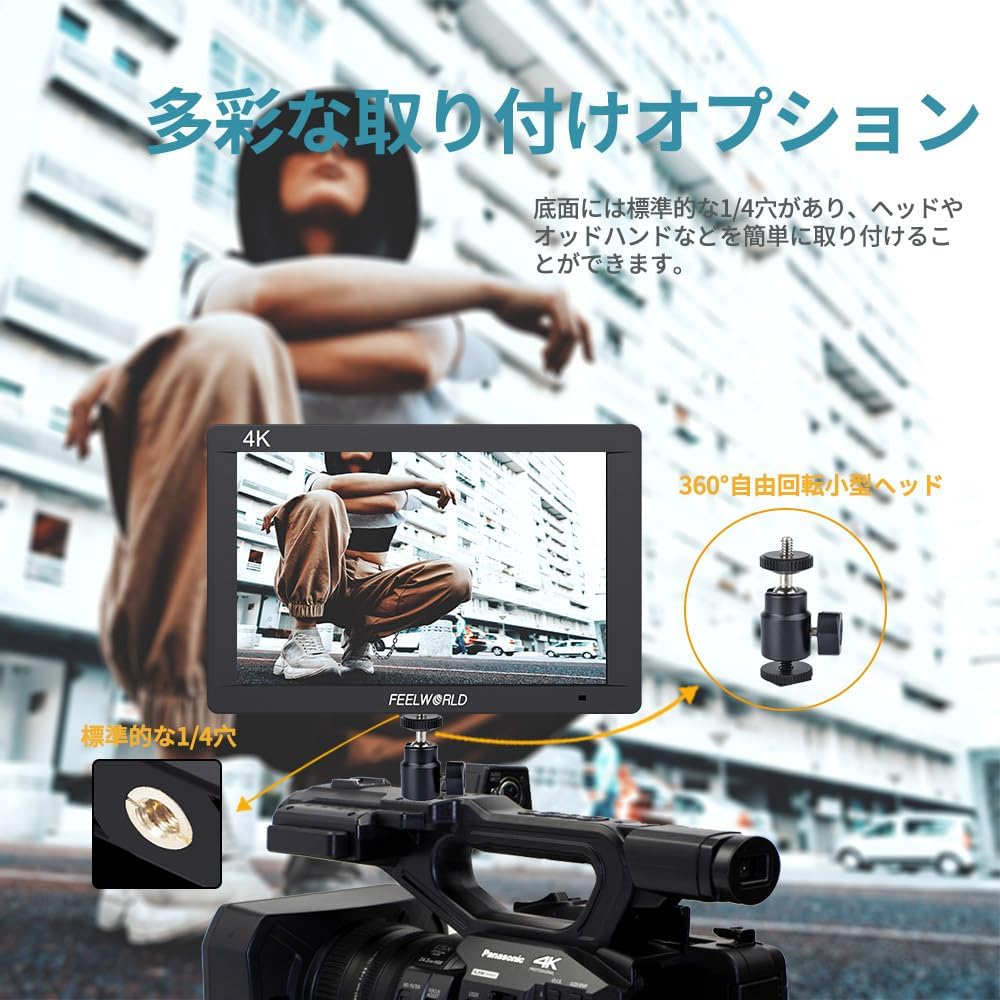
Image: Diverse Mounting Options for the FW703 monitor.
5. Naudojimo instrukcijos
5.1 Pagrindinės operacijos
- Maitinimo įjungimas/išjungimas: Norėdami įjungti arba išjungti monitorių, paspauskite ir palaikykite maitinimo mygtuką.
- Meniu naršymas: Use the MENU button to access the main menu. Use the arrow buttons (or rotary dial, if present) to navigate through options and the SELECT button to confirm.
- Įvesties pasirinkimas: The monitor will automatically detect the input signal. If multiple inputs are connected, you may need to manually select the desired input from the menu.
5.2 Using Auxiliary Functions
The FW703 includes various professional auxiliary functions to assist with accurate monitoring. These can be accessed via the menu or assigned to the F1/F2 shortcut keys.

Image: Assist Shooting Functions available on the FW703.
- Fokusavimo paryškinimo pagalba: Highlights sharp edges in red, green, or blue to indicate in-focus areas.
- Klaidinga spalva: Displays exposure levels as a spectrum of colors, helping to identify overexposed or underexposed areas.
- Zebro ekspozicija: Overlays zebra stripes on areas exceeding a set exposure threshold.
- Histograma: Provides a graphical representation of the tonal distribution of the image.
- Įdėtasis garsas: Displays audio levels on the screen.
- Anamorphic Mode: Pašalina anamorfinį „foo“ garsątage už tinkamą viewing (1.3x, 2.0x, 2.0x mag options).
- Saugi zona: Displays guides for various aspect ratios and safe zones (80%, 85%, 90%, 93%, 96%, 2.35:1).
- Vaizdo apvertimas: Flips the image horizontally or vertically.
- Mastelio keitimas: Magnifies a portion of the image for detailed inspection.
5.3 Custom Shortcut Keys (F1, F2)
The F1 and F2 buttons can be customized to quickly access frequently used functions. To assign a function:
- Eikite į pagrindinį meniu.
- Navigate to the 'Function Key Settings' or similar option.
- Select F1 or F2 and choose the desired function from the list.

Image: New UI Menu and Custom Shortcut Keys.
5.4 Kalbos nustatymai
The monitor supports multiple languages, including Japanese. To change the language:
- Prisijunkite prie pagrindinio meniu.
- Navigate to 'System Settings' or 'Language'.
- Pasirinkite norimą kalbą.
6. Priežiūra
Proper maintenance ensures the longevity and optimal performance of your Feelworld FW703 monitor.
- Valymas: Use a soft, dry cloth to clean the monitor's exterior. For the screen, use a specialized screen cleaning solution and a microfiber cloth. Do not use abrasive cleaners or solvents.
- Saugykla: When not in use, store the monitor in a cool, dry place, away from direct sunlight and extreme temperatures. Use the included sunshade for protection during storage or transport.
- Akumuliatoriaus priežiūra: If using batteries, ensure they are charged regularly and stored properly. Remove batteries if the monitor will not be used for an extended period.
7. Problemų sprendimas
If you encounter issues with your FW703 monitor, refer to the following common troubleshooting steps:
| Problema | Galima priežastis | Sprendimas |
|---|---|---|
| Ekrane nėra vaizdo | No power; Incorrect input selected; Loose cable connection; Camera not outputting signal. | Check power connection/battery; Select correct input source; Ensure cables are securely connected; Verify camera's video output settings. |
| Image is distorted or discolored | Incorrect display settings; Faulty cable; Signal incompatibility. | Reset display settings to default; Try a different HDMI/SDI cable; Ensure camera output resolution/frame rate is supported by the monitor. |
| Monitorius neįsijungia | No power; Dead battery. | Check AC adapter connection; Ensure battery is charged and properly installed. |
| Mygtukai nereaguoja | Laikinas programinės įrangos triktis. | Power off the monitor, wait a few seconds, then power it back on. |
Jei problema išlieka ir išbandžius šiuos sprendimus, susisiekite su klientų aptarnavimo tarnyba.
8. Specifikacijos
| Funkcija | Detalė |
|---|---|
| Modelio numeris | FW703 |
| Ekrano dydis | 7 colių |
| Rezoliucija | 1920x1200 |
| Kontrasto santykis | 1200:1 |
| Ryškumas | 450 cd/m² |
| Pikselių tankis | 323 PPI |
| Viewing kampas | 160° (IPS) |
| Įvesties prievadai | 1x 3G-SDI, 1x 4K HDMI |
| Išvesties prievadai | 1x 3G-SDI, 1x 4K HDMI |
| Maitinimo įvestis | DC 12V/1.5A |
| Baterijų suderinamumas | Sony NP-F series (via F970 plate) |
| Matmenys (supakuoti) | 22.6 x 16.2 x 8 cm |
| Svoris (supakuotas) | 900 g |
| Kitos funkcijos | Anti-glare screen, Frame, Professional auxiliary functions |
9. Garantija ir palaikymas
The Feelworld FW703 monitor comes with a vienerių metų garantija nuo įsigijimo datos. Ši garantija taikoma gamybos defektams ir gedimams įprasto naudojimo metu.
For technical support, warranty claims, or service inquiries, please contact your retailer or Feelworld customer service. Keep your proof of purchase for warranty validation.