
1. Produktas baigtasview
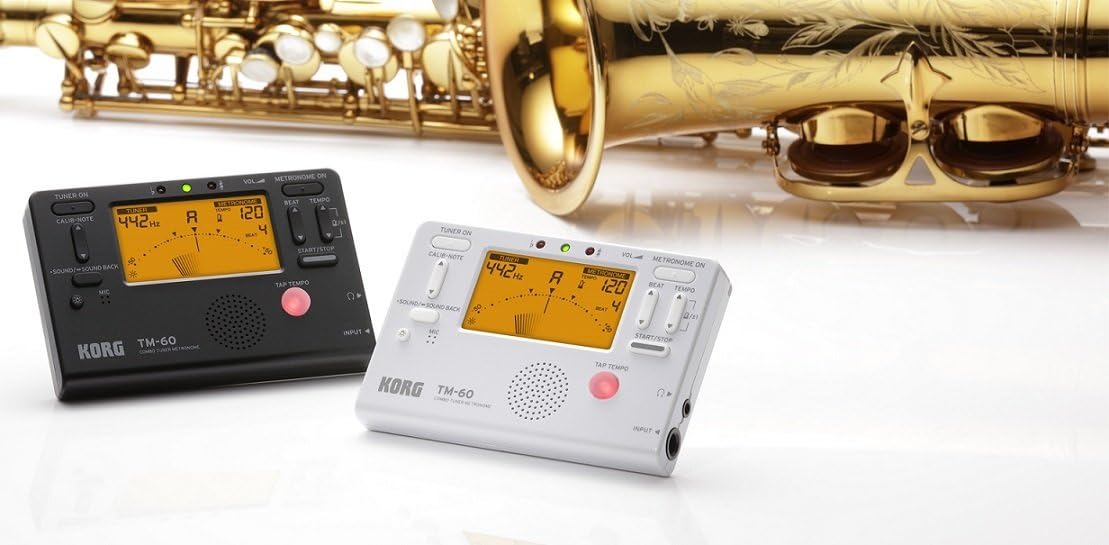
The KORG TM60CBK is a versatile combo tuner and metronome designed for musicians. It features a high-precision tuner function and a metronome function that can be used simultaneously. This model includes a CM-200 Contact Clip-on Microphone for enhanced tuning accuracy, especially in noisy environments. The large screen displays both tuner and metronome functions clearly, making it an essential tool for practicing.
- Dvigubas funkcionalumas: High-precision tuner and metronome functions can be used concurrently.
- Pridedamas mikrofonas: Comes with a CM-200 Contact Clip-on Microphone for direct instrument tuning.
- Aiškus ekranas: Features a new, larger screen for simultaneous display of tuner and metronome.
- Spalva: Juoda.
2. Sąranka
2.1 Akumuliatoriaus įdėjimas
The KORG TM60CBK operates on AAA batteries. To install or replace batteries:
- Atidarykite akumuliatoriaus skyriaus dangtelį, esantį įrenginio gale.
- Insert the AAA batteries, ensuring correct polarity (+/-).
- Saugiai uždarykite akumuliatoriaus skyriaus dangtelį.
2.2 Connecting the CM-200 Contact Clip-on Microphone
For precise tuning, especially with acoustic instruments or in loud settings, connect the included clip-on microphone:
- Plug the microphone's 1/4-inch (6.35mm) jack into the INPUT jack on the side of the TM60CBK unit.
- Attach the clip to the headstock or bell of your instrument. Ensure the clip is securely fastened and the microphone is positioned to pick up vibrations effectively.
3. Naudojimo instrukcijos
3.1 Imtuvo režimas
To use the tuner function:
- Press the 'TUNER ON' button to activate the tuner.
- Select the desired instrument mode (Chromatic, Guitar, Bass, Violin, Ukulele) using the 'ITEM' button.
- Adjust the A4 calibration pitch (default 440Hz) using the 'CALIB./NOTE' buttons if needed.
- Play a single note on your instrument. The display will show the detected note and indicate if it is sharp, flat, or in tune using the needle-style meter and LED indicators.
3.2 Metronomo režimas
To use the metronome function:
- Press the 'METRONOME ON' button to activate the metronome.
- Set the desired tempo (BPM) using the 'TEMPO' buttons.
- Adjust the beat (time signature) using the 'BEAT' buttons.
- Select different rhythm patterns using the 'RHYTHM' button.
- Press 'START/STOP' to begin or pause the metronome.
- Adjust the volume using the 'VOL' slider on the side of the unit.
- For private practice, plug headphones into the 3.5mm headphone jack.
- Use the 'TAP TEMPO' button to set the tempo by tapping along to a desired rhythm.
3.3 Tonų generatorius
The TM60CBK can also generate reference tones:
- In Tuner Mode, press the 'SOUND/SOUND BACK' button to activate the tone generator.
- Use the 'CALIB./NOTE' buttons to select the desired reference note.
- Listen to the generated tone and tune your instrument by ear.
4. Produkto vaizdai



5. Specifikacijos
| Funkcija | Detalė |
|---|---|
| Modelio pavadinimas | TM60 |
| Modelio numeris | TM60C-BK |
| Spalva | Juoda |
| Prekės matmenys (I x P x A) | 4.37 x 2.91 x 0.71 colio |
| Prekės svoris | 0.16 gramų |
| Įtraukti komponentai | Krepšys |
| Jungties tipas | USB (for power, not data) |
6. Priežiūra
To ensure the longevity and optimal performance of your KORG TM60CBK:
- Valymas: Nuvalykite įrenginį minkštu, sausu skudurėliu. Venkite naudoti abrazyvinius valiklius ar tirpiklius.
- Akumuliatoriaus priežiūra: Jei prietaisas ilgesnį laiką nebus naudojamas, išimkite baterijas, kad išvengtumėte elektrolito pratekėjimo.
- Saugykla: Įrenginį laikykite vėsioje, sausoje vietoje, apsaugotoje nuo tiesioginių saulės spindulių ir ekstremalių temperatūrų.
7. Problemų sprendimas
- Įrenginys neįsijungia: Patikrinkite baterijų įdėjimą ir įsitikinkite, kad jos nėra išsikrovusios.
- Tuner is inaccurate: Ensure the CM-200 microphone is securely attached to the instrument. Verify the correct instrument mode is selected. Check the A4 calibration pitch.
- Nėra metronomo garso: Check the volume level. Ensure headphones are not plugged in if you intend to use the internal speaker.
8. Garantija ir palaikymas
For warranty information, technical support, or service inquiries, please refer to the official KORG website or contact KORG customer service directly. Keep your purchase receipt as proof of purchase for warranty claims.