
Ottimo J 300C
Ottimo Home Coffee Bean Cooler J 300C User Manual
Model: J 300C
Įvadas
This manual provides instructions for the safe and efficient operation of your Ottimo Home Coffee Bean Cooler J 300C. Please read this manual thoroughly before using the product and retain it for future reference.
Produktas baigtasview
The Ottimo Home Coffee Bean Cooler J 300C is designed to rapidly cool roasted coffee beans, preventing over-roasting and preserving rich flavor. It features an antique wood design with sanitized stainless steel components.
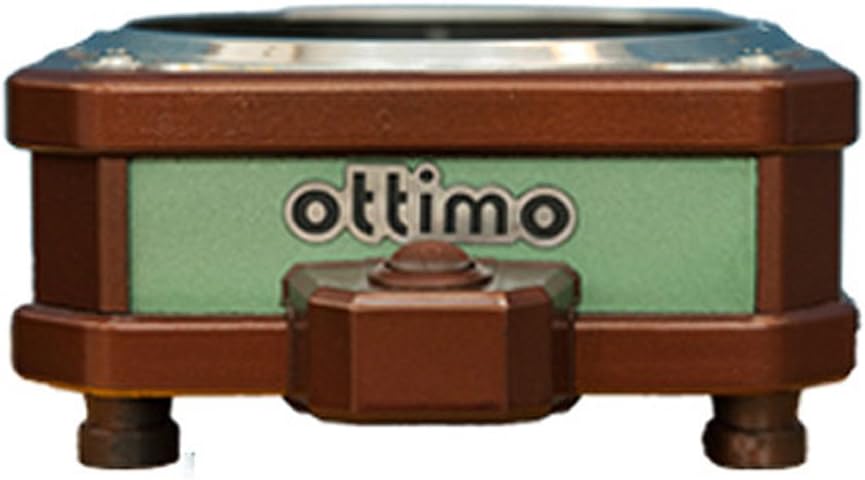
Vaizdas: priekis view of the Ottimo Home Coffee Bean Cooler J 300C, showcasing its compact design and the 'ottimo' brand logo on a green panel.
Komponentai

Image: Diagram illustrating the main components of the coffee bean cooler, including the cooling mesh basket, air outlet, main body (fan), and On/OFF switch/air inlet.
- Cooling Mesh Basket: Holds roasted coffee beans for cooling.
- Oro išleidimo anga: Where cooled air exits the unit.
- Main Body (Fan): Houses the cooling fan and internal mechanisms.
- On/OFF Switch / Air Inlet: Controls power and serves as the air intake.
Specifikacijos
| Funkcija | Detalė |
|---|---|
| Talpa | 200 g - 300 g |
| Produkto dydis (P x P x A) | 160 mm x 192 mm x 82 mm |
| Svoris | 0.8 kg |
| Galia | DC 24 V 0.2 A 5 W (adapter 220 V 60 Hz 2 pin) |
| Modelis | J 300 C |
| Kilmė | Pagaminta Korėjoje |
| Gamintojas | Ottimo |
Saugos informacija
Kad išvengtumėte sužalojimų ar gaminio sugadinimo, laikykitės šių saugos priemonių:
- Ensure the power adapter matches the specified voltage (220V 60Hz) for your region.
- Nemerkite įrenginio į vandenį ar kitus skysčius.
- Laikyti vaikams nepasiekiamoje vietoje.
- Neužblokuokite oro įleidimo ar išleidimo angų veikimo metu.
- Atjunkite įrenginį, kai jo nenaudojate arba prieš valydami.
- Use only with dry coffee beans.
Sąranka
- Išpakuoti: Atsargiai išimkite visus komponentus iš pakuotės.
- Vieta: Place the cooler on a stable, flat, and heat-resistant surface. Ensure adequate ventilation around the unit.
- Assemble Basket: Place the cooling mesh basket securely onto the main body of the cooler.
- Prijunkite maitinimą: Insert the DC 24V adapter into the power port on the cooler. Plug the adapter into a suitable 220V 60Hz power outlet.

Image: The Ottimo Coffee Bean Cooler with the mesh basket in place and the power switch visible, ready for operation.
Naudojimo instrukcijos
- Prepare Beans: After roasting, immediately transfer the hot coffee beans into the cooling mesh basket. Ensure the quantity does not exceed the maximum capacity of 300g.
- Pradėti aušinimą: Flip the On/OFF switch to the 'ON' position. The internal fan will activate, drawing air through the beans to cool them rapidly.
- Monitoriaus aušinimas: Allow the beans to cool completely. This typically takes a few minutes, depending on the bean temperature and ambient conditions.
- Remove Beans: Once cooled, turn the On/OFF switch to the 'OFF' position. Carefully remove the mesh basket and transfer the cooled beans to an airtight container for storage.

Vaizdas: Stambus planas view of roasted coffee beans resting in the cooling mesh basket of the Ottimo Cooler, ready for the cooling process.

Paveikslėlis: Apatinė pusė view of the Ottimo Coffee Bean Cooler, revealing the fan mechanism responsible for circulating air to cool the beans.
Priežiūra ir valymas
Regular cleaning ensures optimal performance and longevity of your coffee bean cooler.
- Atjunkite: Always unplug the cooler from the power outlet before cleaning.
- Clean Mesh Basket: Remove the cooling mesh basket. Wash it with warm, soapy water and rinse thoroughly. Ensure it is completely dry before reattaching.
- Nuvalykite pagrindinį korpusą: Nuvalykite pagrindinio korpuso išorę minkšta,amp Nenaudokite abrazyvinių valiklių ir nemerkite įrenginio į vandenį.
- Clean Fan Area: Periodically inspect the fan area for any accumulated chaff or dust. Use a soft brush or a vacuum cleaner with a brush attachment to gently remove debris.
- Saugykla: Store the cooler in a clean, dry place when not in use.
Trikčių šalinimas
| Problema | Galima priežastis | Sprendimas |
|---|---|---|
| Įrenginys neįsijungia. |
|
|
| Cooling is inefficient. |
|
|
| Neįprastas triukšmas veikimo metu. |
|
|
Garantija ir palaikymas
Specific warranty information is not provided in the product details. For warranty claims or technical support, please contact the manufacturer, Ottimo, or your point of purchase. Retain your proof of purchase for any warranty-related inquiries.
Gamintojas: Ottimo
Modelis: J 300C
Ask a question about this manual
Ask about setup, troubleshooting, compatibility, parts, safety, or missing instructions. Manuals+ will review the question and use this page’s manual context to help answer it.