
PureMate PM850
„PureMate“ 43 colių bokštinio ventiliatoriaus naudojimo instrukcija
Modelis: PM850
1. Saugos informacija
Please read all instructions carefully before using this appliance and retain for future reference. Always follow basic safety precautions when using electrical appliances to reduce the risk of fire, electric shock, and personal injury.
- Įsitikinkite, kad maitinimo šaltinis atitinka tūrįtage nurodyta reitingo etiketėje.
- Nenaudokite ventiliatoriaus, jei pažeistas laidas arba kištukas.
- Keep the fan away from water and moisture. Do not immerse in water or other liquids.
- Nekiškite pirštų ar pašalinių daiktų į groteles, kai ventiliatorius veikia.
- Unplug the fan from the power outlet when not in use, when moving it, or before cleaning.
- Šis prietaisas skirtas naudoti tik patalpose.
- Laikyti vaikams nepasiekiamoje vietoje.
2. Produktas baigtasview
The PureMate 43-inch Tower Fan (Model PM850) is designed to provide efficient and comfortable air circulation for your home or office. It features multiple speed and wind modes, oscillation, a timer, and an aroma function for enhanced comfort.

Image: The PureMate 43-inch Tower Fan in black, showing its sleek design, the remote control, and an illustration of air movement.
Pagrindinės funkcijos:
- 3 vėjo režimai: Normal, Natural, and Sleep for varied comfort.
- 3 greičio nustatymai: Low, Medium, and High to adjust airflow intensity.
- 70-Degree Oscillation: Provides widespread air distribution.
- 8 valandų laikmatis: Allows for automatic shut-off.
- Nuotolinio valdymo pultas: Patogiam valdymui per atstumą.
- Aromato funkcija: Integrated tray for essential oils to diffuse fragrance.
- Oro valytuvas: Padeda pagerinti oro kokybę.
- Didelis LED ekranas: Clear indication of settings and room temperature.
- Tylus veikimas: Designed for low noise levels, ideal for bedrooms.

Image: Detailed diagram of the fan's control panel, illustrating the various buttons and their corresponding functions such as ON/OFF, Speed, Mode, and Oscillation.
3. Sąranka
The PureMate Tower Fan requires minimal assembly. Follow these steps to set up your fan:
- Atsargiai nuimkite visas pakavimo medžiagas nuo ventiliatoriaus ir jo komponentų.
- Attach the base to the main fan unit. Align the screw holes on the base with those on the bottom of the fan.
- Secure the base using the provided screws. Typically, four screws are used to firmly attach the base.
- Pastatykite ventiliatorių ant tvirto, lygaus paviršiaus.
- Įkiškite maitinimo laidą į tinkamą elektros lizdą.
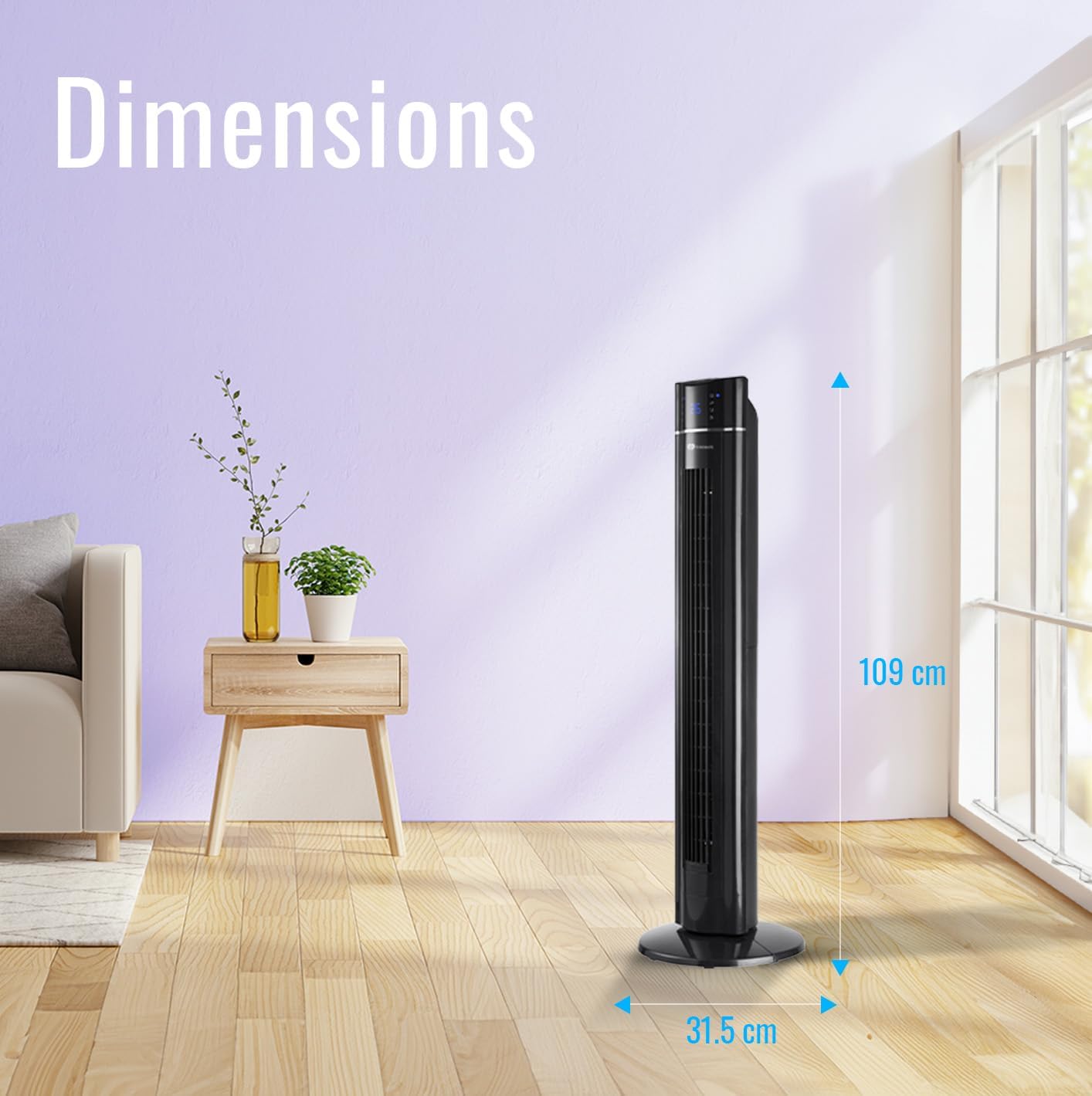
Image: The PureMate Tower Fan with its height (109 cm) and base width (31.5 cm) clearly marked, illustrating its compact and space-saving design.
4. Naudojimo instrukcijos
Your PureMate Tower Fan can be operated using the control panel on top of the unit or the included remote control.
4.1 Maitinimo įjungimas/išjungimas
- Paspauskite ĮJUNGTA/IŠJUNGTA mygtuką valdymo skydelyje arba nuotolinio valdymo pulte, kad įjungtumėte arba išjungtumėte ventiliatorių.
4.2 Greičio reguliavimas
- Paspauskite Greitis button repeatedly to cycle through Low, Medium, and High settings. The current speed will be indicated on the LED display.
4.3 Vėjo režimo pasirinkimas
- Paspauskite Režimas button repeatedly to select Normal, Natural, or Sleep wind mode.
- Įprastas režimas: Provides a constant airflow.
- Natūralus režimas: Imituoja natūralų vėjelį su kintamu ventiliatoriaus greičiu.
- Miegojimo rezimas: Gradually decreases fan speed and dims the LED display for undisturbed sleep.
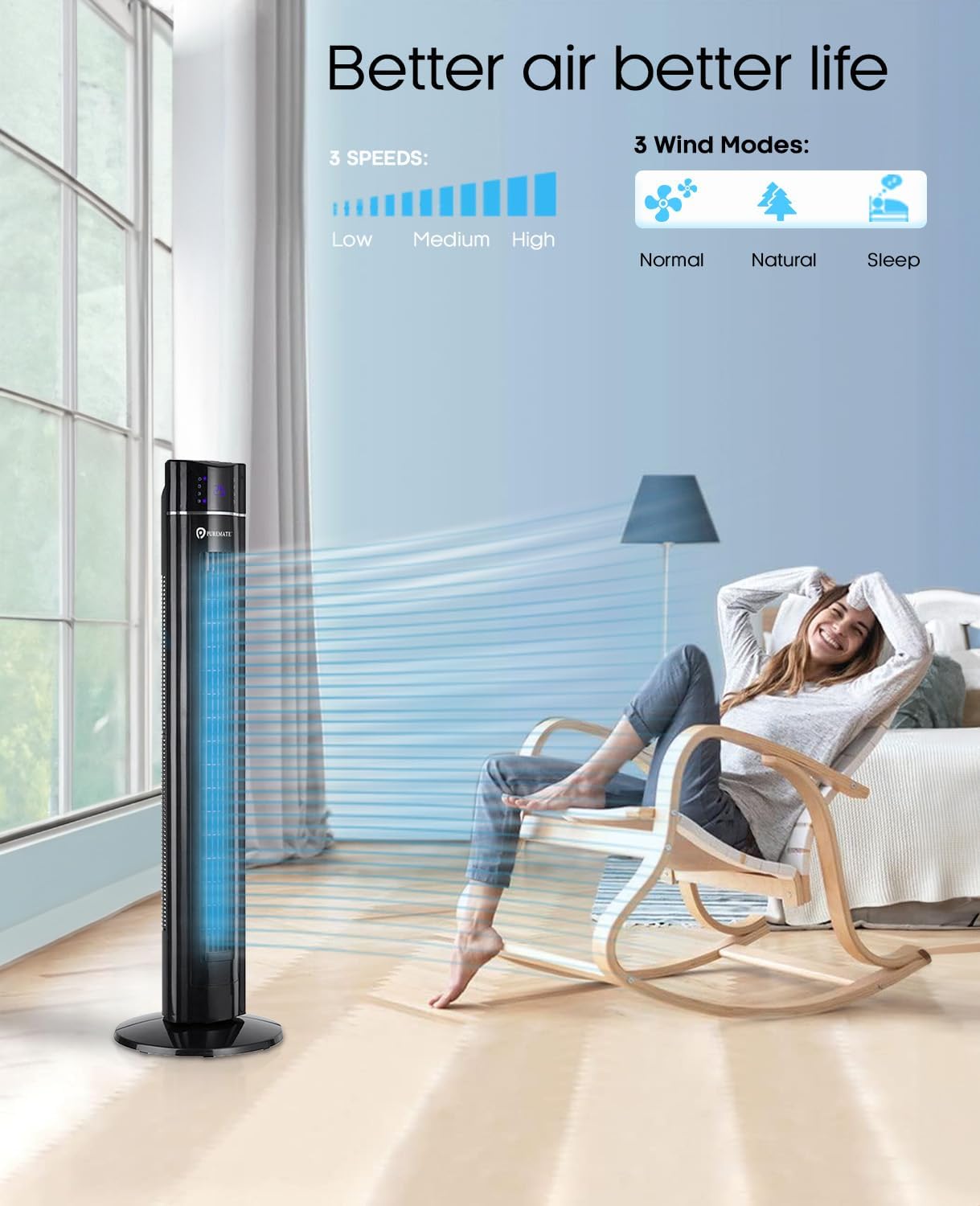
Image: The PureMate Tower Fan demonstrating its three speed settings (Low, Medium, High) and three wind modes (Normal, Natural, Sleep) for customized comfort.
4.4 Osciliacijos funkcija
- Paspauskite OSC (Oscillation) button to activate or deactivate the 70-degree oscillation feature, which helps distribute air across a wider area.
4.5 Laikmačio funkcija
- Paspauskite Laikmatis button repeatedly to set the desired operating time, from 1 to 8 hours, in 1-hour increments. The fan will automatically turn off after the set time.
4.6 Aroma Function
- Locate the aroma tray on the back or side of the fan.
- Pull out the tray and add a few drops of your preferred essential oil onto the sponge pad.
- Slide the tray back into its slot. The fan's airflow will diffuse the aroma.
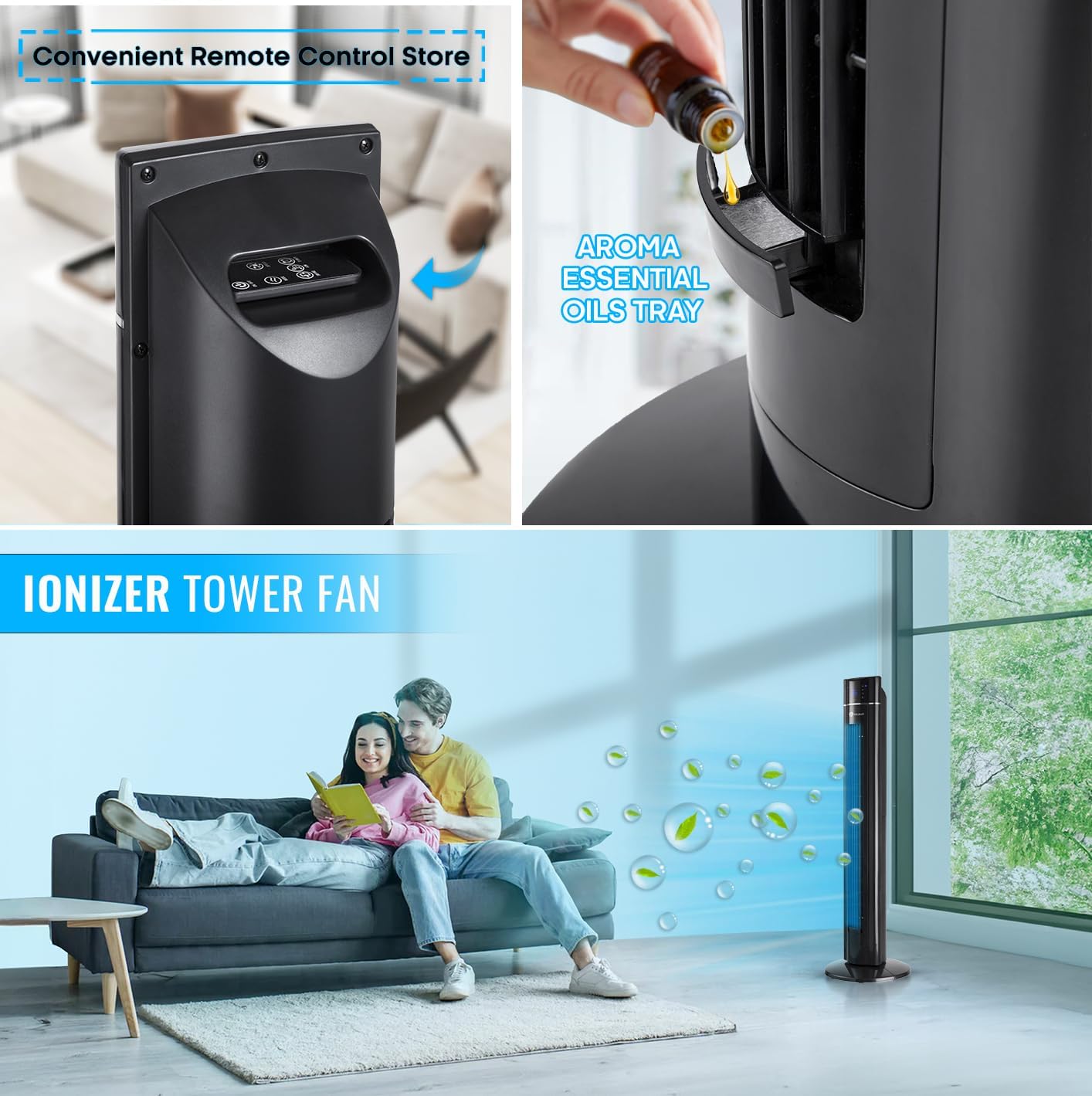
Vaizdas: Stambus planas view of the PureMate Tower Fan's aroma essential oils tray, showing how to add drops of oil for fragrance diffusion.
4.7 Nuotolinis valdymas
- The remote control provides full functionality of the fan from a distance. Ensure batteries are correctly inserted.
- Store the remote control in the designated slot on the fan when not in use to prevent misplacement.
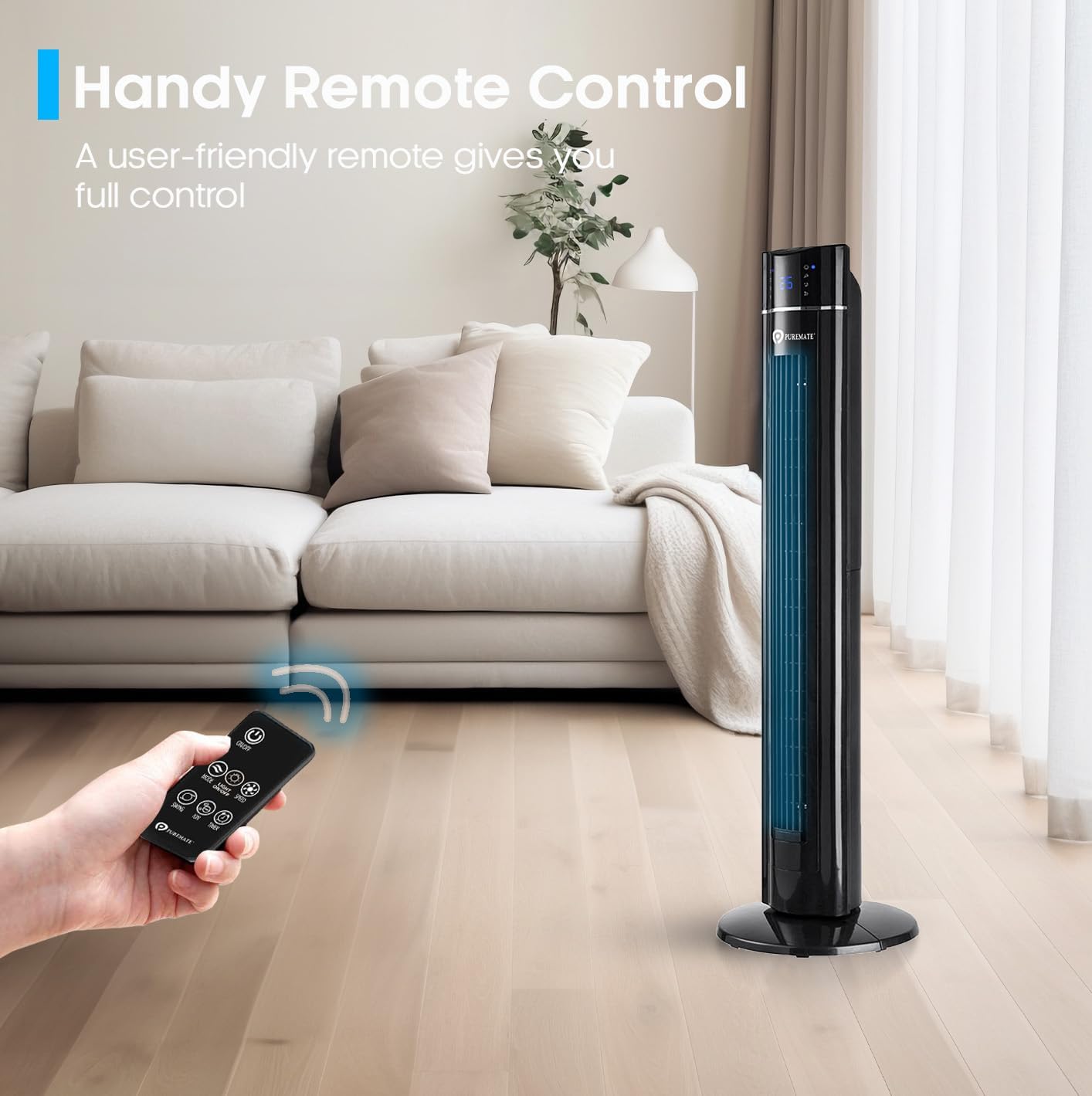
Image: A hand holding the remote control, demonstrating its use to operate the PureMate Tower Fan from a comfortable distance.
5. Priežiūra
Regular cleaning and maintenance will ensure the longevity and optimal performance of your PureMate Tower Fan.
- Išorės valymas: Išorinius paviršius nuvalykite minkšta, damp audinys. Nenaudokite abrazyvinių valiklių ar tirpiklių.
- Oro įleidimo / išleidimo angos valymas: Norėdami pašalinti dulkes nuo oro įleidimo ir išleidimo grotelių, naudokite dulkių siurblį su šepetėliu.
- Aromato dėklas: Periodically clean the aroma tray and replace the sponge pad if it becomes discolored or worn.
- Saugykla: Jei ventiliatoriaus nenaudojate ilgesnį laiką, atjunkite jį nuo elektros tinklo, išvalykite jį ir laikykite vėsioje, sausoje vietoje, geriausia originalioje pakuotėje.
Caution: Always unplug the fan before cleaning or performing any maintenance.
6. Problemų sprendimas
If you encounter issues with your PureMate Tower Fan, refer to the following common problems and solutions:
| Problema | Galima priežastis | Sprendimas |
|---|---|---|
| Ventiliatorius neįsijungia. | Nėra maitinimo; Nenuspaustas maitinimo mygtukas; Išsikrovusios nuotolinio valdymo pulto baterijos. | Check if the fan is plugged in and the outlet is working. Press the power button firmly. Replace remote control batteries. |
| Silpnas oro srautas. | Per mažas ventiliatoriaus greitis; oro įleidimo / išleidimo angos užblokuotos dulkėmis. | Padidinkite ventiliatoriaus greitį. Išvalykite oro įleidimo ir išleidimo angas. |
| Fan makes unusual noise (rattling). | Loose components; Fan not on a level surface. | Ensure the base is securely attached. Place the fan on a stable, flat surface. If noise persists, contact customer support. |
| LED display is too bright at night. | Display light is active. | Use the 'Night Mode' or 'Light Off' button on the remote control or control panel to dim/turn off the display light. Note: Some models may reactivate the light upon power cycle. |
| Fan turns on/off unexpectedly. | Trikdžiai iš kitų nuotolinio valdymo pultelių (pvz., televizoriaus nuotolinio valdymo pulto). | Relocate the fan away from other devices that use infrared remote controls, or be mindful of other remote usage. |
| Loud beeping sound when changing settings. | Įprastas veikimo grįžtamasis ryšys. | This is a design feature. There is no option to disable the beeping sound. |
7. Specifikacijos
| Funkcija | Detalė |
|---|---|
| Prekės ženklas | „PureMate“ |
| Modelio numeris | PM850 |
| Spalva | Tower_fan_black |
| Gaminio matmenys | 31.5 x 31.5 x 109 cm |
| Prekės svoris | 4.3 kg |
| Galia / Vattage | 60 vatų |
| ttage | 230 voltų |
| Triukšmo lygis | 52 dB |
| Osciliacija | 70 laipsnių |
| Laikmatis | Iki 8 valandų |
| Ypatingos savybės | Aroma Function, Air purifier, Portable, Oscillating, Lightweight, Bladeless, Timer, Remote Controlled, Quiet Operation, Safety Certified |
8. Garantija ir palaikymas
PureMate products are manufactured with durability and quality in mind. For specific warranty details and customer support, please refer to the warranty card included with your product or visit the official PureMate websvetainę.
For further assistance, you may contact PureMate customer service through their official channels. You can also visit the PureMate Store on Amazon daugiau informacijos ir produkto registracijai.
Ask a question about this manual
Ask about setup, troubleshooting, compatibility, parts, safety, or missing instructions. Manuals+ will review the question and use this page’s manual context to help answer it.