
Įvadas
Thank you for choosing the Butterfly Eco Smart Plus 25-Litre Air Cooler. This manual provides essential information for the safe and efficient operation, maintenance, and troubleshooting of your new appliance. Please read these instructions carefully before use and retain them for future reference.
Svarbios saugos instrukcijos
Kad sumažintumėte gaisro, elektros smūgio ar sužalojimo riziką, naudodami elektros prietaisus visada laikykitės pagrindinių saugos atsargumo priemonių. Tai apima:
- Užtikrinkite maitinimo šaltinio ttage matches the cooler's requirements (220-240 volts).
- Nemerkite aušintuvo, laido ar kištuko į vandenį ar kitus skysčius.
- Unplug the cooler from the outlet when not in use, before filling with water, or before cleaning.
- Nenaudokite prietaiso, kurio laidas ar kištukas pažeistas, arba po to, kai prietaisas neveikia arba buvo kaip nors sugadintas.
- Keep the cooler on a stable, level surface to prevent tipping.
- Do not block air inlets or outlets. Maintain adequate clearance around the cooler for proper airflow.
- Keep children and pets away from the cooler during operation.
- Do not use the cooler in areas where flammable liquids or gases are stored.
Produktas baigtasview
Familiarize yourself with the components of your Butterfly Eco Smart Plus Air Cooler.

1 paveikslas: Priekyje view of the Butterfly Eco Smart Plus 25-Litre Air Cooler. This image shows the main body, front louvers, digital display control panel at the top, and castor wheels at the base.
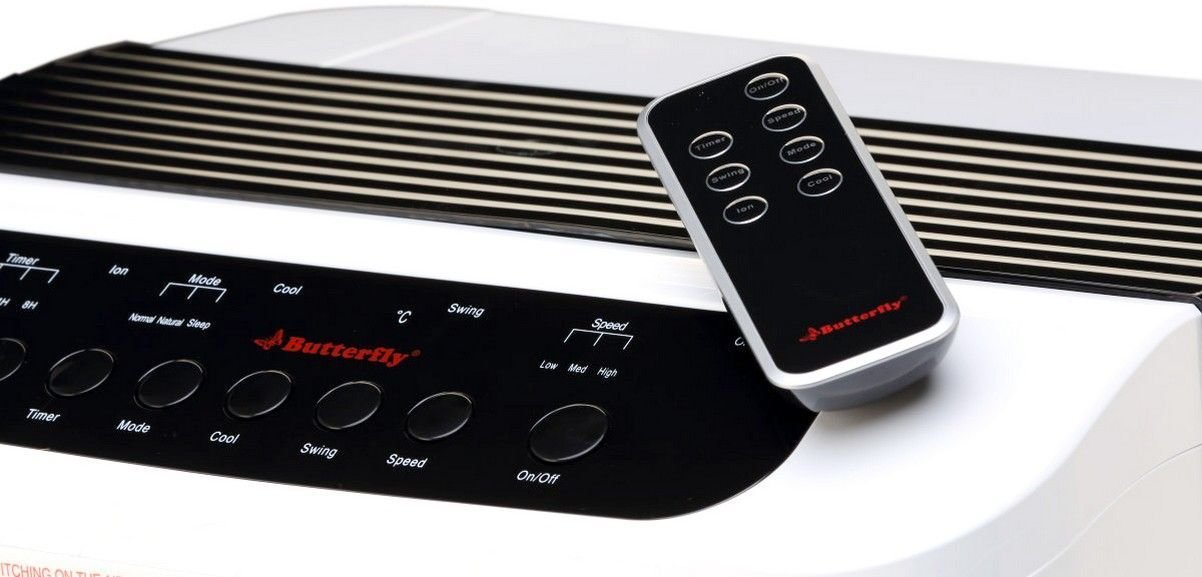
2 paveikslas: Kampuotas view of the air cooler, highlighting the top control panel and the included remote control placed on top. The side profile with vertical vents is also visible.

3 paveikslas: Close-up of the remote control for the air cooler, showing buttons for On/Off, Speed, Mode, Timer, Swing, Ion, and Cool functions.

4 paveikslas: Galinis view of the air cooler with the back panel removed, revealing the honeycomb cooling media. This section is where air is drawn in and cooled by evaporating water.
Pagrindiniai komponentai:
- Digital Display Control Panel: Located on the top, for manual operation.
- Front Louvers: Adjustable for directing airflow. Features both horizontal and vertical louvers for wide air distribution.
- Vandens bakas: 25-litre capacity, located at the bottom for water storage.
- Korio aušinimo medžiaga: Located at the rear, responsible for evaporative cooling.
- Ratukai: Kad būtų lengvas įrenginio mobilumas.
- Nuotolinio valdymo pultas: Patogiam valdymui per atstumą.
Sąranka
- Išpakavimas: Atsargiai išimkite oro aušintuvą iš pakuotės. Išsaugokite visas pakavimo medžiagas, kad galėtumėte jas vėliau laikyti ar transportuoti.
- Vieta: Place the air cooler on a firm, level surface. For optimal cooling, position the cooler near an open window or door to allow fresh air intake and proper ventilation. Ensure there is at least 20 cm of space around the unit for unobstructed airflow.
- Vandens užpildymas: Open the water inlet cap, typically located at the top or side. Fill the water tank with clean, fresh water up to the 'MAX' level indicator. Do not overfill. The cooler has a 25-litre capacity.
- Maitinimo jungtis: Ensure the cooler is switched off before plugging it into a standard 220-240V AC power outlet.
Naudojimo instrukcijos
Your air cooler can be operated using the control panel on the unit or the remote control.
Valdymo skydelio / nuotolinio valdymo pulto funkcijos:
- Įjungimo/išjungimo mygtukas: Press to turn the cooler on or off.
- Greičio mygtukas: Perjungia 3 ventiliatoriaus greičius: žemą, vidutinį, aukštą.
- Šaunus mygtukas: Activates the water pump to circulate water over the honeycomb pads for evaporative cooling.
- Swing mygtukas: Activates or deactivates the automatic oscillation of the vertical louvers to distribute air across a wider area. Horizontal louvers can be adjusted manually.
- Režimo mygtukas: Selects different operating modes (e.g., Normal, Natural, Sleep, if available).
- Laikmačio mygtukas: Sets an operating duration after which the cooler will automatically turn off.
- Ion Button: Activates the ionizer function (if available) for air purification.
Pradinė operacija:
- Įkiškite maitinimo laidą į tinkamą elektros lizdą.
- Paspauskite Įjungta/Išjungta button on the control panel or remote. The unit will start in a default fan speed.
- Paspauskite Greitis button to select your desired fan speed (Low, Medium, High).
- For cooling, press the Kietas button. You will hear the water pump activate.
- Paspauskite Sūpynės button to activate the automatic swing function for wider air distribution.
Priežiūra
Reguliarus oro kondicionieriaus aptarnavimas užtikrina optimalų veikimą ir ilgaamžiškumą.
Kasdienė / savaitinė priežiūra:
- Vandens bakas: Regularly check the water level. For best performance and hygiene, drain and refill the water tank with fresh water every few days, especially if the cooler is used frequently.
- Išorinis valymas: Išorinius paviršius nuvalykite minkšta, damp audinys. Nenaudokite abrazyvinių valiklių ar tirpiklių.
Mėnesinė / sezoninė priežiūra:
- Korio aušinimo pagalvėlės: The honeycomb pads can accumulate dust and mineral deposits. To clean, first unplug the cooler. Remove the back panel (refer to Figure 4 for location). Carefully slide out the honeycomb pads. Rinse them under running water to remove dust and deposits. For stubborn deposits, soak them in a mild descaling solution (e.g., vinegar and water) for 30 minutes, then rinse thoroughly. Ensure pads are completely dry before reinserting.
- Vandens siurblys: Inspect the water pump and its tubing for any blockages or damage. Clean any debris that may have accumulated.
- Nusausinimas: Completely drain the water tank before long periods of non-use or storage.
Saugykla:
Before storing the cooler for an extended period, ensure the water tank is empty and clean, and the honeycomb pads are dry. Store the unit in a dry, cool place, preferably in its original packaging.
Trikčių šalinimas
Jei kyla problemų dėl oro aušintuvo, žr. šias dažniausiai pasitaikančias problemas ir sprendimus:
| Problema | Galima priežastis | Sprendimas |
|---|---|---|
| Aušintuvas neįsijungia. | Nėra maitinimo šaltinio; Maitinimo laidas neįjungtas; Nenuspaustas maitinimo mygtukas. | Check power outlet; Ensure cord is securely plugged in; Press the On/Off button. |
| No cool air / Only hot air. | Water tank empty; Cool function not activated; Honeycomb pads clogged; Water pump malfunction. | Fill water tank; Press the Cool button; Clean honeycomb pads; Check water pump for blockages or contact customer service if damaged. |
| Water is not pumping. | Water tank empty; Water pump or tubing blocked/damaged; Cool function not activated. | Ensure water tank is filled; Inspect pump and tubing for blockages; Press the Cool button. If pump is damaged, contact customer service. |
| Cool button blinking. | Low water level indicator. | Refill the water tank to the 'MAX' level. The blinking should stop once sufficient water is detected. |
| Neįprastas triukšmas veikimo metu. | Low water level; Obstruction in fan or pump; Unit not on a level surface. | Check water level and refill if low; Inspect for foreign objects in fan or pump area (unplug first); Ensure cooler is on a stable, flat surface. |
| Nuotolinio valdymo pultas neveikia. | Batteries depleted; Obstruction between remote and cooler; Remote not pointed correctly. | Replace batteries; Remove any obstructions; Point remote directly at the cooler's receiver. |
Jei problema išlieka ir išbandžius šiuos sprendimus, susisiekite su klientų aptarnavimo tarnyba.
Specifikacijos
- Prekinis ženklas: Drugelis
- Modelio pavadinimas: Eco Smart Plus
- Talpa: 25 litrai
- Energijos suvartojimas: 200 vatų
- Veiklos ttage: 220–240 voltų
- Greičių skaičius: 3 (žemas, vidutinis, aukštas)
- Montavimo tipas: Pastatomas
- Ypatingos savybės: Compact design, Remote Control, Horizontal and Vertical Louvers, Honeycomb Cooling Media, Digital Display Control Panel
- Spalva: Baltas
Garantija
This Butterfly Eco Smart Plus Air Cooler comes with a 1 metų garantija on the product from the date of purchase. Please retain your purchase receipt as proof of purchase for warranty claims. The warranty covers manufacturing defects under normal use. It does not cover damage caused by misuse, accidents, unauthorized repairs, or normal wear and tear.
Pagalba klientams
For any queries, service requests, or technical assistance regarding your Butterfly Eco Smart Plus Air Cooler, please contact Butterfly customer support. Refer to the warranty card or the official Butterfly websvetainę, kurioje rasite naujausią kontaktinę informaciją.
Pastaba: Always provide your product model number (Eco Smart Plus) and purchase details when contacting support.