
Įvadas
Thank you for choosing the Awei B923BL Wireless Magnetic Sports Bluetooth Earphones. This manual provides essential information for setting up, operating, maintaining, and troubleshooting your new earphones. Please read it carefully before use to ensure optimal performance and longevity of your device.
Pakuotės turinys
Patikrinkite pakuotę, ar joje yra šie daiktai:
- Awei B923BL Wireless Magnetic Sports Bluetooth Earphones
- USB įkrovimo laidas
- Įvairūs ausų antgalių dydžiai
- Vartotojo vadovas
Produktas baigtasview
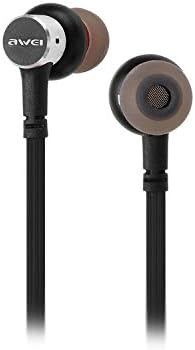
The Awei B923BL earphones are designed for active lifestyles, featuring a wireless Bluetooth connection and a magnetic design for convenient storage around your neck when not in use. They include an integrated microphone for hands-free calling.

Sąranka
1. Ausinių įkrovimas
Before first use, fully charge your earphones. Connect the provided USB charging cable to the charging port on the earphones and the other end to a USB power source (e.g., computer USB port, wall adapter). The indicator light will show charging status and turn off or change color when fully charged.
2. „Bluetooth“ poravimas
- Įsitikinkite, kad ausinės yra išjungtos.
- Paspauskite ir palaikykite daugiafunkcį mygtuką (dažniausiai maitinimo mygtuką), kol indikatoriaus lemputė pakaitomis mirksės raudonai ir mėlynai, rodydama susiejimo režimą.
- Mobiliajame telefone arba „Bluetooth“ įrenginyje eikite į „Bluetooth“ nustatymus ir įjunkite „Bluetooth“.
- Ieškokite available devices. You should see "Awei B923BL" or a similar name in the list.
- Select "Awei B923BL" to connect. Once connected, the indicator light will usually flash blue slowly or turn off, and you may hear a confirmation tone.
- Jei prašoma slaptažodžio, įveskite „0000“.
Once paired, the earphones will automatically connect to the last paired device when turned on, if the device's Bluetooth is active and within range.
Naudojimo instrukcijos
Maitinimo įjungimas/išjungimas
- Maitinimas: Paspauskite ir palaikykite daugiafunkcį mygtuką maždaug 3 sekundes, kol pradės mirksėti mėlyna indikatoriaus lemputė.
- Išjungti: Paspauskite ir palaikykite daugiafunkcį mygtuką maždaug 5 sekundes, kol sumirksės ir užges raudona indikatoriaus lemputė.
Muzikos atkūrimas
- Leisti / pristabdyti: Vieną kartą paspauskite daugiafunkcį mygtuką.
- Kitas takelis: Paspauskite ir palaikykite nuspaudę garsumo didinimo mygtuką.
- Ankstesnis takelis: Paspauskite ir palaikykite nuspaudę garsumo mygtuką.
Skambučių valdymas
- Atsiliepti / Baigti skambutį: Vieną kartą paspauskite daugiafunkcį mygtuką.
- Atmesti skambutį: Paspauskite ir palaikykite daugiafunkcį mygtuką maždaug 2 sekundes.
- Perrink paskutinį numerį: Dukart paspauskite daugiafunkcį mygtuką.
Garsumo valdymas
- Padidinti garsumą: Paspauskite garsumo + mygtuką.
- Sumažinti garsumą: Paspauskite garsumo mygtuką.
Priežiūra
- Clean the earphones regularly with a soft, dry cloth. Do not use harsh chemicals or abrasive materials.
- Nuimkite ausų antgalius ir, jei reikia, nuvalykite juos švelniu muilu ir vandeniu, prieš vėl įdėdami, įsitikinkite, kad jie yra visiškai sausi.
- Ausines laikykite vėsioje, sausoje vietoje, toliau nuo tiesioginių saulės spindulių ir ekstremalių temperatūrų.
- Avoid exposing the earphones to water or excessive moisture.
- Do not attempt to disassemble or modify the earphones, as this will void the warranty.
Trikčių šalinimas
- Ausinės neįsijungia: Įsitikinkite, kad ausinės yra visiškai įkrautos.
- Nepavyksta susieti su įrenginiu:
- Make sure the earphones are in pairing mode (flashing red and blue).
- Įsitikinkite, kad jūsų įrenginyje įjungtas „Bluetooth“.
- Priartinkite ausines arčiau savo įrenginio.
- Pabandykite iš naujo paleisti ausines ir įrenginį.
- Jei ankstesnių „Bluetooth“ ryšių jūsų įrenginyje buvo per daug, juos ištrinkite.
- Nėra garso arba garsas per mažas:
- Patikrinkite garsumo lygius tiek ausinėse, tiek prijungtame įrenginyje.
- Įsitikinkite, kad ausinės tinkamai prijungtos prie jūsų įrenginio.
- Pabandykite leisti skirtingus garso šaltinius.
- Skambučių kokybės problemos:
- Įsitikinkite, kad mikrofonas nėra uždengtas.
- Pereikite į zoną, kurioje mažiau trukdžių.
Specifikacijos
| Funkcija | Detalė |
|---|---|
| Prekės ženklo pavadinimas | Awei |
| Modelio numeris | B923BL |
| Spalva | Juoda |
| Ausinių formos faktorius | Ausyje |
| Ryšio technologija | Bevielis |
| Belaidžio ryšio technologija | Bevielis |
| Amžiaus diapazono aprašymas | Suaugęs |
| Medžiaga | Guma |
| Suderinami įrenginiai | Mobilieji telefonai |
| Kabelio funkcija | Be Kabelio |
| Kontrolės metodas | Palieskite |
| Prekių skaičius | 1 |
| Gamintojas | Awei |
| Ypatingos savybės | Microphone Included (Note: This model does not feature active noise cancellation as per product description.) |
Garantija ir palaikymas
Informacija apie garantiją
This product comes with a 1-year manufacturer's warranty from the date of purchase. For warranty claims or service, please contact the manufacturer or their authorized service agent. For further details, you may also contact the retailer where the product was purchased.
Pagalba klientams
If you encounter any issues not covered in this manual or require further assistance, please refer to the contact information provided with your product packaging or visit the official Awei webpalaikymo išteklių svetainė.