
Įvadas
This manual provides detailed instructions for the proper use and care of your Vivitar DVR917HD 4K Action Camera. Please read this manual thoroughly before operating the device to ensure safe and effective use. The Vivitar DVR917HD is designed to capture high-quality video and photos in various environments, including underwater, thanks to its durable waterproof casing and versatile mounting options.
Produkto savybės
- 2 colių spalvotas LCD ekranas: For precise image capture, video playback, and photo viewing.
- 4K vaizdo įrašymas: Capture stunning video at 4640 x 3480 resolution, along with 1080p and 720p options.
- 16 megapikselių CMOS jutiklis: For high-resolution still photographs.
- Vandeniui atsparus korpusas: Enables use in wet conditions and underwater adventures.
- Integruotas Wi-Fi: Allows direct streaming of content to compatible smartphones or tablets.
- Plataus kampo objektyvas: Designed for capturing expansive scenes.
- Kelios sąsajos: Supports microSD, microSDHC, HDMI, and USB 2.0.
- Kompaktiškas dizainas: Dimensions of 2.6 inches x 2.5 inches x 1.5 inches and a weight of 0.5 pounds.
Pakuotės turinys
Patikrinkite, ar pakuotėje yra visi toliau išvardyti daiktai:
- Vivitar DVR917HD 4K Action Camera
- Neperšlampamas korpusas
- Belaidis nuotolinio valdymo pultas
- Kintamos srovės adapteris
- USB kabelis
- HDMI kabelis
- Helmet Mounting Kit
- Dviračio kalnas

Image: The Vivitar DVR917HD camera shown with its full set of accessories, including the waterproof case, remote, various mounts, and cables.
Sąranka
1. „MicroSD“ kortelės įdėjimas
- Raskite „microSD“ kortelės lizdą kameros šone.
- Gently insert a compatible microSD or microSDHC card (Class 4 or higher recommended) into the slot until it clicks into place. Ensure the card is oriented correctly.
2. Akumuliatoriaus įkrovimas
- Connect the camera to the AC power adapter using the provided USB cable.
- Prijunkite kintamosios srovės adapterį į sieninį lizdą.
- The charging indicator light will illuminate. Charging is complete when the light changes color or turns off.
3. Vandeniui atsparaus korpuso naudojimas
- Open the latch on the waterproof housing.
- Carefully place the camera inside the housing, ensuring it fits snugly.
- Close the latch securely. Before first use in water, perform a leak test without the camera inside.
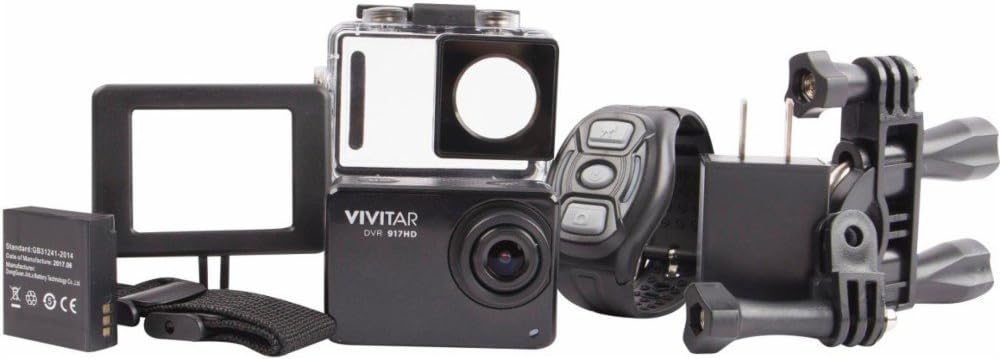
Image: The Vivitar DVR917HD camera positioned within its clear waterproof housing, with the back cover open.
4. Laikiklių tvirtinimas
The camera comes with a helmet mounting kit and a bicycle mount. Follow the instructions provided with each mount to securely attach the camera for your desired activity.

Image: The Vivitar DVR917HD camera enclosed in its waterproof case, securely attached to a mounting accessory.

Image: A person wearing a ski helmet with the Vivitar DVR917HD action camera visibly mounted on the top, against a snowy mountain backdrop.
Naudojimo instrukcijos
1. Įjungimas/išjungimas
- To power on, press and hold the Power/Mode button (usually labeled 'MODE') until the screen illuminates.
- To power off, press and hold the Power/Mode button again until the screen turns off.

Vaizdas: Stambus planas view of the Vivitar DVR917HD action camera, highlighting its front lens and top control buttons.
2. Vaizdo įrašymas
- Ensure the camera is in video recording mode. Use the Mode button to cycle through modes if necessary.
- Press the 'OK' button to start recording. A red indicator light or on-screen icon will typically show recording is active.
- Press the 'OK' button again to stop recording.
3. Fotografavimas
- Switch the camera to photo mode using the Mode button.
- Kadruokite kadrą naudodami 2 colio LCD ekraną.
- Press the 'OK' button to capture a photo.

Image: The Vivitar DVR917HD camera's rear screen displaying a live view from a first-person perspective of someone riding a bicycle.
4. Wi-Fi ryšys
- Įjunkite „Wi-Fi“ fotoaparate per nustatymų meniu.
- On your smartphone or tablet, search for the camera's Wi-Fi network and connect to it.
- Open the Vivitar app (if available) or a compatible action camera app to stream content or control the camera remotely.
5. Belaidžio nuotolinio valdymo pulto naudojimas
The included wireless remote control allows for convenient operation of the camera from a distance. Refer to the remote control's specific instructions for pairing and function details.
Priežiūra
Cleaning the Camera and Housing
- Use a soft, lint-free cloth to clean the camera body and lens. Avoid abrasive materials.
- For the waterproof housing, rinse with fresh water after use in saltwater and allow to air dry. Ensure the O-ring seal is free of debris.
Akumuliatoriaus priežiūra
- Prieš kiekvieną naudojimą visiškai įkraukite akumuliatorių.
- Nelaikykite baterijos nuo ekstremalių temperatūrų.
- Jei fotoaparatas bus nenaudojamas ilgesnį laiką, išimkite bateriją.
Sandėliavimas
Store the camera in a cool, dry place away from direct sunlight and excessive humidity. Keep it protected from dust and impacts.
Trikčių šalinimas
- Kamera neįsijungia: Įsitikinkite, kad akumuliatorius įkrautas ir tinkamai įdėtas.
- Įrašymo problemos: Check if a microSD card is inserted and has sufficient free space. Ensure the card is not corrupted.
- Prasta garso kokybė: The waterproof housing can significantly muffle sound. For better audio, use the camera outside the housing in dry conditions.
- „Wi-Fi“ ryšio problemos: Ensure Wi-Fi is enabled on the camera and your smart device. Try restarting both devices.
- Kameros užšalimas: Išimkite ir vėl įdėkite bateriją, kad iš naujo nustatytumėte fotoaparato gamyklinius nustatymus.
Specifikacijos
| Funkcija | Specifikacija |
|---|---|
| Modelio pavadinimas | DVR917HD |
| Prekės modelio numeris | 3216565590 |
| Veiksminga nejudančioji raiška | 16 MP |
| Vaizdo įrašymo raiška | 4K, 1080p, 720p |
| Vaizdo įrašymo formatas | MP4 |
| Nuotraukų jutiklių technologija | CMOS |
| Ekrano dydis | 2 colių |
| Ryšio technologija | Wi-Fi |
| „Flash“ atminties tipas | Micro SD |
| Ypatinga funkcija | Atsparus vandeniui |
| Objektyvo tipas | Platus kampas |
| Fokusavimo tipas | Automatinis fokusavimas |
| Ekspozicijos valdymas | Automatinis |
| Prekės svoris | 717 g |
| Matmenys | 2.6 x 2.5 x 1.5 colių (apytiksliai) |
Informacija apie garantiją
For detailed warranty information regarding your Vivitar DVR917HD 4K Action Camera, please refer to the warranty card included in your product packaging or visit the official Vivitar websvetainėje. Garantijos sąlygos gali skirtis priklausomai nuo regiono ir pirkimo datos.
Pagalba klientams
If you require further assistance, have questions not covered in this manual, or need technical support, please contact Vivitar customer service. Contact details can typically be found on the Vivitar official websvetainėje arba ant jūsų produkto pakuotės.