
1. Įvadas
This manual provides comprehensive instructions for the installation, operation, and maintenance of your BlueBird A1390 Automatic Irrigation Tap Programmer. This device is designed to automate your garden watering schedule, ensuring efficient and consistent irrigation. Please read this manual thoroughly before using the product to ensure correct operation and to prevent damage.
2. Saugos informacija
- Do not immerse the unit in water. The unit is designed to be weather-resistant, but not submersible.
- Use only 1.5V AA alkaline batteries. Do not mix old and new batteries, or different types of batteries.
- Jei prietaisas ilgesnį laiką nebus naudojamas, išimkite baterijas, kad išvengtumėte elektrolito pratekėjimo.
- Laikyti vaikams nepasiekiamoje vietoje.
- Nebandykite patys ardyti ar remontuoti įrenginio. Dėl remonto kreipkitės į kvalifikuotus specialistus.
- Įsitikinkite, kad visos jungtys yra tvirtos, kad išvengtumėte nuotėkio.
3. Pakuotės turinys
Patikrinkite pakuotę, ar joje yra šie daiktai:
- 1x BlueBird A1390 Automatic Irrigation Tap Programmer
- 1x Naudotojo vadovas (šis dokumentas)
Note: 2 AA 1.5V batteries are required for operation and are not included in the package.
4. Produktas baigtasview
The BlueBird A1390 features two main rotary dials for setting irrigation frequency and duration, along with a battery indicator and an ON/OFF switch.
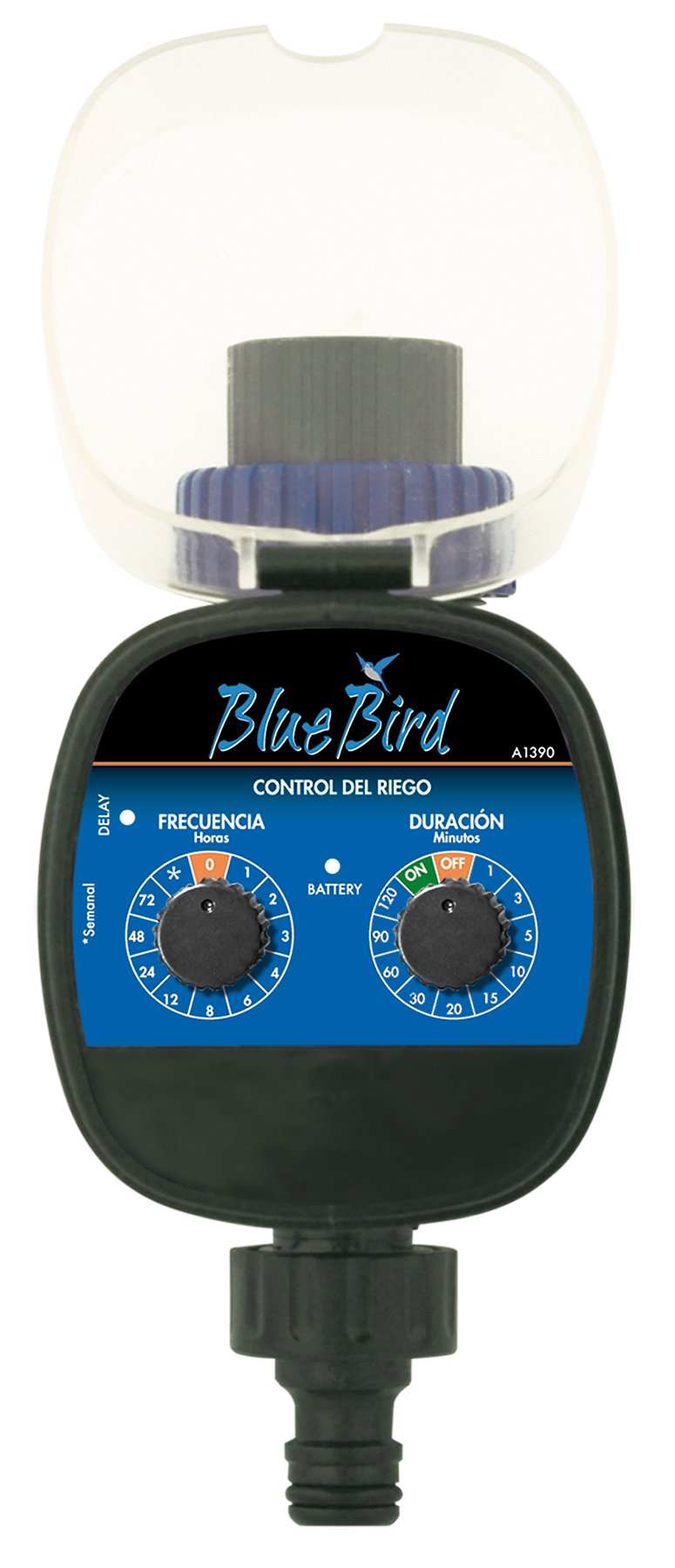
1 paveikslas: Priekyje view of the BlueBird A1390 Irrigation Programmer. The left dial controls irrigation frequency, and the right dial controls irrigation duration. A battery indicator light is located between the dials.
Komponentai:
- Frequency Dial (Frecuencia): Sets how often the irrigation occurs. Options include 0 (off), 1, 2, 3, 4, 6, 8, 12, 24, 48, 72 hours, and a '*' setting for manual or weekly operation.
- Duration Dial (Duración): Sets how long each irrigation cycle lasts. Options include 0 (off), 1, 3, 5, 10, 15, 20, 30, 60, 90, 120 minutes.
- ĮJUNGIMO/IŠJUNGIMO jungiklis: Located on the Duration Dial, allows for manual override or turning the unit off.
- Baterijos indikatorius: A light that indicates battery status.
- Baterijų skyrius: Located at the rear of the unit (not visible in Figure 1).
- Vandens įleidimo / išleidimo anga: Standard tap and hose connections.
5. Sąranka
5.1 Akumuliatoriaus įdėjimas
- Įrenginio gale suraskite baterijų skyriaus dangtelį.
- Remove the cover by twisting or sliding it open.
- Insert two (2) new 1.5V AA alkaline batteries, ensuring correct polarity (+/-).
- Tvirtai užsukite baterijų skyriaus dangtelį, kad išlaikytumėte atsparumą vandeniui.
5.2 Connecting to the Tap
- Įsitikinkite, kad jūsų lauko čiaupas yra užsuktas.
- Screw the BlueBird A1390 programmer onto your tap. Hand-tighten only to prevent damage.
- Connect your garden hose or irrigation system to the outlet of the programmer. Ensure a tight connection to prevent leaks.
- Slowly turn on your outdoor tap. Check for any leaks at the connections.
6. Naudojimo instrukcijos
The BlueBird A1390 is designed for simple, intuitive programming using its two rotary dials.
6.1 Setting Irrigation Frequency
- Pasukite Dažnio rinkimas (left dial) to your desired irrigation interval.
- Galimi nustatymai:
- 0: No irrigation (off).
- 1, 2, 3, 4, 6, 8, 12, 24, 48, 72: Irrigation every X hours.
- *: This setting typically indicates a manual mode or a weekly cycle, depending on the specific model's internal logic. Refer to the example below for common usage.
6.2 Drėkinimo trukmės nustatymas
- Pasukite Duration Dial (right dial) to your desired watering time per cycle.
- Galimi nustatymai:
- IŠJUNGTA: No irrigation.
- ĮJUNGTA: Continuous irrigation (use with caution).
- 1, 3, 5, 10, 15, 20, 30, 60, 90, 120: Irrigation for X minutes.
6.3 Pvzample Programavimas
To water every 6 hours for 10 minutes:
- Nustatykite Dažnio rinkimas į 6 (valandos).
- Nustatykite Duration Dial į 10 (minutėmis).
The programmer will automatically begin the cycle based on these settings. The first cycle will typically start shortly after programming, or after a short delay.
6.4 Manual ON/OFF
To manually turn on the water, rotate the Duration Dial to the ON position. To stop manual watering, rotate the dial back to IŠJUNGTA or a timed setting.
7. Priežiūra
7.1 Akumuliatoriaus keitimas
When the battery indicator light dims or the unit stops functioning, it's time to replace the batteries. Follow the steps in Section 5.1 for battery installation.
7.2 Valymas
Clean the exterior of the programmer with a damp cloth. Do not use abrasive cleaners or solvents. Ensure no water enters the battery compartment or internal electronics.
7.3 Žiemos laikymas
Before the first frost, disconnect the programmer from the tap and hose. Remove the batteries. Store the unit indoors in a dry, frost-free location to prevent damage from freezing water.
8. Problemų sprendimas
| Problema | Galima priežastis | Sprendimas |
|---|---|---|
| Unit does not turn on/display. | Neišsikrovusios arba neteisingai įdėtos baterijos. | Pakeiskite baterijas, užtikrindami teisingą poliškumą. |
| Vanduo neteka. | Tap is off; programmer set to '0' or 'OFF'; low water pressure; clogged filter. | Ensure tap is fully open. Check frequency/duration settings. Verify water pressure. Clean any filters. |
| Unit leaks at connections. | Loose connections; missing or damaged washer. | Tighten connections. Check and replace washers if necessary. |
| Irrigation schedule is incorrect. | Incorrect frequency or duration settings. | Re-check and adjust the Frequency and Duration Dials according to your desired schedule. |
9. Specifikacijos
- Modelis: A1390
- Prekinis ženklas: Mėlynas paukštis
- Gamintojas: Altadex
- Maitinimo šaltinis: 2 x AA 1.5 V šarminės baterijos (nepridedamos)
- Laistymo dažnis: 0, 1, 2, 3, 4, 6, 8, 12, 24, 48, 72 hours, or '*' (manual/weekly)
- Drėkinimo trukmė: OFF, ON, 1, 3, 5, 10, 15, 20, 30, 60, 90, 120 minutes
- Gaminio matmenys: Apytiksliai 19.4 x 10.6 x 10 cm
- Produkto svoris: Maždaug 280 g
- GTIN (UPC): 8426375113909
10. Garantija ir palaikymas
This product is covered by a standard manufacturer's warranty. For specific warranty details, please refer to the documentation provided at the time of purchase or contact your retailer. For technical support or inquiries, please contact the seller or manufacturer directly.