
1. Svarbi saugos informacija
Please read all instructions carefully before using the Royal 1830MX Cross-Cut Paper Shredder. Retain this manual for future reference.
- Keep hands, hair, and loose clothing away from the shredder's paper entry slot.
- Vaikus ir gyvūnus laikykite toliau nuo smulkintuvo.
- Atjunkite smulkintuvą nuo elektros tinklo, kai jo nenaudojate arba prieš valydami.
- Do not shred metal objects, large paper clips, or continuous forms.
- Do not spray any flammable products onto the shredder or use near flammable liquids.
- Nenaudokite smulkintuvo, jei pažeistas maitinimo laidas.
- Empty the waste basket regularly to prevent jams and ensure proper operation.
2. Produktas baigtasview
The Royal 1830MX is a cross-cut paper shredder designed for home or office use. It features a robust motor capable of shredding up to 18 sheets of paper in a single pass, as well as credit cards, CDs, and DVDs. The shredder produces small cross-cut particles for enhanced security.
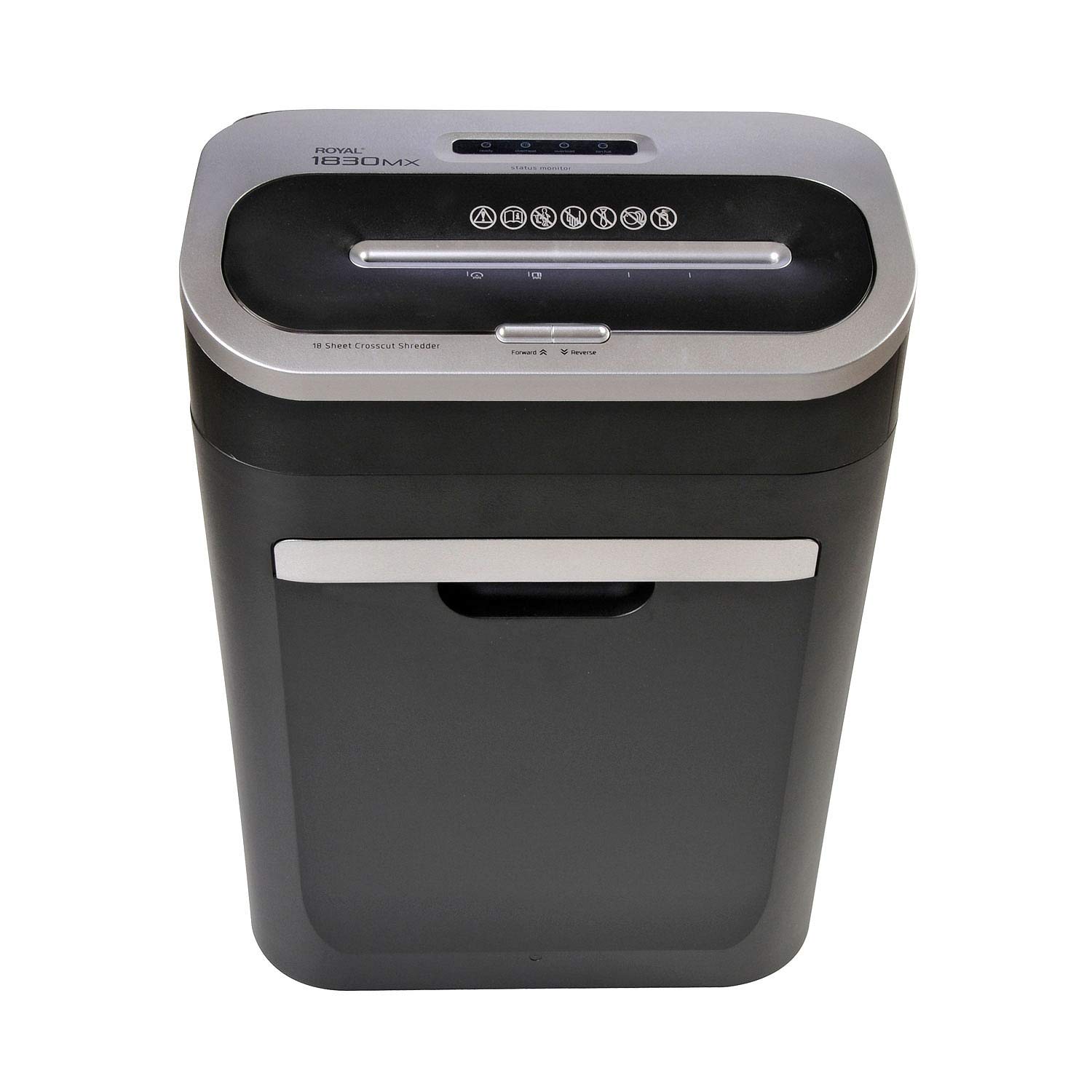
2.1 pav.: priekis view of the Royal 1830MX Cross-Cut Paper Shredder, showing the paper entry slot and control panel.

2.2 pav.: Kampinis view of the Royal 1830MX shredder, highlighting its compact design and pull-out waste basket.
Pagrindinės funkcijos:
- Smulkinimo tipas: Cross-cut (5/32" x 1 5/8" particles)
- Lapo talpa: Up to 18 sheets (20 lb bond paper)
- Susmulkinti: Paper, credit cards, CDs, DVDs, staples
- Waste Basket Capacity: 7.5 gallons, pull-out design with viewlangas
- Funkcijos: Auto start/stop, reverse
- Mobilumas: Casters for easy movement
3. Sąranka
- Išpakuoti: Carefully remove the shredder from its packaging. Ensure all packing materials are removed from the shredder head and waste basket.
- Padėtis: Place the shredder on a flat, stable surface. Ensure there is adequate space around the unit for ventilation and access to the waste basket.
- Prijunkite maitinimą: Prijunkite maitinimo laidą į standartinį 120 V kintamosios srovės lizdą.
- Waste Basket: Ensure the 7.5-gallon pull-out waste basket is correctly inserted and fully closed. The shredder will not operate if the basket is not properly seated.
4. Naudojimo instrukcijos
4.1 Valdymo skydas
The control panel is located on top of the shredder head. It includes buttons for Forward, Reverse, and indicators for power and status.

Figure 4.1: Close-up of the Royal 1830MX control panel, showing the power, forward, and reverse buttons, along with status indicators.
4.2 Popieriaus smulkinimas
- Ensure the shredder is plugged in and the waste basket is correctly inserted.
- The shredder is in "Auto" mode by default when powered on.
- Insert up to 18 sheets of paper (20 lb bond) straight into the paper entry slot. The shredder will automatically start and stop once the paper has passed through.
- Optimaliam našumui ir popieriaus strigimui išvengti neviršykite maksimalaus lapų kiekio.

Figure 4.2: The Royal 1830MX actively shredding paper, demonstrating the paper entry slot in use.
4.3 Shredding Credit Cards, CDs, and DVDs
- Locate the dedicated slot for credit cards and optical media (CDs/DVDs) on the shredder head.
- Insert one credit card or optical disc at a time into the designated slot. The shredder will automatically engage and shred the item.
- The shredded particles for these items will fall into the main waste basket.
4.4 Atvirkštinė funkcija
In case of a paper jam, press the "Reverse" button on the control panel. This will reverse the shredder blades, helping to clear the jam. If the jam persists, unplug the shredder and carefully remove the paper manually.
5. Priežiūra
5.1 Emptying the Waste Basket
The Royal 1830MX features a 7.5-gallon pull-out waste basket. When the basket is full, the shredder's "Bin Full" indicator light may illuminate, and the shredder will cease operation. To empty:
- Atjunkite smulkintuvą nuo elektros lizdo.
- Pull out the waste basket from the front of the unit.
- Susmulkintą medžiagą išmeskite.
- Slide the waste basket back into the unit until it clicks securely into place.
- Prijunkite smulkintuvą atgal.
5.2 Oiling the Shredder Blades
Regular oiling of the shredder blades is recommended to maintain optimal performance and extend the life of your shredder. Oil the blades after every 30 minutes of continuous shredding or at least twice a month with shredder oil (not included).
- Ant popieriaus įvedimo angos užtepkite ploną smulkintuvo alyvos sluoksnį.
- Per smulkintuvą perbraukite kelis popieriaus lapus, kad aliejus pasiskirstytų tolygiai.
- Alternatively, you can oil a sheet of paper and shred it.
6. Problemų sprendimas
| Problema | Galima priežastis | Sprendimas |
|---|---|---|
| Smulkintuvas neįsijungia. |
|
|
| Popieriaus strigtis. |
|
|
| "Bin Full" indicator lights up, but bin is not full. |
|
|
| Shredder is noisy or slow. |
|
|
7. Specifikacijos
- Modelis: 1830 MX
- Smulkinimo tipas: Kryžminis
- Smulkinimo dydis: 5/32" x 1 5/8"
- Lapo talpa: 18 lapų (20 svarų obligacijų popierius)
- Waste Basket Capacity: 7.5 galonai
- Susmulkinti: Paper, Credit Cards, CDs, DVDs, Staples
- Funkcijos: Auto Start/Stop, Reverse
- Prekės svoris: Maždaug 34 svaro
- Galia: 120V kintamoji srovė
- Spalva: Juoda arba sidabrinė
- Pirmą kartą pasiekiama data: 25 m. kovo 2018 d
8. Garantija ir palaikymas
For warranty information or technical support, please refer to the warranty card included with your product or contact Royal customer service. Keep your purchase receipt as proof of purchase.
Note: Specific warranty terms and contact details may vary. Please consult the official Royal website or your product documentation for the most current information.