
1. Įvadas
The Flashpoint Zoom Li-Ion Mini R2 TTL Flash is a compact and powerful flash unit designed for use with select Sony mirrorless cameras, including models such as A7RIII, a7rII, a7R, a58, a99, ILCE6000L, a77II, RX10, and the a9. This flash features an integrated R2 radio transceiver, enabling wireless triggering and control. It can function as a master unit to command other Flashpoint and Godox R2-compatible slave units, offering versatile lighting solutions for various photographic scenarios.
2. Saugos priemonės
- Neardykite ir nemodifikuokite blykstės įrenginio. Remontą turėtų atlikti tik įgalioti techninės priežiūros darbuotojai.
- Blykstės įrenginį laikykite sausą. Saugokite jį nuo lietaus, drėgmės ar didelės oro drėgmės.
- Nelieskite blykstės vamzdžio po įjungimo, nes jis gali būti karštas.
- Laikyti vaikams nepasiekiamoje vietoje.
- Use only the specified battery and charger. Improper use can lead to fire, explosion, or electric shock.
- Venkite tiesioginio blykstės poveikio akims, ypač iš arti, nes ji gali pakenkti regėjimui.
3. Produktas baigtasview
3.1 Pakuotės turinys
- Flashpoint Zoom Li-Ion Mini Flash Unit
- Mini stendas
- Apsauginis dėklas
- Diffuser (assumed from 'Dif' in product data)
3.2 Flash Components
Familiarize yourself with the main components of your Flashpoint Zoom Li-Ion Mini R2 TTL Flash.

3.2.1 paveikslas: Priekyje view of the Flashpoint Zoom Li-Ion Mini R2 TTL Flash, showing the flash head and main body.
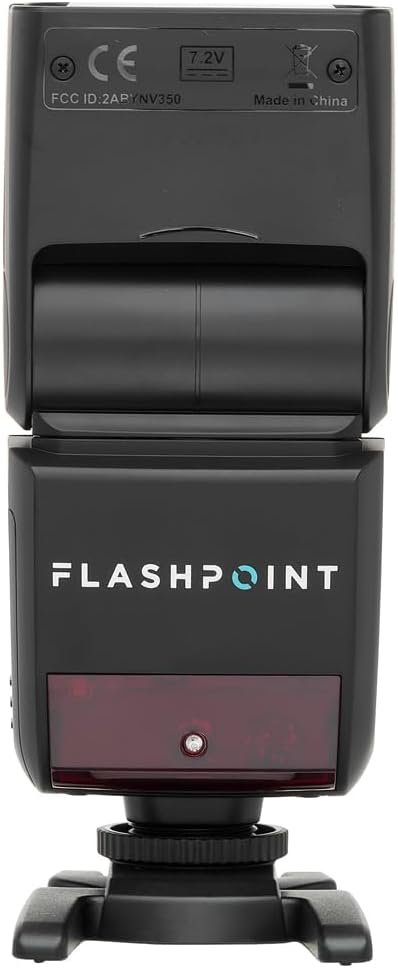
3.2.2 paveikslas: Galinis view of the flash, highlighting the LCD display and control buttons for mode, zoom, sync, and power.

3.2.3 paveikslas: The flash unit with its built-in wide-angle diffuser panel extended from the flash head.
4. Sąranka
4.1 Akumuliatoriaus įdėjimas
- Raskite baterijų skyrių blykstės įrenginio šone.
- Slide the battery cover release latch and open the compartment.
- Insert the Li-Ion battery, ensuring correct polarity as indicated inside the compartment.
- Uždarykite baterijų skyriaus dangtelį, kol jis spragtelėdamas tvirtai užsifiksuos vietoje.

4.1.1 paveikslas: Šoninė view of the flash unit, indicating the battery compartment with a 'BATT.PUSH' label.
4.2 Tvirtinimas prie kameros
- Įsitikinkite, kad blykstės įrenginys yra išjungtas.
- Slide the flash's hot shoe foot into your Sony camera's hot shoe mount.
- Tighten the locking ring on the flash foot to secure it to the camera. Do not overtighten.
4.3 Įjungimas / išjungimas
Press and hold the power button (usually marked with a ⚡ or power symbol) on the rear control panel to turn the flash on or off.
5. Naudojimo instrukcijos
5.1 Pagrindiniai veikimo režimai
The Flashpoint Zoom Li-Ion Mini R2 TTL Flash supports various operating modes:
- TTL automatinės blykstės režimas: Automatiškai nustato blykstės galingumą, kad ekspozicija būtų tinkama.
- Rankinis (M) režimas: Leidžia rankiniu būdu reguliuoti blykstės galią.
- Daugiafunkcis (stroboskopinis) režimas: Vienos ekspozicijos metu suveikia keletas greitų blyksnių.
- S1/S2 optinio pavaldinio režimai: Triggers the flash optically when another flash fires.
Naudokite REŽIMAS button on the control panel to cycle through these modes.

5.1.1 paveikslas: Išsamus view of the flash control panel, showing buttons for MODE, ZOOM, SYNC, SLAVE, GR/CH, and the SET dial.
5.2 R2 Wireless System
The integrated R2 radio transceiver provides wireless control. Set the flash to Master or Slave mode and configure the group (GR) and channel (CH) settings to match your R2-compatible transmitter or other R2 flashes. Refer to your R2 transmitter's manual for detailed wireless setup.
5.3 Blykstės galvutės reguliavimas
The flash head can be rotated and tilted to bounce light off ceilings or walls for softer illumination.
- Horizontalus sukimasis: 0-270 laipsnių.
- Vertikalus pakreipimas: -7 iki 90 laipsnių.

5.3.1 paveikslas: Illustration demonstrating the flexible rotation and tilt capabilities of the flash head.
5.4 Mastelio keitimo funkcija
The flash features an automatically zooming flashhead from 24-105mm. This adjusts the flash coverage to match the focal length of your lens. In manual mode, you can also adjust the zoom manually using the MODYTI mygtuką.
6. Priežiūra
- Valymas: Blykstės įrenginį valykite minkšta, sausa šluoste. Įsisenėjusiam purvui valyti naudokite šiek tiek drėgną šluostę.amp cloth with mild detergent, then wipe dry. Do not use organic solvents like thinner or benzene.
- Saugykla: Kai ilgesnį laiką nenaudojate blykstės, išimkite bateriją ir laikykite ją vėsioje, sausoje vietoje, geriausia apsauginiame dėkle.
- Akumuliatoriaus priežiūra: Recharge the Li-Ion battery regularly, even if not in use, to maintain its lifespan. Avoid fully discharging the battery.
7. Problemų sprendimas
If you encounter issues with your Flashpoint Zoom Li-Ion Mini R2 TTL Flash, refer to the following common problems and solutions:
| Problema | Galima priežastis / sprendimas |
|---|---|
| Blykstė nesuveikia. | Check if the flash is powered on. Ensure the battery is charged and correctly installed. Verify the flash is securely mounted on the camera hot shoe. Check camera flash settings. |
| Flash output is inconsistent or incorrect. | Ensure TTL mode is selected for automatic exposure, or adjust manual power settings. Check for obstructions between the flash and subject. Verify flash head zoom matches lens focal length. |
| Belaidis paleidimas nepavyksta. | Confirm that the flash and transmitter are set to the same R2 group and channel. Ensure both units are within range and have fresh batteries. Check for radio interference. |
| Difficulty mounting flash on camera hot shoe. | Ensure the locking ring is fully loosened. Some camera hot shoes may have tighter tolerances; apply firm, even pressure. If persistent, verify compatibility with your specific camera model. |
| Unable to update firmware via micro-USB port. | The micro-USB port may be recessed. Try using a micro-USB cable with a very slim connector housing. If issues persist, contact Flashpoint customer support for guidance on compatible cables or alternative update methods. |
8. Specifikacijos
| Funkcija | Specifikacija |
|---|---|
| Vadovo numeris | 82ft / 25m (at ISO 100) |
| Perdirbimo laikas | nuo 0.1 iki 1.7 sekundžių |
| Mastelio diapazonas | 24–105 mm (automatinis / rankinis) |
| Bounce Head Rotation | Horizontal: 0 to 270 degrees |
| Bounce Head Tilt | Vertical: -7 to 90 degrees |
| Matmenys (I x P x A) | 8.4 x 7.2 x 2.8 colio |
| Prekės svoris | 1.87 svaro |
| Suderinami tvirtinimai | Sony Alpha |
| Modelio numeris | Zoom-Lion Mini |
| ASIN | B07CV42KFV |
9. Garantija ir palaikymas
9.1 Informacija apie garantiją
Flashpoint products typically come with a limited manufacturer's warranty. For specific details regarding the warranty period and terms for your Zoom Li-Ion Mini R2 TTL Flash, please refer to the warranty card included with your product or visit the official Flashpoint websvetainę.
9.2 Pagalba klientams
For technical assistance, troubleshooting beyond this manual, or service inquiries, please contact Flashpoint customer support. Contact information can usually be found on the Flashpoint websvetainėje arba savo produkto dokumentacijoje.