
1. Įvadas
This manual provides essential instructions for the installation, operation, and maintenance of your Xigmatek Vanguard Plus PC Case. This full tower case is designed to accommodate ATX, Micro ATX, and Mini ITX motherboards and comes with a pre-installed 600W 80PLUS Active PFC power supply. It features convenient front panel connectivity including USB 3.0 and USB 2.0 ports, along with audio jacks, and includes LED fans for enhanced cooling and aesthetics.
2. Sąranka ir diegimas
Before beginning installation, ensure your workspace is clean and static-free. Refer to your motherboard and component manuals for specific installation details.
2.1. Dėklo atidarymas
Carefully remove the side panels of the case. Typically, this involves unscrewing thumbscrews at the rear and sliding the panels backward.
2.2. Pagrindinės plokštės montavimas
Install the I/O shield provided with your motherboard into the rear opening of the case. Align your ATX, Micro ATX, or Mini ITX motherboard with the standoffs inside the case. Secure the motherboard using the appropriate screws. Ensure all standoffs are correctly aligned to prevent damage.

Vaizdas: vidinis view of the Xigmatek Vanguard Plus PC case, illustrating the motherboard mounting area and drive bays.
2.3. Maitinimo blokas (PSU)
The 600W 80PLUS Active PFC power supply is pre-installed in the lower section of the case. Connect the necessary power cables to your motherboard, CPU, graphics card, and storage devices. Route cables through the designated cutouts for optimal airflow and a tidy build.
2.4. Atminties disko diegimas
Install your 2.5-inch SSDs or 3.5-inch HDDs into the available drive bays. Secure them with screws or tool-less mechanisms if provided. Connect SATA data and power cables.
2.5. Išplėtimo kortelės
Remove the necessary expansion slot covers at the rear of the case. Insert your graphics card or other expansion cards into the PCIe slots on your motherboard and secure them with screws.
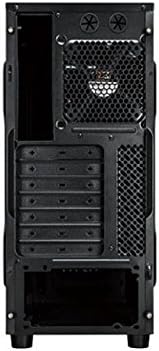
Vaizdas: Galinis view of the Xigmatek Vanguard Plus PC case, highlighting the expansion slots and rear fan mounting area.
2.6. Priekinio skydelio jungtys
Connect the front panel cables (USB 3.0, USB 2.0, HD Audio, Power Switch, Reset Switch, Power LED, HDD LED) to the corresponding headers on your motherboard. Refer to your motherboard manual for header locations.

Vaizdas: priekis view of the Xigmatek Vanguard Plus PC case, showcasing the front panel design and an illuminated LED fan.
3. Naudojimo instrukcijos
Once all components are installed and cables are connected, replace the side panels. Connect your monitor, keyboard, mouse, and power cable to the rear of the PC. Press the power button on the front panel to start your system.
3.1. Priekinio skydelio prievadai
- USB 3.0 prievadai (x2): Didelės spartos duomenų perdavimui su suderinamais įrenginiais.
- USB 2.0 prievadas (x1): Standartiniams USB įrenginiams.
- Microphone Input (x1): Prijunkite mikrofoną.
- Speaker Output (x1): Prijunkite ausines arba garsiakalbius.
3.2. LED Fans
The case includes LED fans that provide cooling and visual effects. These fans typically draw power directly from the power supply or motherboard fan headers and operate automatically based on system temperature or a fixed speed.
4. Priežiūra
Reguliarus techninis aptarnavimas padeda užtikrinti optimalų kompiuterio komponentų veikimą ir ilgaamžiškumą.
- Dulkių filtrai: Periodically check and clean any removable dust filters (e.g., on the front, top, or bottom of the case) to maintain good airflow. Use compressed air or a soft brush.
- Vidaus valymas: Every few months, open the case and use compressed air to remove dust buildup from fans, heatsinks, and other components. Hold fan blades gently to prevent over-spinning during cleaning.
- Išorinis valymas: Išorinius paviršius nuvalykite minkšta, damp audinys. Venkite stiprių cheminių medžiagų.
5. Problemų sprendimas
Šiame skyriuje aptariamos dažniausiai pasitaikančios problemos, su kuriomis galite susidurti.
- Nėra galios:
- Įsitikinkite, kad maitinimo laidas yra tvirtai prijungtas tiek prie maitinimo bloko, tiek prie sieninio lizdo.
- Patikrinkite, ar maitinimo jungiklis maitinimo bloko gale yra padėtyje „Įjungta“.
- Verify all internal power cables (24-pin ATX, 8-pin CPU, GPU power) are correctly seated.
- Įsitikinkite, kad priekinio skydelio maitinimo jungiklio kabelis tinkamai prijungtas prie pagrindinės plokštės lizdo.
- Fans Not Spinning / No LED Lights:
- Check fan power connections to the motherboard or PSU.
- Ensure LED cables (if separate) are connected.
- Priekinio skydelio USB/garsas neveikia:
- Verify that the USB 3.0, USB 2.0, and HD Audio cables from the front panel are correctly connected to the corresponding headers on your motherboard.
- Check your motherboard's BIOS/UEFI settings to ensure front panel audio/USB is enabled.
- Komponentų tinkamumo problemos:
- Ensure all components, especially large graphics cards or CPU coolers, are compatible with the case dimensions.
- Some larger gaming motherboards or specific cooler designs may require careful planning for exhaust fan placement.
6. Specifikacijos
| Funkcija | Detalė |
|---|---|
| Prekės ženklas | Xigmatek |
| Modelio numeris | Vanguard Plus |
| Atvejo tipas | Pilnas bokštas |
| Pagrindinės plokštės suderinamumas | ATX, mikro ATX, mini ITX |
| Įtrauktas maitinimo šaltinis | 600W 80PLUS Active PFC |
| Priekinio skydelio prievadai | 2x USB 3.0, 1x USB 2.0, 1x Microphone, 1x Speaker |
| Aušinimo būdas | Air (includes LED fans) |
| Produkto svoris | 6.82 kilogramo |
| Kilmės šalis | Kinija |
7. Informacija apie garantiją
The Xigmatek Vanguard Plus PC Case comes with a 2 metų gamintojo garantija from the date of purchase. This warranty covers defects in materials and workmanship under normal use. Please retain your proof of purchase for warranty claims. The warranty does not cover damage caused by misuse, accident, modification, or unauthorized repair.
8. Parama
For technical assistance, troubleshooting beyond this manual, or warranty inquiries, please contact Xigmatek customer support through their official website or the retailer where the product was purchased. Have your product model number (Vanguard Plus) and proof of purchase ready when contacting support.