
1. Įvadas
This manual provides detailed instructions for the installation, operation, and maintenance of your SUNNYSKY 60A MPPT Solar Charge Controller. This device is designed to efficiently manage power flow from solar panels to batteries, ensuring optimal charging and battery longevity. It features an intelligent LCD display for real-time monitoring and configuration.
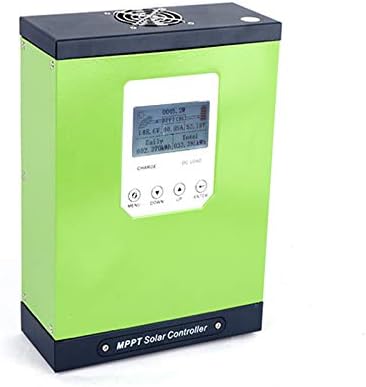
1 pav.: priekis view of the SUNNYSKY 60A MPPT Solar Charge Controller. The device is green with a black top and bottom, featuring an LCD screen and control buttons on the front panel.
2. Pagrindinės savybės
- MPPT solar controller with real-time power generation and current display.
- Displays daily and cumulative power generation.
- Records fault history for easy troubleshooting.
- Supports lead-acid, colloidal, and lithium batteries.
- Constructed with premium brand components for a theoretical design lifespan exceeding 10 years and high-temperature resistance above 105°C.
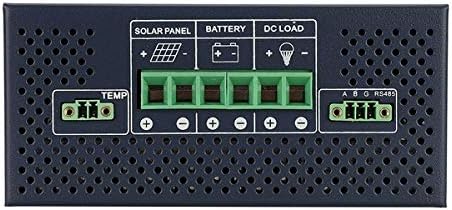
Figure 2: The controller utilizes the latest MPPT algorithm for maximum power point tracking, achieving over 98.5% charging efficiency and over 99.73% tracking accuracy.
3. Saugos informacija
Prieš montuodami ir naudodami, perskaitykite ir supraskite visas saugos instrukcijas. Nesilaikant šių instrukcijų, gali kilti elektros smūgis, gaisras arba sunkūs sužalojimai.
Apsaugos savybės:
- PV atvirkštinio poliškumo apsauga
- PV trumpojo jungimo apsauga
- PV over current alarm protection
- Akumuliatoriaus perkrovos apsauga
- Akumuliatoriaus apsauga nuo išsikrovimo
- Baterijos atvirkštinio poliškumo apsauga
- Apsauga nuo trumpojo jungimo
- Apsauga nuo perkrovos
- Valdiklio apsauga nuo perkaitimo
4. Produktas baigtasview
4.1. Fiziniai matmenys
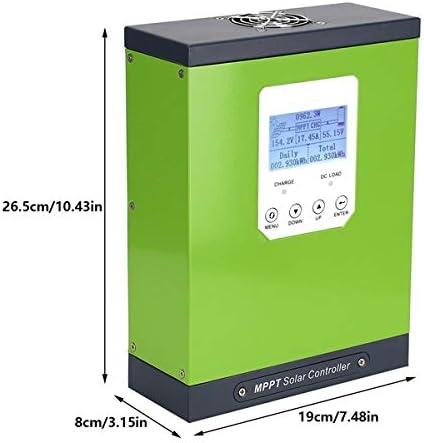
Figure 3: The controller measures 26.5 cm (10.43 inches) in height, 19 cm (7.48 inches) in width, and 8 cm (3.15 inches) in depth.
4.2. Front Panel and Controls

Figure 4: The front panel features an LCD display, charging status indicator, DC output indicator, Menu button, Down page button, Up page button, and Enter button. The wire connection cover is located at the bottom.
4.3. Prijungimo gnybtai

Figure 5: The rear panel includes terminals for Solar Panel (+/-), Battery (+/-), DC Load (+/-), and a TEMP sensor port, along with an RS485 communication port.
5. Sąranka ir diegimas
Proper installation is crucial for the safe and efficient operation of the charge controller. Ensure all connections are secure and correctly polarized.
5.1. Laidų jungtys
- Connect the battery to the controller first. Ensure correct polarity (+ to + and - to -).
- Connect the solar panel to the controller. Ensure correct polarity.
- Connect the DC load to the controller (optional). Ensure correct polarity.
- Connect the temperature sensor to the TEMP port.
- If using communication features, connect the RS485 cable.
Video 1: Demonstration of the controller activating a lithium battery. This video illustrates how the MPPT controller can initiate charging even when a battery is deeply discharged.
Video 2: Short demonstration showing the controller's ability to activate a dead battery, allowing it to begin charging from solar input.
6. Naudojimo instrukcijos
The intelligent LCD display provides real-time data and allows for system configuration.
6.1. LCD ekranas viršview
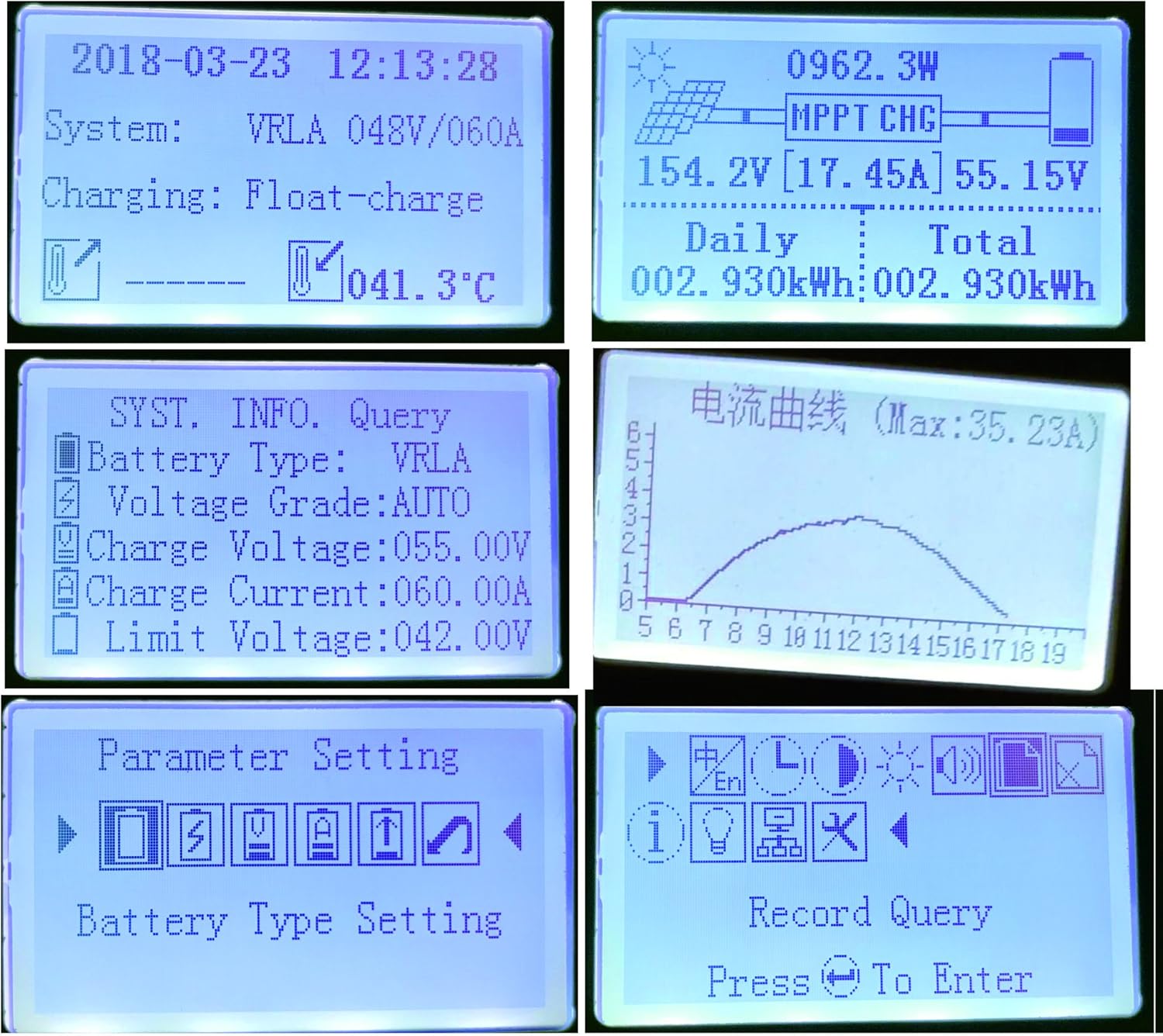
Figure 6: The LCD displays real-time information such as system voltage, charging current, daily and total power generation, battery type, and temperature. It also shows various menu screens for settings and record queries.
6.2. Meniu naršymas
Use the 'MENU', 'DOWN', 'UP', and 'ENTER' buttons to navigate through the display screens and adjust settings.
- MENIU: Accesses the main menu or returns to the previous screen.
- ŽEMYN: Scrolls down through options or decreases a value.
- AUKŠTYN: Scrolls up through options or increases a value.
- Įveskite: Patvirtina pasirinkimą arba įeina į submeniu.
7. Parametrų nustatymai
To access parameter settings, press the 'MENU' button and navigate to the 'Parameter Setting' option. A password may be required (refer to your product's specific documentation for default password).
7.1. Baterijos tipo nustatymas
Select the appropriate battery type (lead-acid, colloidal, or lithium) to ensure correct charging algorithms are applied.
7.2. Charge Voltage Nustatymas
Adjust the charge voltage according to your battery manufacturer's specifications. This includes float, boost, and equalization voltages.
7.3. Charge Current Setting
Set the maximum charging current to prevent overcharging or damage to your batteries.
7.4. Discharge Limit Voltage Nustatymas
Configure the minimum voltage at which the load will be disconnected to protect the battery from over-discharge.
7.5. Laiko ir datos koregavimas
Set the current time and date for accurate record-keeping of power generation data.
8. Priežiūra
Reguliarus saulės įkrovimo valdiklio aptarnavimas užtikrina jo ilgaamžiškumą ir optimalų veikimą.
- Reguliariai tikrinkite visas laidų jungtis, ar nėra sandarumo ir korozijos.
- Clean the controller's exterior and display screen with a dry, soft cloth.
- Užtikrinkite tinkamą vėdinimą aplink valdiklį, kad jis neperkaistų.
- Patikrinkite akumuliatoriaus gnybtus, ar nėra korozijos, ir prireikus nuvalykite.
9. Problemų sprendimas
The controller's fault record display can assist in diagnosing issues.
- Be maitinimo / ekranas išjungtas: Patikrinkite akumuliatoriaus jungtis ir tūrįtage. Ensure solar panels are receiving sufficient sunlight.
- Akumuliatorius neįkraunamas: Verify solar panel connections and output. Check battery type settings. Inspect for any fault codes on the display.
- Įkrovimas neveikia: Check DC load connections. Ensure battery voltage is above the discharge limit. Check for load short circuit or overload protection activation.
- Perkaitimas: Ensure proper ventilation. Reduce load if ambient temperature is high.
3 vaizdo įrašas: išsamus aprašymasview of the SUNNYSKY MPPT Solar Charge Controller, demonstrating its features, display, and configuration options. This video also highlights comparisons with other controllers and discusses installation aspects.
10. Specifikacijos
| Atributas | Vertė |
|---|---|
| Gaminio matmenys | 7.56 x 10.24 x 3.15 colio |
| Prekės svoris | 8.43 svaro |
| Gamintojas | SUNNYSKY |
| ASIN | B07CXZQQTP |
| Reikalingos baterijos | No (8 12V batteries required for system operation, not included with controller) |
| Prekės ženklas | SUNNYSKY |
| UPC | 606814417296 |
11. Garantija ir palaikymas
For warranty information and technical support, please refer to the documentation included with your purchase or contact SUNNYSKY customer service directly. Protection plans may be available for extended coverage.