
Įvadas
This manual provides essential information for the safe and efficient operation of your TechniSat Digitradio 1 BR Home Edition portable radio. This device offers high-quality digital radio reception via DAB+ and traditional FM radio, along with a powerful, interchangeable battery for portable use. Please read these instructions carefully before using the device.
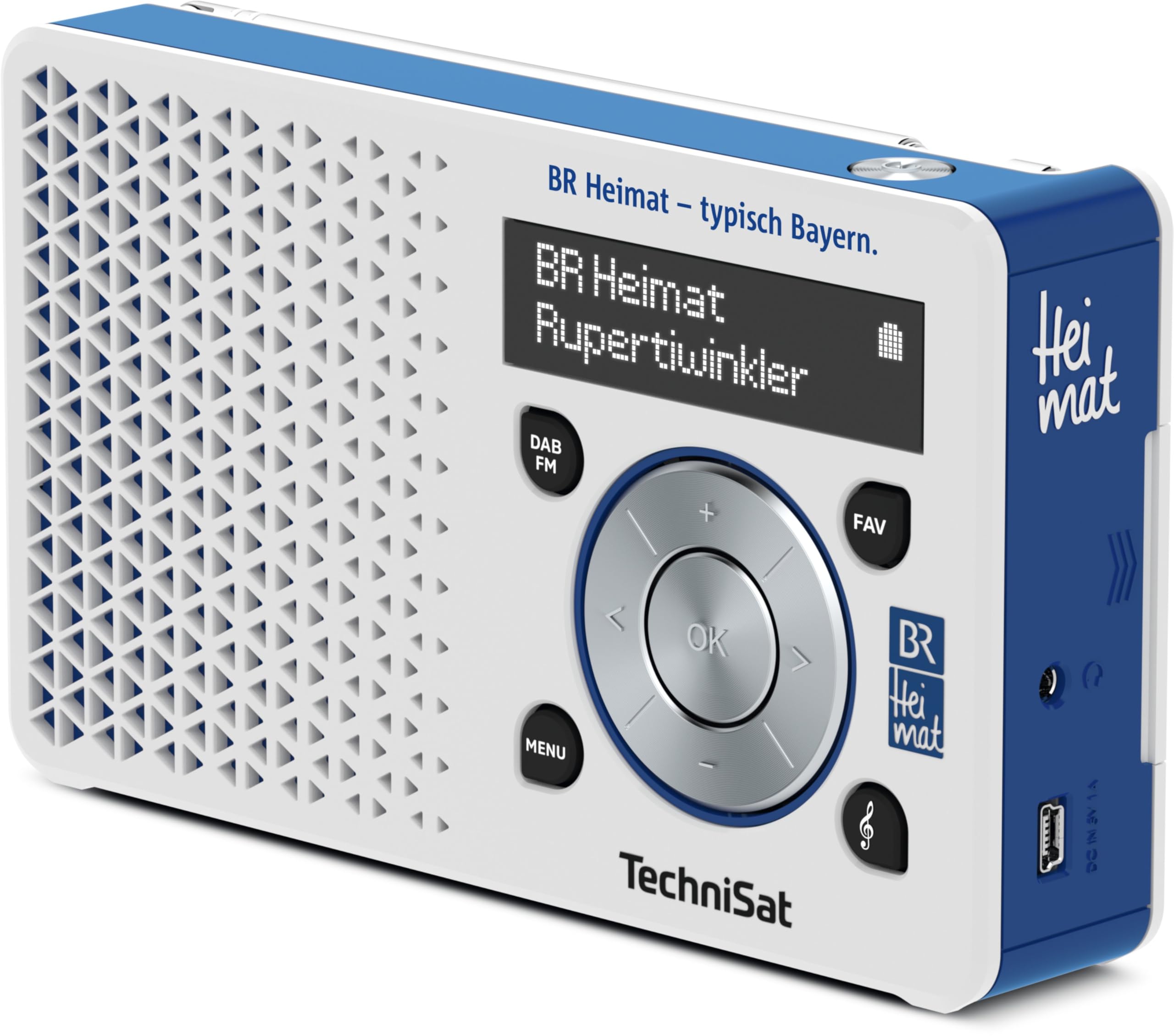
1 pav.: priekis view of the TechniSat Digitradio 1 BR Home Edition, showing the display, control knob, and speaker grille.
Sąranka
1. Maitinimo šaltinis
- Baterijos įdėjimas / įkrovimas: The Digitradio 1 includes a powerful, interchangeable Lithium-ion battery. Before first use, fully charge the battery using the provided AC adapter and USB cable. Connect the USB cable to the radio's DC IN 5V port and the AC adapter to a power outlet. The charging indicator on the display will show the charging status.
- AC veikimas: The radio can also be operated directly from the mains power using the supplied AC adapter, even without the battery installed or while the battery is charging.
2. Antena
- For optimal reception, fully extend the telescopic antenna located on the top of the device. Adjust its position for the best signal quality.
3. Pradinis nuskaitymas
- Upon first power-on, the radio will automatically perform a scan for available DAB+ and FM stations. This process may take a few minutes. Once complete, the radio will tune to the first available station.

2 pav.: Nugara view of the TechniSat Digitradio 1 BR Home Edition, highlighting the DC IN 5V port and headphone jack.
Naudojimo instrukcijos

3 pav.: Kampinis view of the TechniSat Digitradio 1 BR Home Edition, illustrating the control panel with menu, DAB/FM, favorite, and navigation buttons.
1. Maitinimo įjungimas/išjungimas
- Paspauskite Galia button (usually integrated with the volume knob) to turn the radio on or off.
2. Mode Selection (DAB+/FM)
- Paspauskite DAB / FM button to switch between DAB+ digital radio and FM analog radio modes.
3. Station Tuning
- DAB+ režimas: Use the navigation buttons (left/right arrows on the control knob) to browse through available DAB+ stations. Press OK norėdami pasirinkti stotį.
- FM režimas: Use the navigation buttons (left/right arrows) to manually tune to frequencies. A long press on the left/right arrows will initiate an automatic scan to the next available station.
4. Favorite Stations
- Saving Favorites: Klausydamiesi stoties, paspauskite ir palaikykite FAV button. Use the navigation buttons to select a preset number (1-20) and press OK išsaugoti.
- Prisimenant mėgstamiausius: Trumpai paspauskite FAV button. Use the navigation buttons to select your desired preset and press OK.
- BR Heimat Direct Selection: The BR Home Edition features a dedicated direct selection button for BR Heimat via DAB+. Press this button for instant access.
5. Garsumo valdymas
- Norėdami reguliuoti garsumo lygį, pasukite pagrindinį valdymo rankenėlę.
6. Rodyti informaciją
- The OLED display shows station name, program information, time, and battery status. Use the MENIU button to access additional settings and display options.
Priežiūra
1. Valymas
- Wipe the radio with a soft, dry cloth. Do not use liquid cleaners, abrasive pads, or chemical solvents, as these can damage the surface.
2. Akumuliatoriaus priežiūra
- Norėdami pailginti akumuliatoriaus veikimo laiką, venkite dažnai visiškai iškrauti akumuliatorių. Įkraukite akumuliatorių, kai pasirodo žemos įkrovos indikatorius.
- Jei radijo imtuvą ilgesnį laiką nenaudosite, įsitikinkite, kad akumuliatorius yra iš dalies įkrautas (apie 50 %), ir laikykite vėsioje, sausoje vietoje.
Trikčių šalinimas
1. Nėra elektros
- Ensure the AC adapter is securely connected to both the radio and a working power outlet.
- If operating on battery, check if the battery is charged. Recharge if necessary.
2. No Signal/Poor Reception
- Visiškai ištieskite ir sureguliuokite teleskopinę anteną.
- Move the radio to a different location, away from potential interference sources (e.g., other electronic devices, thick walls).
- Perform a full station scan in DAB+ mode to update the station list.
3. Nėra garso
- Check the volume level and increase if necessary.
- Ensure no headphones are connected to the headphone jack, or if they are, check their connection and functionality.
Specifikacijos
Techniniai duomenys
| Modelio numeris | 0025/4997 |
| Tiuningo technologija | DAB+/FM (with RDS and PLL) |
| Ekrano tipas | OLED |
| Maitinimo šaltinis | AC Adapter / Battery |
| Baterijos tipas | 1 ličio jonų (į komplektą įeina) |
| Baterijos veikimo laikas | Up to 10 hours (mobile radio playback) |
| Max Product Power | 1 vatų (RMS) |
| Ryšio technologija | Pagalbinis (ausinių lizdas) |
| Gaminio matmenys (I x P x A) | 15.5L x 3.1W x 9.1H centimetrai |
| Medžiaga | Plastikiniai |
| Atsparumo vandeniui lygis | Neatsparus vandeniui |

Figure 4: TechniSat Digitradio 1 BR Home Edition showing its dimensions: 15.5 cm length, 3.1 cm width, and 9.1 cm height.
Garantija ir palaikymas
Informacija apie garantiją
Specific warranty details for the TechniSat Digitradio 1 BR Home Edition are typically provided with the product packaging or can be found on the manufacturer's official websvetainėje. Išsamias garantijos sąlygas ir nuostatas rasite šiuose šaltiniuose.
Pagalba klientams
For further assistance, technical support, or service inquiries, please visit the official TechniSat website or contact their customer service department. Contact information can usually be found on the TechniSat websvetainėje arba originalioje produkto dokumentacijoje.