
1. Įvadas
The Canon PowerShot G5 X is a compact digital camera featuring a 1.0-inch, 20.2 Megapixel High-Sensitivity CMOS sensor and a built-in 2.36 million dot electronic viewfinder. This camera is designed for advanced photographers seeking high-quality stills and video with comprehensive control. It includes Wi-Fi and NFC capabilities for easy sharing and remote operation.
Pagrindinės funkcijos:
- 1.0-inch, 20.2 Megapixel High-Sensitivity CMOS sensor.
- Canon DIGIC 6 Image Processor for enhanced image quality and fast operation.
- Built-in 2.36 million dot electronic viewieškiklis.
- Multi-angle capacitive 3.0-inch touch panel LCD with 1.04 million dots.
- Full HD 1080p video recording at 60p/30p/24p.
- Integrated Wi-Fi and NFC for wireless connectivity.
2. Kas yra dėžutėje
Prieš pirmą kartą naudodami patikrinkite, ar yra visi daiktai:
- Canon PowerShot G5 X Camera Body
- Baterijų paketas
- Akumuliatoriaus įkroviklis
- Kaklo dirželis

Figure 2.1: Included items with the Canon PowerShot G5 X camera.
3. Pradinė sąranka
3.1 Akumuliatoriaus įkrovimas
- Įdėkite akumuliatorių į akumuliatoriaus įkroviklį.
- Prijunkite įkroviklį prie maitinimo lizdo. Užsidegs įkrovimo indikatoriaus lemputė.
- Once charging is complete, the indicator light will change or turn off. Remove the battery.
3.2 Baterijos ir atminties kortelės įdėjimas
- Atidarykite akumuliatoriaus / kortelės skyriaus dangtelį fotoaparato apačioje.
- Insert the charged battery into the compartment, ensuring correct orientation.
- Insert a compatible SD, SDHC, or SDXC memory card into the card slot until it clicks into place.
- Saugiai uždarykite skyriaus dangtelį.
3.3 Kameros įjungimas
Paspauskite ĮJUNGTA/IŠJUNGTA button located on the top of the camera to power it on. The lens will extend, and the LCD screen will activate.

3.1 pav.: priekis view of the Canon PowerShot G5 X.
4. Fotoaparato valdymas
4.1 Pagrindiniai fotografavimo režimai
Fotoaparato viršuje esantis režimo pasirinkimo ratukas leidžia pasirinkti įvairius fotografavimo režimus:
- Automatinis režimas: For automatic settings.
- P (programuota automatinė ekspozicija): Camera sets aperture and shutter speed, but allows other adjustments.
- Av (Aperture Priority AE): Jūs nustatote diafragmą, fotoaparatas nustato užrakto greitį.
- Tv (Shutter Priority AE): Jūs nustatote užrakto greitį, fotoaparatas nustato diafragmą.
- M (rankinis): Jūs kontroliuojate ir diafragmą, ir užrakto greitį.
- Custom Modes (C1/C2): Save and recall your preferred settings.
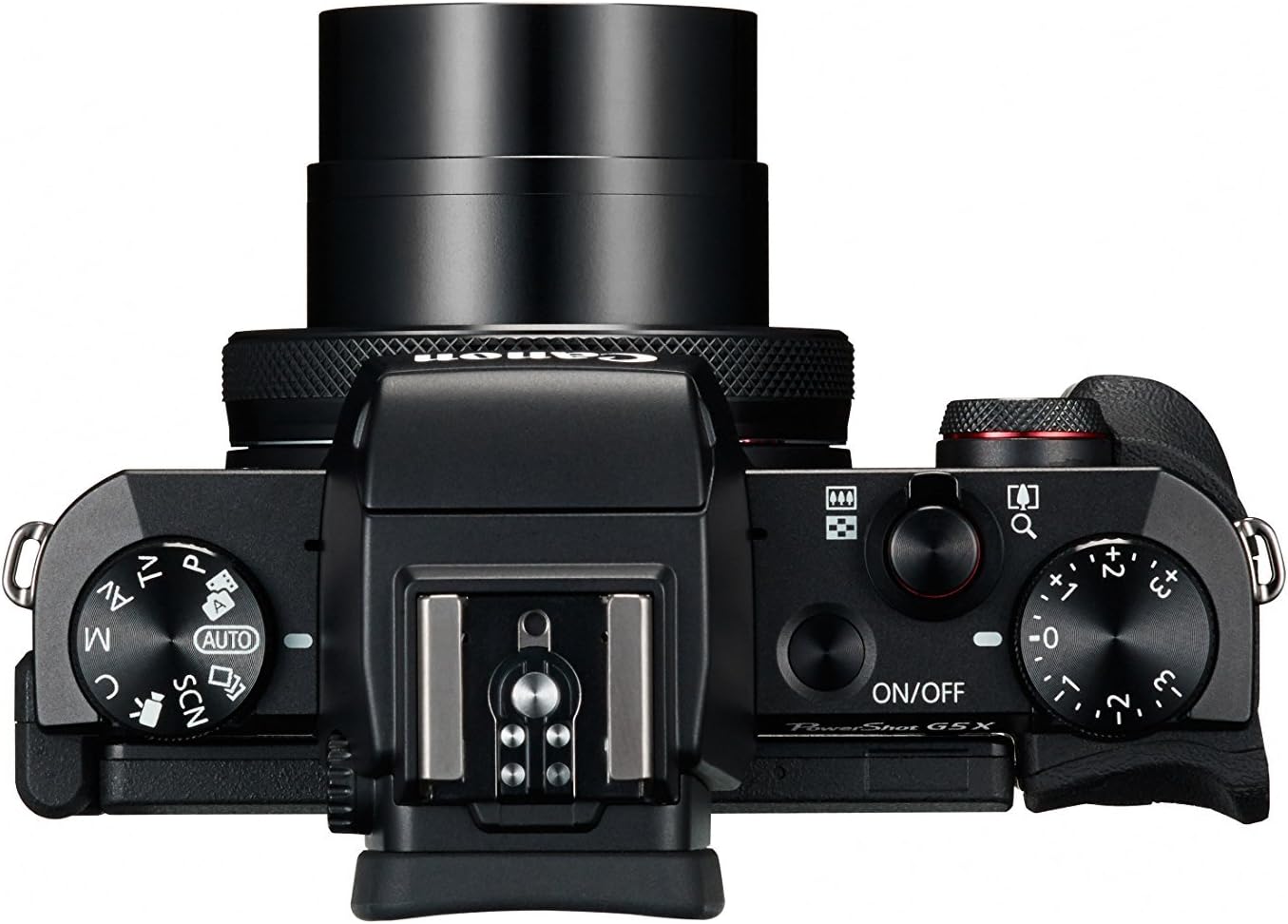
Figure 4.1: Top controls of the Canon PowerShot G5 X.
4.2 Naudojant Viewvaizdo ieškiklis ir LCD ekranas
The camera features both an electronic viewfinder (EVF) and a multi-angle touch panel LCD. You can switch between them or use the EVF for composing shots in bright conditions. The LCD screen can be articulated for various shooting angles and touch operations.

Figure 4.2: Canon PowerShot G5 X with articulated LCD screen.

4.3 pav.: galinis view of the Canon PowerShot G5 X.
4.3 Vaizdo įrašų įrašymas
To record video, set the mode dial to the movie mode icon. Press the dedicated movie button to start and stop recording. The camera supports 1080p Full HD video at various frame rates (60p/30p/24p).
4.4 „Wi-Fi“ ir NFC ryšys
The camera's built-in Wi-Fi and NFC functions allow for wireless transfer of images and videos to compatible smart devices or computers. Refer to the camera's menu for detailed instructions on setting up these connections.
5. Priežiūra ir priežiūra
5.1 Kameros valymas
- Objektyvas: Use a lens brush or blower to remove dust, then gently wipe with a microfiber lens cloth. Avoid touching the lens surface directly.
- LCD ekranas: Wipe gently with a soft, dry cloth. For stubborn smudges, use a screen cleaner specifically designed for electronics.
- Kameros korpusas: Nuvalykite minkštu, sausu skudurėliu. Nenaudokite organinių tirpiklių ar stiprių valymo priemonių.
5.2 Saugykla
Kai nenaudojate fotoaparato, laikykite jį vėsioje, sausoje vietoje, toliau nuo tiesioginių saulės spindulių ir ekstremalių temperatūrų. Jei fotoaparatas bus nenaudojamas ilgesnį laiką, išimkite bateriją.
6. Problemų sprendimas
This section addresses common issues you might encounter with your Canon PowerShot G5 X camera.
| Problema | Galima priežastis / sprendimas |
|---|---|
| Kamera neįsijungia. | Battery is depleted. Charge the battery. Ensure battery is inserted correctly. |
| Vaizdai neryškūs. | Lens is dirty. Clean the lens. Shutter speed is too slow. Increase shutter speed or use image stabilization. Camera shake. Hold the camera steady or use a tripod. |
| Cannot connect to Wi-Fi/NFC. | Ensure Wi-Fi/NFC is enabled in camera settings. Check device compatibility and network settings. Refer to the camera's connectivity guide in the menu. |
| Atminties kortelės klaida. | Atminties kortelė pilna. Ištrinkite nereikalingus files or replace card. Card is corrupted. Format the card (this will erase all data). Card is incompatible. Use a supported SD, SDHC, or SDXC card. |
| Blykstė nesuveikia. | Flash is set to OFF. Change flash mode to Auto or On. Subject is too far. Check flash range. |
7. Specifikacijos
| Funkcija | Detalė |
|---|---|
| Jutiklio tipas | 1.0-inch High-Sensitivity CMOS |
| Veiksminga nejudančioji raiška | 20.2 MP |
| Vaizdo procesorius | DIGIC 6 |
| Optinis priartinimas | 4.2x |
| Objektyvo diafragma | f/1.8-2.8 |
| Židinio nuotolis (35 mm atitikmuo) | 24-100 mm |
| Vaizdo stabilizavimas | Skaitmeninis |
| Viewieškiklis | Built-in Electronic Viewfinder (2.36 million dots) |
| LCD ekranas | 3.0-inch Multi-angle Capacitive Touch Panel (1.04 million dots) |
| Vaizdo raiška | 1080p Full HD (60p/30p/24p) |
| Ryšys | „Wi-Fi“, NFC, HDMI, USB |
| Saugojimo laikmena | SD, SDHC, SDXC atminties kortelės |
| Prekės svoris | 1.8 svaro |
| Modelio numeris | 0510C001 |
| UPC | 748926548632 |
8. Garantija ir palaikymas
8.1 Informacija apie garantiją
This Canon PowerShot G5 X camera comes with a 90-day limited warranty from the date of purchase. This warranty covers manufacturing defects under normal use. Please retain your proof of purchase for warranty claims.
8.2 Pagalba klientams
For technical assistance, service, or further inquiries, please refer to the official Canon support websvetainėje arba susisiekite su jų klientų aptarnavimo skyriumi. Kontaktinę informaciją paprastai galite rasti gamintojo websvetainę.