
1. Įvadas
The Temtop H2 is a professional air quality detector designed for real-time monitoring of Formaldehyde (HCHO) and Total Volatile Organic Compounds (TVOC). This device provides accurate readings to help assess indoor air quality. This manual provides essential information for the safe and effective use of your Temtop H2 detector.

Image: Temtop H2 Air Quality Detector and accessories in its box.
2. Saugos informacija
- Prieš naudodami įrenginį, atidžiai perskaitykite visas instrukcijas.
- Nebandykite ardyti ar modifikuoti įrenginio. Tai gali jį sugadinti ir panaikinti garantiją.
- Keep the device away from water, high humidity, and extreme temperatures.
- Avoid placing the device near strong chemical sources or in areas with high dust concentration, as this may affect sensor accuracy.
- Naudokite tik nurodytas baterijas ir įkrovimo laidą.
3. Gaminio komponentai
The Temtop H2 package includes the following items:
- Temtop H2 Air Quality Detector
- Įkrovimo kabelis
- Iš naujo nustatyti kaištį
- Vartotojo vadovas (šis dokumentas)
Įrenginys baigtasview
The Temtop H2 features a clear display, intuitive control buttons, and a high-accuracy sensor for detecting HCHO and TVOC levels.

Vaizdas: Stambus planas view of the Temtop H2 detector showing the high-accuracy sensor for HCHO/TVOC.

Vaizdas: Galinis view of the Temtop H2 detector, showing the sensor vent and battery compartment cover.
4. Sąranka
4.1. Akumuliatoriaus įdėjimas
- Locate the battery compartment on the back of the Temtop H2 detector.
- Atidarykite akumuliatoriaus skyriaus dangtelį.
- Įdėkite 3 AA tipo baterijas (pridedamos), užtikrindami teisingą poliškumą (+/-).
- Saugiai uždarykite akumuliatoriaus skyriaus dangtelį.

Image: The open battery compartment of the Temtop H2, showing the placement for 3 AA batteries.
4.2. Pradinis įjungimas
After installing the batteries, press and hold the red power button (U) located on the front of the device to turn it on. The device will perform a brief self-check before displaying readings.
5. Naudojimo instrukcijos
5.1. Maitinimo įjungimas/išjungimas
- To power on: Press and hold the red power button (U), kol ekranas įsijungs.
- To power off: Press and hold the red power button (U) until the screen turns off.
5.2. Rodyti informaciją
The device's screen displays real-time measurements and status indicators:
- HCHO: Formaldehyde concentration in milligrams per cubic meter (mg/m³).
- TVOC: Total Volatile Organic Compounds concentration in milligrams per cubic meter (mg/m³).
- Baterijos indikatorius: Rodo esamą baterijos lygį.
- Audio Alarm Icon: Indicates if the audible alarm is active.
- Backlight Icon: Indicates if the screen backlight is active.

Image: The Temtop H2 detector displaying real-time HCHO and TVOC readings in an indoor setting.
5.3. Mygtukų funkcijos
The control panel features several buttons for device operation:

Image: Close-up of the Temtop H2 control buttons, including Set, OK, Up, Down, Speaker, and Backlight.
- Nustatyti mygtukas: Įeina į nustatymų meniu.
- Gerai mygtukas: Patvirtina pasirinkimus arba išeina iš meniu.
- Rodyklės aukštyn / žemyn mygtukai: Naršo meniu parinktis arba koreguoja vertes.
- Garsiakalbio piktogramos mygtukas: Toggles the audible alarm on or off.
- Lightbulb Icon Button: Toggles the screen backlight on or off.
5.4. Garsinis signalas
The Temtop H2 is equipped with an audible alarm that activates when HCHO or TVOC levels exceed preset thresholds. To enable or disable the alarm, press the Speaker Icon Button. When enabled, an alarm icon will appear on the display.
5.5. Health Parameter Guide
Refer to the following guide for understanding the health implications of detected HCHO and TVOC levels:
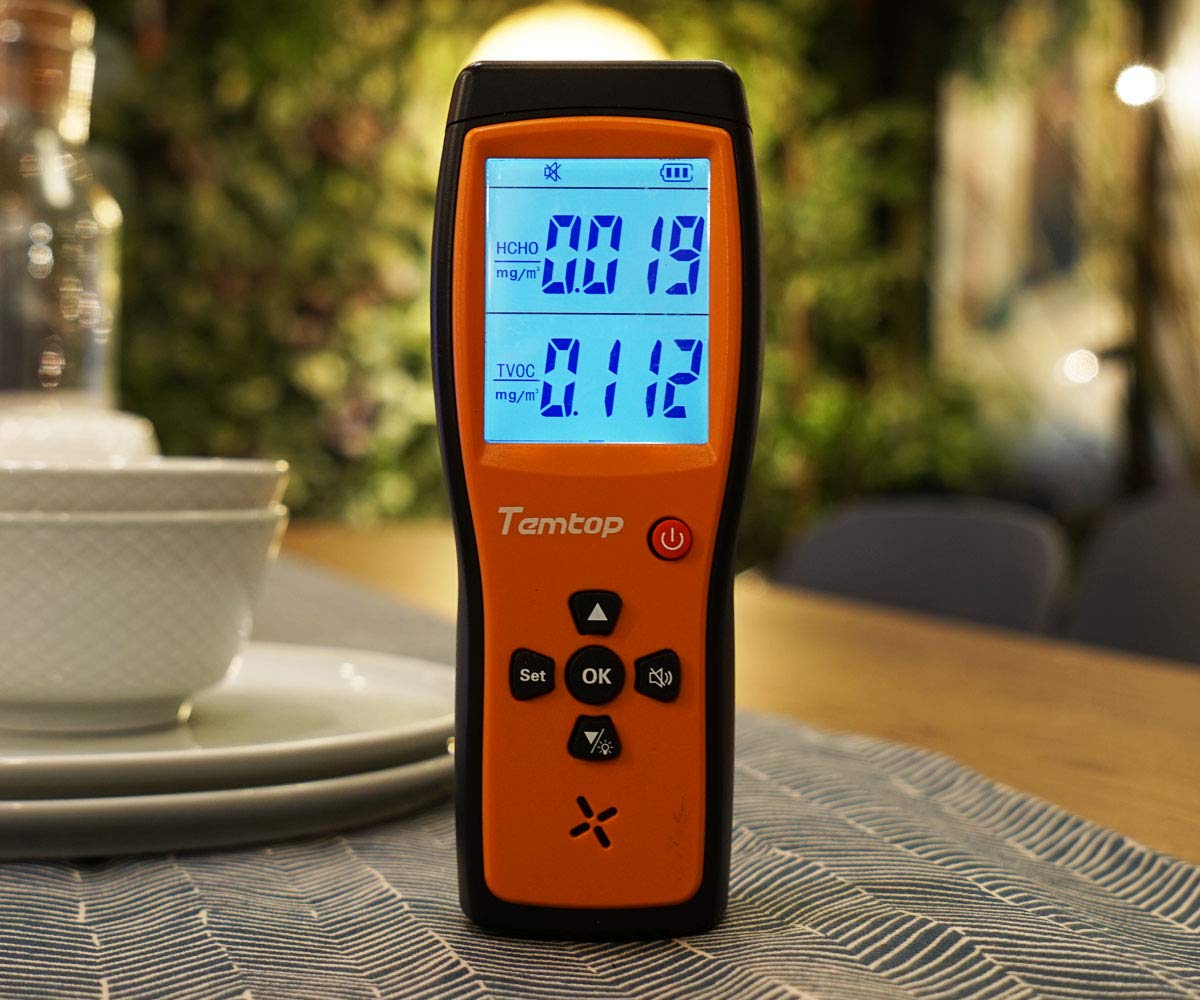
Image: A table illustrating HCHO and TVOC concentration ranges and their corresponding levels of health concern (Healthy or Unhealthy).
| HCHO (mg/m³) | TVOC (mg/m³) | Susirūpinimo sveikata lygiai |
|---|---|---|
| 0 - 0.1 | 0 - 0.5 | Sveikas |
| > 0.1 | > 0.5 | Nesveika |
6. Priežiūra
6.1. Valymas
To clean the device, gently wipe the exterior with a soft, dry cloth. Do not use liquid cleaners, abrasive materials, or solvents, as these can damage the device or affect sensor performance.
6.2. Sandėliavimas
When not in use for extended periods, store the Temtop H2 in a cool, dry place, away from direct sunlight and extreme temperatures. Remove batteries if storing for several months to prevent leakage.
6.3. Baterijos keitimas
Replace the 3 AA batteries when the low battery indicator appears on the screen to ensure continuous and accurate operation. Follow the battery installation steps outlined in Section 4.1.
7. Problemų sprendimas
- Įrenginys neįsijungia:
Check if the batteries are installed correctly with the right polarity. Ensure the batteries have sufficient charge. Try replacing the batteries. - Readings appear inaccurate or fluctuate significantly:
Allow the device to stabilize for at least 5-10 minutes after powering on, especially in a new environment. Ensure the device is not placed near strong sources of chemicals (e.g., cleaning products, fresh paint) or in areas with high airflow that could interfere with readings. - Signalas skamba nuolat:
Check the HCHO and TVOC readings on the display. If levels are genuinely high, ventilate the area. If readings appear normal but the alarm persists, try resetting the device using the provided reset pin by inserting it into the reset hole. - Screen is dim or off:
Paspauskite Lightbulb Icon Button to toggle the screen backlight. Check battery level and replace if low.
8. Specifikacijos
| Funkcija | Specifikacija |
|---|---|
| Prekės ženklas | Temptop |
| Modelis | H2 |
| Jutiklio tipas | HCHO, TVOC |
| Maitinimo šaltinis | Battery Powered (3 AA batteries required, 1 Lithium Metal battery included) |
| Prekės svoris | 0.49 kilogramų (1.08 svarai) |
| Gaminio matmenys | 6.02 x 1.81 x 8.86 colio |
| Signalizacija | Girdimas |
| Darbinė drėgmė | Iki 90% (nekondensuojantis) |
| Viršutinės temperatūros įvertinimas | 50 laipsniai Celsijaus |
| Medžiaga | Plastikiniai |
9. Garantija ir palaikymas
9.1. Informacija apie garantiją
Please refer to the warranty card included with your product or visit the official Temtop webIšsamias garantijos sąlygas ir nuostatas rasite svetainėje. Išsaugokite pirkimo kvitą kaip pirkimo įrodymą garantijos pretenzijoms.
9.2. Pagalba klientams
For technical assistance, troubleshooting not covered in this manual, or other inquiries, please contact Temtop customer support. Contact information can typically be found on the official Temtop websvetainėje arba ant produkto pakuotės.