
1. Įvadas
The EPEVER 20A MPPT Solar Charge Controller, model Tracer2210AN, is an advanced Maximum Power Point Tracking (MPPT) device designed for 12V/24V automatic work solar systems. It efficiently manages power flow from solar panels to batteries, ensuring optimal charging and extending battery life. This controller features high conversion efficiency, supports various battery types, and offers comprehensive protection functions. This manual provides essential information for the safe installation, operation, and maintenance of your solar charge controller.

Image 1.1: EPEVER 20A MPPT Solar Charge Controller (Tracer2210AN). This image shows the front view of the solar charge controller with its LCD display and control buttons.
2. Saugos instrukcijos
- Visada prijunkite akumuliatorių prie įkrovimo valdiklio pirma, then the solar panel, and finally the load. Disconnect in the reverse order: load, then solar panel, then battery.
- Užtikrinkite tinkamą vėdinimą aplink valdiklį, kad jis neperkaistų.
- Visoms jungtims naudokite tinkamo skersmens laidus, kad išvengtumėte įtampos kritimo.tage drop and overheating. Refer to the specifications section for recommended cable sizes.
- Avoid short circuits at all terminals.
- Install the controller in a dry, well-ventilated area, away from direct sunlight and moisture.
- Nebandykite patys taisyti ar modifikuoti valdiklio. Dėl remonto kreipkitės į kvalifikuotus specialistus.
- Montavimo metu dėvėkite tinkamas asmenines apsaugos priemones (AAP), įskaitant akių apsaugą ir izoliuotas pirštines.
3. Produktas baigtasview
The Tracer2210AN controller incorporates advanced features for efficient solar power management:
- Pažangi MPPT technologija: Ensures maximum power extraction from solar panels with tracking efficiency not less than 99.5% and a maximum conversion efficiency of 98%.
- Aukštos kokybės komponentai: Utilizes international famous brands of ST and IR components for reliability and durability.
- Suderinamumas su baterijomis: Supports various battery types including lead-acid (sealed, gel, flooded) and lithium-ion (LiFePO4, Li(NiCoMn)O2), with user-defined settings.
- Temperatūros kompensavimas: Includes battery temperature compensation function for lead-acid batteries.
- Stebėjimas realiuoju laiku: Provides real-time energy statistics and supports communication via RS-485 bus with Modbus protocol for monitoring and parameter setting via mobile APP or PC software (requires optional accessories like MT50, WiFi, or BLE adapters).
- Apsaugos funkcijos: Features multiple safety protections including overheating power reduction.
3.1 Valdiklio komponentai

3.1 vaizdas: priekis view of the EPEVER Tracer2210AN controller with labeled components. Key components include the LCD display, SELECT and ENTER buttons, remote temperature sensor port, solar panel terminals, battery terminals, load terminals, and an RJ45 communication port.

3.2 paveikslas: Viršus ir apačia views of the EPEVER Tracer2210AN controller. The top view shows the model information and certifications, while the bottom view displays the terminal connections and communication port.
4. Sąranka
4.1 Valdiklio montavimas
Mount the controller vertically on a wall or a stable surface. Ensure there is sufficient space around the controller for proper air circulation to dissipate heat. The dimensions of the controller are 220mm x 154mm x 52mm.

Image 4.1: EPEVER MPPT 20A Solar Charge Controller with its physical dimensions indicated. The controller measures 220mm in length, 154mm in width, and 52mm in height.
4.2 Laidų jungtys
Follow the connection order carefully to avoid damage to the controller or other components. Always connect the battery first, then the solar panel, and finally the load. Disconnect in the reverse order.
- Prijunkite akumuliatorių: Connect the positive and negative terminals of the battery to the corresponding battery terminals on the controller. Ensure correct polarity.
- Prijunkite saulės kolektorių: Connect the positive and negative terminals of the solar panel to the corresponding PV terminals on the controller. Ensure correct polarity.
- Prijunkite apkrovą: Connect the positive and negative terminals of the DC load to the corresponding load terminals on the controller. Ensure correct polarity.
- Prijunkite nuotolinį temperatūros jutiklį (pasirinktinai): If using, connect the RTS300R47K3.81A temperature sensor to the designated port on the controller and attach the sensor to the battery for accurate temperature compensation.

Image 4.2: Connection diagram illustrating the proper wiring sequence for the EPEVER solar charge controller. It shows connections from the solar panel, battery (with fuse), and DC load, as well as an optional inverter for AC loads.
5. Naudojimo instrukcijos
5.1 LCD ekranas ir mygtukai
The controller features an LCD display that shows system status, charging parameters, and error codes. The 'SELECT' and 'ENTER' buttons are used to navigate through menus and adjust settings.
5.2 Baterijos tipo nustatymai
The controller supports various battery types. It is crucial to select the correct battery type for optimal charging and battery longevity. The default setting is 'Sealed' for lead-acid batteries.
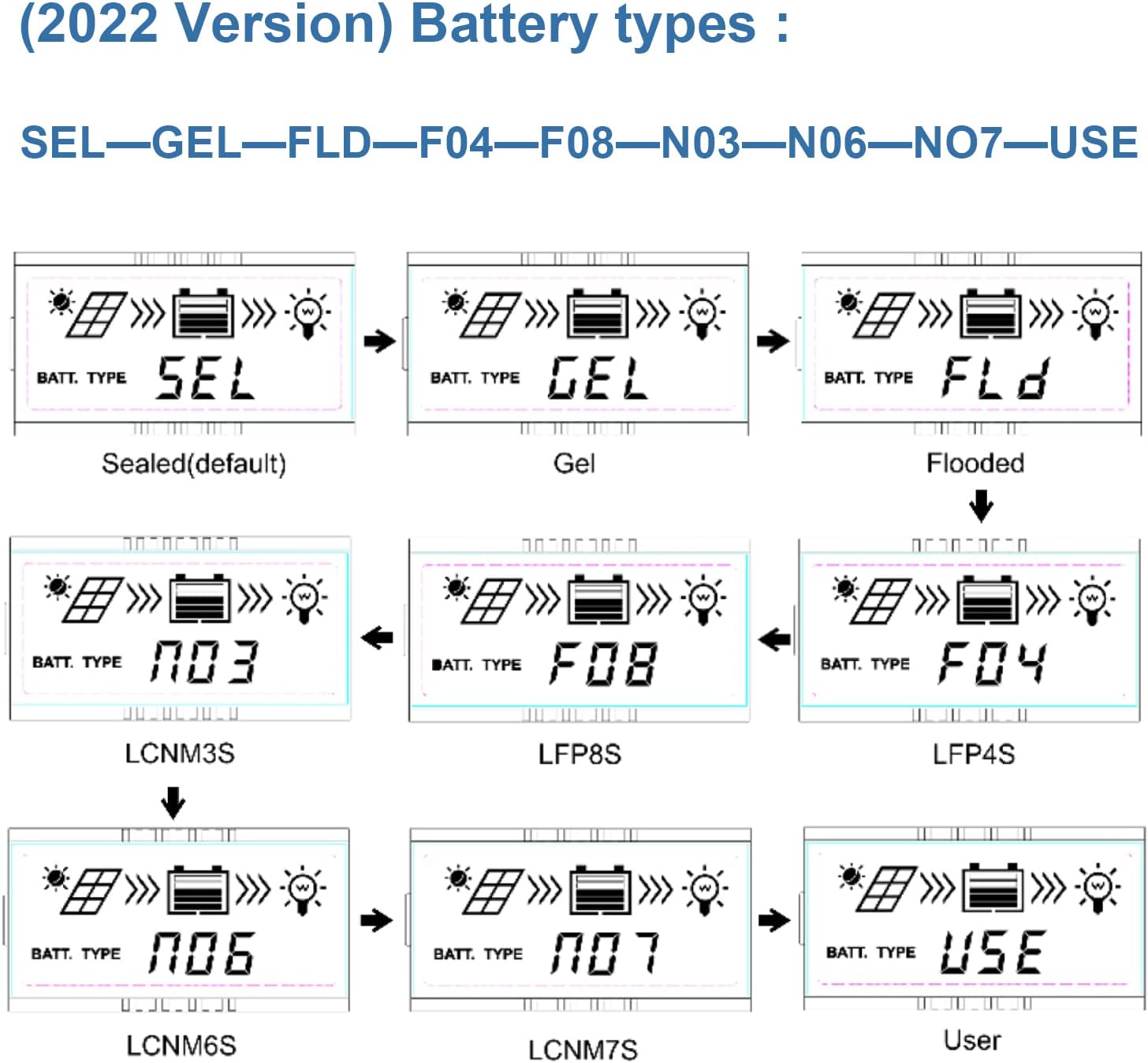
Image 5.1: LCD display showing various battery type selections. Options include Sealed (SEL), Gel (GEL), Flooded (FLD), LiFePO4 (LFP4S, LFP8S), Li(NiCoMn)O2 (LCNM3S, LCNM6S, LCNM7S), and User-defined (USE).
Norėdami pakeisti akumuliatoriaus tipą:
- Press the 'SELECT' button to cycle through the main display screens until you reach the battery type setting.
- Press and hold the 'ENTER' button to enter the setting modification mode.
- Use the 'SELECT' button to choose the desired battery type (e.g., GEL, FLD, LFP4S, USE).
- Press 'ENTER' again to confirm and save the selection.
5.3 Monitoring and Communication
The Tracer2210AN controller can be monitored and configured remotely using optional accessories:
- MT50 nuotolinis skaitiklis: Connects via RJ45 cable to display real-time data and modify parameters.
- WiFi/BLE Adapters (eBox-WIFI-01, eBox-BLE-01): Connects to the RS-485 port to enable wireless monitoring and control via a mobile application.
- PC Communication Cable (CC-RS485-USB-150U): Connects to a PC for monitoring and parameter setting using EPEVER PC software.
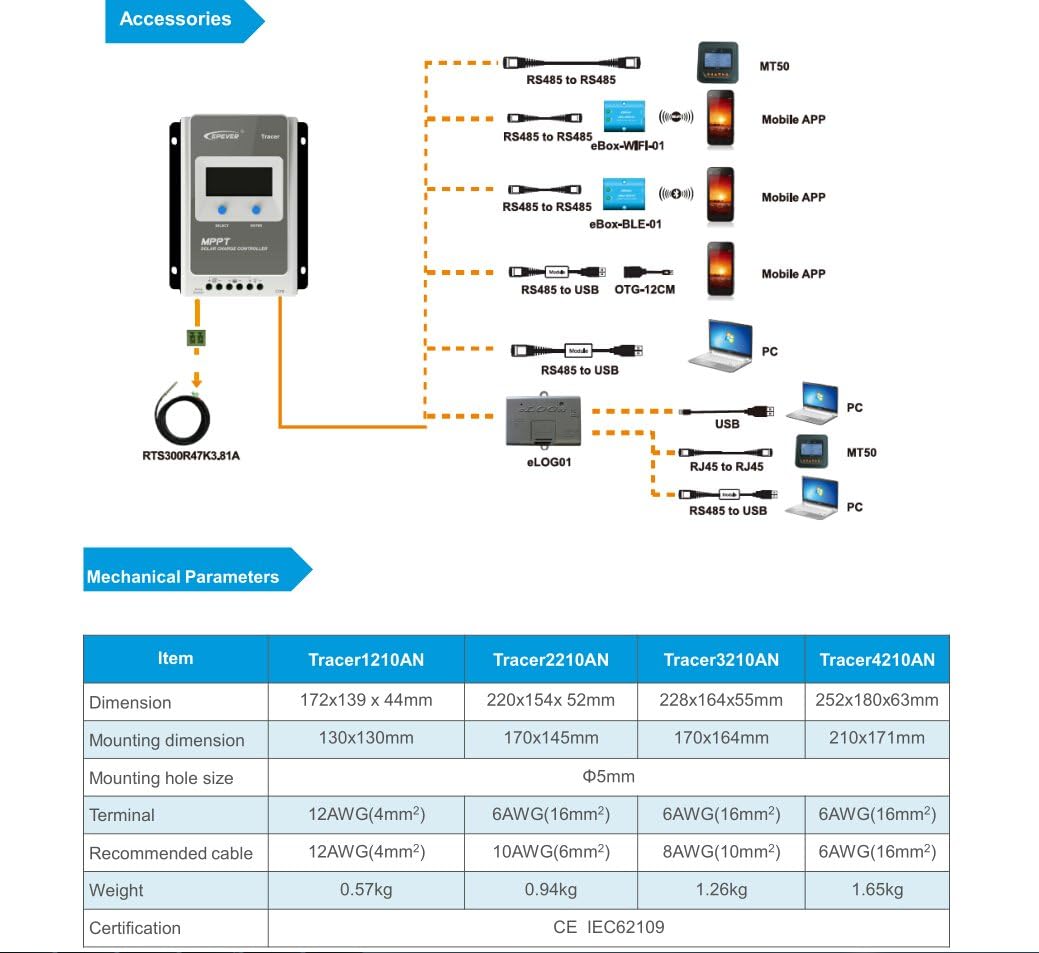
Image 5.2: Diagram showing the EPEVER solar charge controller and its compatible accessories. These include the RTS300R47K3.81A temperature sensor, MT50 remote meter, eBox-WIFI-01, eBox-BLE-01, OTG-12CM, and eLOG01 for various monitoring and communication options.

Image 5.3: The EPEVER Tracer2210AN solar charge controller connected to an MT50 remote meter, displaying system information. This setup allows for convenient monitoring and control.
6. Priežiūra
Regular maintenance ensures the longevity and optimal performance of your EPEVER solar charge controller:
- Patikrinkite jungtis: Reguliariai tikrinkite visas laidų jungtis, ar jos nėra tvirtos ir ar nėra korozijos. Atsilaisvinusios jungtys gali sukelti įtampą.tagkritimai ir perkaitimas.
- Valykite valdiklį: Keep the controller clean and free from dust and debris. Use a dry cloth to wipe the surface. Ensure ventilation openings are not blocked.
- Patikrinkite, ar nėra pažeidimų: Check for any physical damage to the controller, cables, or terminals.
- Akumuliatoriaus patikrinimas: For lead-acid batteries, check electrolyte levels (if applicable) and terminal condition. Ensure lithium batteries are within their recommended operating parameters.
- Aplinkos sąlygos: Užtikrinkite, kad įrengimo aplinka neviršytų nurodytų darbinės temperatūros ir drėgmės diapazonų.
7. Problemų sprendimas
If you encounter issues with your solar charge controller, refer to the following common troubleshooting steps:
- Nėra ekrano / maitinimo:
- Patikrinkite akumuliatoriaus jungtis ir įsitikinkite, kad akumuliatoriaus įtampatage yra valdiklio veikimo diapazone.
- Verify that the battery fuse (if installed) is intact.
- Nereikia krauti iš saulės baterijos:
- Ensure solar panel connections are secure and correct polarity is observed.
- Check the solar panel's open-circuit voltage (Voc) and short-circuit current (Isc) to ensure it is producing power.
- Patikrinkite, ar saulės baterijos tūristage is within the controller's input voltage asortimentas.
- Check for shading on the solar panels.
- Įkrovimas neveikia:
- Patikrinkite apkrovos jungtis ir užtikrinkite teisingą poliškumą.
- Verify that the battery has sufficient charge. The controller may disconnect the load if the battery voltage yra per žemas.
- Check load settings on the controller to ensure the load output is enabled.
- Perkaitimas:
- Ensure the controller is installed in a well-ventilated area and its heat sinks are not obstructed.
- Reduce the load or solar input if operating in extreme temperatures.
For more detailed troubleshooting or specific error codes, please refer to the comprehensive manual provided by EPEVER or contact their customer support.
8. Specifikacijos
The following table outlines the key electrical and mechanical parameters for the Tracer2210AN MPPT Solar Charge Controller:

Image 8.1: Table detailing the electrical parameters for Tracer series controllers, including the Tracer2210AN. This table provides specific values for system voltage, currents, power, and environmental conditions.
| Parametras | Value (Tracer2210AN) |
|---|---|
| Sistemos vardinis ttage | 12 V / 24 V automatinis darbas |
| Nominali įkrovimo srovė | 20A |
| Nominali iškrovimo srovė | 20A |
| Maks. PV įvesties galia | 260W (12V Battery System) 520W (24V Battery System) |
| Maks. PV atviros grandinės ttage | 100V (at min. operating temp) 92V (at 25℃ ambient temp) |
| Baterijos tūristage Diapazonas | 8-32V |
| MPP ttage Diapazonas | V(BAT+2V) ~ 72V |
| Įžeminimas | Bendras neigiamas |
| Stebėjimo efektyvumas | ≥ 99.5 % |
| Maks. Konversijos efektyvumas | 98 % |
| Darbo aplinkos temperatūra | -25 ℃ ~ +50 ℃ |
| Laikymo temperatūros diapazonas | -20 ℃ ~ +70 ℃ |
| Santykinė drėgmė | ≤95%, NC |
| Aptvaras | IP30 |
| Matmenys (I x P x A) | 220 x 154 x 52 mm |
| Svoris | 0.94 kg |
| Terminalo dydis | #6 AWG (16 mm²) |
| Rekomenduojamas kabelis | #10 AWG (6 mm²) |
9. Garantija ir palaikymas
For warranty information, please refer to the documentation provided with your purchase or contact your authorized EPEVER dealer. EPEVER products typically come with a manufacturer's warranty covering defects in materials and workmanship.
For technical support, product inquiries, or service, please visit the official EPEVER website or contact an authorized EPEVER service center. Ensure you have your product model (Tracer2210AN) and serial number available when seeking support.