
1. Įvadas
Thank you for choosing the Zerone LP-838 Small Power Amplifier. This manual provides essential information for the safe and efficient operation of your device. Please read these instructions thoroughly before use and retain them for future reference.
2. Produktas baigtasview
2.1 Pagrindinės savybės
- Kompaktiškas ir nešiojamas dizainas.
- RCA and 3.5mm audio input compatibility.
- High-power audio amplifier chip for 2.1 channel output.
- Adjustable Treble, Bass, and Volume controls.
- Durable all-aluminum alloy shell for electromagnetic interference reduction.
2.2 Komponento identifikavimas
1 pav.: Priekinio skydelio valdikliai ir įėjimai
This image displays the front panel of the LP-838 amplifier. From left to right, it features a power switch, a bass volume knob, a 3.5mm MP3 input jack, and three rotary knobs for Treble, Bass, and Master Volume control. The unit also supports RCA audio input, as indicated by the text overlay.

2 pav.: Galinio skydelio jungtys
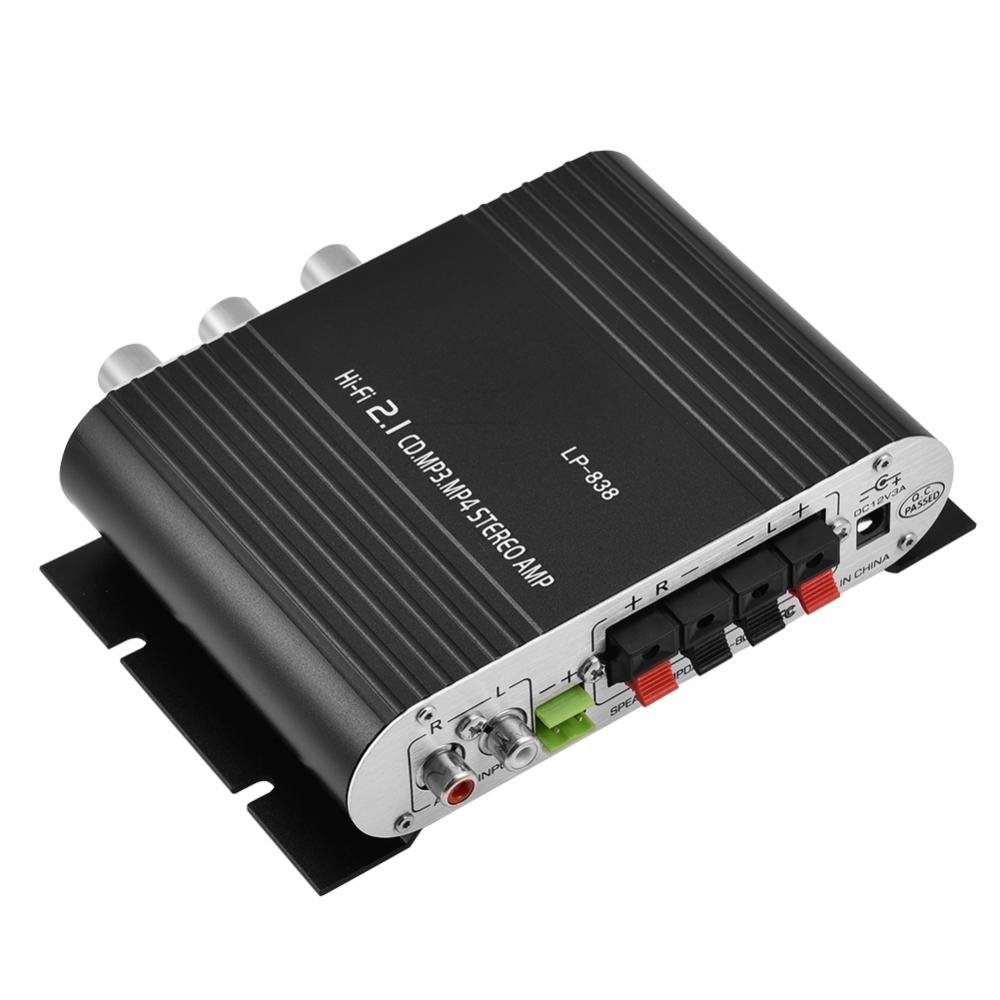
This image shows the rear panel of the LP-838 amplifier. On the left are the RCA audio input jacks (red for right, white for left). In the center are the spring-clip speaker terminals for connecting left and right speakers. On the right is the DC 12V/3A power input jack and a 'Q.C. PASSED' stamp, indicating quality control.
Priekinis skydelis:
- Maitinimo jungiklis: Perjungia ampkeltuvas įjungtas/išjungtas.
- BASS VOLUME Knob: Reguliuoja garso išvesties bosų lygį.
- MP3 įvestis: 3.5 mm lizdas nešiojamųjų garso įrenginių prijungimui.
- TREBLE rankenėlė: Reguliuoja aukšto dažnio atsaką.
- BASS rankenėlė: Reguliuoja žemo dažnio atsaką.
- GARSUMO rankenėlė: Valdo bendrą išvesties garsumą.
Galinis skydas:
- GARSO ĮVESTIS (RCA): Red and white RCA jacks for connecting audio sources (e.g., DVD players, computers).
- SPEAKER OUTPUTS (+R -R +L -L): Spring-clip terminals for connecting passive speakers. Ensure correct polarity (+ to + and - to -).
- Nuolatinė 12 V / 3 A įvestis: Power input jack for connecting the external power adapter (not included).
3. Sąranka
- Prijunkite garsiakalbius: Connect your passive speakers to the SPEAKER OUTPUT terminals on the rear panel. Ensure the positive (+) terminal of the ampLifier jungiamas prie garsiakalbio teigiamo (+) gnybto, o prie neigiamo (-) gnybto. amplifier connects to the negative (-) terminal of the speaker. The amplifier supports speakers with an impedance of 4-8 Ohms.
- Prijungti garso šaltinį:
- For RCA input: Connect your audio source (e.g., CD player, TV, computer) to the RCA AUDIO INPUT jacks on the rear panel using an RCA cable.
- For 3.5mm input: Connect your portable audio device (e.g., smartphone, MP3 player) to the MP3 input jack on the front panel using a 3.5mm audio cable.
- Prijunkite maitinimą: Connect a compatible DC 12V/3A power adapter (not included) to the DC 12V/3A input jack on the rear panel. Plug the power adapter into a wall outlet.
Important: Ensure all connections are secure before powering on the ampgyvesnis.
4. Naudojimo instrukcijos
- Maitinimas: Flip the POWER switch on the front panel to the 'ON' position. The power indicator light will illuminate.
- Pasirinkite įvestį: The amplifier automatically uses the active input. If both RCA and 3.5mm inputs are connected, the 3.5mm input may take precedence.
- Reguliuoti garsumą: Start with the VOLUME knob set to a low level. Begin playing audio from your source, then slowly increase the VOLUME knob to your desired listening level.
- Tono reguliavimas: Use the TREBLE and BASS knobs to fine-tune the high and low frequencies according to your preference. The BASS VOLUME knob provides additional control over the bass output.
- Išjungti: When finished, turn the VOLUME knob down to its minimum setting, then flip the POWER switch to the 'OFF' position.
5. Priežiūra
- Valymas: Naudokite minkštą, sausą šluostę, kad nuvalytumėte prietaiso išorę ampNenaudokite skystų valiklių ar tirpiklių.
- Vėdinimas: Užtikrinti, ampšaldytuvas pastatytas gerai vėdinamoje vietoje, kad neperkaistų. Neužblokuokite ventiliacijos angų.
- Saugykla: Kai ilgesnį laiką nenaudojate, atjunkite maitinimo adapterį ir laikykite jį ampLaikyti vėsioje, sausoje vietoje.
6. Problemų sprendimas
| Problema | Galima priežastis | Sprendimas |
|---|---|---|
| Nėra galios | Maitinimo adapteris neprijungtas arba sugedęs; išjungtas maitinimo jungiklis. | Ensure power adapter is securely connected and functional. Flip power switch to ON. |
| Nėra garso išvesties | Incorrect audio input connection; speaker wires loose or incorrect polarity; volume too low; audio source issue. | Check audio input cables and connections. Verify speaker wire connections and polarity. Increase volume. Test audio source with another device. |
| Iškraipytas garsas | Volume too high; incorrect tone settings; faulty audio source or cable. | Reduce volume. Adjust Treble and Bass knobs. Test with a different audio source or cable. |
| Dumbimas ar zvimbimas | Ground loop issue; interference from other electronics; faulty cables. | Ensure all components are properly grounded. Move amplifier away from other electronic devices. Try different audio cables. |
7. Specifikacijos
- Prekinis ženklas: Zerone
- Modelio numeris: Zeroneq8ae3d902g-02 (LP-838)
- ttage: 14.4 voltai (darbinė)
- Kanalų skaičius: 2
- Garsiakalbio varža: 4-8 omai
- Montavimo tipas: Paviršinis montavimas
- Prekės svoris: 7.8 uncijos
- ASIN: B07DM4QJGX
- UPC: 763741184919
- Pirmą kartą pasiekiama data: 4 m. liepos 2019 d
8. Informacija apie garantiją
For specific warranty terms and conditions, please refer to the documentation provided at the time of purchase or contact your retailer. Warranty coverage typically includes defects in materials and workmanship under normal use.
9. Parama
If you encounter issues that cannot be resolved using the troubleshooting guide, please contact the retailer or manufacturer for assistance. Provide your product model number (LP-838) and a detailed description of the problem when seeking support.