
Įvadas
The Teesa Hypercare T300 rotary shaver (model TSA0520) is designed for efficient and comfortable facial hair removal. Its three flexible blades adapt to facial contours, and the integrated pop-up trimmer allows for precise styling of sideburns and moustaches. This manual provides essential information for safe operation, maintenance, and optimal performance of your device.
Saugos informacija
Please read these safety instructions carefully before using the appliance and keep them for future reference.
- Šis prietaisas skirtas naudoti tik buityje.
- Do not immerse the shaver in water or other liquids. Keep it dry.
- Nenaudokite prietaiso, jei pažeistas maitinimo laidas arba kištukas.
- Always disconnect the shaver from the power supply before cleaning.
- Prietaisą laikykite vaikams nepasiekiamoje vietoje.
- Use only the power cable supplied with the device.
- Do not use the shaver if the shaving heads are damaged, as this may cause injury.
Pakuotės turinys
Patikrinkite pakuotės turinį. Jei trūksta kokių nors daiktų arba jie pažeisti, susisiekite su pardavėju.
- Teesa Hypercare T300 Rotary Shaver
- Maitinimo kabelis
- Apsauginis dangtelis
- Valymo šepetys
- Tepimo alyva
- Instrukcijų vadovas
Produktas baigtasview
Familiarize yourself with the components of your Teesa Hypercare T300 Rotary Shaver.
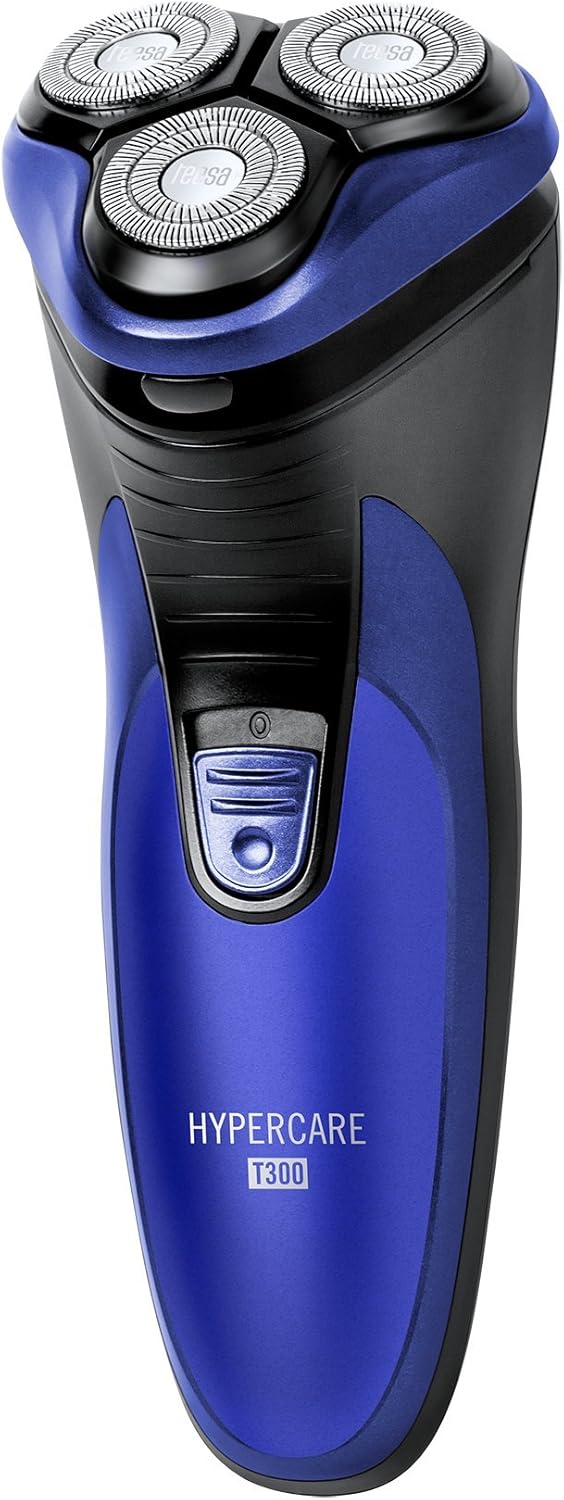


Sąranka
Skustuvo įkrovimas
- Prieš įkraunant įsitikinkite, kad skustuvas yra išjungtas.
- Connect the power cable to the charging port on the shaver.
- Plug the other end of the power cable into a standard electrical outlet (220-240V; 50/60Hz).
- Užsidegs įkrovimo indikatoriaus lemputė, rodanti, kad barzdaskutė kraunasi.

A full charge takes approximately 8 hours and provides up to 45 minutes of cordless operation. Do not leave the shaver connected to the charger for extended periods after it is fully charged.
Veikiantis
Skutimasis
- Įsitikinkite, kad skustuvas visiškai įkrautas.
- Paspauskite maitinimo mygtuką, kad įjungtumėte skustuvą.
- Laikykite skustuvą stačiu kampu į odą.
- Move the shaver in small, circular motions over your face and neck. For optimal results, shave against the direction of hair growth.
- The flexible shaving heads will adapt to the contours of your face for a close shave.
- Po skutimosi paspauskite maitinimo mygtuką, kad išjungtumėte skustuvą.
Iššokančio žoliapjovės naudojimas
- Įjunkite skustuvą.
- Locate the pop-up trimmer release button on the side of the shaver.
- Slide the release button upwards to extend the pop-up trimmer.

- Use the trimmer to precisely shape sideburns, moustaches, or beard lines.
- After use, push the trimmer back down until it clicks into its closed position.
Priežiūra
Skustuvo valymas
Reguliarus valymas užtikrina optimalų našumą ir higieną.
- Išjunkite barzdaskutę ir atjunkite ją nuo maitinimo šaltinio.
- Press the release button on the front of the shaver to open the shaving head unit.
- Use the provided cleaning brush to remove any accumulated hair clippings from the shaving heads and the hair chamber.
- For a more thorough cleaning, you may rinse the shaving heads under running water. Ensure the main body of the shaver does not get wet.
- Allow all parts to air dry completely before reassembling the shaving head unit.
- Periodically apply a small drop of the provided lubricating oil to the shaving foils and cutters to maintain smooth operation and prolong blade life.
- Always replace the protective cap over the shaving heads after each use to prevent damage.
Trikčių šalinimas
If you encounter any issues with your shaver, refer to the following common problems and solutions:
- Skustuvas neįsijungia:
- Įsitikinkite, kad skustuvas visiškai įkrautas.
- Tvirtai paspauskite maitinimo mygtuką.
- Prastas skutimosi efektyvumas:
- The blades may be clogged with hair. Clean the shaver thoroughly as described in the Maintenance section.
- Ensure the shaver is fully charged. Performance may decrease with low battery.
- Blades may be dull. Consider replacing the shaving heads after extended use (replacement parts sold separately).
- Skustuvas nesikrauna:
- Check that the power cable is securely connected to both the shaver and the electrical outlet.
- Patikrinkite, ar elektros lizdas veikia tinkamai.
- Ensure the charging indicator light illuminates when connected.
Jei problema išlieka ir išbandžius šiuos sprendimus, susisiekite su klientų aptarnavimo tarnyba.
Specifikacijos
| Funkcija | Specifikacija |
|---|---|
| Modelio numeris | TSA0520 |
| Galia | 3 W |
| Sukimosi greitis | 6000 aps./min |
| Veikimo laikas | Iki 45 minučių |
| Įkrovimo laikas | Iki 8 valandų |
| Baterija | 2.4 V; 2/3 AA 600 mAh x2 (Rechargeable) |
| Maitinimo šaltinis | 220 – 240 V; 50/60 Hz |
| Svoris | 165 g |
| Matmenys (I x P x A) | 58.2 x 46.8 x 150.9 mm |
| Ašmenų medžiaga | Legiruotasis plienas |
| Ašmenų skaičius | 3 (Rotary Type) |
| Ypatinga funkcija | Ergonomiškas dizainas |
Garantija ir palaikymas
For warranty information, technical assistance, or to inquire about replacement parts, please refer to the documentation included with your purchase or visit the official Teesa websvetainėje. Išsaugokite pirkimo įrodymą garantiniams reikalavimams.