
Integra CDC-3.4
Integra CDC-3.4
6-Disc CD Carousel Changer User Manual
Įvadas
This manual provides detailed instructions for the proper setup, operation, and maintenance of your Integra CDC-3.4 6-Disc CD Carousel Changer. Please read this manual thoroughly before using the unit to ensure optimal performance and longevity. The Integra CDC-3.4 is designed for high-fidelity audio playback from compact discs, featuring a robust carousel mechanism for convenient disc management.
Svarbi saugos informacija
Kad sumažintumėte elektros smūgio, gaisro ar įrenginio sugadinimo riziką, laikykitės šių saugos priemonių:
- Skaitykite instrukcijas: Prieš naudodami prietaisą, perskaitykite visas saugos ir naudojimo instrukcijas.
- Išsaugokite instrukcijas: Saugos ir naudojimo instrukcijas išsaugokite ateičiai.
- Atkreipkite dėmesį į įspėjimus: Laikykitės visų prietaiso ir naudojimo instrukcijos įspėjimų.
- Vykdykite instrukcijas: Laikykitės visų naudojimo ir naudojimo instrukcijų.
- Vanduo ir drėgmė: Nenaudokite šio prietaiso šalia vandens.
- Valymas: Valykite tik sausa šluoste.
- Vėdinimas: Neužblokuokite jokių ventiliacijos angų. Montuokite pagal gamintojo instrukcijas.
- Šiluma: Nemontuokite šalia jokių šilumos šaltinių, pvz., radiatorių, šilumokaičių, viryklių ar kitų įrenginių (įskaitant ampkeltuvai), kurie gamina šilumą.
- Maitinimo laido apsauga: Saugokite maitinimo laidą, kad ant jo neužeitų ar nesuspaustų, ypač prie kištukų, patogių lizdų ir toje vietoje, kur jie išeina iš aparato.
- Atjunkite audros metu: Atjunkite šį įrenginį žaibuojant arba kai nenaudojate ilgą laiką.
- Aptarnavimas: Visus techninės priežiūros darbus patikėkite kvalifikuotam techninės priežiūros personalui. Techninė priežiūra reikalinga, kai aparatas buvo kaip nors pažeistas, pvz., pažeistas maitinimo laidas arba kištukas, į aparatą išsiliejo skystis ar įkrito daiktai, aparatas buvo paveiktas lietaus ar drėgmės, neveikia normaliai. , arba buvo numestas.
Kas yra dėžutėje
Carefully unpack your Integra CDC-3.4 and ensure all the following items are present:
- Integra CDC-3.4 CD Player
- Maitinimo laidas
- Basic manual (this document)
- RCA Cable (for analog audio connection)
- RI Cable (for system remote integration)
- Remote Control (RC-778C)
- 2 AAA baterijos (nuotolinio valdymo pultui)
Sąranka
1. Įdėjimas
Place the Integra CDC-3.4 on a stable, level surface with adequate ventilation. Ensure there is sufficient space around the unit for proper airflow to prevent overheating. Avoid placing it near heat sources or in direct sunlight.
2. Connecting Audio Cables
The CDC-3.4 offers multiple audio output options. Choose the connection type that best suits your audio receiver or ampgyvybingesnis:
- Analog Audio Output (RCA): Connect the supplied RCA cable from the ANALOG OUTPUT (L/R) jacks on the CDC-3.4 to the corresponding analog audio input jacks on your receiver/ampgyvesnis.
- Skaitmeninė koaksialinė išvestis: For a digital audio connection, use a coaxial digital cable (not supplied) to connect the COAXIAL jack on the CDC-3.4 to a digital coaxial input on your receiver/ampgyvesnis.
- Skaitmeninė optinė išvestis: For an optical digital audio connection, use an optical digital cable (not supplied) to connect the OPTICAL jack on the CDC-3.4 to a digital optical input on your receiver/ampgyvesnis.
3. Connecting RI Cable (Remote Interactive)
Jei jūsų imtuvas/amplifier supports Integra's RI (Remote Interactive) system, connect the supplied RI cable from the REMOTE CONTROL (RI) jack on the CDC-3.4 to the RI jack on your receiver/amplifier. This allows for integrated control functions between the components.
4. Maitinimo prijungimas
After all audio and control cables are connected, plug the supplied power cord into the AC INLET on the rear of the CDC-3.4, and then plug the other end into a wall outlet.
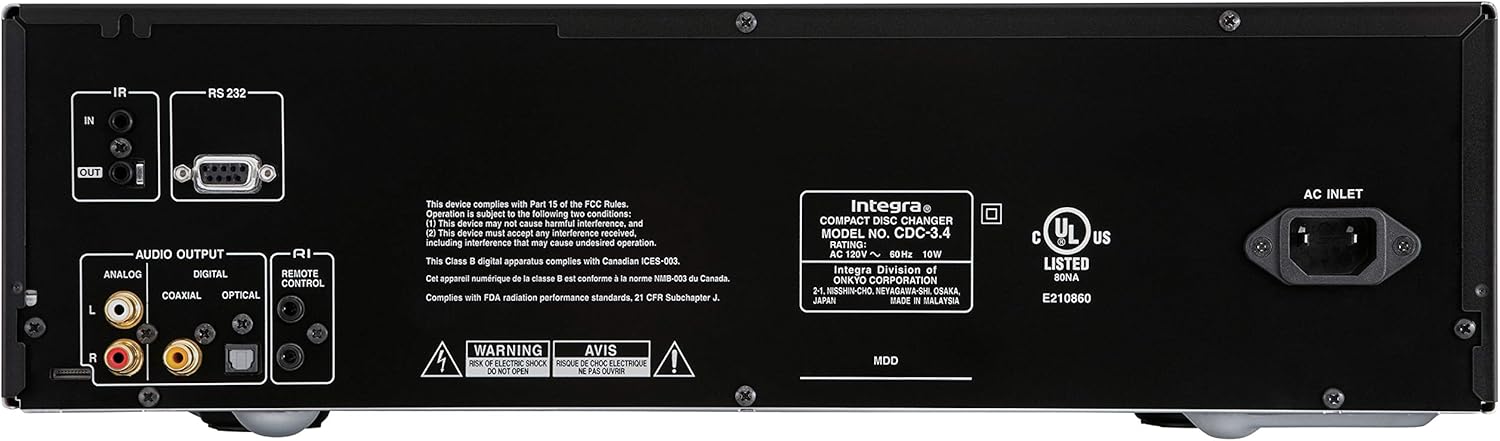
Figure 1: Rear panel connections of the Integra CDC-3.4.
Naudojimo instrukcijos
1. Maitinimo įjungimas/išjungimas
Paspauskite Budėjimo režimas/Įjungtas mygtuką priekiniame skydelyje arba On mygtuką ant nuotolinio valdymo pulto, kad įjungtumėte arba išjungtumėte įrenginį.
2. Loading Discs
The CDC-3.4 is a 6-disc carousel changer. To load discs:
- Paspauskite Atidaryti/Uždaryti mygtuką priekiniame skydelyje arba nuotolinio valdymo pulte, kad atidarytumėte diskų dėklą.
- Place a CD onto an empty disc well, ensuring it is seated correctly. The disc wells are numbered 1 through 6.
- You can swap up to 5 discs while the 6th disc continues to play.
- Paspauskite Atidaryti/Uždaryti dar kartą, kad uždarytumėte dėklą.
3. Disko pasirinkimas
To select a specific disc for playback:
- On the front panel, use the Disko pasirinkimas buttons (1-6) to directly choose a disc.
- On the remote control, use the numbered buttons (1-6) to select a disc.
4. Atkūrimo valdikliai
Use the following buttons on the front panel or remote control for playback:
- Play/Pause (►/▐▐): Pradeda arba pristabdo atkūrimą.
- Stop (■): Sustabdo atkūrimą.
- Skip (◀◀/►►): Peršoka prie ankstesnio arba kito takelio.
- Search (◀◀◀/►►►): Fast forwards or reverses within a track (hold down).
5. Atkūrimo režimai
- Atsitiktinis: Paspauskite Atsitiktinis button to play tracks in a random order.
- Pakartokite: Paspauskite Pakartokite button to repeat the current track, current disc, or all discs.

Figure 2: Front panel controls of the Integra CDC-3.4.

Figure 3: Integra RC-778C Remote Control.
Priežiūra
Įrenginio valymas
To clean the exterior of the unit, use a soft, dry cloth. For stubborn stains, slightly dampen the cloth with water or a mild, non-abrasive cleaner. Do not use harsh chemicals, solvents, or abrasive cleaning pads, as these can damage the finish.
Disko priežiūra
Handle CDs by their edges to avoid fingerprints and scratches. Store discs in their cases when not in use. If a disc is dirty, wipe it gently from the center outwards with a soft, lint-free cloth. Do not use abrasive materials or solvents.
Vidinė priežiūra
The Integra CDC-3.4 contains no user-serviceable parts. Do not attempt to open the casing or perform any internal maintenance. Refer all servicing to qualified service personnel.
Trikčių šalinimas
If you experience issues with your Integra CDC-3.4, please consult the table below before contacting support.
| Problema | Galima priežastis | Sprendimas |
|---|---|---|
| Nėra galios | Maitinimo laidas netinkamai prijungtas. | Įsitikinkite, kad maitinimo laidas tvirtai įjungtas į įrenginį ir sieninį lizdą. |
| Sieninis lizdas neaktyvus. | Išbandykite lizdą su kitu įrenginiu. | |
| Nėra garso | Garso kabeliai netinkamai prijungti. | Check all audio cable connections between the CDC-3.4 and your receiver/ampgyvesnis. |
| Incorrect input selected on receiver/ampgyvesnis. | Select the correct input source on your receiver/ampgyvesnis. | |
| Disc not playing or reading | Diskas nešvarus arba subraižytas. | Clean the disc with a soft, lint-free cloth. Try another disc. |
| Diskas įdėtas neteisingai. | Ensure the disc is placed correctly in the disc well with the label side up. | |
| Nuotolinio valdymo pultas neveikia | Baterijos išsikrovusios arba įdėtos neteisingai. | Pakeiskite baterijas naujomis AAA baterijomis, užtikrindami teisingą poliškumą. |
| Kliūtis tarp nuotolinio valdymo pulto ir įrenginio. | Įsitikinkite, kad tarp nuotolinio valdymo pulto ir įrenginio IR jutiklio yra aiškus matomumas. |
Specifikacijos
| Funkcija | Detalė |
|---|---|
| Modelio numeris | CDC-3.4 |
| Disko talpa | 6 Discs (CD Carousel Changer) |
| Digital to Analog Converters (DACs) | Dual High Quality Wolfson 192 kHz / 24-bit |
| Vietomisampmolva | 128 times oversampmolva |
| Signal Path Technology | Vector Linear Shaping Circuitry (VLSC) for Noise-free Signal Path, Proprietary Direct Digital Path |
| Garso išvestys | Analog (RCA L/R), Digital Coaxial, Digital Optical |
| Valdymo sąsajos | RS232, IR (Infrared), RI (Remote Interactive) |
| Produkto matmenys (P x A x G) | Apytiksliai 17.1 x 9.8 x 21 colio (43.4 x 24.9 x 53.3 cm) |
| Prekės svoris | 15.2 svaro (6.9 kg) |
| Galios reikalavimai | Kintamoji srovė 120V ~ 60Hz |
| Pridedami priedai | Remote Control, RCA Cable, RI Cable, Power Cord, AAA Batteries |
Garantija ir palaikymas
Gamintojo garantija
The Integra CDC-3.4 typically comes with a manufacturer's warranty, which may vary by region. Please refer to the warranty card included with your product or visit the official Integra (Onkyo) website for specific warranty terms and conditions. It is recommended to retain your proof of purchase for warranty claims.
Pagalba klientams
For technical assistance, troubleshooting beyond this manual, or warranty inquiries, please contact Integra customer support. You can find contact information, including phone numbers and online support resources, on the official Onkyo/Integra websvetainę.
Ask a question about this manual
Ask about setup, troubleshooting, compatibility, parts, safety, or missing instructions. Manuals+ will review the question and use this page’s manual context to help answer it.