
1. Įvadas
Thank you for choosing the Petlibro Automatic Pet Feeder. This device is designed to provide consistent and timely meals for your pet, ensuring they are fed according to a set schedule, even when you are away. Please read this manual thoroughly before use to ensure proper operation and maintenance of your feeder.
2. Svarbi saugos informacija
Kad išvengtumėte sužalojimų ar gaminio sugadinimo, laikykitės šių saugos priemonių:
- Prieš naudodami tiektuvą, atidžiai perskaitykite visas instrukcijas.
- Laikykite lesyklėlę atokiau nuo vaikų ir naminių gyvūnėlių, kai ji nenaudojama arba surinkimo metu.
- Nemerkite pagrindinio įrenginio į vandenį ar kitus skysčius.
- Use only dry pet food with a diameter between 5-15mm. Do not use wet, canned, or moist food.
- Ensure the feeder is placed on a stable, level surface.
- Prieš valydami ar atlikdami bet kokią techninę priežiūrą, atjunkite tiektuvą nuo elektros tinklo.
- Do not attempt to repair or modify the feeder yourself. Contact customer support for assistance.
- Atsakingai išmeskite baterijas pagal vietinius reikalavimus.
3. Pakuotės turinys
Patikrinkite pakuotės turinį, kad įsitikintumėte, jog yra visi reikalingi daiktai:
- Petlibro Automatic Pet Feeder Main Unit
- Maisto dubuo
- USB-C Power Adapter and Cable
- Sausinimo maišelis (iš anksto sumontuotas arba atskiras)
- Vartotojo vadovas
4. Produktas baigtasview
Familiarize yourself with the different parts of your Petlibro Automatic Pet Feeder:
- Maisto bakas: Stores dry pet food.
- Dangtis: Covers the food tank to keep food fresh.
- Valdymo skydelis: Buttons and display for setting schedules and manual feeding.
- Maisto parduotuvė: Where food dispenses into the bowl.
- Maisto dubuo: Nuimamas dubenėlis, iš kurio jūsų augintinis gali ėsti.
- Maitinimo prievadas (USB-C): Jungiamas prie maitinimo adapterio.
- Baterijų skyrius: Holds backup batteries (not included).
5. Sąranka
Follow these steps to set up your Petlibro Automatic Pet Feeder:
5.1 Surinkimas
- Išpakuoti: Atsargiai išimkite visus komponentus iš pakuotės.
- Maisto dubenėlio įrengimas: Place the food bowl securely at the base of the feeder.
- Maisto bako įrengimas: Align the food tank with the base and twist to lock it into place.
- Insert Desiccant Bag: If not pre-installed, open the desiccant compartment (usually under the lid) and insert the desiccant bag to keep food fresh. Replace every 15-30 days.

Image: Step-by-step assembly guide for the Petlibro Automatic Pet Feeder. It shows how to twist open the lid, take out the food bowl, put the desiccant bag into its compartment, install the food tank, put the lid back on, and finally install the food bowl.
5.2 Maitinimo šaltinis
The feeder can be powered by a USB-C adapter or backup batteries.
- Pirminė galia: Connect the USB-C power adapter to the feeder's power port and plug it into a wall outlet.
- Baterijos atsarginis maitinimas (neprivaloma): Dėl galios otages, install 3 D-cell batteries (not included) into the battery compartment at the bottom of the feeder. This ensures continuous operation.
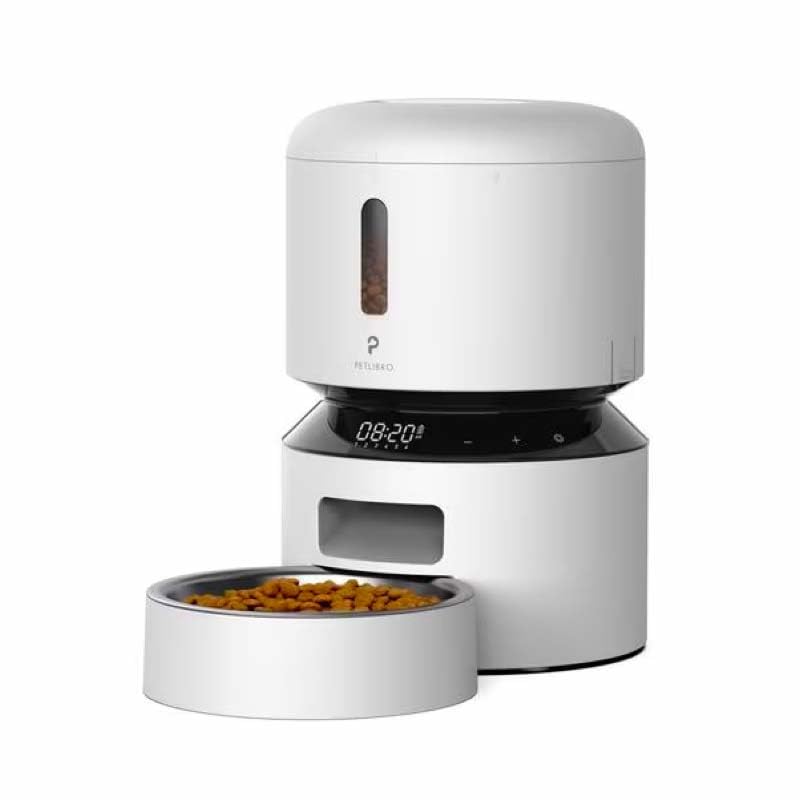
Image: Diagram illustrating the dual power supply system of the Petlibro Automatic Pet Feeder. It shows the USB-C adapter connected for primary power and the battery compartment for backup power. A note indicates that batteries are not included.
6. Naudojimo instrukcijos
Once assembled and powered, you can begin programming your feeder.
6.1 Maisto bako pildymas
- Atidarykite maisto bako dangtelį.
- Pour dry pet food into the tank. Ensure the food is within the recommended size (5-15mm diameter).
- Close the lid securely to maintain freshness.
6.2 Setting Meal Schedules and Portions
The feeder allows you to schedule up to 6 meals per day, with 1 to 50 portions per meal.

Image: A cat eating from the Petlibro Automatic Pet Feeder, illustrating the feeder's function. Text overlays indicate "Portion: 1-50" and "Meals: 1-6", highlighting the customizable feeding schedule.
- Nustatyti dabartinį laiką: Use the control panel buttons (e.g., "SET", "UP", "DOWN") to set the current time.
- Programos maitinimo laikas: Press the "MEAL" button to enter meal programming mode. Select the desired meal number (e.g., Meal 1) and set the feeding time.
- Set Portions: For each programmed meal, set the number of portions (1-50) using the "PORTION" or "UP/DOWN" buttons.
- Repeat for all meals: Program up to 6 meals as needed.
- Išsaugoti nustatymus: Ensure all settings are saved according to the feeder's specific interface (usually by pressing "SET" or waiting for auto-save).
6.3 Rankinis šėrimas
To dispense food instantly, press the manual feed button (often labeled "FEED" or a paw icon) on the control panel. Each press typically dispenses one portion.
7. Priežiūra ir valymas
Reguliarus valymas užtikrina higieną ir prailgina lesyklėlės tarnavimo laiką.
- Atjunkite: Always unplug the feeder from the power outlet before cleaning.
- Išardyti: Remove the food bowl and food tank.
- Švarūs komponentai: Wash the food bowl and food tank with mild soap and water. Rinse thoroughly and dry completely before reassembling.
- Pagrindinio įrenginio valymas: Nuvalykite pagrindinį įrenginį minkšta, damp audinys. Nenardinkite pagrindinio įrenginio į vandenį.
- Replace Desiccant: Replace the desiccant bag every 15-30 days to maintain food freshness.
- Surinkti iš naujo: Prieš surinkdami tiektuvą, įsitikinkite, kad visos dalys yra sausos.
8. Problemų sprendimas
Jei kyla problemų dėl tiektuvo, žr. šias dažniausiai pasitaikančias problemas ir jų sprendimus:
| Problema | Galima priežastis | Sprendimas |
|---|---|---|
| Tiektuvas neįsijungia. | No power connection; batteries depleted or incorrectly installed. | Check power adapter connection; replace batteries or ensure correct polarity. |
| Maistas neišduodamas. | Food tank empty; food jammed; dispenser blocked; incorrect schedule settings. | Refill food tank; clear any food jams; check dispenser for blockages; verify meal schedule and portion settings. |
| Maisto išduodama per daug / per mažai. | Incorrect portion settings. | Adjust portion settings for each meal. |
| Ekranas neveikia. | Maitinimo problema; ekrano gedimas. | Patikrinkite maitinimo šaltinį; jei problema išlieka, kreipkitės į klientų aptarnavimo tarnybą. |
9. Specifikacijos
| Funkcija | Detalė |
|---|---|
| Produkto pavadinimas | Petlibro Automatic Pet Feeder |
| Modelis | 3L automatinis naminių gyvūnėlių tiektuvas |
| Talpa | 3 litrai |
| Medžiaga | Food-grade ABS plastic |
| Maitinimo šaltinis | USB-C adapter (5V/1A); 3 x D-cell batteries (backup, not included) |
| Maitinimas per dieną | Up to 6 meals |
| Porcijos vienam valgiui | 1-50 portions (approx. 5-10g per portion, depending on food density) |
| Rekomenduojamas maisto dydis | 5-15mm dry kibble |
| Spalva | Baltas |
10. Garantija ir palaikymas
Your Petlibro Automatic Pet Feeder comes with a standard manufacturer's warranty. For detailed warranty information, please refer to the warranty card included in your package or visit the official Petlibro websvetainę.
If you have any questions, require technical support, or need assistance with your product, please contact Petlibro customer service. Contact details can typically be found on the product packaging, the official website, or by searching for "Petlibro customer support" online.