
360 S6
360 roboto dulkių siurblio ir šluotos naudotojo vadovas
Modelis: S6
Įvadas
Thank you for choosing the 360 Robot Vacuum and Mop Cleaner. This intelligent cleaning device is designed to provide efficient and thorough cleaning for your home, featuring advanced laser navigation, powerful suction, and smart app control. This manual will guide you through the setup, operation, and maintenance of your new robot vacuum to ensure optimal performance and longevity.

The 360 Robot Vacuum and Mop Cleaner, Model S6, shown with its companion mobile application interface.
Saugos informacija
- Prieš naudodami prietaisą, atidžiai perskaitykite visas instrukcijas.
- Neleiskite vaikams valdyti roboto dulkių siurblio. Prižiūrėkite vaikus ir naminius gyvūnus, kai robotas veikia.
- Ensure the charging dock is placed on a flat surface against a wall, with clear space around it.
- Nenaudokite roboto dulkių siurblio drėgnoje aplinkoje arba šalia skysčių.
- Prieš valydami, nuimkite nuo grindų visus palaidus laidus, smulkius daiktus ar trapius daiktus, kad jie nesusipainiotų ir nepažeistų jų.
- Do not use the robot vacuum to pick up large debris, sharp objects, or burning/smoking materials.
- Only use the original charger and battery provided by the manufacturer.
- Kad užtikrintumėte saugų ir efektyvų veikimą, reguliariai atlikite techninę priežiūrą, kaip aprašyta šiame vadove.
Pakuotės turinys
Patikrinkite, ar pakuotėje yra visi komponentai:
- 360 Robot Vacuum and Mop Cleaner (S6)
- Įkrovimo dokas
- Maitinimo adapteris
- Vandens bakas
- Mopo audinys
- Šoniniai šepečiai (2 poros)
- Valymo įrankis
- Vartotojo vadovas
- Baterija (iš anksto sumontuota)
- Filtras (iš anksto įdiegtas)
Produktas baigtasview
Familiarize yourself with the main components of your 360 Robot Vacuum and Mop Cleaner.

Baigėsiview of the robot vacuum's intelligent features including anti-collision, anti-drop sensors, long-lasting battery, LDS laser navigation, and SLAM algorithm for mapping.
Į viršų View:
- LDS lazerinės navigacijos jutiklis: For accurate mapping and navigation.
- Maitinimo / valymo mygtukas: Press to start/pause cleaning, long press to turn on/off.
- Įkrovimo mygtukas: Paspauskite, kad robotas grįžtų į įkrovimo stotelę.
- Dustbin Compartment: Įsikūręs po viršutiniu dangteliu.
Apačia View:
- Pagrindinis šepetys: Giluminiam kilimų ir kietų grindų valymui.
- Šoniniai šepečiai: Šluostyti šiukšles nuo kraštų ir kampų.
- Varomieji ratai: Skirtas judėjimui ant įvairių paviršių.
- Omni-directional Wheel: For steering.
- Įkrovimo kontaktai: To connect with the charging dock.
- Skardžio jutikliai: Kad nenukristų nuo laiptų.
- Sieninis jutiklis: To sweep along walls and corners effectively.
Sąranka
1. Charging the Robot Vacuum
- Place the charging dock on a hard, level surface against a wall. Ensure there is at least 0.5 meters (1.6 feet) of clear space on both sides and 1.5 meters (4.9 feet) in front of the dock.
- Connect the power adapter to the charging dock and plug the other end into a power outlet.
- Place the robot vacuum onto the charging dock, ensuring the charging contacts align. The robot will announce that it is charging. For first use, fully charge the robot before operation.
2. Connecting to the 360 Robot App
- Download the "360 Robot" app from the App Store (iOS) or Google Play Store (Android).
- Atidarykite programėlę ir sukurkite paskyrą arba prisijunkite.
- Follow the in-app instructions to add your device. This typically involves selecting your robot model, connecting to its Wi-Fi hotspot, and then connecting the robot to your home Wi-Fi network (2.4GHz only).
- Prijungę galite valdyti robotą, view cleaning maps, set schedules, and access advanced features through the app.
Veikiantis
Valymo ciklo pradžia
- Per roboto mygtuką: Press the Power/Clean button on the robot once to start a cleaning cycle. Press again to pause.
- Per programą: Open the 360 Robot app and tap the "Clean" button. You can also select specific cleaning modes (e.g., Spot cleaning, Proximity cleaning) or set schedules.
- Via Voice Command (Alexa): If integrated with Alexa, you can use voice commands like "Alexa, ask 360 Robot to start cleaning."
Valymo režimai

The robot vacuum is capable of both sweeping (vacuuming) and mopping, utilizing its main brush, side brushes, and mop cloth.
- Automatinis valymas: The robot intelligently maps your home and cleans systematically. It identifies carpet and automatically switches to Max Mode with 1800Pa suction power for deep cleaning.
- Vietų valymas: Nurodo robotui intensyviai valyti konkretų nedidelį plotą.
- Proximity Cleaning: Cleans a designated area around the robot.
- Šluostymo režimas: Pritvirtinkite vandens baką su reklamaamp mop cloth. The robot will mop hard floors. Note: The mopping function is designed for light mopping and not for heavy stains.
Išplėstinės programos funkcijos
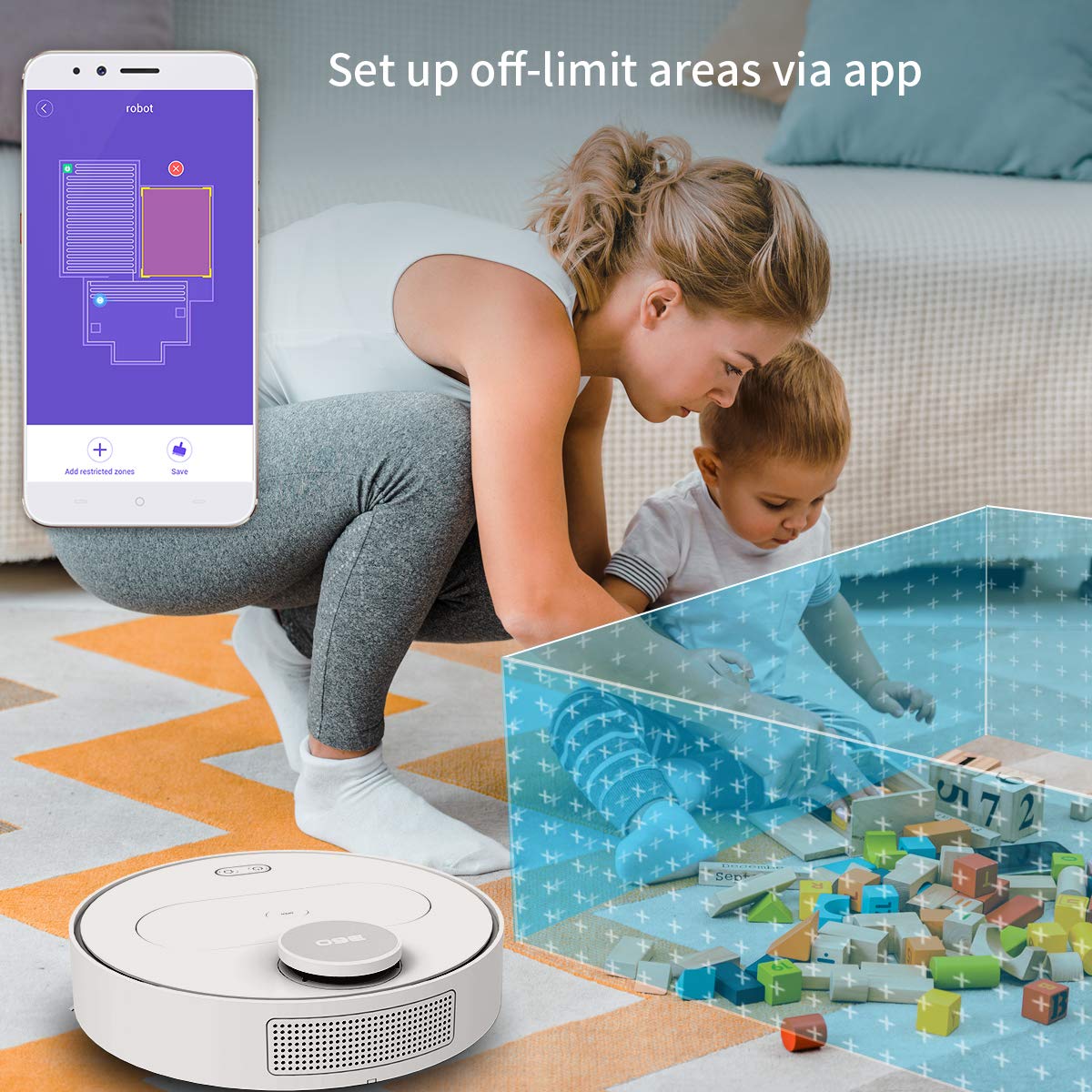
The 360 Robot app allows users to define and set up off-limit areas on the cleaning map, preventing the robot from entering specific zones.
- Multi-map Management: Save and manage multiple floor plans for different levels of your home.
- Off-limit Area: Draw virtual boundaries or no-go zones on the map to prevent the robot from entering specific areas.
- Planavimas: Nustatykite konkretų laiką, kada robotas automatiškai pradės valyti.
- Nuotolinio valdymo pultas: Manually control the robot's movement using the app.
- Tako valymas: Monitor the robot's real-time cleaning path and progress on the map.
- Siurbimo lygiai: Adjust suction power (Quiet, Normal, Powerful, Max) according to your cleaning needs.
Automatic Recharge and Breakpoint Resume
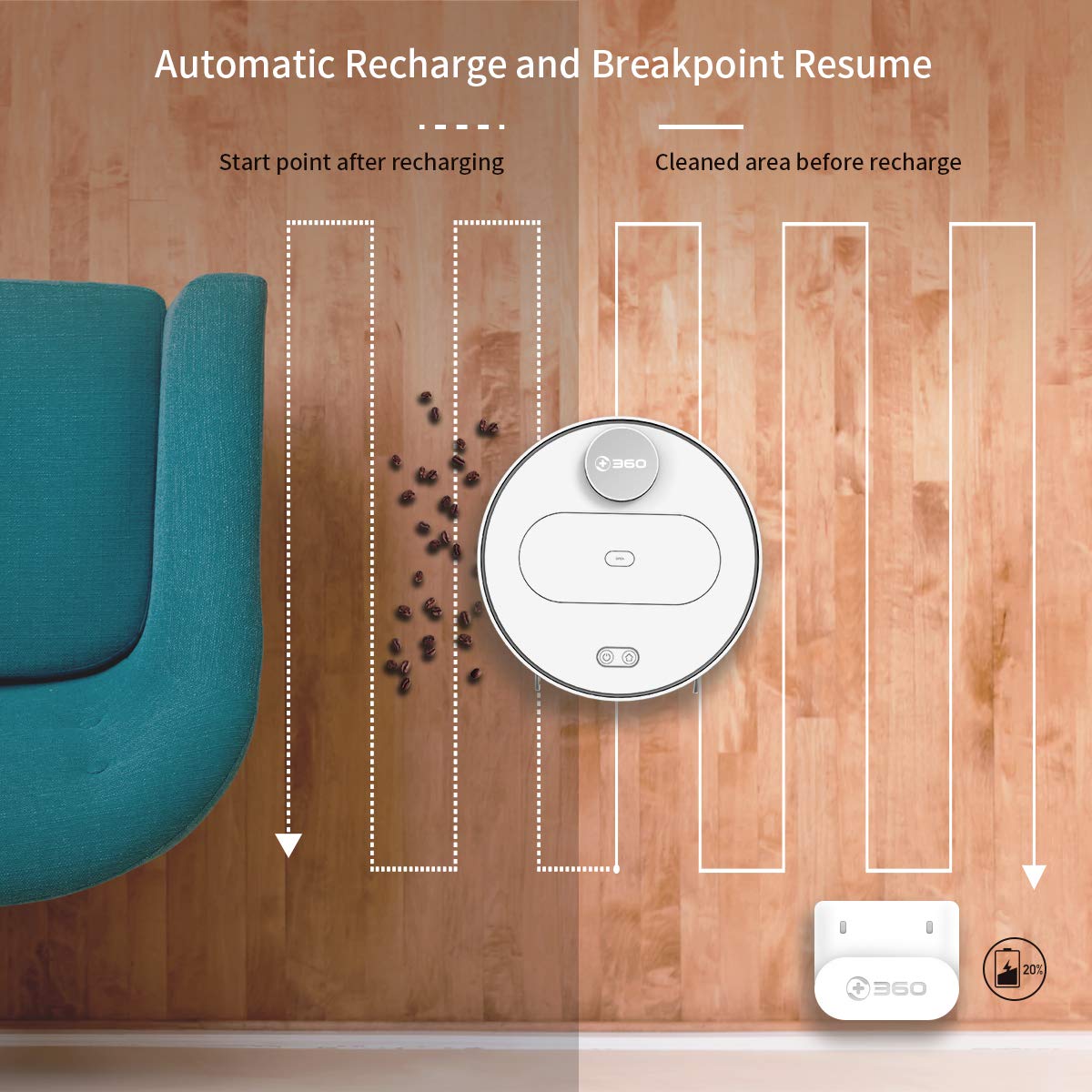
The robot automatically returns to its charging dock when the battery is low and resumes cleaning from the last uncleaned spot after recharging.
When the battery level is low during a cleaning cycle, the robot will automatically return to its charging dock. Once fully recharged, it will resume cleaning from where it left off, ensuring complete coverage of your home.
Priežiūra
Reguliarus techninis aptarnavimas yra labai svarbus optimaliam roboto dulkių siurblio veikimui ir ilgaamžiškumui.
1. Šiukšlių dėžės ištuštinimas
- Atidarykite viršutinį roboto dangtį ir išimkite šiukšliadėžę.
- Atidarykite šiukšliadėžės dangtį ir išpilkite jos turinį į šiukšliadėžę.
- It is recommended to empty the dustbin after each cleaning cycle.
2. Filtro valymas

The 360 Robot Vacuum features a washable HEPA filter, which helps maintain high filtration efficiency and contributes to cleaner indoor air.
- Išimkite filtrą iš dulkių surinktuvo.
- Tap the filter gently to remove loose dirt.
- Rinse the filter under running water. Ensure it is completely dry before reinserting it into the dustbin. Do not use a brush or other tools to clean the filter, as this may damage it.
- It is recommended to clean the filter weekly and replace it every 3-6 months, depending on usage.
3. Valymo šepečiai
- Pagrindinis šepetys: Remove the main brush cover and then the main brush. Use the provided cleaning tool to remove hair and debris tangled around the brush. Reinstall the brush and cover. Clean weekly.
- Šoniniai šepečiai: Check side brushes for tangled hair or debris. If necessary, remove them (they can be pulled off) and clean. Reinstall, ensuring they click into place. Replace if worn or damaged. Clean monthly.
4. Jutiklių ir įkrovimo kontaktų valymas
- Wipe the cliff sensors (on the bottom of the robot), wall sensor (on the side), and charging contacts (on the robot and charging dock) with a clean, dry cloth. This ensures proper navigation and charging. Clean monthly.
5. Water Tank and Mop Cloth Maintenance
- After mopping, remove the water tank and empty any remaining water.
- Remove the mop cloth and wash it thoroughly. Allow it to air dry completely before reattaching or storing.
- Do not leave water in the tank when the robot is not in use for extended periods.
Trikčių šalinimas
| Problema | Galima priežastis | Sprendimas |
|---|---|---|
| Robotas neįsijungia. | Baterija išsikrovusi arba jos įkrova maža. | Padėkite robotą ant įkrovimo stotelės ir įsitikinkite, kad jis kraunasi. |
| Robotas negali prisijungti prie „Wi-Fi“. | Neteisingas „Wi-Fi“ slaptažodis; 5 GHz tinklas; robotas per toli nuo maršrutizatoriaus. | Ensure correct 2.4GHz Wi-Fi password. Move robot closer to router. Restart robot and router. |
| Robotas dažnai užstringa. | Obstacles on the floor; narrow spaces. | Clear obstacles. Use the app to set off-limit areas for problematic zones. |
| Prastas valymo našumas. | Pilna šiukšliadėžė; užsikimšęs filtras; susivėlę šepečiai. | Ištuštinkite dulkių konteinerį. Išvalykite arba pakeiskite filtrą. Išvalykite pagrindinį ir šoninius šepečius. |
| Robotas negrįžta į įkrovimo doką. | Charging dock obstructed; charging contacts dirty. | Ensure clear space around the dock. Clean charging contacts on both robot and dock. |
Specifikacijos
| Funkcija | Detalė |
|---|---|
| Prekės ženklas | 360 |
| Modelio pavadinimas | S6 |
| Ypatingos savybės | Anti-Collision, Anti-Fall, Washable Filter |
| Spalva | Daugiaspalvis |
| Filtro tipas | Audinys |
| Baterijos veikimo laikas | 110 minučių |
| Maitinimo šaltinis | Maitinamas baterijomis |
| Kontrolės metodas | Programėlė |
| Suderinami įrenginiai | Alexa |
| Prekės svoris | 3 kg 490 g |
| Prekės matmenys (IxPxH) | 35x35x10 cm |
Garantija ir palaikymas
For warranty information and technical support, please refer to the warranty card included in your product packaging or visit the official 360 SmartAI website. You can also contact customer service through the 360 Robot app for assistance.
Daugiau išteklių ir DUK rasite apsilankę 360 Store on Amazon.
Susiję dokumentaiS6


Ask a question about this manual
Ask about setup, troubleshooting, compatibility, parts, safety, or missing instructions. Manuals+ will review the question and use this page’s manual context to help answer it.