
Įvadas
This manual provides essential instructions for the safe and effective use of your Andoer Portable 1080P Digital Camera D11773S. Please read this manual thoroughly before operating the device and retain it for future reference. This digital camera is designed for capturing high-resolution photos and videos, featuring a 48MP image sensor, 1080P video recording, 8X digital zoom, and a 2.7-inch LCD screen.
Saugos informacija
- Saugokite fotoaparatą nuo vandens ar drėgmės.
- Venkite fotoaparato numetimo ir stiprių smūgių.
- Laikykite fotoaparatą atokiau nuo stiprių magnetinių laukų.
- Do not attempt to disassemble or modify the camera. Repairs should only be performed by qualified personnel.
- Use only the specified battery type and charging cable.
- Nenaudojamą fotoaparatą laikykite vėsioje, sausoje vietoje.
- Laikyti mažiems vaikams nepasiekiamoje vietoje.
Pakuotės turinys
Patikrinkite, ar pakuotėje yra visi reikalingi daiktai:
- Andoer Portable Digital Camera (Model D11773S)
- Lithium Battery (3.7V 550mAh)
- C tipo įkrovimo laidas
- Riešo dirželis
- Maišelis
- Vartotojo vadovas

Image: Contents of the camera package, showing the camera, battery, USB-C cable, wrist strap, carry bag, and user manual.
Fotoaparatas baigtasview
Susipažinkite su pagrindiniais savo fotoaparato komponentais.
Priekyje View

Vaizdas: priekis view of the Andoer D11773S camera. Key features visible include the digital lens, built-in flash, and the 2.7" TFT display and 48 Mega pixels indicators.
- Objektyvas: Užfiksuoja vaizdus ir vaizdo įrašus.
- Flash: Suteikia apšvietimą esant silpnam apšvietimui.
- Mikrofonas: Įrašo garsą vaizdo įrašymo metu.
Galinis View

Vaizdas: Galinis view of the Andoer D11773S camera, displaying the 2.7-inch LCD screen and various control buttons for navigation and settings.
- LCD Screen (2.7 Inch): Rodo tiesiogiai view, meniu ir atkūrimas.
- Valdymo mygtukai: For menu navigation, mode selection, zoom, and playback.
- Pranešėjas: Garso atkūrimui.
Šoninė View ir Matmenys

Image: Diagram illustrating the dimensions of the Andoer D11773S camera: 9.2cm length, 6.1cm width, and 1.4cm thickness.
- USB prievadas (C tipo): Įkrovimui ir duomenų perdavimui.
- Atminties kortelės lizdas: For inserting a Micro SD card.
- Baterijų skyrius: Talpina įkraunamą ličio bateriją.
Sąranka
1. Akumuliatoriaus įkrovimas
- Insert the provided lithium battery into the camera's battery compartment.
- Connect the camera to a power source (e.g., computer USB port or USB wall adapter) using the supplied Type-C charge cable.
- Užsidegs įkrovimo indikatoriaus lemputė. Kai prietaisas bus visiškai įkrautas, lemputė gali pakeisti spalvą arba užgesti.
2. Atminties kortelės įdėjimas
The camera requires a Class-10 external Micro SD memory card (not included) with a maximum capacity of 128GB.
- Suraskite atminties kortelės angą fotoaparato šone.
- Įdėkite „Micro SD“ kortelę metaliniais kontaktais į kameros priekį, kol ji spragtelės ir užsifiksuos.
- To remove, gently press the card inward until it springs out.
Naudojimo instrukcijos
Maitinimo įjungimas/išjungimas
- Norėdami įjungti, paspauskite ir palaikykite maitinimo mygtuką.
- Norėdami išjungti, dar kartą paspauskite ir palaikykite nuspaudę maitinimo mygtuką.
Fotografavimas
The camera supports picture resolutions up to 48MP.
- Įjunkite fotoaparatą.
- Kadruokite kadrą naudodami 2.7 colių LCD ekraną.
- Press the Shutter button halfway to focus (if applicable), then fully press to capture the photo.

Image: Visual representation of the camera's capabilities, showing a 48MP photo example and a 1080P video example.
Vaizdo įrašų įrašymas
The camera supports video resolution up to 1920x1080 (1080P).
- Switch the camera to video recording mode (refer to on-screen icons or mode button).
- Norėdami pradėti įrašyti, paspauskite mygtuką Įrašyti.
- Norėdami sustabdyti įrašymą, dar kartą paspauskite įrašymo mygtuką.
Mastelio funkcija
The camera features 8X digital zoom.
- Use the zoom buttons (often marked 'W' for Wide and 'T' for Telephoto) to adjust the zoom level.
„Flash“ nustatymai
The built-in flash can be used in dark conditions.
- Access the flash settings through the camera's menu to select modes like Auto Flash, Fill-in Flash, Red-eye Reduction, or Flash Off.
Special Features: Anti-Shake, Face Detect, Smile Capture, Self-Timer
These features enhance your photography experience.
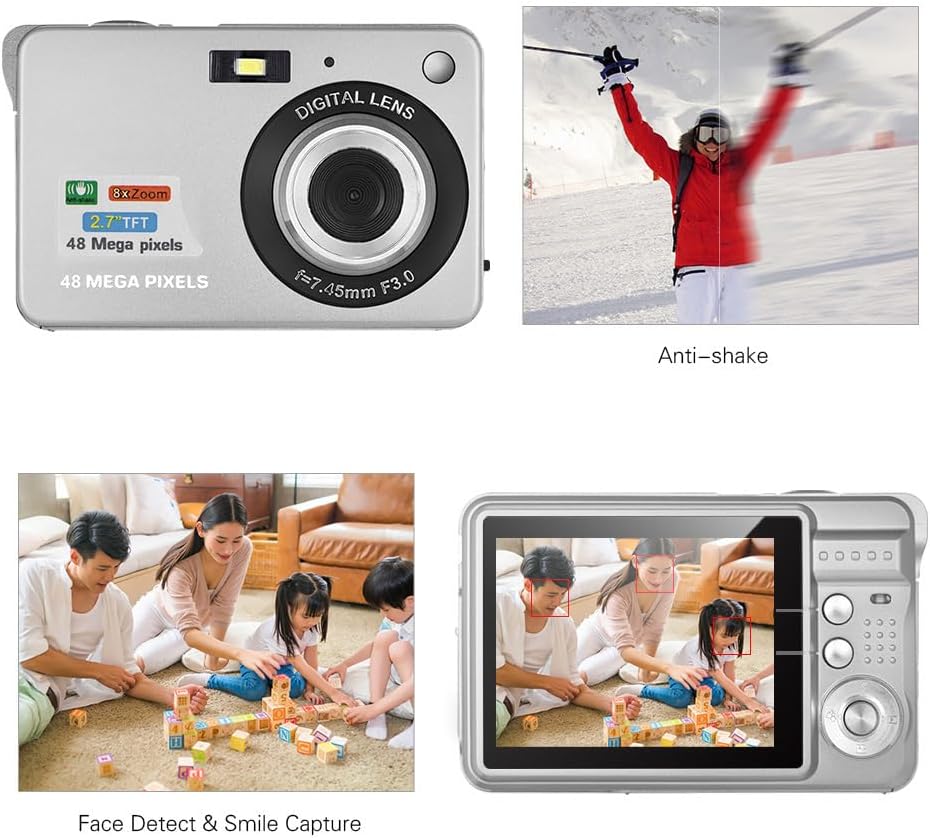
Image: Demonstrations of the camera's Anti-shake function (reducing blur from movement) and Face Detect & Smile Capture (identifying faces and automatically taking a photo when a smile is detected).
- Anti-shake: Helps reduce blur caused by camera movement. This feature is typically enabled by default or can be toggled in settings.
- Face Detect & Smile Capture: The camera can detect faces and automatically capture a photo when a smile is detected. Enable these options in the camera's menu.
- Laikmatis: Set a delay (2, 5, or 10 seconds) before the photo is taken, allowing you to be in the shot.
Makro režimas
Skirta mažų objektų fotografavimui stambaus plano režimu.

Image: A close-up photograph of an ant, demonstrating the camera's Macro Mode capability for detailed shots of small subjects.
- Activate Macro Mode through the camera's menu or a dedicated button for close-up shots.
Atkūrimo režimas
- Paspauskite atkūrimo mygtuką, kad iš naujoview užfiksuotas nuotraukas ir vaizdo įrašus LCD ekrane.
- Norėdami slinkti per mediją, naudokite naršymo mygtukus.
Prisijungimas prie kompiuterio
You can transfer photos and videos to a computer using the supplied Type-C USB cable.
- Įsitikinkite, kad fotoaparatas įjungtas.
- Connect one end of the Type-C USB cable to the camera's USB port and the other end to an available USB port on your computer.
- The camera should appear as a removable disk or media device on your computer.
- Open the camera's folder to access and transfer your files.
- Prieš atjungdami laidą, saugiai atjunkite įrenginį nuo kompiuterio.
Priežiūra
- Valymas: Use a soft, dry cloth to clean the camera body. For the lens and LCD screen, use a specialized lens cleaning cloth and solution. Do not use abrasive cleaners.
- Saugykla: When not in use for extended periods, remove the battery and store the camera in a cool, dry place, preferably in its carry bag.
- Akumuliatoriaus priežiūra: Kad pailgintumėte akumuliatoriaus tarnavimo laiką, net jei jo nenaudojate, periodiškai jį įkraukite.
Trikčių šalinimas
| Problema | Galimas sprendimas |
|---|---|
| Kamera neįsijungia. | Įsitikinkite, kad akumuliatorius yra visiškai įkrautas ir teisingai įdėtas. |
| Negalima fotografuoti / įrašyti vaizdo įrašų. | Check if a memory card is inserted and has sufficient free space. Ensure the camera is in the correct mode. |
| Vaizdai neryškūs. | Ensure the lens is clean. Hold the camera steady during capture. Check lighting conditions and use flash if necessary. |
| Kompiuteris neatpažįsta kameros. | Ensure the USB cable is securely connected. Try a different USB port or restart the computer. |
| Baterija greitai išsikrauna. | Reduce LCD brightness. Limit flash usage. Ensure the camera is powered off when not in use. |
Specifikacijos
| Funkcija | Detalė |
|---|---|
| Vaizdo jutiklis | CMOS jutiklis |
| Ekranas | 2.7 colio LCD |
| File Formatas | JPEG (Photo), AVI (Video) |
| Paveikslėlio raiška | Up to 48M (8000x6000) |
| Vaizdo raiška | 1920x1080 (1080P), 1280x720 |
| Skaitmeninis priartinimas | 8X |
| Ekspozicijos kompensavimas | EV-3 to EV+3 |
| Laikmatis | Išjungta / 2 sek. / 5 sek. / 10 sek |
| Ypatingos savybės | Anti-Shake, Face Detect, Smile Capture |
| Maitinimo šaltinis | 1 * Lithium battery (3.7V 550mAh) |
| Palaikoma atminties kortelė | Class-10 Micro SD, max. 128GB (not included) |
| Sąsaja | C tipo USB |
| Matmenys (L*P*A) | 9.2 * 6.1 * 1.4 cm / 3.6 * 2.4 * 0.5 inch |
| Svoris | 99 g / 3.5 uncijos |
| Palaikoma sistema | Windows XP, VISTA, WIN7, MAC |
Garantija ir palaikymas
This product comes with a standard manufacturer's warranty. Please refer to the warranty card included in your package for specific terms and conditions. For technical support, troubleshooting assistance, or further inquiries, please visit the official Andoer websvetainėje arba susisiekite su jų klientų aptarnavimo skyriumi. Išsaugokite pirkimo kvitą kaip pirkimo įrodymą garantijos pretenzijoms.
Palaikymas internetu: Visit the Andoer Store on Amazon