
1. Įvadas
Šiame vadove pateikiamos išsamios instrukcijos, kaip naudoti juodąweb SDVD1183-BW Portable Blu-ray/DVD Player. Please read this manual thoroughly before using the device to ensure proper operation and to maximize your viewklausymosi patirtį. Išsaugokite šį vadovą ateičiai.
2. Saugos informacija
- Saugokite įrenginį nuo lietaus, drėgmės ar ekstremalių temperatūrų.
- Stenkitės, kad prietaisas nenumestų ar nepatirtų stipraus smūgio.
- Nebandykite patys ardyti ar taisyti įrenginio. Visus techninės priežiūros darbus patikėkite kvalifikuotiems specialistams.
- Use only the provided power adapters and accessories.
- Užtikrinkite tinkamą vėdinimą; neužblokuokite jokių ventiliacijos angų.
- Išmeskite baterijas laikydamiesi vietinių taisyklių.
3. Pakuotės turinys
Patikrinkite, ar pakuotėje yra visi reikalingi daiktai:
- Juodaweb SDVD1183-BW Portable Blu-ray/DVD Player
- Kintamos srovės adapteris
- Automobilio maitinimo adapteris
- A/V kabelis
- Nuotolinio valdymo pultas
- Vartotojo vadovas (šis dokumentas)
4. Produktas baigtasview
4.1 Priekis View

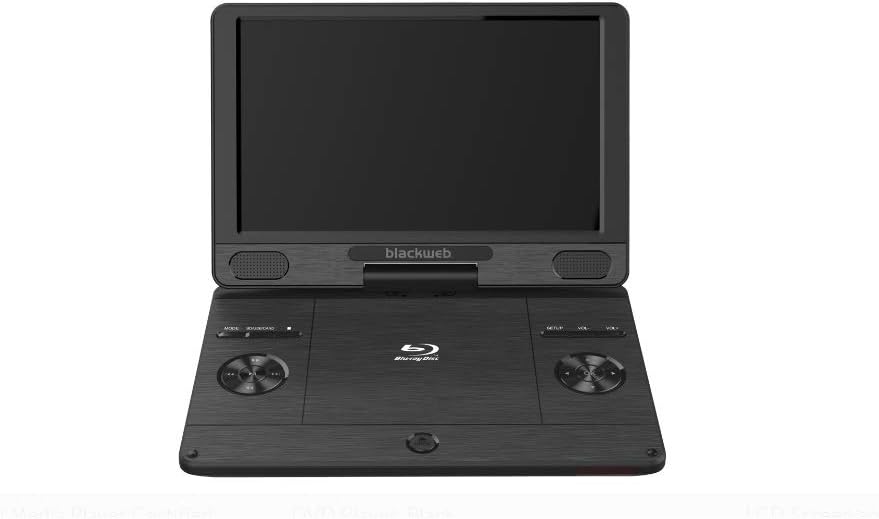
Vaizdas: priekis view Juodaodžiųweb SDVD1183-BW Portable Blu-ray/DVD Player, showing the open 11.4-inch screen, integrated speakers, and control buttons on the base.
Priekyje view displays the 11.4-inch HD screen, stereo speakers, and essential control buttons on the player's base. These buttons typically include MODE, SOURCE/CARD, SETUP, and Volume controls (VOL+, VOL-).
4.2 Side/Rear View
Vaizdas: Šoninė view Juodaodžiųweb SDVD1183-BW Portable Blu-ray/DVD Player, closed, highlighting the various input/output ports.
The side and rear panels house various connectivity ports. These include the DC IN port for power, USB port for external storage, SD/MMC card slot, HDMI OUT for connecting to external displays, AV OUT for analog video/audio, a headphone jack, and an Ethernet port for network connectivity. A power ON/OFF switch is also located on the side.
5. Sąranka
5.1 Akumuliatoriaus įkrovimas
Before first use, fully charge the player's internal Lithium Ion battery. Connect the AC power adapter to the DC IN port on the player and plug it into a wall outlet. The charging indicator light will illuminate, typically turning off or changing color when fully charged.
5.2 Įjungimas / išjungimas
To power on the player, slide the ON/OFF switch to the 'ON' position. To power off, slide the switch to the 'OFF' position.
5.3 Connecting to External Display (HDMI)
Į view content on a larger screen, connect an HDMI cable (not included) from the player's HDMI OUT port to an HDMI input on your TV or monitor. Select the corresponding HDMI input on your external display.
5.4 Disko įdėjimas
Gently open the disc compartment lid. Place a Blu-ray disc, DVD, or CD onto the spindle with the label side facing up. Press down gently on the center of the disc until it clicks into place. Close the lid firmly.
5.5 USB / SD kortelės naudojimas
Insert a USB flash drive into the USB port or an SD/MMC card into the card slot. The player should automatically detect the media. If not, use the SOURCE/CARD button to select the appropriate input source.
6. Naudojimo instrukcijos
6.1 Pagrindinis atkūrimas
After inserting a disc or connecting USB/SD media, the player will typically begin playback automatically or display a menu. Use the navigation buttons on the player or remote control to select options and press the PLAY/PAUSE button to start or pause playback.
6.2 Nuotolinio valdymo pulto naudojimas
The included remote control provides full functionality for the player. Point the remote control directly at the player's IR sensor. Functions include: Play, Pause, Stop, Fast Forward, Rewind, Skip Track/Chapter, Menu, Setup, Volume Up/Down, and Mute.
6.3 Adjusting Volume and Screen
Use the VOL+ and VOL- buttons on the player or remote control to adjust the audio volume. Screen brightness, contrast, and other display settings can typically be adjusted through the SETUP menu.
6.4 Medijos atkūrimas
The player supports a wide range of media formats, including:
- Diskai: CD-R/RW, DVD±R/RW, CD, Video CD, BD-R, BD-RE, Blu-ray Disc
- Garsas: WMA, DTS, Dolby Digital, Dolby Digital Plus, Dolby TrueHD
- Vaizdo įrašas: MPEG-1, MPEG-2, MPEG-4, WMV, H.264, VC-1
- Vaizdai: GIF, JPEG, PNG
6.5 Network Connection (Ethernet)
Connect an Ethernet cable to the player's Ethernet port for wired network access. This feature may be used for firmware updates or accessing online content if supported by the player's software.
7. Priežiūra
7.1 Grotuvo valymas
Wipe the player's exterior with a soft, dry cloth. Do not use liquid cleaners, aerosols, or abrasive materials. For the screen, use a soft, lint-free cloth specifically designed for electronics displays.
7.2 Diskų priežiūra
Diskus imkite už kraštų, kad išvengtumėte pirštų atspaudų. Laikykite diskus švarius ir nesubraižytus. Kai nenaudojate, laikykite diskus jų dėkluose.
7.3 Akumuliatoriaus priežiūra
To prolong battery life, avoid fully discharging the battery frequently. Charge the battery regularly, even if the player is not used for extended periods. Avoid exposing the player to extreme heat or cold, which can degrade battery performance.
8. Problemų sprendimas
Jei kyla problemų dėl grotuvo, žr. šias dažniausiai pasitaikančias problemas ir sprendimus:
- Nėra galios: Ensure the AC adapter is securely connected and plugged into a working outlet. Check if the battery is charged. Verify the ON/OFF switch is in the 'ON' position.
- Nefotografuoti: If using an external display, ensure the HDMI cable is connected correctly and the TV/monitor is set to the correct input source. Check the player's screen brightness settings.
- Nėra garso: Check the volume level on the player and any connected external audio devices. Ensure headphones are fully plugged in if used. Verify audio settings in the SETUP menu.
- Diskas negroja: Ensure the disc is inserted correctly and is clean and free of scratches. Verify the disc format is supported by the player (e.g., Blu-ray, DVD, CD). Some Blu-ray discs may have region coding; ensure it matches the player's region.
- USB / SD kortelė neatpažinta: Įsitikinkite, kad USB atmintinė arba SD kortelė yra suformatuota suderinamu formatu file system (e.g., FAT32). Reinsert the media. Try a different USB port or SD card slot if available.
9. Specifikacijos
| Funkcija | Specifikacija |
|---|---|
| Modelio numeris | SDVD1183-BW |
| Ekrano dydis | 11.4 colių |
| Medijos tipas | Blu-Ray, DVD, CD, USB, SD/MMC |
| Grojami formatai | CD-R/RW, DVD±R/RW, CD, Video CD, BD-R, BD-RE, Blu-ray Disc, GIF, JPEG, PNG, WMA, DTS, MPEG-1, MPEG-2, MPEG-4, WMV, H.264, VC-1 |
| Ryšio technologija | Ethernet, HDMI, USB |
| Gaminio matmenys | 16 x 14.5 x 3.5 colio |
| Prekės svoris | 5.6 svaro |
| Baterijos | Reikalinga 1 ličio jonų baterija |
| Spalva | Juoda |
10. Informacija apie garantiją
This Blackweb product comes with a limited manufacturer's warranty. Please refer to the warranty card included in your original product packaging for specific terms, conditions, and duration of coverage. Keep your purchase receipt as proof of purchase for any warranty claims.
11. Parama
For technical assistance, troubleshooting beyond this manual, or customer service inquiries, please refer to the contact information provided in your product packaging or visit the official Blackweb parama website. Have your model number (SDVD1183-BW) and purchase details ready when contacting support.