
Juodaweb 8541666919
Juodaweb Žaidimų mechaninės klaviatūros naudotojo vadovas
Modelis: 8541666919
Įvadas
Šiame vadove pateikiamos išsamios instrukcijos, kaip naudoti „Black“web Gaming Mechanical Keyboard. Designed for advanced gaming and everyday computer use, this keyboard features vibrant backlit keys, anti-ghosting capabilities, and a durable mechanical design. Please read this manual thoroughly to ensure proper setup, operation, and maintenance of your device.
Saugos informacija
- Laikykite klaviatūrą atokiau nuo skysčių ir per didelės drėgmės.
- Venkite ekstremalių temperatūrų.
- Nebandykite patys ardyti ar taisyti klaviatūros. Kreipkitės į kvalifikuotus techninės priežiūros darbuotojus.
- Use only with compatible computer systems.
Pakuotės turinys
Įsitikinkite, kad pakuotėje yra visi daiktai:
- Juodaweb Mechaninė žaidimų klaviatūra
- Accessories (as supplied)
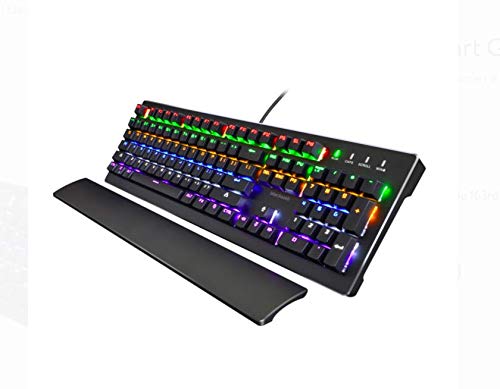
Paveikslėlis: Juodasisweb Gaming Mechanical Keyboard, featuring its full-size layout, vibrant RGB backlighting, and an included detachable wrist rest. The keyboard is black with illuminated keys displaying a spectrum of colors.
Sąranka
- Išpakuokite klaviatūrą: Atsargiai išimkite klaviatūrą ir visus priedus iš pakuotės.
- Prisijunkite prie kompiuterio: Plug the USB connector of the keyboard into an available USB port on your computer. The keyboard is compatible with various computer systems.
- Tvarkyklės diegimas: The keyboard is typically plug-and-play and does not require additional driver installation. Your operating system should automatically detect and configure the device.
- Optional Wrist Rest: If included, attach the wrist rest to the designated area at the bottom front of the keyboard for enhanced ergonomic comfort during use.
Naudojimo instrukcijos
Foninio apšvietimo valdymas
Juodasisweb Gaming Mechanical Keyboard features vibrant backlit keys with multiple lighting modes and color-changing effects. Specific key combinations (often involving the "Fn" key and other function keys like Insert, Home, Delete, etc.) are used to cycle through these modes and adjust brightness. Refer to the keyboard's keycap legends for exact combinations.
- 7 Flash Modes: Cycle through various dynamic lighting patterns.
- LED spalvą keičiančios lemputės: Experience a spectrum of colors across the keys.
- Ryškumo reguliavimas: Increase or decrease the intensity of the backlighting.
Anti-ghosting ir N klavišo apvertimas
This keyboard is designed with full anti-ghosting and unlimited simultaneous keystrokes (N-Key Rollover). This ensures that every key press is registered accurately, even when multiple keys are pressed at the same time, which is crucial for fast-paced gaming.
Swappable Keycap Design
The keyboard features a swappable keycap design, allowing for customization or replacement of individual keycaps. Use a keycap puller (if supplied) to carefully remove and install keycaps.
Priežiūra
- Valymas: Regularly clean the keyboard to prevent dust and debris buildup. Use a soft, dry cloth for general cleaning. For deeper cleaning, a can of compressed air can be used to remove particles from between the keys. Avoid using harsh chemicals or abrasive materials.
- Saugykla: Kai klaviatūra ilgesnį laiką nenaudojama, laikykite ją švarioje, sausoje vietoje.
Trikčių šalinimas
- Klaviatūra nereaguoja:
- Įsitikinkite, kad USB laidas yra tvirtai prijungtas tiek prie klaviatūros, tiek prie kompiuterio.
- Pabandykite prijungti klaviatūrą prie kito kompiuterio USB prievado.
- Iš naujo paleiskite kompiuterį.
- Foninis apšvietimas neveikia:
- Check if the backlighting has been turned off using the keyboard's function keys.
- Adjust brightness settings using the appropriate key combinations.
- Neregistruojami raktai:
- Įsitikinkite, kad klaviatūra švari ir be nešvarumų, kurie gali trukdyti paspausti klavišus.
- If specific keys are not working, and the keyboard has swappable switches (not explicitly stated but implied by "swappable keycap design" and "clicky and tactile keyboard"), consider if a switch might be faulty. However, user repair is not recommended.
Specifikacijos
| Funkcija | Detalė |
|---|---|
| Prekės ženklas | Juodaweb |
| Modelio numeris | 8541666919 |
| Gaminio matmenys | 17.6 x 6.7 x 1.6 colio |
| Prekės svoris | 2.6 svaro |
| Ryšio technologija | USB |
| Klaviatūros aprašymas | Žaidimas |
| Rekomenduojami naudojimo būdai | Žaidimas |
| Ypatinga funkcija | Foninis apšvietimas |
| Spalva | Juoda |
| Raktų skaičius | 104 |
| Klaviatūros foninio apšvietimo spalvų palaikymas | RGB |
| Suderinami įrenginiai | Gaming Console (and PC, implied) |
| Pirmoji laisva data | 14 m. rugpjūčio 2018 d |
Garantija ir palaikymas
For warranty information or technical support, please refer to the documentation provided with your purchase or visit the official Blackweb websvetainėje. Išsaugokite pirkimo įrodymą garantiniams reikalavimams.
Ask a question about this manual
Ask about setup, troubleshooting, compatibility, parts, safety, or missing instructions. Manuals+ will review the question and use this page’s manual context to help answer it.