
1. Įvadas
This manual provides essential information for the safe and effective use of your Sigma 60-600mm F4.5-6.3 DG OS HSM Camera Lens. Please read this manual thoroughly before using the lens and keep it for future reference. This lens is designed to offer a versatile focal range from 60mm to 600mm, suitable for various photographic applications, including wildlife, sports, and landscapes.
2. Produktas baigtasview
The Sigma 60-600mm F4.5-6.3 DG OS HSM is a high-performance super-telephoto zoom lens. It features a robust construction, optical stabilization, and advanced optical elements to deliver high image quality across its extensive zoom range.

Figure 2.1: Sigma 60-600mm F4.5-6.3 DG OS HSM Camera Lens with lens hood.
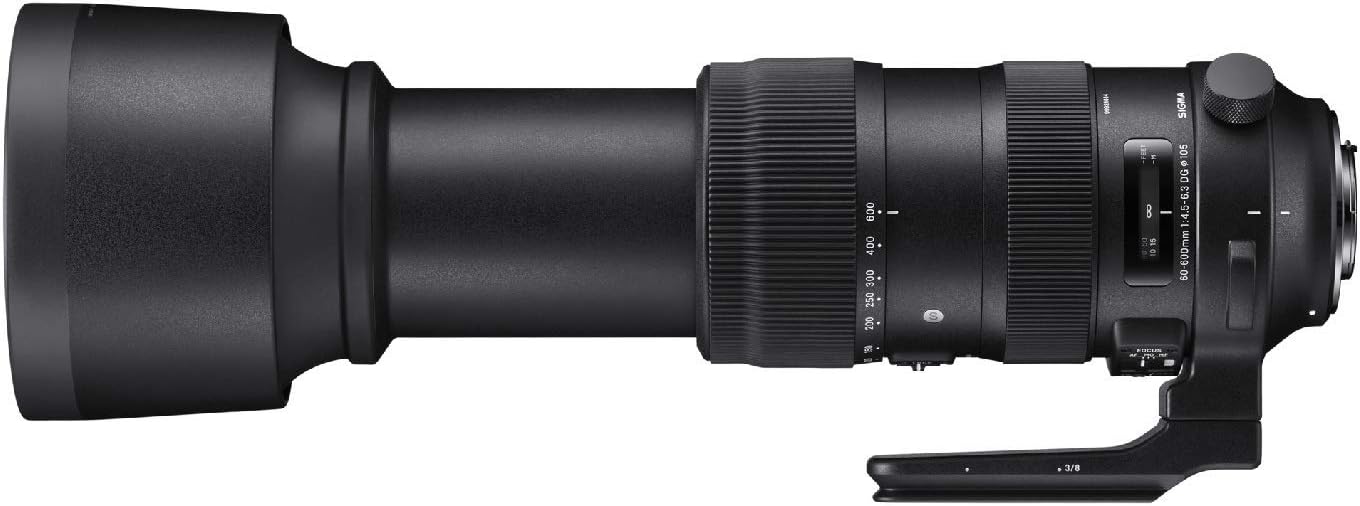
2.2 pav.: šonas view of the lens highlighting control switches.

Figure 2.3: Detached lens hood.
3. Sąranka ir diegimas
3.1 Objektyvo pritvirtinimas prie fotoaparato
- Align the lens mount index mark with the corresponding mark on your camera body.
- Rotate the lens clockwise (for Canon EF mount) until it clicks into place. Ensure it is securely locked.
- Norėdami nuimti, paspauskite objektyvo atleidimo mygtuką, esantį ant fotoaparato korpuso, ir pasukite objektyvą prieš laikrodžio rodyklę.
3.2 Objektyvo gaubto pritvirtinimas
- Suderinkite raudoną tašką ant objektyvo gaubto su raudonu tašku objektyvo priekyje.
- Sukite objektyvo gaubtą pagal laikrodžio rodyklę, kol jis užsifiksuos vietoje.
- To remove, twist counter-clockwise.
3.3 Trikojo apykaklės naudojimas
The lens includes a tripod collar for stable mounting on a tripod or monopod, especially recommended due to the lens's weight. The collar allows for rotation of the camera without detaching the lens, facilitating quick changes between horizontal and vertical orientations.
4. Objektyvo valdymas
4.1 Mastelio keitimas
Rotate the zoom ring to adjust the focal length between 60mm and 600mm. The lens also supports push-pull zooming for rapid focal length changes.
4.2 Fokusavimas
- Automatinis fokusavimas (AF): Set the FOCUS mode switch to 'AF'. The lens will automatically focus when the camera's shutter button is half-pressed.
- Rankinis fokusavimas (MF): Set the FOCUS mode switch to 'MF'. Rotate the focus ring to manually adjust focus.
- Manual Override (MO): This mode allows for manual focus adjustment even when the lens is set to autofocus, providing fine-tuning capability.
4.3 Fokusavimo ribotuvas
The focus limiter switch allows you to restrict the autofocus range, which can improve autofocus speed when shooting subjects within a specific distance. Options typically include FULL (full range), 6m - ∞ (6 meters to infinity), and 6m - 2.6m (6 meters to 2.6 meters).
4.4 Optinis stabilizavimas (OS)
The Intelligent OS system minimizes camera shake, providing up to 4 stops of stabilization. Set the OS switch to 'ON' for handheld shooting. Different OS modes may be available for various shooting scenarios (e.g., Mode 1 for general use, Mode 2 for panning shots).
4.5 Zoom Lock Switch
Use the zoom lock switch to secure the lens at a desired focal length, preventing zoom creep during transport or when shooting at a fixed focal length.
5. Priežiūra ir priežiūra
- Keep the lens caps on when not in use to protect the front and rear elements.
- Clean lens surfaces with a soft, lint-free cloth and a specialized lens cleaning solution. Avoid harsh chemicals.
- Objektyvą laikykite vėsioje, sausoje vietoje, toliau nuo tiesioginių saulės spindulių ir ekstremalių temperatūrų.
- The lens features a dust and splash-proof construction, but it is not fully waterproof. Avoid exposing it to heavy rain or submersion.
6. Problemų sprendimas
- Objektyvas nefokusuoja: Ensure the camera is set to the correct focus mode (AF/MF) and the lens's focus mode switch matches. Check the focus limiter setting.
- Neryškūs vaizdai: Verify that the optical stabilization (OS) is enabled for handheld shots. Check shutter speed and aperture settings. Ensure the lens and camera are clean.
- Zoom ring stiff: Ensure the zoom lock switch is disengaged. If the issue persists, contact customer support.
7. Specifikacijos
| Funkcija | Specifikacija |
|---|---|
| Prekės ženklas | Sigma |
| Modelio pavadinimas | 730954 |
| Objektyvo tipas | Superzoom |
| Suderinami tvirtinimai | „Canon EF“ |
| Minimalus židinio nuotolis | 60 milimetrų |
| Maksimalus židinio nuotolis | 600 milimetrų |
| Didžiausia diafragma | f/22 |
| Minimali diafragma | f/32 |
| Fokusavimo tipas | Automatinis fokusavimas |
| Vaizdo stabilizavimas | Optinis |
| Photo Filter Size | 105 milimetrų |
| Prekės svoris | 4 svaro |
| Atsparumo vandeniui lygis | Atsparus vandeniui |
| Gamintojas | „Sigma Corporation of America“ |
8. Garantija ir palaikymas
Šiam produktui taikoma gamintojo garantija. Išsamesnės informacijos apie garantiją ieškokite prie pirkinio pridėtoje dokumentacijoje arba apsilankykite oficialioje „Sigma“ svetainėje. website. For technical support, service, or inquiries, please contact Sigma Corporation of America customer service.