
1. Įvadas
Ačiū, kad pirkoteasing the SENCOR SSS 3200 Kids Bluetooth Speaker with Karaoke Microphone. This portable speaker is designed to provide entertainment with its Bluetooth connectivity, karaoke function, and vibrant LED lighting. Please read this manual carefully before using the product to ensure proper operation and to maximize its lifespan. Keep this manual for future reference.
2. Saugos instrukcijos
- Nelaikykite prietaiso ekstremaliose temperatūrose, tiesioginiuose saulės spinduliuose ar didelėje drėgmėje.
- Use only the supplied charger to recharge the product.
- Stenkitės, kad garsiakalbis nenumestų ar nepatirtų stipraus smūgio.
- Neardykite ir nebandykite taisyti įrenginio patys. Visus techninės priežiūros darbus patikėkite kvalifikuotiems specialistams.
- Garsiakalbį laikykite atokiau nuo vandens ar kitų skysčių, kad išvengtumėte elektros smūgio.
- Naudojimo metu užtikrinkite tinkamą vėdinimą aplink garsiakalbį.
3. Pakuotės turinys
Carefully unpack your SENCOR SSS 3200 Kids speaker and check that all items are present and in good condition. The package should include:
- SENCOR SSS 3200 Kids Bluetooth Speaker
- Laidinis mikrofonas
- 3.5mm Audio Cable (AUX cable)
- USB įkrovimo laidas
- Maitinimo adapteris
- Pečių dirželis
- Vartotojo vadovas (šis dokumentas)

Image 3.1: Included accessories for the SENCOR SSS 3200 Kids speaker, including the wired microphone, various cables, power adapter, and shoulder strap.
4. Produktas baigtasview
4.1 Priekinis skydelis

4.1 vaizdas: priekis view of the SENCOR SSS 3200 Kids Bluetooth Speaker, showcasing the main speaker grille with LED backlighting and the SENCOR logo.
The front of the speaker features the main speaker grille, which is equipped with multi-color flashing LED backlighting for an enhanced visual experience. The SENCOR brand logo is prominently displayed.
4.2 Galinis skydelis ir valdikliai

Image 4.2: Rear panel of the SENCOR SSS 3200 Kids Bluetooth Speaker, showing various input ports, control buttons, and adjustment knobs.
The rear panel houses all the essential controls and connectivity ports:
- MIC-IN: 6.3 mm lizdas laidinio mikrofono prijungimui.
- GUITAR-IN: 6.3mm jack for connecting a guitar (if applicable).
- LINE IN EAR MIC: 3.5mm AUX input.
- USB prievadas: USB atmintinės įrašų atkūrimui.
- TF kortelės lizdas: For microSD card playback.
- 9 V nuolatinė srovė: Maitinimo įvestis įkrovimui.
- Maitinimo jungiklis: To turn the speaker ON/OFF.
- Ekranas: Digital display for mode and track information.
- Valdymo mygtukai: Play/Pause, Skip tracks, Mode/Shift, Record/Delete.
- Rankenėlės: VOLUME+, -TREBLE+, -ECHO+, -MIC VOL+ for audio adjustments.
- Baterijos indikatorius: Rodo akumuliatoriaus būseną.
5. Sąranka
5.1 Akumuliatoriaus įkrovimas
Before first use, fully charge the speaker's built-in rechargeable battery. Connect the supplied power adapter to the DC 9V input on the rear panel and plug it into a power outlet. The battery indicator will show charging status. A full charge typically takes 3-5 hours. Ensure the product is fully charged before initial operation to ensure proper functionality.
5.2 Mikrofono prijungimas
Insert the plug of the wired microphone into the MIC-IN jack on the rear panel of the speaker. Ensure the microphone's ON/OFF switch is in the 'ON' position when in use.
6. Naudojimo instrukcijos
6.1 Maitinimo įjungimas/išjungimas
To turn the speaker ON, slide the Power switch on the rear panel to the 'ON' position. To turn it OFF, slide the switch to the 'OFF' position.
6.2 Bluetooth poravimas
- Turn on the speaker. It will automatically enter Bluetooth pairing mode, indicated by a flashing Bluetooth icon on the display.
- Įjunkite „Bluetooth“ savo išmaniajame telefone, planšetiniame kompiuteryje ar kitame suderinamame įrenginyje.
- Ieškokite available Bluetooth devices and select "SSS 3200 Kids" from the list.
- Once paired, the speaker will emit a confirmation sound, and the Bluetooth icon on the display will stop flashing.
- Dabar galite leisti garsą iš savo įrenginio per garsiakalbį.
6.3 USB/TF kortelių atkūrimas
Insert a USB flash drive or a TF (microSD) card into the respective port/slot on the rear panel. The speaker will automatically detect the storage device and begin playing audio files. Use the control buttons (Play/Pause, Skip tracks) to manage playback.
6.4 AUX įvestis
Connect an external audio device (e.g., MP3 player, laptop) to the LINE IN EAR MIC (3.5mm AUX) port using the supplied 3.5mm audio cable. Press the 'MODE/SHIFT' button to switch to AUX input mode. Audio will then play from your connected device.
6.5 Karaoke Function and Recording
With the microphone connected to the MIC-IN port, you can sing along to music playing from any source (Bluetooth, USB, TF, AUX). Adjust the microphone volume using the 'MIC VOL+' knob and add echo effects with the '-ECHO+' knob. The speaker also supports recording your karaoke performance. Refer to the 'REC/DEL' button for recording and deleting functions.
6.6 LED šviesos režimų
The speaker features multi-color flashing LED backlighting. These lights automatically activate when the speaker is on, enhancing the party atmosphere. There may be a dedicated button or a combination of buttons to cycle through different light modes or turn them off, if available (refer to specific product documentation for details).
6.7 Garso reguliavimas
Use the 'VOLUME+' knob to adjust the overall speaker volume. The '-TREBLE+' knob allows you to fine-tune the treble levels for clearer sound. The '-ECHO+' and '-MIC VOL+' knobs are specifically for microphone effects and volume, respectively.
7. Priežiūra
7.1 Valymas
Garsiakalbio išorę nuvalykite minkšta, sausa šluoste. Nenaudokite abrazyvinių valiklių, vaško ar tirpiklių. Įsitikinkite, kad į garsiakalbio angas nepatektų skysčių.
7.2 Saugykla
When not in use for extended periods, store the speaker in a cool, dry place, away from direct sunlight and extreme temperatures. It is recommended to fully charge the battery every few months to maintain its health.
8. Problemų sprendimas
- Nėra galios: Ensure the speaker is charged. Connect the power adapter and allow it to charge for a few hours. Check the power switch is in the 'ON' position.
- Nėra garso: Check the volume levels on both the speaker and the connected device. Ensure the correct input mode (Bluetooth, USB, AUX) is selected.
- „Bluetooth“ neprisijungia: Make sure the speaker is in pairing mode. Disable and re-enable Bluetooth on your device. Move your device closer to the speaker.
- Mikrofonas neveikia: Ensure the microphone is securely plugged into the MIC-IN jack and its ON/OFF switch is in the 'ON' position. Adjust the 'MIC VOL+' knob.
- Iškraipytas garsas: Sumažinkite garsumą tiek garsiakalbyje, tiek prijungtame įrenginyje. Įsitikinkite, kad garsas files nėra sugadinti.
9. Specifikacijos
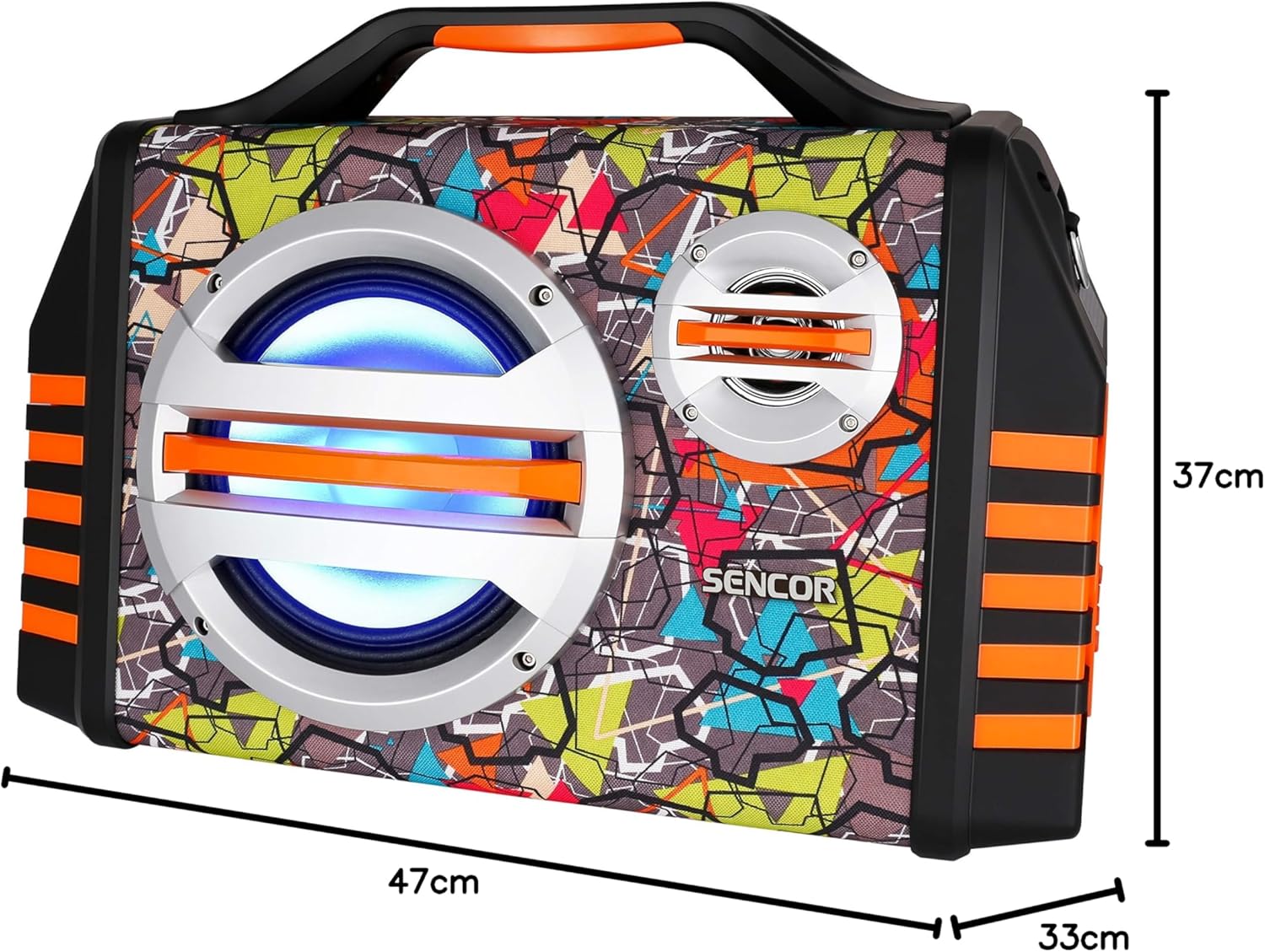
Image 9.1: Dimensions of the SENCOR SSS 3200 Kids Bluetooth Speaker, showing approximate measurements of 47cm (width), 37cm (height), and 33cm (depth).
| Funkcija | Specifikacija |
|---|---|
| Prekės ženklas | SENCORAS |
| Modelio numeris | SSS3200KIDS |
| Spalva | Įvairiaspalvis |
| Ryšio technologija | Bluetooth |
| Ryšio prievadai | 3.5 mm lizdas, USB |
| Ypatingos savybės | Integrated Microphone, Multi-color LED Backlight |
| Iš viso USB prievadų | 1 |
| Varža | 4 omai |
| Suderinami įrenginiai | Nešiojamasis kompiuteris, išmanusis telefonas, planšetinis kompiuteris |
| Rekomenduojami naudojimo būdai | Children's Entertainment, Music Activities |
| Maitinimo šaltinis | Maitinamas baterijomis |
| Kalbėtojų skaičius | 1 |
10. Garantija ir palaikymas
SENCOR products are designed and manufactured to the highest quality standards. For warranty information, please refer to the warranty card included with your purchase or contact your local SENCOR distributor. For technical support or service inquiries, please visit the official SENCOR websvetainėje arba susisiekite su klientų aptarnavimo skyriumi.