
1. Įvadas
Ačiū, kad pirkoteasing the auna V-20 Vertical Stereo System. This manual provides essential information for the safe and efficient operation of your device. Please read it thoroughly before use and keep it for future reference.
2. Saugos instrukcijos
- Prieš naudodami įrenginį, atidžiai perskaitykite visas instrukcijas.
- Saugokite įrenginį nuo vandens, drėgmės ir ekstremalių temperatūrų.
- Neužblokuokite jokių ventiliacijos angų.
- Naudokite tik gamintojo nurodytus priedus/priedus.
- Atjunkite prietaisą žaibuojant arba kai nenaudojate ilgą laiką.
- Visus techninės priežiūros darbus patikėkite kvalifikuotam techninės priežiūros personalui.
- Neatidarykite casing; viduje nėra dalių, kurias galėtų aptarnauti vartotojas.
3. Pakuotės turinys
Prašome patikrinti, ar yra visi daiktai:
- 1 x auna V-20 Vertical Stereo System
- 1 x Remote Control (including 2 x 1.5V AAA batteries)
- 1x maitinimo adapteris
- 1 x Removable Stand Base
- 1 x Wire Antenna
- User Manual (English and German)
4. Produktas baigtasview
The auna V-20 is a versatile micro stereo system featuring a vertical design. It includes a CD player, DAB+ and FM radio, Bluetooth, NFC, USB, and AUX connectivity. The system can be used with its stand or mounted on a wall.

Figure 4.1: The auna V-20 Vertical Stereo System shown with its remote control in a modern living room environment.
Priekinio skydelio valdikliai ir ekranas
The front panel features a sleek design with a motorized CD drive cover and an LED display that shows time and operational information. Control buttons are located on the top edge of the unit.
Galinio skydelio jungtys
The rear panel provides various connection ports for external devices and power.
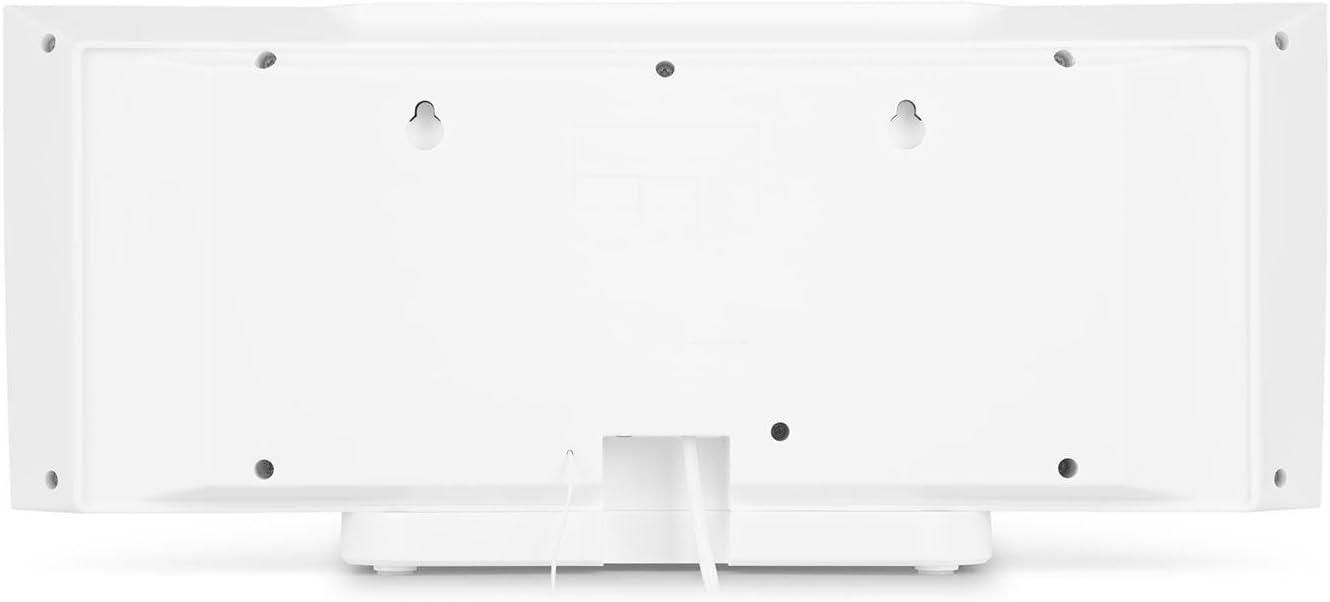
4.2 pav.: galinis view of the auna V-20, highlighting the USB port and AUX input.
Nuotolinio valdymo pultas
The included remote control allows for convenient operation of all functions from a distance.

4.3 pav. Išsamus view of the remote control for the auna V-20 stereo system.
5. Sąranka
5.1 Įdėjimo parinktys
The auna V-20 offers flexible placement:
- Stovo tvirtinimas: Attach the removable stand base for desktop or shelf placement. Ensure the unit is stable on a flat surface.
- Montavimas ant sienos: The unit can be mounted on a wall to save space. Use appropriate wall mounting hardware (not included) and ensure the wall can support the unit's weight.

5.1 pav.: galinis view illustrating the wall mounting points and the stand attachment area.
5.2 Maitinimo jungtis
Connect the provided power adapter to the DC IN port on the rear of the unit, then plug it into a standard wall outlet (AC 230V, 50 Hz).
5.3 Antenos prijungimas
Extend the wire antenna for optimal DAB+ and FM radio reception. Adjust its position for the best signal quality.
6. Naudojimo instrukcijos
6.1 Įjungimas / išjungimas ir budėjimo režimas
Paspauskite ĮJUNGTAS / BUDĖTIS button on the unit or remote control to switch the system on or put it into standby mode.
6.2 Režimo pasirinkimas
Paspauskite FUNKCIJA button on the unit or the dedicated mode buttons (FM/DAB, USB, CD, AUDIO IN, BLUETOOTH) on the remote control to switch between different audio sources.
6.3 Garsumo valdymas
Reguliuokite garsumą naudodami VOL+ ir VOL- buttons on the unit or remote control. The LED display will show the current volume level.
6.4 Ekvalaizerio nustatymai
The system features a 2-band equalizer and equalizer presets. Use the EQ button on the remote control to cycle through presets or adjust bass/treble. The X-BASS function can be activated for enhanced bass.
7. „Bluetooth“ ir NFC ryšys
7.1 Bluetooth poravimas
To stream music wirelessly from your smartphone, tablet, or laptop:
- Switch the stereo system to Bluetooth mode. The LED display will indicate pairing mode.
- Įjunkite „Bluetooth“ savo mobiliajame įrenginyje ir ieškokite galimų įrenginių.
- Select "auna V-20" from the list to pair. Once connected, you can play audio from your device.

Figure 7.1: A smartphone being used to connect to the auna V-20 via Bluetooth.
7.2 NFC ryšys
For intuitive pairing with NFC-enabled devices:
- Įsitikinkite, kad jūsų mobiliajame įrenginyje įjungtas NFC.
- Gently swipe your NFC-enabled device over the NFC sensor on the auna V-20.
- The devices will automatically pair via Bluetooth.

7.2 pav. Iš arti view of the NFC sensor for quick device pairing.
8. CD grotuvo valdymas
The auna V-20 features an MP3-compatible CD player with a motorized drive.

Figure 8.1: The motorized CD player mechanism with a disc inserted.
8.1 Kompaktinio disko įdėjimas
- Paspauskite ATIDARYTI/UŽDARYTI button to open the motorized CD cover.
- Carefully place a CD (CD, CD-R/RW, MP3-CD) onto the spindle with the label side facing you.
- Paspauskite ATIDARYTI/UŽDARYTI again to close the cover. The system will automatically switch to CD mode and begin playback.
8.2 Atkūrimo valdikliai
- Leisti / pristabdyti: Paspauskite PALEISTI / PAUZĖ , kad pradėtumėte arba pristabdytumėte atkūrimą.
- Praleisti takelius: Naudokite Praleisti pirmyn or PRAŠKITE ATGAL mygtukai, skirti naršyti tarp takelių.
- Sustabdyti: Paspauskite STOP mygtuką, kad užbaigtumėte atkūrimą.
- Kartoti / Atsitiktinai: Naudokite KARTOT ir ATSITIKTINIAI mygtukus nuotolinio valdymo pulte, kad būtų rodomos atkūrimo parinktys.
- Programuojamas atkūrimas: The system supports programmable title display for custom playlists.
9. Radijo veikimas (DAB+/FM)
The auna V-20 features both DAB+ digital radio and analog FM radio with RDS function.
9.1 Selecting Radio Mode
Paspauskite FM/DAB button on the remote control to switch between FM and DAB+ modes.
9.2 Automatinis stočių nuskaitymas
In either FM or DAB+ mode, press the NUSKAITYTI button on the remote control to automatically scan and store available stations. The system can store up to 20 presets per reception type.
9.3 Manual Tuning and Presets
- Rankinis derinimas: Naudokite TUNE +/- buttons on the remote control for fine-tuning.
- Išankstinių nustatymų išsaugojimas: Once a station is found, press the NUSTATYMAS button, then use the number buttons (0-9, 10+) to assign a preset number. Press ENTER patvirtinti.
- Išankstinių nustatymų atšaukimas: Press the corresponding number button on the remote control to quickly access a saved station.
- Informacijos mygtukas: DAB+ režimu paspauskite INFORMACIJA button to display additional information such as artist, title, album, or news.
10. USB atkūrimas
The auna V-20 allows playback of MP3 audio files tiesiai iš USB atmintinės.
10.1 USB įrenginio prijungimas
- Insert your USB stick into the USB port on the rear of the unit.
- Switch the stereo system to USB mode using the USB nuotolinio valdymo pulto mygtuką.
- Sistema automatiškai aptiks ir pradės leisti MP3 files.
10.2 USB Playback Controls
Playback controls (Play/Pause, Skip, Stop, Repeat, Random) are similar to CD player operation. Use the APLANKAS button on the remote to navigate through folders on the USB device.
11. AUX įvestis
Connect external audio devices such as MP3 players, CD players, or computers using the AUX input.
11.1 Išorinio įrenginio prijungimas
- Connect a 3.5mm audio cable (not included) from the headphone jack or audio output of your external device to the Aux in port on the rear of the auna V-20.
- Switch the stereo system to AUDIO IN mode using the GARSO ĮVEDIS nuotolinio valdymo pulto mygtuką.
- Play audio from your external device. The sound will be output through the auna V-20 speakers.
12. Priežiūra
12.1 Valymas
- Prieš valydami prietaisą visada ištraukite kištuką iš elektros lizdo.
- Išoriniams paviršiams valyti naudokite minkštą, sausą šluostę.
- Nenaudokite abrazyvinių valiklių, vaško ar tirpiklių, nes jie gali pažeisti apdailą.
- CD lęšiui, jei reikia, naudokite specializuotą CD lęšių valiklį.
12.2 Bendroji priežiūra
- Nedėkite ant įrenginio sunkių daiktų.
- Saugokite įrenginį nuo tiesioginių saulės spindulių ir šilumos šaltinių.
- Užtikrinkite tinkamą vėdinimą aplink įrenginį, kad išvengtumėte perkaitimo.
13. Problemų sprendimas
| Problema | Galima priežastis | Sprendimas |
|---|---|---|
| Nėra galios | Maitinimo laidas neprijungtas; sugedęs maitinimo lizdas | Patikrinkite maitinimo laido jungtį; pabandykite kitą lizdą |
| Nėra garso | Volume too low; incorrect source selected; mute activated | Increase volume; select correct source; deactivate mute |
| CD negroja | CD inserted incorrectly; CD dirty/scratched; unsupported format | Reinsert CD correctly; clean or replace CD; ensure CD is compatible (CD, CD-R/RW, MP3-CD) |
| Prastas radijo priėmimas | Antena neištiesta; silpnas signalas | Extend and adjust antenna position; try moving the unit to a different location |
| „Bluetooth“ susiejimas nepavyksta | Device too far; Bluetooth not enabled; incorrect pairing procedure | Ensure devices are close; enable Bluetooth on mobile device; follow pairing instructions (Section 7.1) |
14. Specifikacijos
| Funkcija | Detalė |
|---|---|
| Prekės ženklas | auna |
| Modelis | V-20 |
| Dalies numeris | AUVZ-1100-ghfr |
| Gaminio matmenys | 51 x 25 x 16 cm |
| Svoris | 2.6 kg |
| Maitinimo šaltinis | Elektrinis |
| Vattage | 27 vatų |
| Garso išvesties režimas | Stereo |
| Garsiakalbio konfigūracija | 2.0 |
| Palaikomi garso formatai | MP3 |
| Medijos tipas | CD, MP3 |
| Jungčių tipai | Bluetooth, NFC, USB, AUX |
| Suderinamas su Bluetooth | Taip |
| Bluetooth versija | 2.1+EDR |
| „Bluetooth Pro“file | A2DP |
| Suderinami įrenginiai | Smartphone, tablet, MP3 player |
| Ypatingos savybės | Lengva naudoti |
| Nuotolinio valdymo pulto baterijos | 2 x 1.5 V AAA (įtraukta) |
| DAB+ dažnių diapazonas | 174 - 240 MHz (Band III) |
15. Garantija ir palaikymas
This product is covered by a manufacturer's warranty. For detailed warranty information, please refer to the documentation provided at the time of purchase or contact auna customer support.
If you encounter any issues not covered in the troubleshooting section, or require further assistance, please contact auna customer service through their official websvetainėje arba jūsų pardavėjui.