
AWEI T5
AWEI T5 True Wireless Earbuds User Manual
Įvadas
This manual provides detailed instructions for the AWEI T5 True Wireless Earbuds. Please read this guide carefully before using the product to ensure proper operation and to maximize your listening experience.
Pakuotės turinys
Patikrinkite, ar jūsų pakuotėje yra visi toliau išvardyti daiktai:
- AWEI T5 True Wireless Earbuds (Left and Right)
- Įkrovimo dėklas
- USB įkrovimo laidas
- Vartotojo vadovas
- Įvairūs ausų antgalių dydžiai

Image: AWEI T5 True Wireless Earbuds retail packaging, showing the brand logo and product model.
Produktas baigtasview
Familiarize yourself with the components of your AWEI T5 True Wireless Earbuds and charging case.

Image: The AWEI T5 True Wireless Earbuds inside their charging case, with an additional image showing an earbud being worn by a user.

Vaizdas: Stambus planas view of the AWEI T5 True Wireless Earbuds and their charging case resting on a laptop keyboard.
The earbuds are designed for a secure and comfortable fit, and the charging case provides both protection and power on the go.
Sąranka
1. Pradinis įkrovimas
Prieš pirmą kartą naudodami, visiškai įkraukite ausines ir įkrovimo dėklą.
- Įdėkite abi ausines į įkrovimo dėklą.
- Prijunkite USB įkrovimo laidą prie įkrovimo dėklo ir maitinimo šaltinio.
- The indicator lights on the case and earbuds will show charging status.
- Visiškai įkrovę atjunkite laidą.
2. Susiejimas su įrenginiu
To connect your AWEI T5 earbuds to a Bluetooth-enabled device:
- Įsitikinkite, kad ausinės yra įkrautos.
- Atidarykite įkrovimo dėklą ir išimkite abi ausines. Jos automatiškai įsijungs susiejimo režimu.
- Savo įrenginyje (išmaniajame telefone, planšetiniame kompiuteryje ir kt.) eikite į „Bluetooth“ nustatymus ir įjunkite „Bluetooth“.
- Ieškokite galimus įrenginius ir iš sąrašo pasirinkite „AWEI T5“.
- Prisijungus, išgirsite patvirtinimo toną ir pasikeis ausinių indikatoriaus lemputės.
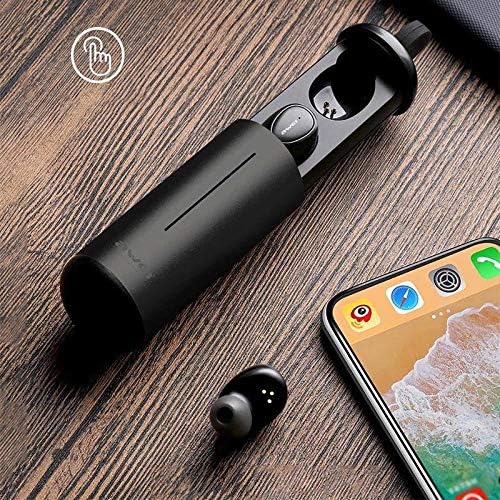
Image: AWEI T5 Earbuds in their charging case, positioned next to a smartphone, illustrating the pairing process.
Naudojimo instrukcijos
Pagrindiniai valdikliai
The AWEI T5 earbuds feature touch controls for various functions:
- Leisti / pristabdyti: Vieną kartą bakstelėkite bet kurią ausinę.
- Kitas takelis: Dukart bakstelėkite dešinę ausinę.
- Ankstesnis takelis: Dukart palieskite kairę ausinę.
- Atsiliepti / Baigti skambutį: Įeinančio skambučio metu vieną kartą palieskite bet kurią ausinę.
- Atmesti skambutį: Įeinančio skambučio metu paspauskite ir 2 sekundes palaikykite nuspaudę bet kurią ausinę.
- Suaktyvinti „Voice Assistant“: Tris kartus bakstelėkite bet kurią ausinę.
Vienos ausinės režimas
You can use either the left or right earbud independently:
- Remove one earbud from the charging case. It will automatically connect to the last paired device.
- The other earbud can remain in the case or be turned off.
Dviejų ausinių režimas
For a stereo audio experience, use both earbuds:
- Remove both earbuds from the charging case. They will automatically connect to each other and then to the last paired device.
Priežiūra ir priežiūra
To ensure the longevity and optimal performance of your AWEI T5 earbuds:
- Valymas: Reguliariai valykite ausines ir įkrovimo dėklą minkštu, sausu, nepūkuotu skudurėliu. Nenaudokite stiprių cheminių medžiagų ar abrazyvinių medžiagų.
- Saugykla: Kai nenaudojate, laikykite ausines įkrovimo dėkle, kad apsaugotumėte jas nuo dulkių ir pažeidimų.
- Akumuliatoriaus priežiūra: Avoid fully discharging the battery frequently. Charge the earbuds and case regularly, even if not used for extended periods.
- Atsparumas vandeniui: The earbuds are rated IPX4, meaning they are resistant to splashing water from any direction. Do not submerge them in water or expose them to heavy rain.

Image: AWEI T5 Earbuds with water droplets, indicating their IPX4 splash-resistant rating.
Trikčių šalinimas
If you encounter issues with your AWEI T5 earbuds, refer to the following common problems and solutions:
| Problema | Sprendimas |
|---|---|
| Ausinės nesusijungia su įrenginiu. | Įsitikinkite, kad ausinės įkrautos. Išjunkite ir įjunkite „Bluetooth“ savo įrenginyje. Pamirškite „AWEI T5“ iš savo įrenginio „Bluetooth“ sąrašo ir iš naujo susiekite. |
| Veikia tik viena ausinė. | Įdėkite abi ausines atgal į įkrovimo dėklą, uždarykite dangtelį, tada atidarykite ir išimkite jas kartu. Įsitikinkite, kad abi įkrautos. |
| Nėra garso arba garsas per mažas. | Patikrinkite garsumo lygius tiek savo įrenginyje, tiek ausinėse. Įsitikinkite, kad ausinės tinkamai prijungtos. |
| Įkrovimo dėklas neįkraunamas. | Verify the USB cable is securely connected to both the case and the power source. Try a different cable or power adapter. |
Specifikacijos
Technical details for the AWEI T5 True Wireless Earbuds:
| Funkcija | Detalė |
|---|---|
| Modelio numeris | T5 |
| Ryšys | Bluetooth |
| Formos faktorius | Į ausis |
| Medžiaga | Plastikiniai |
| Spalva | Juoda |
| Matmenys (produktas) | 4 x 10 x 16.5 cm |
| Svoris (produktas) | 4.54 g |
| Baterijos tipas | 1 Lithium Ion (per earbud, typically) |
| Atsparumo vandeniui įvertinimas | IPX4 (apsauga nuo vandens purslų) |
Garantija ir palaikymas
Dėl garantijos informacijos ir klientų aptarnavimo žr. kartu su pirkiniu pateiktus dokumentus arba susisiekite su pardavėju. Išsaugokite pirkimo įrodymą, jei prireiktų pateikti garantinį ieškinį.
Ask a question about this manual
Ask about setup, troubleshooting, compatibility, parts, safety, or missing instructions. Manuals+ will review the question and use this page’s manual context to help answer it.