
1. Įvadas
Thank you for choosing the Cecotec Ready Warm 6670 Cristal Electric Radiator. This modern and elegant crystal convector is designed to provide efficient and rapid heating for your living spaces. Featuring an adjustable thermostat, timer function, and Wi-Fi connectivity, it offers convenient control and optimized energy consumption. This manual provides essential information for safe operation, installation, maintenance, and troubleshooting.
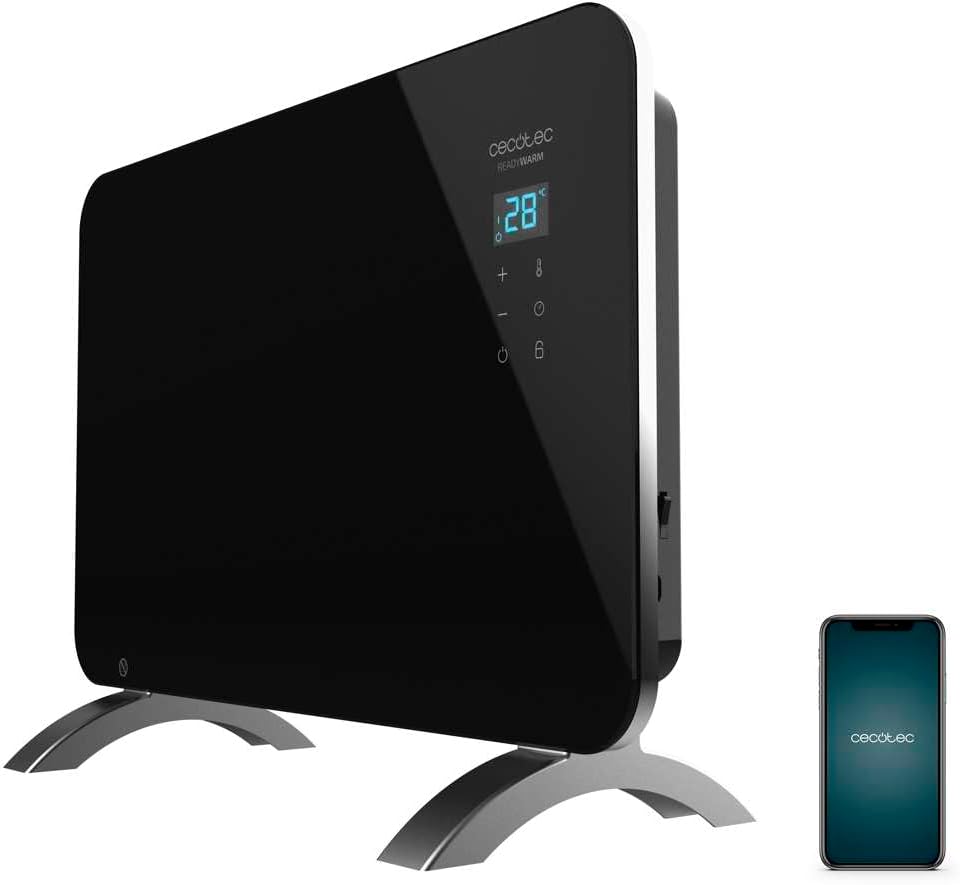
Figure 1: The Cecotec Ready Warm 6670 Cristal Electric Radiator, showcasing its sleek black design and digital display, alongside a smartphone indicating its Wi-Fi control capability.
2. Svarbios saugos instrukcijos
Prieš naudodami prietaisą, atidžiai perskaitykite visas instrukcijas ir išsaugokite jas ateičiai. Nesilaikant šių instrukcijų, gali kilti elektros smūgis, gaisras arba sunkūs sužalojimai.
- Įsitikinkite, kad ttagAnt etiketės nurodyta įtampa atitinka jūsų elektros tinklo įtampątage prieš prijungdami prietaisą.
- Nenaudokite šio prietaiso šalia vandens aramp environments, such as bathrooms, due to its IP24 splash protection rating.
- Always place the radiator on a stable, flat surface. Ensure adequate clearance from walls and furniture for proper ventilation.
- Neuždenkite radiatoriaus, nes tai gali sukelti perkaitimą ir gaisro pavojų.
- Veikiant prietaisui, laikykite vaikus ir naminius gyvūnus atokiau nuo jo, nes jo paviršiai gali labai įkaisti.
- Unplug the appliance from the power outlet when not in use, before cleaning, or before moving it.
- Do not operate the appliance with a damaged cord or plug, or if it has malfunctioned or been dropped.
- Repairs should only be performed by qualified personnel. Improper repairs can be dangerous.
- Šis prietaisas skirtas naudoti tik patalpose.
3. Gaminio komponentai
Familiarize yourself with the main parts of your Cecotec Ready Warm 6670 Cristal Electric Radiator:
- Main Heating Unit (Glass Panel)
- Skaitmeninis ekrano skydelis
- Control Buttons (+, -, Power, Mode, Timer)
- Maitinimo laidas ir kištukas
- Detachable Pedestal Feet (for freestanding use)
- Wall Mounting Brackets (optional, not included in this model description but common for panel heaters)

2 pav.: Išsamus view of the radiator's digital display and control buttons, showing temperature, mode, and timer indicators.
4. Sąranka ir diegimas
Your radiator can be used as a freestanding unit with the included pedestal feet.
4.1. Attaching the Pedestal Feet
- Carefully unpack the radiator and all components.
- Place the radiator on a soft, flat surface to prevent scratching the glass panel.
- Align the pedestal feet with the mounting holes at the bottom of the radiator.
- Secure the feet using the provided screws. Ensure they are firmly attached.
- Once the feet are attached, carefully place the radiator upright in your desired location. Ensure it is on a stable, level surface and away from flammable materials.

Figure 3: The radiator positioned in a room, demonstrating its freestanding setup with the pedestal feet.
5. Naudojimo instrukcijos
5.1. Pagrindinė operacija
- Plug the radiator into a suitable power outlet.
- Paspauskite Galia mygtukas (simbolis: apskritimas su vertikalia linija) on the control panel to turn the unit on. The digital display will illuminate.
- Naudokite + ir - mygtukais nustatykite norimą temperatūrą. Ekrane bus rodoma nustatyta temperatūra.
- Paspauskite Režimas mygtukas (symbol: thermometer) to cycle through heating modes (e.g., Eco, Max).
- To turn off the radiator, press the Galia mygtuką dar kartą.
5.2. Wi-Fi Connectivity and App Control
The Cecotec Ready Warm 6670 Cristal can be controlled via your smartphone using the Tuya Smart APP.
- Download the "Tuya Smart" app from your smartphone's app store (available for iOS and Android).
- Užsiregistruokite arba prisijunkite prie savo „Tuya Smart“ paskyros.
- Įsitikinkite, kad jūsų išmanusis telefonas yra prijungtas prie 2.4 GHz Wi-Fi tinklo.
- On the radiator, press and hold the Wi-Fi button (if available, or a combination of buttons as per app instructions) to enter pairing mode. The Wi-Fi indicator on the display will blink.
- In the Tuya Smart app, tap "+" to add a device. Select "Heater" or "Radiator" from the device list.
- Follow the on-screen instructions in the app to connect the radiator to your Wi-Fi network. This typically involves confirming the Wi-Fi indicator is blinking and entering your Wi-Fi password.
- Once connected, you can control the radiator's power, temperature, mode, and timer settings directly from the app.

Figure 4: A user interacting with a smartphone, illustrating the convenience of controlling the radiator remotely via the Tuya Smart application.
5.3. Laikmačio funkcija
The timer allows you to set a specific duration for the radiator to operate.
- Paspauskite Laikmatis mygtukas (simbolis: laikrodis) on the control panel or in the app.
- Naudokite + ir - buttons to set the desired operating time in hours.
- The radiator will automatically turn off after the set time has elapsed.
6. Priežiūra ir valymas
Reguliarus valymas užtikrina optimalų veikimą ir prailgina radiatoriaus tarnavimo laiką.
- Prieš valydami visada atjunkite radiatorių nuo elektros lizdo ir leiskite jam visiškai atvėsti.
- Išorinius paviršius nuvalykite minkšta, damp šluoste. Nenaudokite abrazyvinių valiklių, tirpiklių ar stiprių cheminių medžiagų, nes jos gali pažeisti apdailą.
- Nemerkite radiatoriaus į vandenį ar kitą skystį.
- Įsitikinkite, kad vanduo nepatenka į valdymo skydelį ar elektros komponentus.
- For storage, clean the unit and store it in a cool, dry place, preferably in its original packaging.
7. Problemų sprendimas
Jei kyla problemų dėl radiatoriaus, žr. šias dažniausiai pasitaikančias problemas ir sprendimus:
| Problema | Galima priežastis | Sprendimas |
|---|---|---|
| Radiatorius neįsijungia. | Not plugged in; power outlet faulty; power button not pressed; overheat protection activated. | Check power connection; try a different outlet; press power button; unplug and let cool for 30 minutes before restarting. |
| Nėra šilumos perdavimo. | Temperature setting too low; mode not set correctly. | Increase desired temperature; ensure correct heating mode (e.g., Max) is selected. |
| „Wi-Fi“ ryšys neveikia. | Incorrect Wi-Fi password; router too far; 5 GHz network used; pairing mode not active. | Verify password; move radiator closer to router; ensure 2.4 GHz network is used; re-enter pairing mode on radiator. |
| Radiatorius netikėtai išsijungia. | Timer function active; overheat protection activated. | Check timer settings; ensure radiator is not covered and has adequate ventilation. |
8. Techninės specifikacijos
| Funkcija | Detalė |
|---|---|
| Prekės ženklas | Cecotec |
| Modelio numeris | big-V1704474 (05350) |
| Spalva | Juoda |
| Galia | 1000 W |
| ttage | 220 voltų |
| Medžiaga | Aluminum (Heating element), Glass (Panel) |
| Šildymo būdas | Konvekcija |
| Ypatinga funkcija | Adjustable Thermostat, Wi-Fi Connectivity, Timer, Overheat Protection, IP24 Splash Protection |
| Matmenys (I x P x A) | 47 x 13 x 64 cm (Product); 60 x 24 x 46 cm (Product, alternative) |
| Prekės svoris | 5.1 kilogramo |
| Triukšmo lygis | 44 dB |
| Rekomenduojamas naudojimas | Indoor (Home) |
9. Garantija ir palaikymas
Cecotec products are manufactured to high-quality standards. This product comes with a standard manufacturer's warranty covering defects in materials and workmanship from the date of purchase. Please refer to the warranty card included with your product for specific terms and conditions.
Dėl techninės pagalbos, trikčių šalinimo ar garantijos reikalavimų susisiekite su „Cecotec“ klientų aptarnavimo tarnyba per jų oficialią website or the contact information provided in your product packaging. When contacting support, please have your model number (big-V1704474) and purchase date ready.
Atsarginių dalių tiekimas: 10 metai.