
1. Įvadas
This manual provides detailed instructions for the installation, operation, and maintenance of your TooQ TQE-2528B 2.5-inch SATA USB 3.1 Gen1 HDD Enclosure. This device allows you to convert a 2.5-inch SATA I/II/III hard disk drive or solid-state drive into an external storage solution, connecting via USB 3.1 Gen1 for high-speed data transfer.
2. Pakuotės turinys
Prašome patikrinti, ar pakuotėje yra visi reikalingi daiktai:
- TooQ TQE-2528B 2.5-inch SATA USB 3.1 Gen1 HDD Enclosure
- USB 3.0 Type-A to Micro-B Cable
- Vartotojo vadovas (šis dokumentas)

Image 2.1: The TooQ TQE-2528B enclosure shown with its included USB 3.0 cable.
3. Produktas baigtasview
The TooQ TQE-2528B is designed for ease of use and portability. Key features include:
- Compatible with 2.5-inch SATA I/II/III HDDs and SSDs up to 9.5mm height.
- USB 3.1 Gen1 (USB 3.0) interface for data transfer speeds up to 5.0 Gbps.
- Tool-free installation for quick setup.
- LED indicator for connection status and data access.
- Powered directly via USB port.
3.1. Komponento identifikavimas
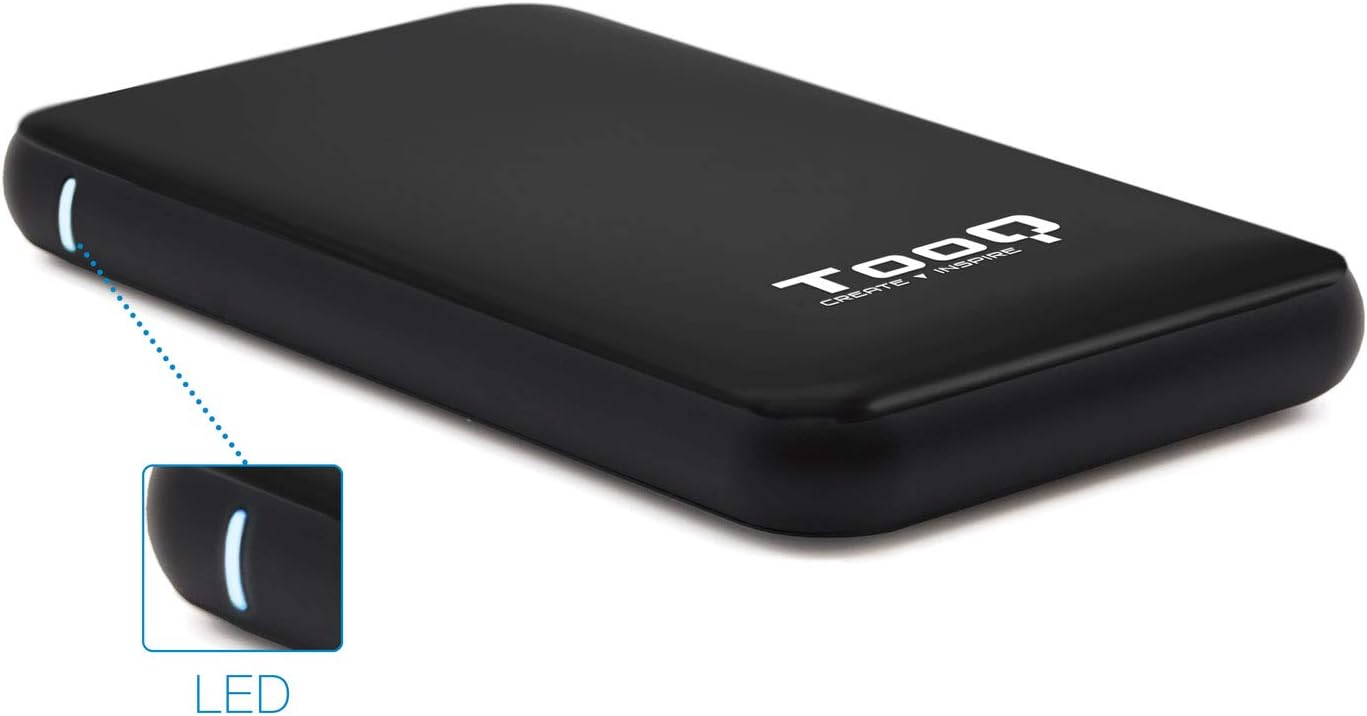
Image 3.1: The enclosure features an LED indicator on the side, which illuminates to show power and data activity.

Image 3.2: The rear of the enclosure includes a power button and a Micro-USB port for connection.
4. Setup: Hard Drive Installation
Follow these steps to install a 2.5-inch SATA HDD or SSD into the enclosure:
- Atidarykite korpusą: Gently slide the top cover of the enclosure to open it. The design allows for tool-free access.
- Prijunkite diską: Align your 2.5-inch SATA HDD/SSD with the SATA connector inside the enclosure. Carefully push the drive into the connector until it is firmly seated. Ensure the drive is flush with the internal tray.
- Uždarykite korpusą: Slide the top cover back into place until it clicks securely.
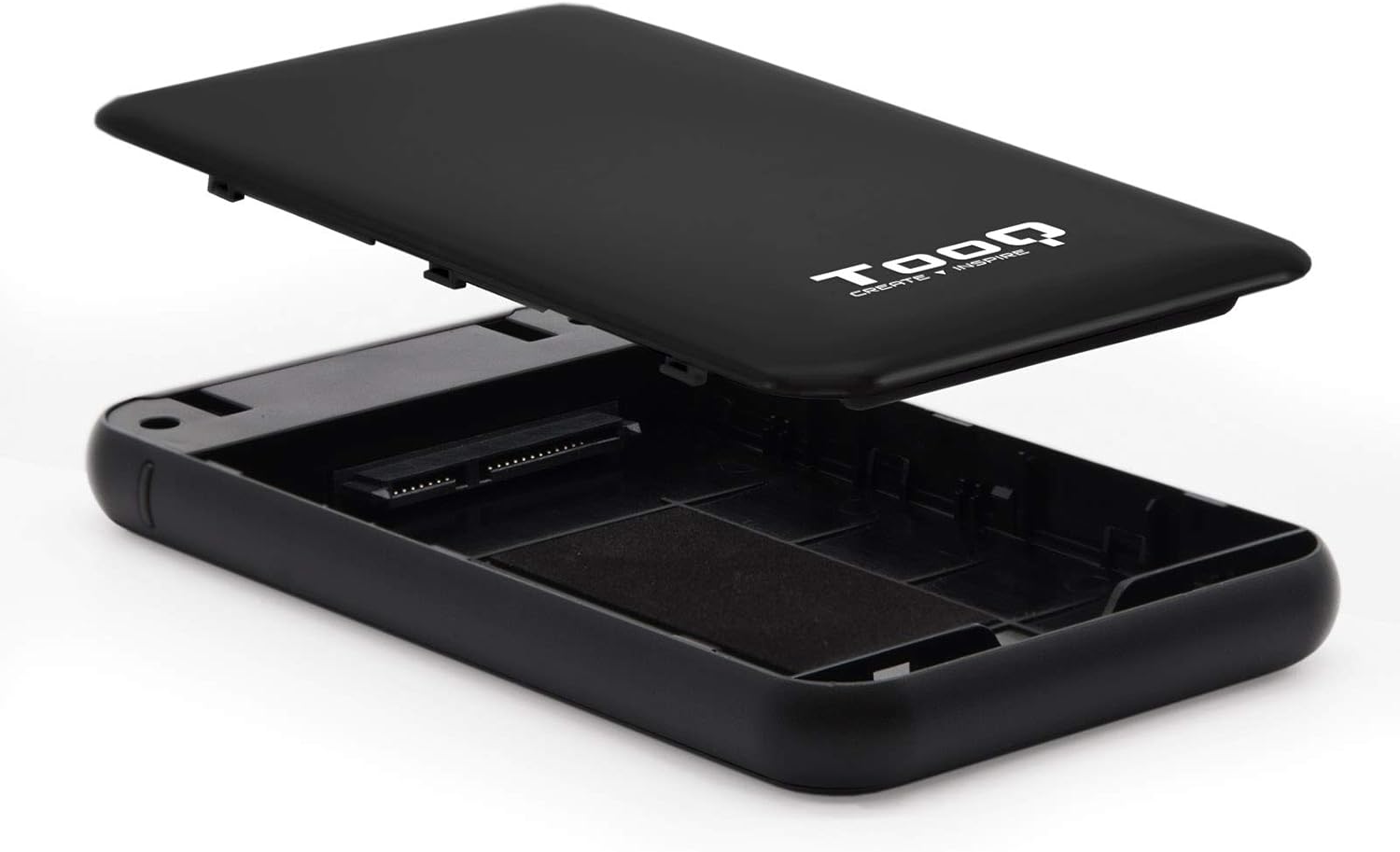
Image 4.1: The enclosure opened, revealing the internal SATA data and power connector for a 2.5-inch drive.
5. Naudojimo instrukcijos
After installing your hard drive, connect the enclosure to your computer:
- Prijunkite USB kabelį: Plug the Micro-B end of the included USB 3.0 cable into the enclosure's Micro-USB port.
- Prisijunkite prie kompiuterio: Plug the Type-A end of the USB cable into an available USB port on your computer. For optimal performance, use a USB 3.0 or USB 3.1 Gen1 port.
- Maitinimas: If the enclosure has a power button (refer to Image 3.2), press it to turn on the device. The LED indicator (Image 3.1) will illuminate, indicating power and connection status.
- Prieiga prie disko: Your operating system should automatically detect the new storage device.
- Nauji diskai: If you are using a brand new hard drive, it may need to be initialized and formatted before use. Refer to your operating system's disk management tools for this process.
- Existing Drives: If the drive contains data, it should appear as a removable drive in 'My Computer' (Windows) or on the desktop (macOS).

Image 5.1: The TooQ TQE-2528B enclosure connected to a laptop, demonstrating a typical usage scenario.
6. Priežiūra
To ensure the longevity and optimal performance of your enclosure:
- Korpusą laikykite švarų ir be dulkių. Valymui naudokite minkštą, sausą šluostę.
- Saugokite, kad prietaisas nepatektų į ekstremalią temperatūrą, drėgmę ar tiesioginius saulės spindulius.
- Do not drop or subject the enclosure to strong impacts.
- Prieš atjungdami USB laidą, visada saugiai atjunkite diską nuo operacinės sistemos, kad išvengtumėte duomenų sugadinimo.
7. Problemų sprendimas
If you encounter issues with your TooQ TQE-2528B enclosure, refer to the following common solutions:
- Diskas neaptiktas:
- Įsitikinkite, kad USB laidas yra tvirtai prijungtas tiek prie korpuso, tiek prie kompiuterio.
- Pabandykite prijungti prie kito kompiuterio USB prievado.
- Verify that the hard drive is correctly seated within the enclosure's SATA connector.
- Patikrinkite kompiuterio disko tvarkymo programą („Windows“) arba disko įrankio programą („macOS“) ir pažiūrėkite, ar diskas atpažįstamas, bet neinicializuotas arba neformatuotas.
- Test the enclosure with a different 2.5-inch SATA drive, if available, to rule out a drive issue.
- Lėtas duomenų perdavimas:
- Ensure you are connected to a USB 3.0 or USB 3.1 Gen1 port on your computer. Connecting to a USB 2.0 port will result in slower speeds.
- Patikrinkite, ar jūsų operacinė sistema ir tvarkyklės yra atnaujintos.
- Enclosure Does Not Power On:
- Ensure the USB cable is properly connected and providing power. The enclosure is bus-powered.
- Išbandykite kitą kompiuterio USB prievadą.
8. Specifikacijos
| Modelio numeris | TQE-2528B |
| Suderinami diskai | 2.5-inch SATA I/II/III HDD/SSD (up to 9.5mm height) |
| Sąsaja | USB 3.1 Gen1 (USB 3.0) |
| Duomenų perdavimo sparta | Iki 5.0 Gbps |
| Maitinimo šaltinis | USB Bus-powered (5 Volts) |
| Medžiaga | ABS plastikas |
| Matmenys (I x P x A) | 13.5 cm x 8 cm x 1.6 cm (apytiksliai 5.3 x 3.1 x 0.6 colio) |
| Svoris | 50 g (apie 0.11 svaro) |
| Operacinės sistemos suderinamumas | Universal (Windows, macOS, Linux) |

Image 8.1: Technical drawing illustrating the dimensions of the TooQ TQE-2528B enclosure.
9. Garantija ir palaikymas
TooQ products are designed for reliability and performance. This product comes with a standard manufacturer's warranty. For specific warranty terms and conditions, please refer to the warranty card included with your product or visit the official TooQ websvetainę.
For technical support, frequently asked questions, or to download the latest drivers (if applicable), please visit the official TooQ support websvetainėje arba susisiekite su jų klientų aptarnavimo skyriumi. Kontaktinę informaciją paprastai galite rasti ant produkto pakuotės arba oficialioje websvetainę.
Gamintojas: TOOQ
Pasaulinis prekybos prekės numeris (GTIN): 08433281008304