
1. Produktas baigtasview
The Sato One-Touch Timer TM-22 is a versatile digital timer designed for various timing needs, from kitchen use to laboratory applications. It combines ease of use with practical features to enhance your daily tasks.
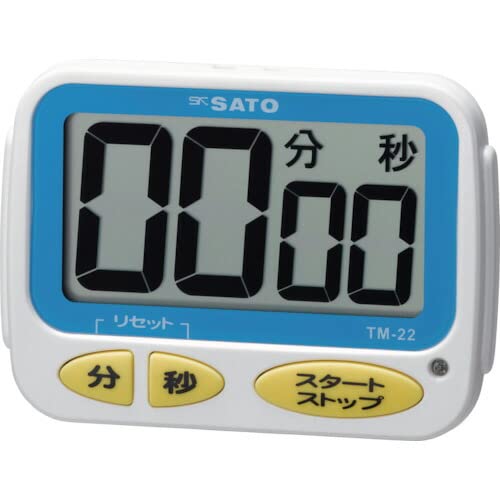
1 vaizdas: priekis view of the Sato One-Touch Timer TM-22. The timer features a clear digital display and control buttons.
Pagrindinės funkcijos:
- Automatic Reset Alarm: The alarm sounds for 5 seconds at the set time and automatically resets to the initial set time.
- Paprasta operacija: The primary key is for starting; no complex operations are required to stop the timer's alarm cycle.
- Dual Notification: Alerts users with both sound (70dB) and light.
- Drip-Proof Construction: Designed to resist splashes, making it suitable for kitchen environments.
- Keli montavimo variantai: Equipped with a magnet on the back for attachment to metal surfaces and a strap for hanging.
- Atgalinės atskaitos ir skaičiavimo funkcijos: Supports both decreasing ir padidėjimasasing time measurements.
2. Sąranka
Akumuliatoriaus montavimas:
The TM-22 timer requires one AAA battery for operation. A battery is included with the unit.
- Raskite baterijų skyriaus dangtelį laikmačio gale.
- Norėdami atidaryti skyrių, pastumkite arba atkabinkite dangtelį.
- Įdėkite vieną AAA bateriją, užtikrindami, kad teigiamas (+) ir neigiamas (-) poliai teisingai sutaptų su žymėjimais skyriaus viduje.
- Saugiai uždėkite akumuliatoriaus skyriaus dangtelį.
The timer should power on, and the display will show '00:00' or the last set time.
3. Naudojimo instrukcijos
The TM-22 timer features both countdown and count-up functionalities.
3.1. Atgalinis laikmatis
This function allows you to set a specific duration, and the timer will count down to zero.
- Nustatyti laiką: Use the 'M' (Minute) button and 'S' (Second) button to adjust the desired countdown duration. The timer can be set from 1 second up to 99 minutes and 59 seconds.
- Start Countdown: Press the 'START' button to begin the countdown.
- Aliarmo pranešimas: When the time reaches zero, an alarm will sound for 5 seconds, accompanied by a flashing light.
- Automatinis atstatymas: After the 5-second alarm, the timer automatically resets to the initial set time, ready for the next countdown without manual intervention.
- Pristabdyti / sustabdyti: To pause the countdown, press the 'START' button again. To resume, press 'START' once more. To clear the set time, press the 'RESET' button (if available) or hold the 'START' button for a few seconds.
3.2. Count-up Timer
This function measures elapsed time from zero.
- Start Count-up: Ensure the timer display shows '00:00'. If not, press the 'RESET' button to clear any previous settings. Press the 'START' button to begin counting upwards from zero.
- Pristabdyti / tęsti: To pause the count-up, press the 'START' button. To resume, press 'START' again.
- Atstatyti: To reset the count-up timer to '00:00', press the 'RESET' button (if available) or hold the 'START' button for a few seconds while paused.
4. Priežiūra
Valymas:
To maintain the timer's appearance and functionality:
- Wipe the exterior of the timer with a soft, dry cloth.
- Do not use abrasive cleaners, solvents, or chemical agents, as these may damage the casing arba ekranas.
- The timer is drip-proof, but do not immerse it in water or expose it to heavy splashing.
Baterijos keitimas:
Replace the battery when the display becomes dim or the timer's functions become erratic.
- Follow the battery installation steps outlined in the "2. Setup" section.
- Visada naudokite naują AAA bateriją.
- Išmeskite panaudotas baterijas laikydamiesi vietinių taisyklių.
5. Problemų sprendimas
If you encounter issues with your TM-22 timer, refer to the following common problems and solutions:
| Problema | Galima priežastis | Sprendimas |
|---|---|---|
| Laikmatis neįsijungia. | Baterija išsikrovusi arba neteisingai įdėta. | Patikrinkite baterijų poliškumą. Pakeiskite naujomis AAA baterijomis. |
| Ekranas blankus arba mirga. | Maža akumuliatoriaus energija. | Pakeiskite AAA bateriją. |
| Signalizacija neskamba. | Volume obstruction or internal issue. | Ensure the speaker is not covered. Check battery level. If problem persists, contact support. |
| Timer does not reset automatically after alarm. | This feature is specific to the countdown function. | Ensure you are using the countdown function. For count-up, manual reset is required. |
6. Specifikacijos
| Funkcija | Detalė |
|---|---|
| Modelio numeris | TM-22 |
| Maksimalus laikas | 99 minutės 59 sekundžių |
| Minimum Timing | 1 sekundė |
| Matmenys (A x P x G) | 67 mm x 93 mm x 20 mm |
| Svoris | 96 g |
| Maitinimo šaltinis | AAA baterija x 1 (pridedama) |
| Signalizacijos garsumas | 70 dB |
| Funkcijos | Countdown, Count-up |
| Ypatingos savybės | Drip-proof construction, Magnet on back, Hanging strap, Sound and light notification |
7. Garantija ir palaikymas
For warranty information, technical assistance, or customer support regarding your Sato One-Touch Timer TM-22, please contact your authorized retailer or the manufacturer, Sato Corporation. Keep your purchase receipt as proof of purchase.
Please visit the official Sato websvetainę, kurioje rasite naujausią pagalbos informaciją ir kontaktinius duomenis.