
Itek ITMC30V201FHD
iTek GGC 30-inch Curved Monitor User Manual
Model: ITMC30V201FHD
Sveiki atvykę
Thank you for choosing the iTek GGC 30-inch Curved Monitor. This manual provides essential information for setting up, operating, and maintaining your new monitor. Please read it thoroughly before use to ensure optimal performance and safety.
Svarbios saugos instrukcijos
To prevent damage and ensure safe operation, please observe the following precautions:
- Saugokite monitorių nuo lietaus, drėgmės ar ekstremalių temperatūrų.
- Užtikrinkite tinkamą vėdinimą aplink monitorių. Neužblokuokite ventiliacijos angų.
- Naudokite tik prie monitoriaus pridėtą maitinimo adapterį.
- Ant maitinimo laido nedėkite sunkių daiktų.
- Jei monitorius ilgą laiką nebus naudojamas, atjunkite maitinimo kištuką nuo lizdo.
- Nebandykite patys atlikti monitoriaus techninės priežiūros. Visus techninės priežiūros darbus patikėkite kvalifikuotiems specialistams.
- Clean the monitor screen and casinminkštu, sausu skudurėliu. Venkite naudoti abrazyvinius valiklius ar tirpiklius.
Pakuotės turinys
Patikrinkite pakuotę, ar joje yra šie daiktai:
- iTek GGC 30-inch Curved Monitor
- Monitoriaus stovas (pagrindas ir kaklelis)
- Maitinimo adapteris ir laidas
- „DisplayPort“ laidas
- HDMI kabelis
- Vartotojo vadovas
- Stovo surinkimo varžtai
Produktas baigtasview
The iTek GGC 30-inch Curved Monitor is designed for an immersive viewing experience, ideal for gaming and professional use. It features a WFHD (2560x1080) resolution, a high 200Hz refresh rate, and a rapid 1ms MPRT response time.

Key Performance Highlights
- 200Hz Refresh Rate & AMD FreeSync Technology: Experience ultra-smooth visuals and tear-free gaming with a high refresh rate and adaptive sync technology.

Figure 2: 200Hz Refresh Rate and AMD FreeSync Technology in action. - Flicker-Free & Low Blue Light: Designed to reduce eye strain during prolonged use, providing a more comfortable viewpatirtį.

Figure 3: Flicker-Free and Low Blue Light features for eye comfort. - 1 ms MPRT atsako laikas: Minimizes motion blur and ghosting, crucial for fast-paced games and action sequences.

Figure 4: Rapid Refresh Rate and Response Time for smooth visuals. - 1800R išlenktas ekranas: The immersive curvature brings the edges of the screen closer to your field of view, enhancing depth perception and reducing distortion.

Figure 5: 1800R Curved Display for an immersive experience.
Sąranka
Stovo surinkimas
- Atsargiai išimkite monitoriaus ir stovo komponentus iš pakuotės.
- Attach the stand neck to the monitor panel using the provided screws. Ensure it clicks securely into place or is fastened tightly.
- Attach the stand base to the stand neck, securing it with the thumb screw or screws from underneath.
- Surinktą monitorių padėkite ant stabilaus, lygaus paviršiaus.
Monitoriaus prijungimas
The iTek GGC monitor offers multiple connectivity options for various devices:
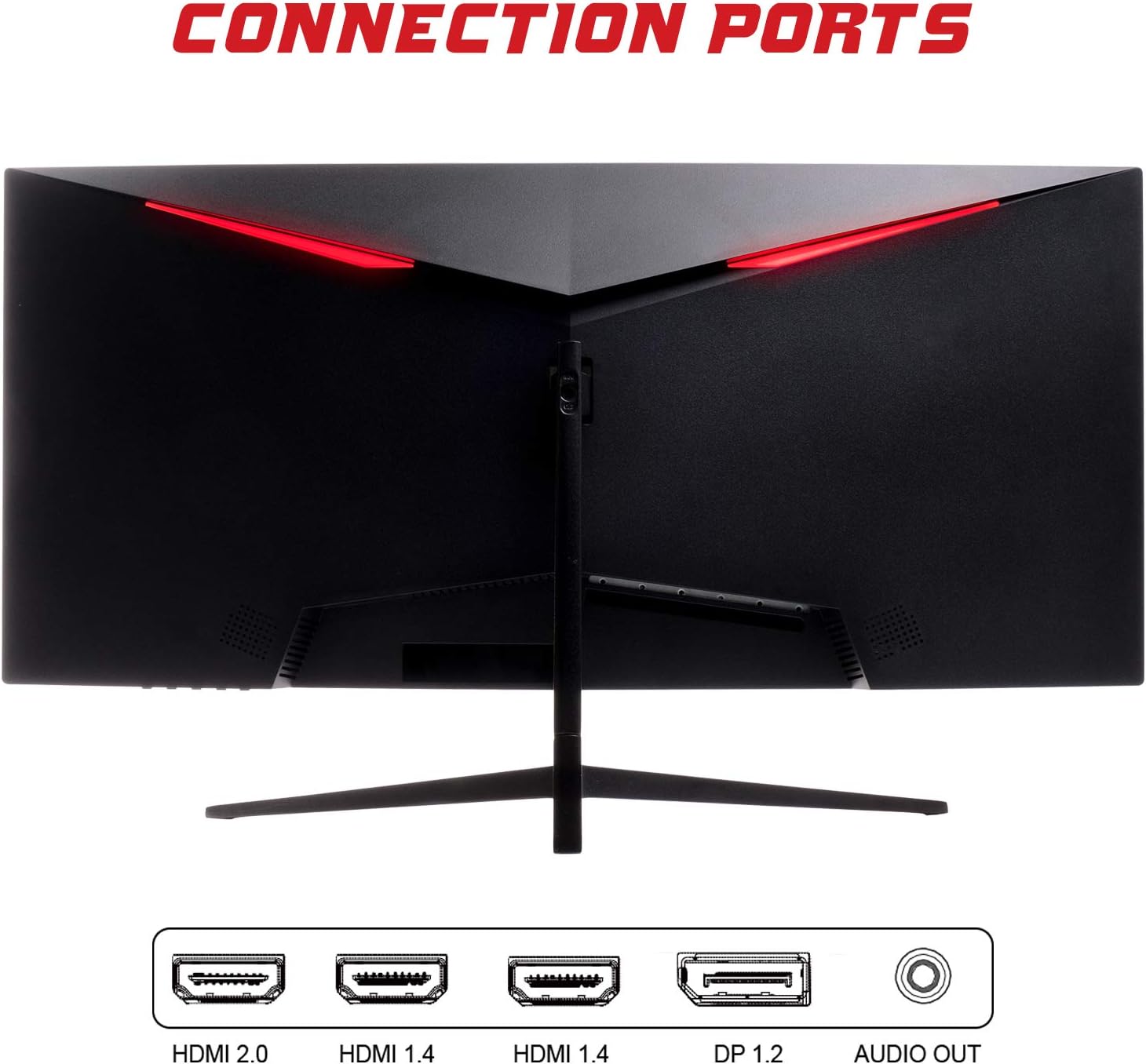
- DisplayPort (DP 1.2): For high-resolution and high-refresh-rate connections to your PC.
- HDMI (HDMI 2.0, HDMI 1.4 x2): Connect to PCs, gaming consoles, and other multimedia devices. HDMI 2.0 supports higher refresh rates at certain resolutions.
- Garso išvestis: Prijunkite išorinius garsiakalbius arba ausines.
After connecting the video cable, connect the power adapter to the monitor and then to a power outlet.
Monitoriaus valdymas
Maitinimo įjungimas/išjungimas
Norėdami įjungti arba išjungti monitorių, paspauskite maitinimo mygtuką, kuris paprastai yra jo apačioje arba gale. Maitinimo indikatoriaus lemputė užsidegs, kai monitorius įjungtas.
Ekrano ekrano (OSD) meniu
The OSD menu allows you to adjust various monitor settings. Use the buttons on the monitor (typically on the back or bottom right) to navigate the menu.
- Vaizdo nustatymai: Reguliuokite ryškumą, kontrastą, ryškumą ir gamą.
- Spalvų nustatymai: Keisti spalvų temperatūrą, atspalvį ir sodrumą.
- Įvesties pasirinkimas: Rankiniu būdu perjunkite „DisplayPort“ ir HDMI įvestis.
- Garsas: Adjust volume for the audio output.
- Sistemos nustatymai: Access language, OSD timeout, and reset options.
- Žaidimų ypatybės: Enable/disable FreeSync, adjust response time overdrive, and activate crosshair overlays if available.
Priežiūra
Tinkama priežiūra užtikrina jūsų monitoriaus ilgaamžiškumą:
- Prieš valydami visada išjunkite monitorių ir atjunkite maitinimo laidą.
- Švelniai nuvalykite ekraną minkštu, nepūkuotu audiniu. Jei dėmės sunkiai įveikiamos, šiek tiek pamirkykite.ampNuvalykite šluostę vandeniu arba švelniu, neabrazyviniu ekrano valikliu.
- Išvalykite monitorių casing minkštu, sausu skudurėliu.
- Venkite purkšti skysčius tiesiai ant ekrano arasing.
- Do not use benzene, thinner, ammonia-based cleaners, or abrasive materials.
Trikčių šalinimas
If you encounter issues with your monitor, please refer to the following table for common problems and solutions:
| Problema | Galimas sprendimas |
|---|---|
| Nėra galios | Ensure the power cable is securely connected to the monitor and the power outlet. Check if the power outlet is working. |
| Nėra signalo / Tuščias ekranas | Verify the video cable (DisplayPort or HDMI) is firmly connected to both the monitor and your computer. Select the correct input source via the OSD menu. Ensure your computer is powered on and not in sleep mode. |
| Vaizdas mirga arba yra nestabilus | Check the video cable connection. Try a different cable or port. Ensure your graphics card drivers are up to date. Adjust the refresh rate in your computer's display settings. |
| Poor image quality (blurry, distorted colors) | Adjust brightness, contrast, and color settings in the OSD menu. Ensure the display resolution on your computer matches the monitor's native resolution (2560x1080). |
| Nėra garso iš garso išvesties | Check the audio cable connection to your speakers/headphones. Verify the volume setting in the OSD menu and on your computer. Ensure the correct audio output device is selected in your computer's sound settings. |
Techninės specifikacijos
| Funkcija | Specifikacija |
|---|---|
| Prekės ženklas | Itek |
| Modelis | ITMC30V201FHD |
| Ekrano dydis | 30 colių |
| Skydelio tipas | VA |
| Kreivumas | R1800 |
| Rezoliucija | 2560 x 1080 (WFHD) |
| Krašto santykis | 21:9 |
| Atnaujinimo dažnis | 200 Hz |
| Reagavimo laikas | 1 ms MPRT |
| Ryškumas | 350 cd/m² |
| Kontrasto santykis | 3000:1 |
| Viewing kampas | 178° (horizontalus / vertikalus) |
| Ryšys | 1x DisplayPort 1.2, 1x HDMI 2.0, 2x HDMI 1.4, Audio Out |
| Ypatingos savybės | HDR Ready, FreeSync, Low Blue Light, Flicker Free, VESA Mountable |
| Gaminio matmenys (su stovu) | 70.68 x 40.89 x 18.48 cm |
| Svoris | 6.9 kg |
Energijos efektyvumas

For detailed energy consumption information and product registration, please refer to the official EPREL database:
Garantija ir palaikymas
Your iTek GGC monitor is backed by a manufacturer's warranty. Please retain your proof of purchase for warranty claims.
- Garantuotas produkto palaikymas: This product is guaranteed to have support available until at least January 1, 2031.
- For technical support, warranty inquiries, or service requests, please contact iTek customer service through their official websvetainę arba perkant pateiktą kontaktinę informaciją.
Ask a question about this manual
Ask about setup, troubleshooting, compatibility, parts, safety, or missing instructions. Manuals+ will review the question and use this page’s manual context to help answer it.