
1. Įvadas
This manual provides essential information for the installation, operation, and maintenance of your Itek Meshcore 36B Gaming Tower PC Case. Please read this manual thoroughly before beginning assembly to ensure proper setup and safe usage. Keep this manual for future reference.
Saugos informacija
- Prieš montuodami ar atlikdami techninę priežiūrą, visada atjunkite visų komponentų maitinimą.
- Atsargiai elkitės su grūdinto stiklo plokštėmis, kad nesudužtų.
- Venkite dėklo laikymo ekstremaliose temperatūrose ar drėgmėje.
- Smulkias dalis laikykite vaikams nepasiekiamoje vietoje.
2. Pakuotės turinys
Patikrinkite, ar pakuotėje yra visi komponentai:
- Itek Meshcore 36B PC Case
- 4 x 14cm ARGB Fans (3 pre-installed in front, 1 pre-installed in rear)
- ARGB Fan Hub
- Accessory box (screws, cable ties, standoffs, etc.)
- Vartotojo vadovas (šis dokumentas)
3. Produktas baigtasview
The Itek Meshcore 36B is an ATX gaming tower designed for optimal airflow, ease of assembly, and modern aesthetics. It features a perforated mesh front panel, four pre-installed ARGB fans, and a tempered glass side panel.
Pagrindinės savybės
- Puikus oro srautas: Full mesh front panel and four pre-installed ARGB fans (3 front, 1 rear) for efficient cooling.
- Grūdinto stiklo šoninė panelė: Suteikia aiškų view vidinių komponentų ir RGB apšvietimo.
- Šiuolaikinis ryšys: Includes 2x USB 3.0 ports and 1x USB-C port on the front/side I/O panel.
- Sutvarkytas interjeras: Separate compartment for the power supply unit (PSU) and storage drives (HDD/SSD) for clean cable management.
- Platus suderinamumas: Supports ATX motherboards, graphics cards up to 420mm, CPU coolers up to 174mm, and liquid cooling radiators up to 360mm.
Komponento identifikavimas

3.1 pav.: priekis view of the Itek Meshcore 36B PC case, showcasing the mesh front panel and three 14cm ARGB fans.

3.2 pav.: Kampuota priekinė pusė view, highlighting the tempered glass panel and front I/O ports (USB 3.0, Type-C).

3.3 pav.: Galinė pusė view, illustrating the rear exhaust fan and expansion slots.

3.4 pav. Vidus view from the tempered glass side, detailing the motherboard tray and component layout.
4. Sąranka ir diegimas
Follow these steps for assembling your PC components within the Itek Meshcore 36B case.
4.1 Bylos parengimas
- Padėkite dėklą ant stabilaus, lygaus paviršiaus.
- Carefully remove the tempered glass side panel by unscrewing the thumb screws at the rear and gently pulling the panel away. Set it aside on a soft, non-abrasive surface.
- Remove the solid metal side panel on the opposite side to access the cable management area.
4.2 Pagrindinės plokštės montavimas
- Įdėkite įvesties / išvesties skydą (jei jis nėra iš anksto pritvirtintas prie pagrindinės plokštės) į korpuso galinę angą.
- Align the motherboard with the standoffs in the case. Ensure the standoffs match your ATX motherboard's screw holes.
- Pritvirtinkite pagrindinę plokštę naudodami pateiktus varžtus. Neperveržkite.
4.3 Maitinimo bloko (PSU) montavimas
- Locate the PSU compartment at the bottom rear of the case.
- Slide the PSU into the compartment from the rear of the case, ensuring the fan faces downwards (if the case has a bottom vent) or upwards.
- Pritvirtinkite maitinimo bloką varžtais iš korpuso galo.
4.4 Atminties disko (HDD/SSD) diegimas
The case features dedicated bays for 3.5" HDDs and 2.5" SSDs, typically located in the PSU shroud area or behind the motherboard tray.
- For 3.5" HDDs: Slide the drive into the designated drive cage and secure with screws.
- For 2.5" SSDs: Mount the SSD onto the designated brackets, usually found behind the motherboard tray, and secure with screws.
4.5 Vaizdo plokštės ir išplėtimo plokštės įdiegimas
- Nuimkite reikiamus išplėtimo lizdų dangtelius nuo korpuso galo.
- Insert the graphics card or other expansion card into the appropriate PCIe slot on the motherboard.
- Secure the card with the provided screw or latch mechanism.
4.6 Kabelių valdymas
The Meshcore 36B offers 21mm of cable management space behind the motherboard tray.
- Route all necessary cables (PSU, data, front panel) through the cutouts in the motherboard tray.
- Use the included cable ties to bundle and secure cables, ensuring they do not obstruct airflow or interfere with side panel closure.
- Connect the front panel connectors (USB 3.0, USB-C, audio, power/reset switches, LED indicators) to the corresponding headers on your motherboard.
- Connect the ARGB fan hub to your motherboard's ARGB header (if available) for software control, or use the integrated controller for basic lighting effects. Ensure all fans are connected to the hub.
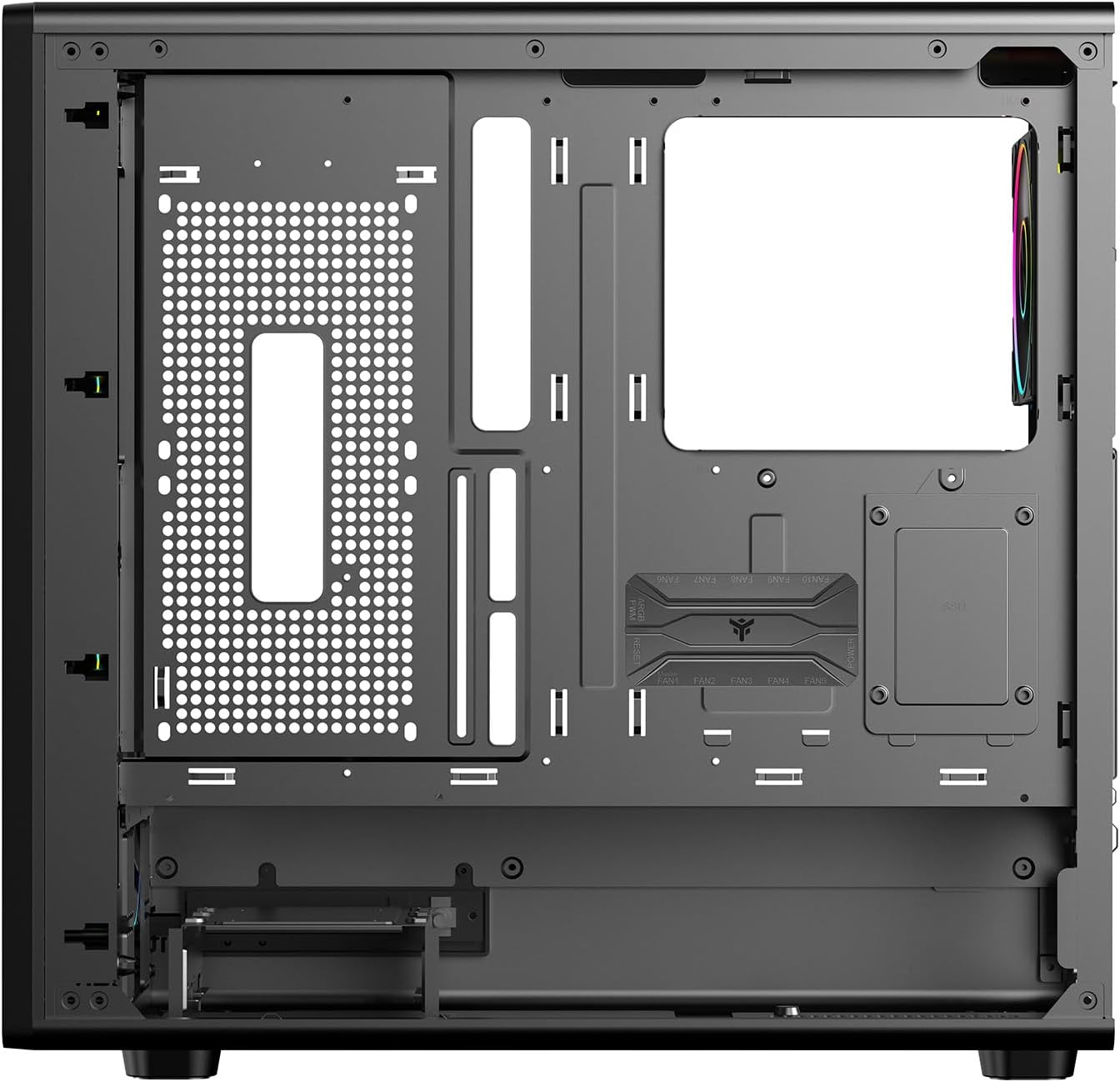
4.1 pav. Vidus view from the backplate side, illustrating cable management options.
5. Naudojimo instrukcijos
5.1 Įjungimas
- Once all components are installed and cables are connected, replace both side panels.
- Prijunkite monitorių, klaviatūrą, pelę ir kitus periferinius įrenginius.
- Prijunkite maitinimo laidą prie maitinimo bloko ir sieninio lizdo.
- Pasukite maitinimo jungiklį ant maitinimo bloko į padėtį „ĮJUNGTA“.
- Press the power button on the front panel of the case to start your computer.
5.2 Priekinio skydelio jungtys
The front/side I/O panel provides convenient access to:
- 2 USB 3.0 prievadai: Didelės spartos duomenų perdavimui su suderinamais įrenginiais.
- 1 x USB-C Port: For modern USB Type-C devices.
- Garso lizdai: Ausinėms ir mikrofonams.
- Maitinimo mygtukas: Įjungti / išjungti sistemą.
- Atkūrimo mygtukas: Norėdami iš naujo paleisti sistemą.
- LED indikatoriai: For power and HDD activity.
5.3 ARGB apšvietimo valdymas
The pre-installed ARGB fans are connected to an ARGB hub. Lighting can be controlled in two ways:
- Pagrindinės plokštės programinės įrangos valdymas: If the ARGB hub is connected to a compatible 3-pin 5V ARGB header on your motherboard, you can use your motherboard's RGB software (e.g., ASUS Aura Sync, MSI Mystic Light, Gigabyte RGB Fusion) to synchronize and customize lighting effects.
- Integruotas valdiklis: If not connected to a motherboard ARGB header, the hub typically has a button (often labeled 'LED' or 'RGB') on the case's front I/O panel or directly on the hub itself to cycle through pre-set lighting modes and colors.
6. Priežiūra
Reguliarus techninis aptarnavimas padeda užtikrinti optimalų kompiuterio korpuso veikimą ir ilgaamžiškumą.
6.1 Dulkių filtro valymas
The Meshcore 36B includes dust filters to prevent dust buildup inside the case. These filters should be cleaned periodically.
- Locate and remove the dust filters (typically on the top, front, and/or bottom of the case).
- Clean the filters using compressed air, a soft brush, or by rinsing with water (ensure they are completely dry before reinstallation).
- Reinstall the dust filters.
6.2 Bendras valymas
- Naudokite minkštą, damp cloth to wipe down exterior surfaces. Avoid abrasive cleaners.
- Grūdinto stiklo plokštei valyti naudokite stiklo valiklį ir mikropluošto šluostę, kad išvengtumėte dryžių.
- Reguliariai naudokite suslėgtą orą, kad nuvalytumėte dulkes nuo vidinių komponentų ir ventiliatoriaus menčių.
7. Problemų sprendimas
If you encounter issues with your PC case, refer to the following common problems and solutions.
7.1 Fans Not Spinning / ARGB Not Lighting Up
- Patikrinkite maitinimo jungtis: Ensure all fans are properly connected to the ARGB hub, and the hub itself is receiving power from the PSU (usually via a SATA power connector).
- Check ARGB Signal: If using motherboard software control, verify the ARGB hub is connected to a 3-pin 5V ARGB header on the motherboard and that the software is correctly configured.
- Try Integrated Controller: If motherboard control fails, try using the physical button on the case or hub to cycle through lighting modes.
7.2 Front Panel USB/Audio Ports Not Working
- Verify Motherboard Connections: Ensure the USB 3.0, USB-C, and audio headers from the front panel are securely connected to the correct pins on your motherboard. Refer to your motherboard manual for header locations.
- Patikrinkite tvarkykles: Ensure you have installed the latest chipset and audio drivers for your motherboard.
7.3 System Overheating
- Dulkių filtrų valymas: Ensure dust filters are clean and not obstructing airflow.
- Patikrinkite ventiliatoriaus orientaciją: Verify that fans are installed with correct airflow direction (front fans typically intake, rear/top fans exhaust).
- Improve Cable Management: Poor cable management can restrict airflow. Re-route cables for better air circulation.
8. Specifikacijos
| Funkcija | Specifikacija |
|---|---|
| Prekės ženklas | Itek |
| Modelio pavadinimas | Itek Case MESHCORE 36B |
| Modelio numeris | ITGCAMC36B |
| Atvejo tipas | Bokštas |
| Pagrindinės plokštės suderinamumas | ATX |
| Medžiaga | Metalas, plastikas, grūdintas stiklas |
| Spalva | Juoda |
| Aušinimo būdas | Oras |
| Iš anksto įdiegti ventiliatoriai | 4 x 14cm ARGB Fans (3 Front, 1 Rear) |
| Priekinės įvesties / išvesties prievadai | 2 x USB 3.0, 1 x USB-C |
| Maksimalus GPU ilgis | 420 mm |
| Maksimalus procesoriaus aušintuvo aukštis | 174 mm |
| Skysčio aušinimo palaikymas | Iki 360 mm |
| Kabelių valdymo erdvė | 21 mm |
| Papildomos funkcijos | Dust Filter, Perforated Front, ARGB Lighting, Integrated Fan |
9. Garantija ir palaikymas
9.1 Gaminio garantija
The Itek Meshcore 36B PC Case comes with a 24 mėnesių garantija from the date of purchase. This warranty covers manufacturing defects and faulty components under normal use. It does not cover damage caused by misuse, accidents, unauthorized modifications, or improper installation.
9.2 Techninė pagalba
For technical assistance, troubleshooting beyond this manual, or warranty claims, please contact Itek customer support through their official website or the retailer where the product was purchased. Please have your product model number (ITGCAMC36B) and proof of purchase ready when contacting support.